PUBG: New State Top Up: Fast NC Recharge Online
New State Credits (NC) are the premium in-game currency used in PUBG: New State (NEW STATE Mobile). With NC, you can unlock seasonal Survivor Passes, open premium weapon crates, purchase character cosmetics, and customize your futuristic gear on the battlegrounds of Troi and Erangel 2051. ArcTopup provides a direct recharge service that deposits NC straight into your account using only your User ID.
How to Top Up PUBG: New State NC on ArcTopup
- Select the NC package you want to purchase from the catalog above.
- Enter your PUBG: New State User ID in the designated field.
- Verify your User ID to ensure your account details are correct.
- Choose your preferred payment method from the available checkout options.
- Complete your payment. Once confirmed, the NC balance will be added directly to your PUBG: New State account.
Live pricing for every NC denomination is listed on the checkout screen, allowing you to select the exact amount you need before confirming your purchase.
Step-by-Step Guide: How to Find Your PUBG: New State User ID
To ensure your NC top-up arrives without delay, you must provide your exact in-game User ID (also referred to as Account ID). Follow these steps inside the game client to locate and copy it:
- Launch PUBG: New State on your mobile device.
- In the main lobby screen, tap the three horizontal dots icon or your profile icon in the upper-right corner to open the menu.
- Select Settings (gear icon) from the slide-out menu.
- Make sure you are in the Basic tab on the right-hand settings column.
- Look for the Account ID string displayed near your linked account status.
- Tap the Copy icon next to your Account ID string to save it to your clipboard.
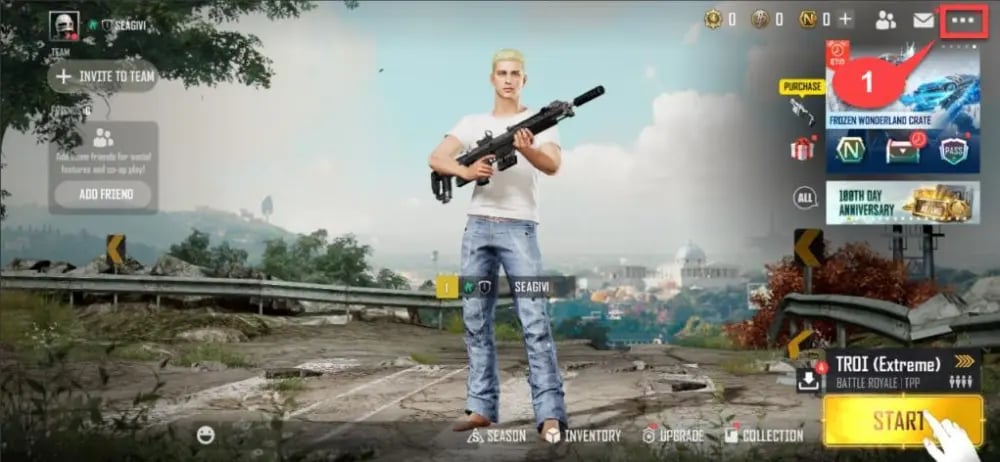
Paste this copied string directly into the User ID field on ArcTopup. Do not include spaces, player nicknames, or special characters outside your actual Account ID.
What Is NC in PUBG: New State and How to Use It
NC functions as the main premium transactional medium across the PUBG: New State ecosystem. Obtaining NC allows you to access exclusive content and progression paths that cannot be acquired through standard gameplay BP (Battle Points).
Core Uses of NC:
- Survivor Pass Upgrades: Purchase the Premium Pass or Premium Plus Pass to unlock exclusive tiered rewards, character skins, vehicle wraps, and bonus NC cashback as you level up your season rank.
- Weapon Customization & Crates: Open limited-edition Royale and Crate drops containing futuristic weapon skins, specialized muzzle/scope attachments, and progressive upgradable weapon blueprints.
- Exclusive Outfits & Emotes: Purchase character cosmetics, futuristic armor sets, masks, and interactive victory emotes directly from the in-game shop.
- Preset Expansion & Identity Items: Unlock additional inventory preset slots to quickly switch loadouts between matches, or purchase Nickname Change Cards to update your profile handle.
PUBG Mobile UC vs. PUBG: New State NC: Key Differences
A frequent point of confusion among players is the distinction between PUBG Mobile and PUBG: New State currencies. These games operate on entirely separate servers, game engines, and account databases.
| Feature | PUBG: New State (NEW STATE Mobile) | PUBG Mobile |
|---|---|---|
| Currency Name | NC (New State Credits) | UC (Unknown Cash) |
| Account Identifier | Account ID / User ID (from Settings -> Basic) | Player UID / Character ID (from Profile) |
| Currency Transferability | Cannot be transferred to PUBG Mobile | Cannot be transferred to NEW STATE Mobile |
| Pass Name | Survivor Pass (Premium / Premium Plus) | Royale Pass (Elite / Elite Plus) |
| Setting & Theme | Futuristic battleground (Year 2051, Troi, Akinta) | Classic battle royale (Erangel, Miramar, Sanhok) |
Important: Always ensure you are playing PUBG: New State before completing your purchase on this page. NC bought here cannot be converted into PUBG Mobile UC or transferred to other titles.
Why Top Up PUBG: New State on ArcTopup
ArcTopup is built to provide players with a straightforward, reliable, and secure environment for digital gaming top-ups.
- No Passwords Required: We only ask for your PUBG: New State User ID. We will never ask for your account password, email login credentials, or social media authentication tokens.
- Direct Account Crediting: Your NC is credited straight to your game account balance. You do not need to manually copy, paste, or redeem external voucher codes.
- Clear and Transparent Pricing: What you see on the live checkout interface is what you pay, with clear package tiers.
- Multiple Payment Methods: Choose from an extensive range of local and international payment solutions tailored to your country.
- Global Access: Our platform offers full multilingual and multicurrency support, allowing players worldwide to top up their accounts at any time.
Troubleshooting and NC Delivery Support
In most cases, NC orders are processed promptly after payment confirmation. If you experience any delay in seeing your balance update, follow these troubleshooting steps:
- Check Your In-Game Mail: Certain bonus packs, event bundles, or promotional items sent alongside an NC recharge are delivered via the in-game mailbox rather than added straight to the top balance bar. Open your in-game mailbox in the lobby and claim any pending messages.
- Restart the Game Client: Completely close PUBG: New State from your device task manager and relaunch it. This forces the client to synchronize with the official game servers and update your wallet balance.
- Verify the User ID Provided: Review your ArcTopup order receipt to confirm that the Account ID entered matches the one inside your game settings.
- Contact Customer Support: If your NC has not arrived after restarting, reach out to the ArcTopup support team with your Order ID, the User ID submitted, and your payment confirmation receipt for assistance.
Frequently Asked Questions
How do I find my PUBG: New State User ID?
Open PUBG: New State on your mobile device, tap the menu icon (three dots) in the top-right corner of the lobby, go to Settings, and select the Basic tab. Your Account ID is shown on this screen with a copy button next to it.
What is the difference between PUBG: New State NC and PUBG Mobile UC?
PUBG: New State NC is exclusive to NEW STATE Mobile and cannot be used in standard PUBG Mobile. PUBG Mobile uses UC (Unknown Cash). The accounts, stores, and items are completely independent.
Do I need to provide my account login password to top up PUBG: New State NC?
No. ArcTopup only requires your in-game User ID. You should never share your account login passwords, social media logins, or SMS verification codes with anyone.
Is PUBG: New State (NEW STATE Mobile) still active in 2026?
Yes, PUBG: New State continues to receive regular maintenance, seasonal Survivor Passes, balance updates, and cosmetic releases throughout 2026.
What items can I buy with NC in PUBG: New State?
You can use NC to buy the Survivor Pass (Premium and Premium Plus), open Royale and themed item crates, acquire upgradable weapon skins, unlock vehicle wraps, purchase character apparel, and obtain account utility items such as Nickname Change Cards.
What should I do if my NC top up is not credited to my account?
First, restart your game to refresh your account data, and check your in-game mailbox for any claimable attachments. If the balance remains unchanged, contact ArcTopup customer support with your Order ID and User ID for verification.
Current packages and prices
Current base prices exclude Tax. Tax, payment fees and coupon adjustments are shown at checkout.
| Package | Price |
|---|---|
| 300 NC | USD 0.79 |
| 1500 + 80 NC Bonus | USD 4.00 |
| 3600 + 250 NC Bonus | USD 9.60 |
| 9300 + 930 NC Bonus | USD 24.64 |
| 15000 + 1800 NC Bonus | USD 39.23 |
| 30000 + 5000 NC Bonus | USD 80.01 |