SEGA Football Club Champions RB Top Up Overview and Uses
SEGA Football Club Champions RB represents the primary premium currency used to manage, build, and upgrade your football club. Club managers rely on RB to execute critical operations across every phase of team progression. Whether you are building a roster from scratch or optimizing a veteran squad for high-tier competitive divisions, having sufficient RB gives you the strategic resources required to succeed.
Key uses for SEGA Football Club Champions RB include:
- Scouting Elite Footballers: Open premium scout packs to sign star players, legendary veterans, and high-potential prospects for your starting lineup.
- Manager and Coaching Contracts: Hire top-rated tacticians, defensive coordinators, and specialized trainers to improve club tactics and player chemistry.
- Training and Skill Upgrades: Speed up skill development programs, breakthrough level caps, and maximize individual player attributes before tournament fixtures.
- Stamina and Match Energy Refills: Restore team energy instantly to compete in continuous ranked division matches, limited-time events, and club cup tournaments.
- Club Infrastructure and Facilities: Invest in facility upgrades that generate long-term tactical and economic benefits for your squad.
Acquiring your RB bundles directly through ArcTopup allows you to secure the packs you need with zero hassle and total security.
Quick Summary of SEGA Football Club Champions Top-Up Details
| Feature | Details |
|---|---|
| Game Name | SEGA Football Club Champions |
| In-Game Currency | RB (Resource / Reserve Balance) |
| Delivery Method | Direct Server Credit via Player ID |
| Required Information | Player ID Only (Zero Password Required) |
| Platform Support | Mobile (iOS / Android), PC, Console |
| Payment Options & Pricing | View live checkout options on ArcTopup |
How to Top Up SEGA Football Club Champions RB on ArcTopup
Refueling your in-game RB balance on ArcTopup is straightforward and requires only your public Player ID. Follow these steps to complete your purchase:
- Select Your RB Pack: Browse the available SEGA Football Club Champions RB packages on ArcTopup and choose the denomination that fits your squad requirements. Current prices and package options are displayed live on the product list.
- Enter Your Player ID: Input your exact SEGA Football Club Champions Player ID into the provided field. Double-check the numbers to guarantee the delivery reaches your club.
- Proceed to Checkout: Review your selected pack and select your preferred payment method on the secure checkout screen.
- Finalize Payment: Complete your transaction through our encrypted payment system.
- Receive Your RB: Once payment is confirmed, your RB pack is credited directly to your game account or sent to your in-game Gift Box.
How to Find Your SEGA Football Club Champions Player ID
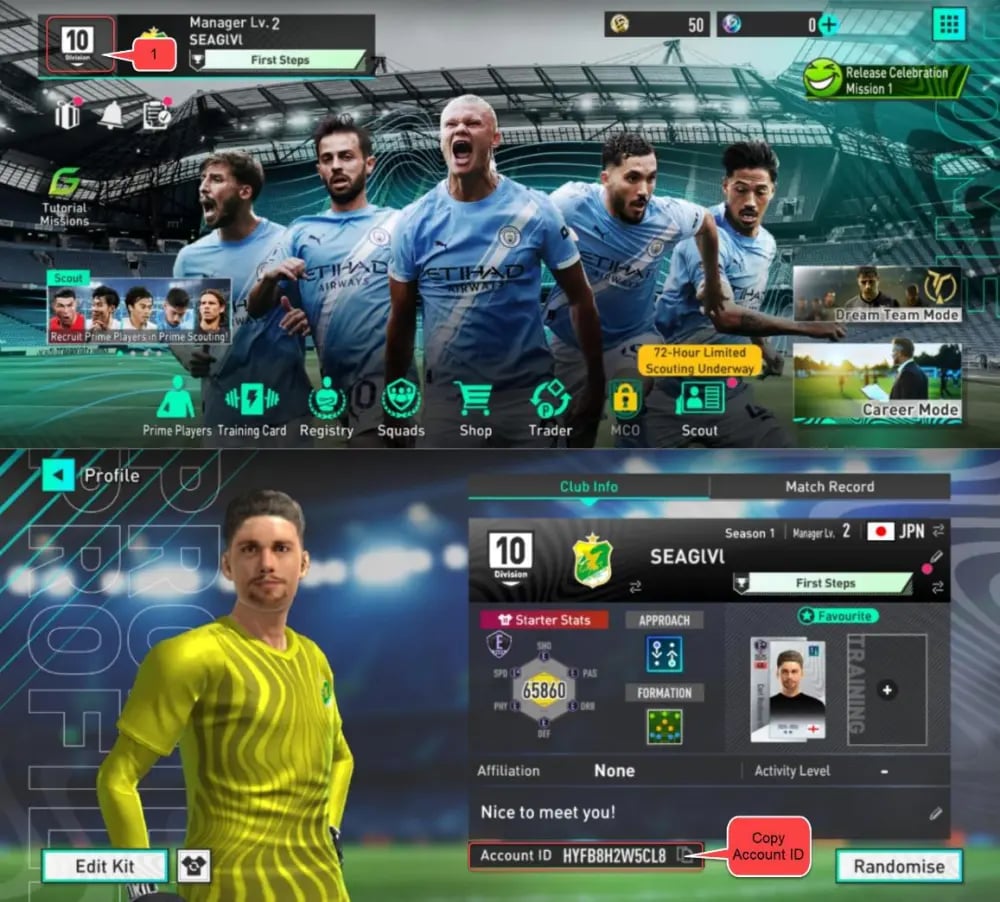
To ensure your top-up credits correctly, you must supply your accurate in-game Player ID. Follow these steps to locate your ID inside the game client:
- Open SEGA Football Club Champions on your device.
- From the main menu or club management hub, select your Manager Profile avatar icon located at the top corner of the screen.
- Your profile window will open, displaying your manager level, club name, and numeric Player ID.
- Tap the copy icon next to your Player ID to copy the number string to your device clipboard.
- Paste this copied Player ID into the order form on ArcTopup before checking out.
Cross-Platform RB Balance and Device Transfer Rules
SEGA Football Club Champions allows players to link their club progress across multiple supported platforms, including mobile systems (iOS and Android), PC, and console versions. However, specific rules govern how premium currency functions across these operating systems:
- Platform-Specific Paid Currency Wallets: Due to digital store policies, paid RB currency is tied directly to the ecosystem where the top-up is processed. For example, RB credited to an account active on an iOS client may not reflect when opening the same linked profile on a PC or console client.
- Shared Club Progress: Players, managers, unlocked kits, stadium upgrades, and club items unlocked using RB are fully cross-platform and remain accessible across all linked devices.
- Recommended Practice: Always perform your top-up for the specific device platform where you intend to spend your RB. Once you spend the RB on scout packs or manager items on that device, the acquired players and upgrades will sync across your entire linked account.
Secure Player ID Recharge with No Password Sharing
Account protection is essential when buying game currencies online. ArcTopup uses a direct-to-account Player ID top-up mechanism, meaning you never need to hand over sensitive account credentials:
- Zero Login Information Required: ArcTopup will never ask for your account password, email login credentials, SEGA ID login, or two-factor authentication codes.
- Elimination of Account Sharing Risks: Because top-ups are processed through your public Player ID, your personal information, linked payment methods, and account security settings remain entirely in your control.
- Direct Delivery Pipeline: All transactions are processed through direct game systems, preventing profile lockouts, suspicious login flags, or unauthorized access issues.
How to Claim and Verify Your RB Packs in the Gift Box
After completing your purchase on ArcTopup, the system transmits your RB directly to the game server. To verify and collect your currency:
- Launch or return to SEGA Football Club Champions.
- Check your RB counter located on the upper-right corner of the main dashboard. In many cases, the total updates immediately.
- If the balance does not increment automatically, navigate to the in-game Mailbox or Gift Box icon on your home screen.
- Locate the system delivery message containing your purchased RB bundle.
- Tap Claim or Claim All to transfer the RB into your active balance.
- If the notification does not show immediately, perform a clean restart of the game app to force a fresh connection to the game servers.
Troubleshooting Delayed or Missing RB Orders
If your RB pack has not arrived after completing your transaction on ArcTopup, follow this checklist to resolve the issue:
- Restart the Game Client: Force-close SEGA Football Club Champions completely and relaunch it. A fresh login forces the client to synchronize with the server database.
- Check the Gift Box / Mail Filter: Ensure your mailbox is not set to a filtered view that hides system deliveries or currency rewards. Make sure your mailbox capacity is not full.
- Verify Your Player ID Entry: Check your ArcTopup order confirmation to ensure the Player ID submitted matches the ID on your in-game profile.
- Check ArcTopup Order Status: Log into your ArcTopup account and review your order history to confirm that payment processing is marked as complete.
- Contact ArcTopup Support: If your order status shows completed but your balance remains unchanged after restarting, reach out directly to 24/7 ArcTopup customer assistance. Provide your order number, Player ID, and transaction details for prompt resolution.
Frequently Asked Questions About SEGA Football Club Champions RB
What is RB in SEGA Football Club Champions?
RB is the premium currency in SEGA Football Club Champions. Managers use RB to purchase elite player scouting packs, contract top-level coaches, speed up facility upgrades, refill match stamina, and enter special club tournament events.
How do I find my Player ID in SEGA Football Club Champions?
Launch the game, tap your Manager Profile icon in the top corner of the main dashboard, and view your numeric Player ID displayed under your club details. Use the in-game copy button to copy the ID directly to your clipboard.
Do I need to share my password to top up RB on ArcTopup?
No. ArcTopup only requires your public in-game Player ID to process your top-up. You never have to provide your password, SEGA ID login, or verification codes.
Where do my RB packs appear after completing the top-up?
Purchased RB packs are credited directly to your account or delivered to your in-game Gift Box/Mailbox. Open your Gift Box and tap the claim button to add the currency to your wallet.
Can I transfer my RB balance if I switch from mobile to PC or console?
Paid RB balances are restricted to the specific platform ecosystem where the top-up was credited. However, all players, items, and team upgrades purchased with RB sync across all linked devices automatically.
What should I do if my SEGA Football Club Champions RB pack is delayed?
First, restart the game client and check your in-game Gift Box. If the currency is still missing after a few minutes, check your order status on ArcTopup and contact the 24/7 customer support team with your order number and Player ID for assistance.
Current packages and prices
Current base prices exclude Tax. Tax, payment fees and coupon adjustments are shown at checkout.
| Package | Price |
|---|---|
| RB Set B | USD 1.39 |
| RB Set C | USD 6.07 |
| RB Set D | USD 14.17 |
| RB Set E | USD 23.34 |
| RB Set F | USD 46.55 |
| RB Set F x3 | USD 148.15 |
| RB Set F x5 | USD 245.57 |






























































