
LivU Coins Top Up: Direct In-App Balance Recharges
LivU connects people worldwide through instant 1-on-1 video chats, interactive messaging, and real-time social discovery. To make the most of your video matching sessions, keep conversations going, and show appreciation to friends or creators, you need LivU coins. A LivU Coins top up on ArcTopup provides an instant balance refill straight to your account using only your User ID (UID).
Recharging your balance gives you direct access to premium interaction features, gender and region matching filters, video effects, and high-tier virtual gifts. With direct UID delivery, you never need to share account passwords or log in through third-party forms.
What Are LivU Coins and How to Use Them
LivU coins are the primary virtual currency used within the LivU app ecosystem. They power real-time interactions and give you full control over how you connect with others.
1. Direct Video Matching and Filtered Connections
Standard video chats connect you with users randomly across the globe. By spending LivU coins, you can apply targeted matching filters, including specific regions or preferences, ensuring you meet people who share your interests and language.
2. Sending Animated In-Call Virtual Gifts
LivU features a vast catalog of virtual gifts ranging from simple icons to elaborate 3D animated effects. Sending gifts during live video calls helps break the ice, express gratitude, and build lasting friendships with your favorite conversation partners.
3. Unlimited Messaging and Live Translation
If you want to stay in touch outside of video calls, coins allow you to send direct text messages, share images, and activate real-time translation features. This breaks down language barriers so you can chat freely with users from any country.
4. Interactive Video Effects and Filters
Enhance your video calls by applying interactive stickers, dynamic filters, and beauty enhancements. Many premium visual effects require coin balances to activate during active calls.
| Feature | How Coins Are Used | In-App Benefit |
|---|---|---|
| Filtered Video Calls | Deducted per minute or match | Connect with preferred regions and criteria |
| Virtual Gifts | Purchased and sent during calls | Express appreciation and support chat hosts |
| Real-Time Translation | Applied to text chat sessions | Chat across languages without communication gaps |
| Direct Chat Extensions | Unlocks continuous text sessions | Keep messaging active connections anytime |
| Premium Visual Effects | Activated during active video calls | Customize your camera appearance with filters |
How to Find Your LivU UID in the App
To complete a recharge on ArcTopup, you only need your LivU User ID (UID). Finding your UID takes just a few seconds inside the LivU mobile application.
- Open the LivU app on your mobile device.
- Tap the Profile icon located in the bottom-right corner of the main screen.
- Your LivU UID is displayed directly below your profile photo and display name as a numeric string.
- Tap the copy icon next to your UID or write the numbers down accurately.
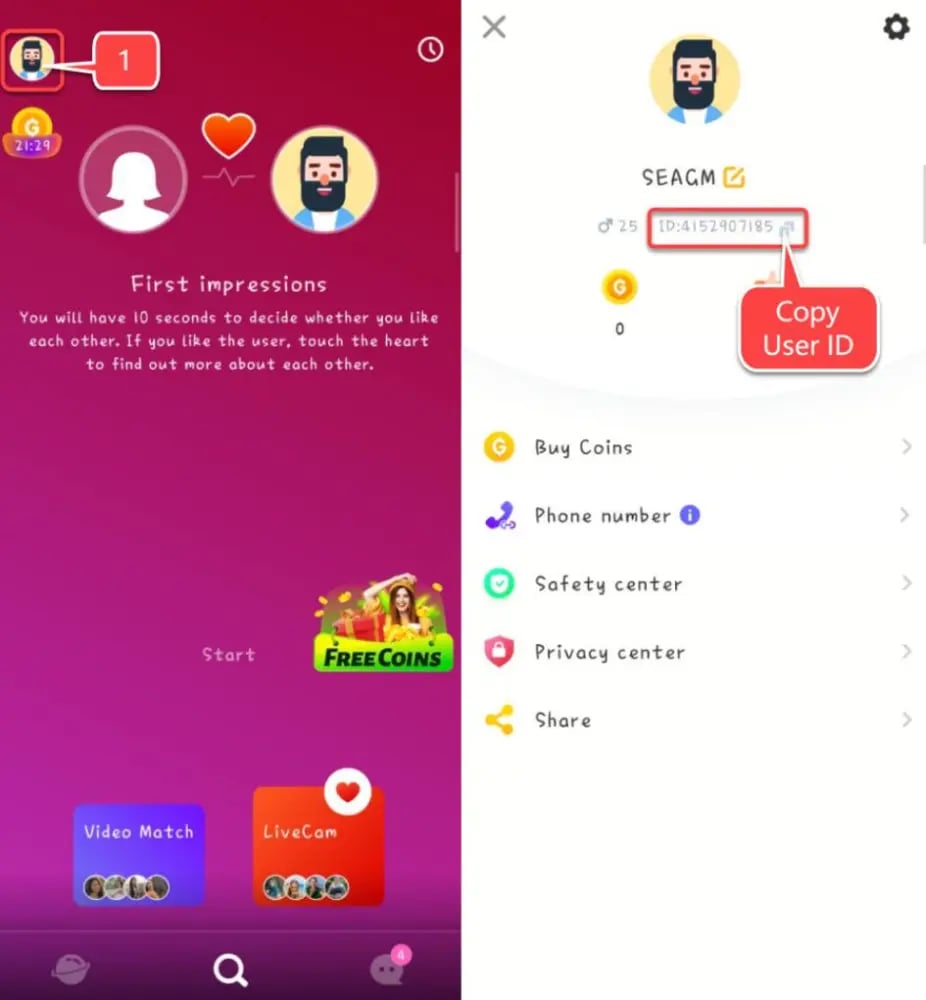
Tip: Always double-check your UID before proceeding to checkout to ensure your coins arrive in the correct account without delay.
Step-by-Step Guide: How to Top Up LivU Coins on ArcTopup
Recharging your LivU wallet on ArcTopup is straightforward. Follow these steps to complete your purchase:
- Choose Your Package: Browse the available coin tiers on the live ArcTopup product page and select the amount that fits your chatting needs.
- Enter Your UID: Input your numeric LivU UID into the required player field on the checkout screen.
- Select Payment Option: Choose from the available payment channels listed on the live checkout interface.
- Confirm Your Order: Review your entered UID and selected coin package carefully, then proceed with the secure payment.
- Receive Your Coins: Once payment processing completes, open your LivU app and refresh your profile wallet to view your new coin balance.
LivU Coin Recharge Packages and Value Breakdown
ArcTopup offers multiple coin package sizes to accommodate different calling habits:
- Starter Coin Packs: Best for casual users who want to send a few introductory gifts or test out specific matching filters.
- Standard Value Bundles: Ideal for regular video callers who engage in daily 1-on-1 chats and want uninterrupted call time.
- High-Volume Refills: Designed for power users and community creators who frequently exchange premium animated gifts and maintain multiple extended calls.
Exact package quantities, real-time availability, and localized pricing are dynamically updated on the live ArcTopup catalog to reflect current regional offerings.
Security & Safety: Why ArcTopup Uses Password-Free UID Recharge
Protecting your personal information and social media accounts is critical. ArcTopup uses a direct-to-account delivery method that only requires your public LivU UID.
- No Passwords Required: You never have to share your LivU login credentials, linked phone numbers, email addresses, or one-time verification codes.
- Direct System Crediting: The recharge is processed directly against your public account ID through standard server requests, eliminating third-party account takeover risks.
- Private Data Protection: Your personal chat history, friend lists, and private messages remain completely untouched and secure on your device.
Troubleshooting, Order Verification, and Support Guidelines
If you experience any delays or have questions about your order, use these verification steps:
- Restart the LivU App: Completely close LivU from your background apps and reopen it to force a balance refresh with the server.
- Verify Order Status: Check your ArcTopup transaction confirmation page or account order history to ensure the payment status shows completed.
- Confirm the UID Entered: Review your order receipt to verify that the submitted UID matches the numeric ID on your current LivU profile screen.
- Contact Customer Support: If your balance does not update after verification, reach out to ArcTopup customer support with your Order ID and LivU UID for rapid resolution.
LivU Coin Delivery, Order Status, and Support FAQs
How do I find my LivU UID to top up coins?
Open the LivU application, tap the Profile icon in the bottom right corner, and look below your profile picture. Your numeric UID is displayed there with a convenient copy button.
Do I need to share my LivU password to recharge coins?
No. ArcTopup processes recharges exclusively through your public LivU UID. You never need to provide passwords, social login details, or SMS verification codes.
What can LivU coins be used for inside the app?
Coins can be spent on filtered video matching by region or gender, sending animated virtual gifts during live calls, enabling real-time chat translation, and sending direct messages.
How long does it take for LivU coins to arrive after payment?
Once payment is verified, coin packages are delivered directly to your LivU account. In most cases, the balance updates immediately after restarting or refreshing the app.
Can I top up LivU coins for a friend using their UID?
Yes. Because the top-up process only requires a LivU UID, you can enter any valid user ID at checkout to send coins directly to a friend or creator.
What should I do if I entered the wrong LivU UID during checkout?
Double-check your UID before finalizing payment. Because digital recharges are processed instantly to the ID provided, orders sent to an incorrect but active account cannot be reversed. If you notice an error immediately before processing completes, contact ArcTopup support right away with your transaction details.
Current packages and prices
Current base prices exclude Tax. Tax, payment fees and coupon adjustments are shown at checkout.
| Package | Price |
|---|---|
| 650 LivU Coins | USD 3.35 |
| 1250 LivU Coins | USD 6.05 |
| 1800 LivU Coins | USD 8.45 |
| 3500 LivU Coins | USD 14.83 |
| 7000 LivU Coins | USD 29.65 |
| 15000 LivU Coins | USD 63.63 |
| 35000 LivU Coins | USD 148.72 |






























































