Dragon Nest M Classic Cash Top Up on ArcTopup
Dragon Nest M Classic brings the classic 3D action MMORPG experience to mobile devices, featuring real-time combo combat, team-based dragon raids, and competitive PvP arenas. Cash serves as the primary premium currency in Dragon Nest M Classic, enabling you to acquire exclusive costume sets, rare mount skins, inventory expansions, gear upgrade materials, and seasonal pass tracks.
To progress efficiently through Saint Haven and conquer challenging Nest dungeons like Cerberus, Manticore, and Apocalypse, topping up your Cash balance provides direct access to vital progression supplies. ArcTopup offers direct Cash top-ups using only your character User ID and Server ID, avoiding account sharing or login interruptions.
How to Top Up Dragon Nest M Classic Cash on ArcTopup
Recharging your character balance on ArcTopup takes only a few quick steps. Follow this guide to complete your purchase:
- Select your desired Dragon Nest M Classic Cash denomination from the product catalog.
- Enter your Dragon Nest M Classic User ID in the designated field.
- Enter your Server ID in the secondary field.
- Verify your order details to ensure the character ID and server match your active game account.
- Select your preferred payment method and finalize your transaction at checkout.
- Open Dragon Nest M Classic on your device and check your in-game mailbox or direct Cash balance to access your new currency.
How to Find Your Dragon Nest M Classic User ID and Server ID
To ensure your Cash reaches the correct character, you need to provide your exact User ID and Server ID. Both details are located inside your game client.
- Launch Dragon Nest M Classic on your mobile phone or tablet.
- Tap your character avatar located in the upper-left corner of the main screen.
- Select the Basic Info tab in your player profile window.
- Locate your User ID, which is a numerical sequence displayed below your character name. Tap the copy icon next to it to prevent typos.
- Confirm your Server ID (for example, S1, S2, or regional cluster name) displayed on your profile screen or the initial server selection list.
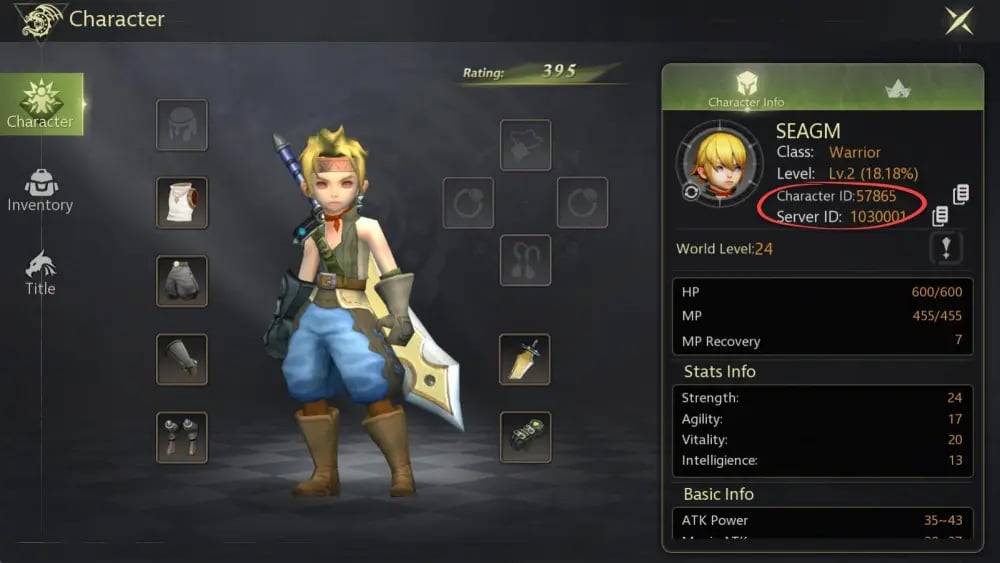
Always double-check both fields before completing your order. Accurate credentials prevent fulfillment delays and ensure immediate crediting.
Dragon Nest M Classic Cash Packages and In-Game Denominations
ArcTopup supports multiple package sizes to suit your specific gameplay goals, from minor stamina top-ups to large costume draw reserves.
| Package Tier | Primary In-Game Purpose | Delivery Method |
|---|---|---|
| Small Cash Tier | Daily stamina refills, bag expansions, resurrection stones | Direct Account Delivery / Mail |
| Medium Cash Tier | DN Pass activation, monthly privilege cards, mount growth stones | Direct Account Delivery / Mail |
| Large Cash Tier | Premium costume sets, Dragon Jade upgrades, S-rank spirits | Direct Account Delivery / Mail |
| Elite Cash Tier | Competitive guild raid prep, max equipment enhancement protection | Direct Account Delivery / Mail |
Live pricing and active regional payment rates are calculated directly on the ArcTopup live checkout selector above.
How to Use Cash to Unlock the DN Pass in 2026
The DN Pass represents one of the most efficient progression tracks in Dragon Nest M Classic in 2026. By finishing daily quests, weekly challenges, and clearing seasonal Nest instances, players accumulate Pass EXP to unlock milestone tiers.
The system includes two tracks:
- Free Pass: Grants base gold, basic upgrade powders, and standard enhancement materials available to every adventurer.
- Premium DN Pass: Unlocked with premium Cash. This track rewards exclusive seasonal wings, rare mount skins, high-grade Dragon Jades, and substantial refinement materials.
To unlock the premium track:
- Complete your Cash purchase on ArcTopup.
- Once credited, open the in-game event center and select the DN Pass menu.
- Choose Unlock Premium Pass and confirm the purchase using your in-game Cash balance.
- Collect all unlocked milestone rewards and enjoy bonus weekly mission experience multipliers.
What You Can Buy with Dragon Nest M Classic Cash: Costumes, Mounts, and Upgrades
Investing Cash into your character helps you tackle higher-tier dungeon difficulties across all classes, including Warrior, Archer, Sorceress, Cleric, Academic, and Assassin:
- Costume Sets and Tail/Wing Cosmetics: Beyond their visual appearance, complete costume sets supply cumulative stat bonuses such as increased Physical/Magic Attack, Max HP, and Critical rate.
- Mounts and Mount Growth Items: Mounts increase map travel speed and provide permanent passive combat attributes directly to your character profile.
- Spirits and Fairy Companions: Fairy gacha summons and companion food provide autonomous attacks, healing triggers, and stat boosts during boss encounters.
- Dragon Jades and Enhancement Protection: High-level gear forging requires protection jellies to prevent gear degradation or breakage at high refinement levels.
- Daily Resets and Storage: Vault expansions, extra bag slots, and daily dungeon ticket resets let you farm valuable materials without inventory friction.
Safe and Password-Free Top-Up Protection on ArcTopup
Account safety is a top priority when recharging digital game currencies. ArcTopup uses a direct ID-based fulfillment process designed to protect your account:
- Zero Password Sharing: You never need to share your game password, Google account, Apple ID, or verification codes. You only supply your public User ID and Server ID.
- Secure Payment Processing: All checkout transactions are encrypted through protected payment gateways.
- Direct In-Game Delivery: Orders route straight through standard game delivery channels, keeping your account safe from unauthorized third-party issues.
Troubleshooting In-Game Cash Delivery Issues
Transactions on ArcTopup process quickly, but network delays or server sync lag can occasionally occur. If your balance does not update right away, follow these steps:
- Restart the Game: Force-close Dragon Nest M Classic from your device app switcher and launch it again to trigger a server balance refresh.
- Check Your In-Game Mail: Depending on current game patch rules, certain Cash packages or bonus vouchers are sent as system attachments. Open your mailbox and select claim.
- Verify Server Selection: Ensure you logged into the exact Server ID provided at checkout. Characters on separate servers do not share individual Cash totals.
- Check ArcTopup Order Status: Log into ArcTopup to review your order details. If the order shows completed but the balance is missing after a brief period, contact ArcTopup customer support with your Order ID for direct assistance.
Frequently Asked Questions
How do I top up Dragon Nest M Classic Cash on ArcTopup?
Select the Cash amount you want, input your User ID and Server ID, choose your payment method, and complete the transaction. Your Cash will be delivered directly to your character account.
Where can I find my Dragon Nest M Classic User ID and Server ID?
Tap your character avatar in the upper-left corner of the game screen. Your User ID is the numeric code listed under your character name, and your Server ID is shown on the login selection screen and profile summary.
Do I need to share my login password to recharge Dragon Nest M Classic Cash?
No. ArcTopup only needs your public User ID and Server ID. Never share your password or personal login credentials with anyone.
How much Cash do I need to unlock the DN Pass in 2026?
The required Cash depends on whether you choose the standard Premium Pass or the Deluxe Bundle with instant level skips. Review the in-game DN Pass interface for exact 2026 season pricing before selecting your top-up package.
What should I do if my Dragon Nest M Classic Cash is not delivered immediately?
Restart your game client and check your in-game mailbox. If your Cash does not appear after a few minutes, check your order history on ArcTopup and reach out to ArcTopup 24/7 customer support with your Order ID.
Is Dragon Nest M Classic still active in 2026?
Yes, Dragon Nest M Classic remains active in 2026 with ongoing seasonal events, Nest raid rotations, guild battles, and updated DN Pass seasons.
Current packages and prices
Current base prices exclude Tax. Tax, payment fees and coupon adjustments are shown at checkout.
| Package | Price |
|---|---|
| 626 Cash (600+26 Bonus) | USD 0.63 |
| 3,130 Cash (3000+130 Bonus) | USD 3.22 |
| 6,366 Cash (6000+366 Bonus) | USD 6.57 |
| 12,800 Cash (12000+800 Bonus) | USD 13.14 |
| 19,500 Cash (18000+1500 Bonus) | USD 19.71 |
| 32,900 Cash (30000+2900 Bonus) | USD 32.99 |
| 66,000 Cash (60000+6000 Bonus) | USD 66.36 |
| 132,000 Cash (120000+12000 Bonus) | USD 131.64 |
| 198,000 Cash (180000+18000 Bonus) | USD 196.39 |
| 264,000 Cash (240000+24000 Bonus) | USD 259.06 |
| 330,000 Cash (300000+30000 Bonus) | USD 319.55 |
| 600 + 26 Gems Pack | USD 0.61 |
| 3,000 + 130 Gems Pack | USD 3.16 |
| 6,000 + 366 Gems Pack | USD 6.40 |
| 12,000 + 800 Gems Pack | USD 12.81 |
| 18,000 + 1,500 Gems Pack | USD 19.18 |
| 30,000 + 2,900 Gems Pack | USD 32.16 |
| 60,000 + 6,000 Gems Pack | USD 64.76 |
| 120,000 + 12,000 Gems Pack | USD 128.32 |
| 180,000 + 18,000 Gems Pack | USD 191.44 |