Find your Dragon Nest M Classic numeric User ID and Server ID on mobile in seconds. Follow our exact profile UI guide to avoid failed top-ups and errors.
Step-by-Step UI Guide to Locate Your User ID and Server
Finding your exact account identifiers in Dragon Nest M: Classic takes less than ten seconds once you know where the client stores them. The interface separates your public display name from your permanent numeric identifier. Submitting a nickname instead of your account number causes verification forms, gift distribution, and balance checkouts to fail.
Follow these steps on Android or iOS:
- Launch Dragon Nest M: Classic and log into your server.
- Wait until your character loads into the main town hub.
- Look at the upper-left corner of your display screen where your character avatar, level, and HP bars sit.
- Tap your character avatar portrait.
- In the character summary window, look beneath your character model and equipment slots.
- Locate the line labeled User ID (shortened to Role ID or UID on some regional patches).
- Tap the copy icon next to the numeric sequence to save your UID to the mobile clipboard.
- Note the active Server Name or Zone ID displayed directly adjacent to or above your numeric ID.
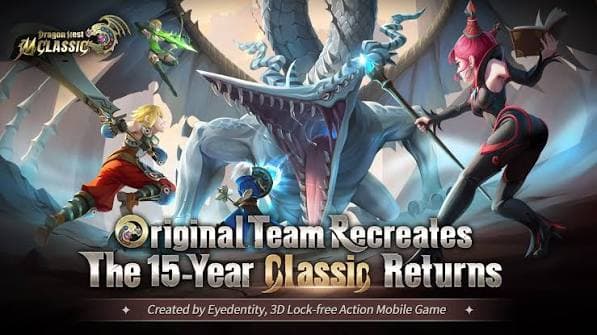
Tap the in-game copy icon rather than typing the digits manually. Transposing numbers or adding trailing spaces will route transactions and support requests to an invalid account.

626 Cash (600+26 Bonus)
 626 Cash (600+26 Bonus)USD 0.63Buy Now
3,130 Cash (3000+130 Bonus)
3,130 Cash (3000+130 Bonus)USD 3.22Buy Now6,366 Cash (6000+366 Bonus)
6,366 Cash (6000+366 Bonus)USD 6.57Buy Now12,800 Cash (12000+800 Bonus)
12,800 Cash (12000+800 Bonus)USD 13.14Buy Now19,500 Cash (18000+1500 Bonus)
19,500 Cash (18000+1500 Bonus)USD 19.71Buy Now32,900 Cash (30000+2900 Bonus)
32,900 Cash (30000+2900 Bonus)USD 32.99Buy Now66,000 Cash (60000+6000 Bonus)
66,000 Cash (60000+6000 Bonus)USD 66.36Buy Now132,000 Cash (120000+12000 Bonus)
132,000 Cash (120000+12000 Bonus)USD 131.64Buy Now198,000 Cash (180000+18000 Bonus)
198,000 Cash (180000+18000 Bonus)USD 196.39Buy Now264,000 Cash (240000+24000 Bonus)
264,000 Cash (240000+24000 Bonus)USD 259.06Buy Now330,000 Cash (300000+30000 Bonus)
330,000 Cash (300000+30000 Bonus)USD 319.55Buy Now600 + 26 Gems Pack
600 + 26 Gems PackUSD 0.61Buy Now3,000 + 130 Gems Pack
3,000 + 130 Gems PackUSD 3.16Buy Now6,000 + 366 Gems Pack
6,000 + 366 Gems PackUSD 6.40Buy Now12,000 + 800 Gems Pack
12,000 + 800 Gems PackUSD 12.81Buy Now18,000 + 1,500 Gems Pack
18,000 + 1,500 Gems PackUSD 19.18Buy Now30,000 + 2,900 Gems Pack
30,000 + 2,900 Gems PackUSD 32.16Buy Now60,000 + 6,000 Gems Pack
60,000 + 6,000 Gems PackUSD 64.76Buy Now120,000 + 12,000 Gems Pack
120,000 + 12,000 Gems PackUSD 128.32Buy Now180,000 + 18,000 Gems Pack
180,000 + 18,000 Gems PackUSD 191.44Buy Now
The Difference Between Character Name, Server ID, and Account UID
Dragon Nest M: Classic uses three distinct identification layers: your public character nickname, your Server/Zone identifier, and your underlying numeric User ID.
Your character nickname is purely aesthetic. Published by 7road International HK Limited and built upon Eyedentity's original action combat mechanics, the mobile framework allows players on different regional servers to share duplicate nicknames. Because of this structure, external databases cannot verify an account based on text names like "DragonSlayer" or "SaintArcher".
[ Account Identifier Hierarchy ]
  ├── Server / Zone ID  ──> Directs the balance to the correct regional cluster
  ├── Numeric User ID   ──> Isolates the exact character account entity
  └── Character Name    ──> Visual display tag only (Ignored by external API queries)
Database forms frequently interchange the terms "Server ID" and "Zone ID". In Dragon Nest M: Classic, both terms describe the world where your character lives (such as SEA S1 or S12). When recharging Cash for Dragon Nest M Classic, supply both your numeric User ID and this specific Zone/Server name so currency reaches the right character.
Mobile Device Compatibility and Settings Interface Requirements
Dragon Nest M: Classic requires Android 4.3 or higher, alongside equivalent legacy iOS support. On older hardware or custom mobile operating systems, UI scaling issues can occasionally hide UI elements in town hubs.
If the top-left avatar icon fails to respond to input, use the secondary settings route:
- Tap the gear icon in the lower-right corner of the town screen.
- Open the Account or Basic Settings sub-tab.
- Locate your numeric User ID in the system information box alongside the current client build version.
- Tap the copy button to capture the digits.

This secondary menu helps on devices with camera cutouts or curved display corners that cover the standard avatar frame.
Cash Pack Tiers and What Your Numeric UID Unlocks
Dragon Nest M: Classic uses Cash as its premium currency for seasonal items, costumes, mounts, and gear enhancement components.
Direct digital recharges deposit Cash into your profile balance via numeric UID without requiring your password.
| Cash Package Tier | Total Cash Received | Bonus Inclusions |
|---|---|---|
| 600 Cash Pack | 626 Cash | 600 base Cash + 26 bonus Cash |
| 3,000 Cash Pack | 3,130 Cash | 3,000 base Cash + 130 bonus Cash |
| 6,000 Cash Pack | 6,366 Cash | 6,000 base Cash + 366 bonus Cash |
| 12,000 Cash Pack | 12,800 Cash | 12,000 base Cash + 800 bonus Cash |
| 30,000 Cash Pack | 32,900 Cash | 30,000 base Cash + 2,900 bonus Cash |
| 120,000 Cash Pack | 132,000 Cash | 120,000 base Cash + 12,000 bonus Cash |
| 300,000 Cash Pack | 330,000 Cash | 300,000 base Cash + 30,000 bonus Cash |
Higher denominations yield larger bonus margins, lowering the per-unit cost of Cash.
When you purchase Dragon Nest M Classic Cash, you can buy the seasonal DN Pass directly. The DN Pass costs 9,900 Cash in the seasonal shop and unlocks a progression track offering monthly cosmetic items and upgrade materials.
Account Milestones and Feature Unlock Requirements
Your numeric User ID anchors every character milestone you reach across Saint Haven and Calderock Village. New accounts choose between four base classes: Warrior, Archer, Cleric, or Sorceress. Each class branches into specialized skill paths at set level thresholds.
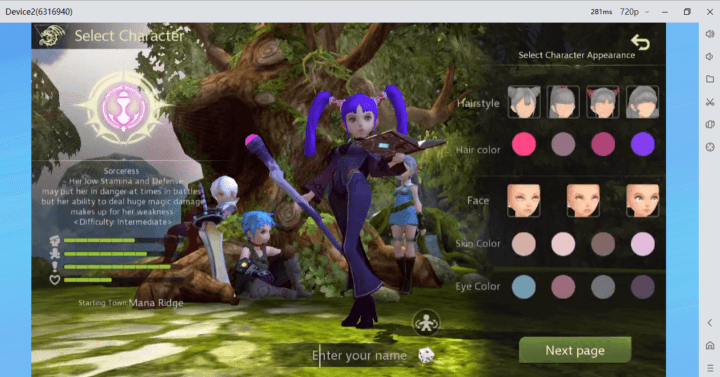
Branch choices begin around level 10, but the first job advancement locks in at level 15, leading to second specializations at level 45 and the level 50 cap.
| Character Level | System Unlocked | Gameplay Impact and Utility |
|---|---|---|
| Level 9 | Bonus Menu & Emblem System | Unlocks coupon gift redemption and equipment emblem stat boosts |
| Level 15 | 1st Job Class Advancement | Specializes base class into specialized skill branches |
| Level 24 | Daily Nest Dungeons | Grants over 120,000 EXP daily plus rare gear crafting materials |
| Level 45 | 2nd Job Specialization | Unlocks end-game combat rotations and skill trees |
| Level 50 | Regional Cap & Green Dragon Nest | Grants access to Lotus Marsh and top-tier raid encounters |
Reaching level 9 unlocks both emblem stat enhancements and the Bonus menu used for gift code entry.
Promotional codes must be redeemed inside the client rather than on external websites. Level your character to 9, open the Bonus interface, and tap Coupon Gift to paste your voucher.
Weekly Dungeon Limits and Reset Timers by Account
Raid lockouts and progression instances track completions directly to your server-linked User ID. Running dungeons with limited entries requires tracking weekly reset timers to avoid wasted attempts.
| Activity / Resource | Maximum Allocation | Reset Schedule / Details |
|---|---|---|
| Warrior Goblin Dungeon | 7 entries per week | Resets weekly on Saturday at 9:00 a.m. GMT+8 |
| Nest Dungeon Runs | Daily entry limit | Grants over 120,000 EXP daily plus gear drops |
| Newbie Reward Package | 7-day introductory track | Unlocks daily stamina points, EXP potions, and weapons |
| DN Pass Seasonal Track | Monthly progression | Unlocks dual-tier rewards for 9,900 Cash |
Schedule weekly runs around the Saturday 9:00 a.m. GMT+8 reset to optimize EXP gains before entering high-tier raids.
Prioritize the 7-day newbie track when starting on a fresh server. The extra stamina points and EXP potions push characters past level 24 within a few play sessions, unlocking high-yield Nest crafting runs.
Common Account Identification Mistakes and How to Avoid Them
Account identification errors lead directly to failed deliveries, stalled support tickets, and missed gift rewards:
- Typing the UID Manually: Swapping digits or leaving a trailing space breaks automated lookup tools. Use the in-game copy button instead.
- Confusing Server Names with Character Names: Entering a character nickname in the Server ID field invalidates requests. Always enter the server cluster name.
- Selecting the Wrong Regional Zone: Sending a balance to SEA S1 when your character is on SEA S2 credits the wrong account or fails.
- Sharing Login Credentials: Official top-ups and support channels never request account passwords. Only provide your public User ID and Server ID.
If a currency transfer does not register immediately, restart the game app. Client reloads force an account ledger refresh and display updated Cash balances.
Direct Account Verification for In-Game Currency Top-Ups
External credit systems process balance additions through automated API lookups that query your server and numeric UID directly. This process requires zero account passwords.
When ordering a Dragon Nest M Classic Cash top-up, select your package tier, paste your numeric User ID, and pick your server from the dropdown menu. The automated delivery system sends the Cash directly to your character inventory.
[ Safe UID Checkout Flow ]
  1. Copy numeric UID from in-game profile
  2. Select active Server / Zone in web form
  3. Paste exact UID into checkout field
  4. Complete payment without sharing passwords
  5. Reload mobile client to receive Cash
Verifying your server and UID before confirming payment ensures quick delivery for limited-time event costumes and DN Pass tracks.
Final Verdict on Managing Your Dragon Nest M Classic Account Data
Your numeric User ID is the core identifier for your account in Dragon Nest M: Classic. Character nicknames can change, but your UID and Server ID permanently anchor your class advancements, raid lockouts, and wallet balances.
Copy your numeric ID from the profile screen, store it in a notes app, and keep your server name on hand to streamline support requests and balance recharges.
FAQ
Where do I find my User ID and Server ID in Dragon Nest M Classic?
Open the game on your mobile device and tap your character portrait in the top-left corner of the screen. Your numeric User ID and designated Server name are displayed directly under your character model with a built-in copy button.
Can I use my character display name instead of a numeric User ID for account verification?
No, forms and top-up checkouts require the exact numeric User ID alongside the server selection. Character display names cannot be used to locate accounts in external balance distribution systems.
Do I need to provide my account password to receive Cash top-ups?
No, direct recharges only require your public User ID and Server or Zone ID. You should never share your account passwords, OTP codes, or login credentials with anyone.
Where are gift codes entered in Dragon Nest M Classic?
You must reach character level 9 to unlock the Bonus menu icon on the main screen. Once unlocked, open the Bonus interface and select Coupon Gift to paste your redemption code.
How much Cash is required to unlock the premium DN Pass?
The seasonal DN Pass costs 9,900 Cash within the in-game pass store. Make sure your account balance covers this amount before purchasing the upgrade track.
What should I do if purchased Cash does not reflect on my account immediately?
Restart the game app and confirm that you provided the correct Server and User ID during checkout. If the currency still does not appear, check your transaction receipt and verify that the numeric UID matches your profile screen exactly.






Comments