Goddess of Victory: Nikke Top Up: Fast Gem Delivery via Player ID
Stocking up on Gems in Goddess of Victory: Nikke gives Commanders the resources needed to recruit top-tier Nikkes, pull on limited-edition Pilgrim banners, and upgrade the Synchro Device. Whether you are aiming for rate-up character drops, expanding Outpost infrastructure, or gathering spare bodies for limit breaks, getting your currency quickly and safely is essential.
ArcTopup offers a direct, passwordless top-up service for Goddess of Victory: Nikke. By using your in-game Player ID and selecting your server region, your Gem packs are delivered straight to your account balance without sharing passwords or granting third-party account access. All regional servers—including KR, JP, Global, SEA, and NA—are fully supported with direct UID processing.
How to Top Up Goddess of Victory: Nikke Gems on ArcTopup
Completing a Nikke gem recharge on ArcTopup takes only a few simple steps. Follow this guide to submit your order:
- Select Your Gem Pack: Browse the available denomination options on the product catalog above and choose the amount of Nikke Gems or resource packs you want to purchase.
- Enter Your Player ID: Input your numerical Goddess of Victory: Nikke Player ID into the designated input field.
- Select Your Server: Choose your active game server from the dropdown list (KR, JP, Global, SEA, or NA).
- Check Your Details: Verify that the Player ID digits and server match your in-game profile exactly.
- Proceed to Checkout: Select your preferred payment option and complete the transaction.
- Receive In-Game Gems: Once the payment is confirmed, the purchased Gems are credited directly to your Nikke account. Open your game client to check your updated balance.
How to Find Your Nikke Player ID and Server
To ensure your recharge arrives at the correct account, you need your unique numeric Player ID and your assigned game server. You can find both directly within the Nikke game interface.
- Launch Goddess of Victory: Nikke on your mobile device or official PC client.
- Log in to your Commander account and enter the main Lobby screen.
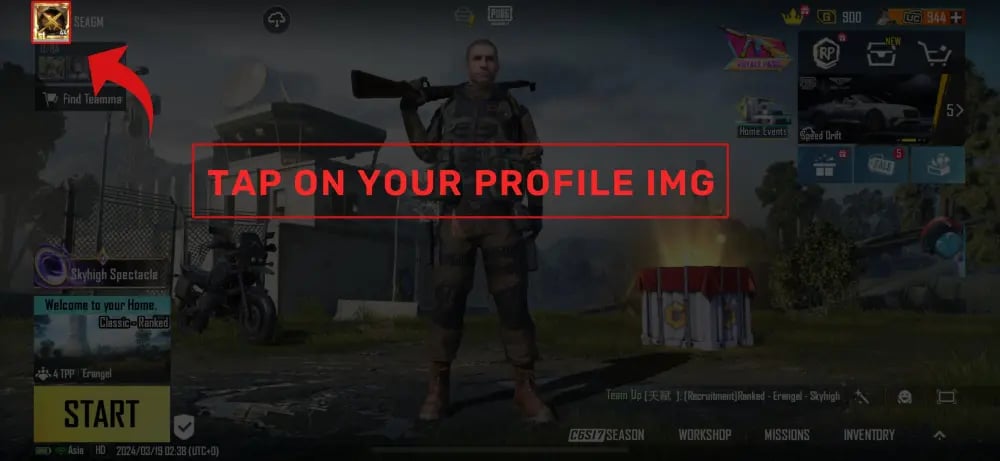
- Tap your Commander Profile Avatar located in the top-left corner of the screen.
- In the profile overview window, locate your Player ID (UID) displayed beneath your Commander name.
- Tap the Copy icon next to the number to copy your Player ID to your clipboard.
- Check your server region, which is displayed on the profile page or on the initial title login screen.
Double-check that you paste the exact numeric string into the ArcTopup order form to prevent delivery delays.
Supported Regional Servers: KR, JP, Global, SEA, and NA
Goddess of Victory: Nikke operates separate server clusters worldwide. ArcTopup supports player ID recharges across all active regions. Make sure you select the server where your active Commander account resides.
| Server Name | Server Code | Primary Regions Covered | Account Routing |
|---|---|---|---|
| KR | Korea | South Korea | Direct UID Routing |
| JP | Japan | Japan | Direct UID Routing |
| Global | Global | Europe, Latin America, Oceania & Other | Direct UID Routing |
| SEA | Southeast Asia | Singapore, Malaysia, Philippines, Thailand, Indonesia | Direct UID Routing |
| NA | North America | United States, Canada | Direct UID Routing |
Selecting the wrong server will prevent the system from matching your Player ID, which can cause processing delays. Always check your server code before confirming payment.
What You Can Buy: Paid Gems and In-Game Resources in Nikke
Gems serve as the primary premium currency in Goddess of Victory: Nikke. Understanding how different currencies work helps you plan your recruitment strategy and outpost upgrades efficiently.
Paid Gems vs. Free Gems
When you top up your account through ArcTopup via Player ID, the currency delivered is categorized as Paid Gems. In Nikke, the game tracks Paid Gems and Free Gems separately:
- Paid Gems: Can be used on exclusive banners, including the guaranteed SSR New Commander Special Recruitment banner, daily 100-gem discounted single pulls, and special cash shop milestone packages.
- Free Gems: Earned from campaign stages, daily/weekly missions, tribe towers, and maintenance compensations. Free Gems work on standard pick-up banners and ordinary recruitments but cannot be used for paid-exclusive draws.
Banner Recruitments & Mileage System
- Pick-Up Recruitments (300 Gems / pull, 3,000 Gems / 10-pull): Feature boosted rates for newly released Nikkes and Pilgrims. Every pull awards Golden Mileage Tickets. Accumulating 200 Golden Mileage Tickets allows you to exchange directly for the featured rate-up character in the Mileage Shop without resetting your counter.
- Ordinary Recruitment: Uses gems or Ordinary Recruit Vouchers to build your core roster, awarding Silver Mileage Tickets used to buy spare bodies for limit breaks.
Outpost & Progression Upgrades
Beyond recruitments, Gems can be spent on:* Expanding Synchro Device slots to level up multiple Nikkes simultaneously without spending extra battle data.* Purchasing Wipe Out stamina refreshes in the Outpost Defense to accelerate Commander level gains and resource income.* Buying event entry passes during ongoing 2026 seasonal story campaigns to farm high-value materials and core dust.
Nikke Top Up Safety: Passwordless UID Checkout vs Account Sharing
Account security is critical when purchasing game currency online. Some unauthorized websites require players to hand over login credentials, email verification codes, or linked social media logins. This exposes your account to security risks, unauthorized data changes, and potential terms-of-service violations.
ArcTopup operates entirely on password-free direct top-ups:
- No Passwords Required: You only submit your public Player ID and server name. We never ask for your Level Infinite Pass password, Google credentials, Apple ID, or social logins.
- No Account Access: Deliveries are processed through official system channels directly to your UID without anyone logging into your client.
- Safe Transactions: Your personal login data remains secure on your own device at all times.
Why Choose ArcTopup for Goddess of Victory: Nikke Recharges
ArcTopup provides a straightforward, secure recharge experience built specifically for mobile and PC commanders:
- Comprehensive Server Coverage: Full support for KR, JP, Global, SEA, and NA servers ensures that commanders worldwide can recharge without region-lock obstacles.
- Clear Live Pricing: Package prices, denomination tiers, and live product availability are displayed clearly on the product catalog before you check out.
- Streamlined Order Process: Simply paste your Player ID, choose your server, select your payment method, and complete the order in just a few clicks.
- Dedicated Support: If you ever need help with order tracking or server verification, ArcTopup customer support is available to assist you.
Troubleshooting Common Nikke Top Up Issues
If your Gems do not appear immediately after completing payment, follow these troubleshooting steps:
- Restart the Game Client: Completely close Goddess of Victory: Nikke and launch it again. This forces the client to synchronize your balance with the server.
- Check the In-Game Mailbox: Some promotional sets or bonus resources are delivered to your in-game mailbox rather than directly to the top balance bar. Tap the envelope icon in the top-right corner of the lobby screen to claim them.
- Verify Your Player ID and Server: Check your receipt to confirm that the Player ID and server you submitted match your profile exactly. A typo in your numeric ID will cause the order to fail or route incorrectly.
- Contact Customer Support: If your order status shows completed but the currency has not arrived after restarting the game, reach out to ArcTopup support with your order number, submitted Player ID, and a screenshot of your in-game profile.
Frequently Asked Questions
Where can I find my Goddess of Victory: Nikke Player ID?
Open Goddess of Victory: Nikke and tap your Commander profile avatar in the upper-left corner of the main lobby. Your numerical Player ID is displayed directly below your Commander name. Tap the copy icon next to the number to copy it to your clipboard.
Which servers are supported for Nikke top up on ArcTopup?
ArcTopup supports all primary operational server regions for Goddess of Victory: Nikke, including Korea (KR), Japan (JP), Global, Southeast Asia (SEA), and North America (NA).
Do I need to provide my Nikke account password or login credentials?
No. ArcTopup recharges only require your public Player ID and server selection. You never need to share your password, Level Infinite Pass, or third-party login credentials.
How long does it take for Nikke Gems to be credited after checkout?
Orders are processed promptly after payment confirmation. In most cases, the Gems are added directly to your account balance within a few moments. You may need to restart the game client or switch scenes to see the updated total.
What should I do if I selected the wrong server or entered an invalid Player ID?
If you realize you entered incorrect information, contact ArcTopup customer support immediately with your order number and the correct Player ID and server details. If the order has not yet been processed by the automated system, support can assist in correcting the details.
Are Nikke Gems purchased via Player ID considered Paid Gems?
Yes. Gems purchased through UID top-ups on ArcTopup are credited as Paid Gems, allowing you to use them on paid-only recruitment banners, daily discounted pulls, and special cash shop packages.
Current packages and prices
Current base prices exclude Tax. Tax, payment fees and coupon adjustments are shown at checkout.
| Package | Price |
|---|---|
| 60 Gems | USD 0.63 |
| 120 Gems | USD 1.28 |
| 320 Gems | USD 3.22 |
| Monthly Pass | USD 3.22 |
| 720 Gems | USD 6.46 |
| Technical Master Pack | USD 7.16 |
| 1500 Gems | USD 12.93 |
| Class Research Set | USD 14.33 |
| Grow Selection Set | USD 14.33 |
| 2300 Gems | USD 19.11 |
| 2370 Gems | USD 19.79 |
| Manufacturer Research Set | USD 21.50 |
| 4200 Gems | USD 35.59 |
| Enhanced Module Set | USD 38.34 |
| Manufacturer Backup Pack | USD 38.34 |
| Technical Support S I | USD 38.34 |
| 6200 Gems | USD 50.63 |
| Technical Support S II | USD 71.01 |