Devil May Cry: Peak of Combat Top Up on ArcTopup
Devil May Cry: Peak of Combat brings Capcom's signature stylish action to mobile devices. Commanding legendary Devil Hunters like Dante, Vergil, Nero, and Lady requires steady access to premium resources. Devil Gems serve as the core currency needed to summon top-tier Hunter variants, pull signature weapons, replenish stamina for resource grinding, and access exclusive growth packs.
ArcTopup provides a direct top up service for Devil May Cry: Peak of Combat players worldwide. By using your in-game User ID, you can recharge Devil Gems directly to your account without logging out or sharing sensitive account credentials. Live pricing and supported payment channels are clearly displayed during checkout on our storefront.
How to Top Up Devil May Cry: Peak of Combat Devil Gems Using User ID
Recharging your Devil May Cry: Peak of Combat account on ArcTopup is straightforward. Follow these steps to complete your purchase:
- Select the Devil Gems package denomination you wish to purchase from the product catalog.
- Enter your Devil May Cry: Peak of Combat User ID in the required field.
- Verify that your User ID matches your in-game profile exactly.
- Choose your preferred payment method from the available checkout options.
- Complete the payment transaction.
- Launch Devil May Cry: Peak of Combat on your mobile device to verify that your Devil Gems have arrived in your balance or in-game mailbox.
How to Find Your Devil May Cry: Peak of Combat User ID in 2026
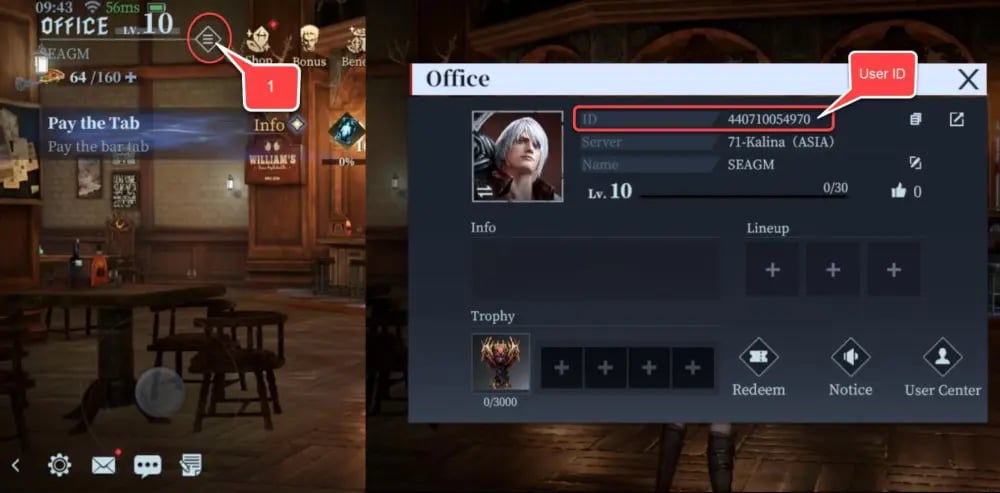
Your User ID is a unique numeric identifier assigned to your game profile. You do not need to share your login credentials, email, or social media link to top up. Follow these exact steps to copy your User ID:
- Open Devil May Cry: Peak of Combat on your Android or iOS device.
- Tap your Avatar / Character Profile icon located in the top-left corner of the main lobby screen.
- In the profile overview window, locate your User ID (UID) displayed beneath your player nickname and hunter level.
- Tap the Copy icon next to your User ID to avoid manual typing mistakes.
- Paste the copied digits directly into the User ID box on the ArcTopup product page.
What Are Devil Gems and How to Use Them in DMC: Peak of Combat
Devil Gems are the premium currency in Devil May Cry: Peak of Combat. While basic gameplay rewards offer Red Orbs and basic materials, high-level progression and limited-time banner pulls require Devil Gems. Understanding where to spend your gems helps optimize your team builds and weapon loadouts.
| Currency / Resource | Primary Acquisition Method | Primary In-Game Purpose |
|---|---|---|
| Devil Gems | ArcTopup Direct Recharge / Store Purchase | Special Hunter Summons, Weapon Vault pulls, Stamina refreshes, VIP packs |
| Red Orbs | In-game stages, challenges, daily logins | Upgrading basic hunter skills, weapon enhancements, skill tree unlocks |
| Stamina (Vitality) | Time recovery, Devil Gem conversions | Entering story chapters, boss trials, and resource farming dungeons |
| Secret Keys / Summons | Devil Gem exchange, milestone events | Pulling from standard character banners and gear pools |
Key Uses for Devil Gems:
- Special Summons & Limited Banners: Exchange Devil Gems for premium summon tokens to recruit top-tier hunters such as Vergil - Endless Judgment, Dante - One-Man Show, or limited seasonal styles.
- Weapon Vault Draws: Equip your hunters with their signature legendary weapons (like Yamato, Rebellion, or Kalina Ann) to activate unique combo passives and stat boosts.
- Stamina Refreshes: Refill your energy to farm training grounds, relic upgrade dungeons, and memory stages to maximize your squad's power level.
- Growth Bundles & Pass Tiers: Unlock premium reward tracks and resource bundles inside the in-game shop to speed up skill leveling.
DMC: Peak of Combat Gacha Banners, Hunter Summons, and Vault Packs
Building an effective team in Peak of Combat requires pairing hunters of complementary elements—such as Physical, Fire, Electric, and Frost—with their signature weapon kits. Gacha banners rotate frequently, introducing new combat styles and signature gear with high pity thresholds.
Having an available balance of Devil Gems ensures you can pull during limited-time banner windows without missing pity targets. Purchasing Vault tickets directly via Devil Gems guarantees steady progression toward 5-star weapon milestones, which provide substantial damage multipliers in boss challenges, Bloody Palace runs, and co-op raid instances.
Safe and Password-Free DMC PoC Recharge on ArcTopup
Account safety is a top priority for mobile gamers. ArcTopup uses a direct User ID top-up system that ensures zero risk to your account credentials:
- No Password Required: We never ask for your Google, Apple ID, Facebook, or game login passwords. All orders are processed using only your public User ID.
- Direct Account Delivery: Purchased Devil Gems are credited directly to your official game account balance via server integration.
- Clear Pricing & Payments: Real-time prices are clearly displayed in your selected local currency on the checkout screen without hidden platform fees.
- Global Account Support: Our top-up system supports global players across various server regions, providing an accessible and straightforward transaction flow.
Delivery Troubleshooting and Order Verification for DMC Peak of Combat
Most Devil May Cry: Peak of Combat top-ups arrive within moments of a completed transaction. If you experience an unexpected delay, follow these troubleshooting steps:
- Restart the Game Application: Completely close Devil May Cry: Peak of Combat and restart the app. This forces the client to synchronize your current currency balance with the game server.
- Check the In-Game Mailbox: Some promotional top-up items or bonus gems are delivered directly to your mailbox rather than the main HUD balance. Tap the mail icon on the main menu to claim pending rewards.
- Verify Your Submitted User ID: Check your ArcTopup order confirmation email to verify that the submitted User ID matches your in-game profile number.
- Contact Customer Support: If your order status is marked complete on ArcTopup but gems do not reflect after restarting, reach out to ArcTopup support with your order number and profile details for quick verification.
Frequently Asked Questions
How do I find my Devil May Cry: Peak of Combat User ID?
Open Devil May Cry: Peak of Combat and tap your character avatar in the top-left corner of the main lobby. Your User ID is displayed under your player name. Tap the copy icon next to the number to copy it to your clipboard.
Do I need to share my account password to top up on ArcTopup?
No. ArcTopup processes recharges exclusively via your User ID. You never need to provide passwords, verification codes, or third-party login credentials.
What can I buy with Devil Gems in Devil May Cry: Peak of Combat?
Devil Gems can be used to purchase Special Summon tokens for character banners, Weapon Vault keys for signature armaments, stamina refreshes for dungeon grinding, and value resource packs in the store.
How long does it take for Devil Gems to arrive after checkout?
Orders are sent to the game server immediately once payment confirmation is received. Most players see their updated Devil Gem balance within minutes after restarting the game client.
What should I do if I entered the wrong User ID during purchase?
Double-check your User ID carefully before confirming payment. Because top-ups are credited automatically to the submitted ID, orders sent to an existing incorrect account cannot be reversed once processed. If your order is still processing, contact ArcTopup customer support immediately.
Can I top up Devil May Cry: Peak of Combat Devil Gems for a friend?
Yes. You only need your friend's accurate Devil May Cry: Peak of Combat User ID. Enter their User ID during checkout, complete the payment, and the Devil Gems will be credited directly to their game account.
Current packages and prices
Current base prices exclude Tax. Tax, payment fees and coupon adjustments are shown at checkout.
| Package | Price |
|---|---|
| 60 Devil Gems | USD 0.49 |
| Daily Value Gem Pack I | USD 1.40 |
| Daily Mega Gem Pack II | USD 2.11 |
| 300 Devil Gems | USD 2.33 |
| Card EXP Pack | USD 3.52 |
| Daily Gem Luxury Pack III | USD 3.52 |
| Epic Weapon Selection | USD 3.52 |
| Hunter EXP Pack | USD 3.52 |
| Random Fragment Pack | USD 3.52 |
| Red Orb Pack | USD 3.52 |
| Weapon EXP Pack | USD 3.52 |
| 680 Devil Gems | USD 4.89 |
| Crimson Scale Pack | USD 7.16 |
| Epic Hunter Selection | USD 7.16 |
| Eye of Destruction Pack | USD 7.16 |
| Eye of the Abyss Pack | USD 7.16 |
| Skill Manual Pack | USD 7.16 |
| Weekly Gem Luxury Pack | USD 7.16 |
| 1280 Devil Gems | USD 9.61 |
| Advanced Rune Selection | USD 10.73 |
| 3280 Devil Gems | USD 24.79 |
| Hunter Premium Pack | USD 35.76 |
| Hunter Supreme Pack | USD 35.76 |
| Weapon Supreme Pack | USD 35.76 |
| 6480 Devil Gems | USD 48.05 |