How to Top Up Super Sus Goldstar Using Space ID
Getting Goldstars for your Super Sus account takes only a few simple steps. You do not need to link third-party social media profiles or provide passwords. Follow this quick walkthrough to complete your order on ArcTopup:
- Select the Desired Package: Choose the amount of Goldstars, Super Pass bundle, or seasonal offer you want to purchase.
- Enter Your Space ID: Type or paste your numeric Super Sus Space ID accurately into the required field.
- Review Order Details: Double-check your Space ID and the selected item on the live checkout interface.
- Choose Payment Option: Select your preferred payment method available for your region.
- Complete Payment: Confirm the transaction. Once the payment clears, your Goldstars are sent directly to your in-game account.
- Verify In-Game Balance: Open the Super Sus app on your mobile device or emulator, log in, and check the top-right currency balance on the main lobby screen.
Where to Find Your Super Sus Space ID in the App
Your Space ID is a unique numeric identifier assigned to your game account. Because every order on ArcTopup uses direct ID delivery, finding and entering your correct Space ID ensures that purchases arrive in your inventory without delays.
Here is how to locate your Space ID inside the game client:
- Launch Super Sus on your device and make sure you are logged into your primary profile.
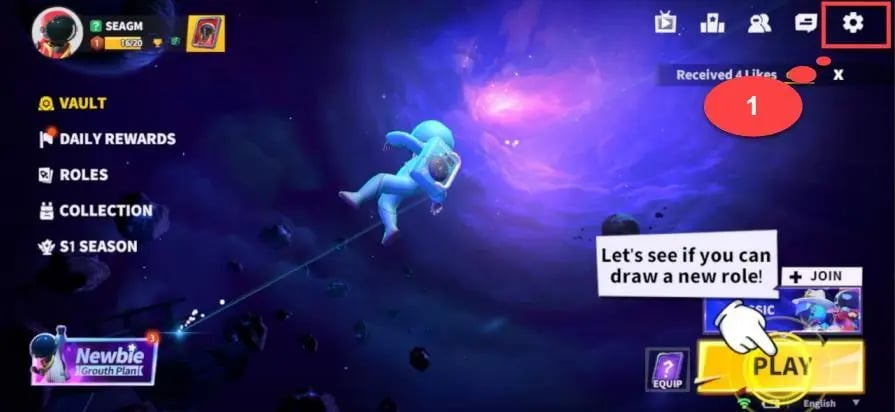
- From the main lobby screen, tap on your Avatar / Profile Picture located in the top-left corner.
- Open the Personal Info or Overview tab inside your profile menu.
- Look below your player nickname or near your level badge. You will see a string of digits labeled Space ID.
- Tap the Copy icon next to the Space ID number to copy it to your clipboard.
- Paste the copied ID directly into the input box on ArcTopup to avoid typing mistakes.
Always verify that you copied the complete numeric sequence without spaces or trailing characters.
Super Sus In-Game Currencies: Goldstars and Super Pass Explained
Super Sus features several currencies and progression passes that unlock distinctive customization options, exclusive skins, character roles, and lucky draws. Understanding how each currency works helps you spend your resources wisely.
Goldstars (Golden Stars)
Goldstars are the primary premium currency in Super Sus. They cannot be earned in large quantities through regular gameplay and must be acquired through direct top-up. You use Goldstars to:- Purchase legendary outfits, hats, backpacks, and kill animations from the in-game Shop.- Spin premium lucky wheels and limited-time gacha banners for rare role skins.- Unlock exclusive character roles directly or acquire role cards.- Upgrade seasonal battle passes to gain bonus tiers and tier-specific rewards.
Super Pass & Advanced Super Pass
The Super Pass is the seasonal battle pass system in Super Sus. Completing daily missions, weekly challenges, and seasonal quests levels up your pass tier. Upgrading to the premium Super Pass grants high-tier cosmetic rewards, exclusive emojis, extra Goldstars, and unique character effects not obtainable through the free track.
Cookies and Other In-Game Tokens
Cookies and role shards are free, grindable currencies earned by playing matches, completing achievements, and participating in events. While Cookies allow you to buy basic cosmetics and recruit select roles, premium items require Goldstars.
| Item / Currency Type | In-Game Utility | Top-Up Delivery Method | Account Login Required |
|---|---|---|---|
| Goldstars | Premium store purchases, gacha spins, exclusive skins | Direct via Space ID | No |
| Super Pass | Seasonal battle pass rewards and exclusive cosmetics | Direct via Space ID / Goldstar conversion | No |
| Weekly / Monthly VIP | Daily resource claims, exclusive chat frames, discounts | Direct via Space ID | No |
| Cookies | Basic cosmetic shop items, common character unlocks | Gameplay rewards only | N/A |
Safe and Password-Free Super Sus Recharge Process
Account security is paramount when purchasing virtual goods online. ArcTopup uses a direct ID-based fulfillment process designed to keep your personal information secure.
- Zero Password Sharing: You never have to share your game password, Google account, Apple ID, Facebook credentials, or email verification codes.
- Global & Cross-Region Compatibility: Super Sus Space IDs operate on a global server architecture. Whether your account was created in Southeast Asia, Latin America, Europe, or North America, your Space ID directs the Goldstars to the correct profile automatically.
- Direct API Processing: Orders are transmitted through authorized distribution channels straight to the game server, eliminating the risk of third-party account takeover or unauthorized access.
- Transaction Privacy: Your billing information and payment details remain encrypted throughout checkout, protecting your financial data.
Why Choose ArcTopup for Super Sus Top Up
Players worldwide rely on ArcTopup for their Super Sus top-up needs due to several core advantages:
- Instant Processing: Automated systems dispatch your Goldstar order as soon as payment is confirmed, so you can jump straight into matches with your new skins.
- Live Transparent Pricing: Check real-time rates and package amounts directly on the live checkout screen with no hidden surcharges.
- Local and International Payment Options: Pay comfortably using digital wallets, bank transfers, credit/debit cards, and regional payment methods tailored to your location.
- Accessible Interface: The clean, multilingual interface makes finding your product and completing your purchase straightforward on both desktop and mobile browsers.
- Dedicated Customer Support: If you ever have a question regarding an order or need confirmation on a transaction, support assistance is ready to help resolve your query.
Troubleshooting Delivery and Verifying In-Game Balance
In the vast majority of transactions, Goldstars appear on your account within moments of checkout completion. If your balance does not update right away, follow these diagnostic steps:
- Restart the Game App: Completely close Super Sus from your device's recent apps switcher and relaunch it. This forces the game client to refresh its server connection and sync your current currency balance.
- Check the In-Game Mailbox: Some promotional bundles, bonus Goldstars, or pass activation items are delivered directly to your in-game mailbox rather than being added directly to your wallet counter. Tap the envelope icon in the main lobby and claim any pending attachments.
- Verify Space ID Accuracy: Check your ArcTopup receipt to confirm that the Space ID entered matches your in-game profile number. If you entered an alternate account's ID, the Goldstars were sent to that specific account.
- Confirm Payment Status: Check your banking or digital wallet statement to ensure the payment went through and was not held in pending status by your financial provider.
- Contact Support with Order Details: If your payment was completed and your balance remains unchanged after restarting, contact ArcTopup customer support with your Order ID, Space ID, and payment receipt for immediate review.
Frequently Asked Questions About Super Sus Top Up
Where can I find my Super Sus Space ID?
You can find your Space ID by tapping your profile avatar in the upper-left corner of the main lobby. Your Space ID is the numeric code displayed in your profile overview beneath your nickname. You can tap the copy icon next to it to copy the numbers directly.
Do I need to share my Super Sus account password for top up?
No. ArcTopup never asks for your password, email login, social media credentials, or two-factor authentication codes. All orders are processed exclusively using your public Space ID.
How quickly will the Goldstars be credited to my Super Sus account?
Goldstars are processed automatically upon payment confirmation. In most cases, the currency reflects on your account balance immediately. If the game is already open during checkout, restart the app to refresh your wallet display.
What can I buy with Super Sus Goldstars?
Goldstars can be used to unlock premium character roles, purchase legendary skins and outfits, open mystery boxes and lucky gacha wheels, buy exclusive kill and interaction animations, and upgrade your seasonal Super Pass.
Can I top up Super Sus for a friend using their Space ID?
Yes. You can recharge Goldstars for friends, teammates, or family members. Simply obtain their Space ID, enter it into the Space ID field on the ArcTopup product page, select the package, and complete checkout. The Goldstars will be credited directly to their profile.
What should I do if I entered the wrong Space ID during checkout?
Because top-ups are automated and delivered directly to the server based on the numeric ID provided, items sent to a valid, existing Space ID cannot be reversed or transferred. Always verify your Space ID carefully before confirming your purchase. If you notice an error before payment completes or if the ID does not exist, reach out to customer support immediately.
Current packages and prices
Current base prices exclude Tax. Tax, payment fees and coupon adjustments are shown at checkout.
| Package | Price |
|---|---|
| Weekly Card | USD 0.66 |
| 100 Golden Stars | USD 0.66 |
| 310 Golden Stars | USD 1.97 |
| 520 Golden Stars | USD 3.29 |
| Super Pass | USD 3.29 |
| 1060 Golden Stars | USD 6.64 |
| Super Pass Bundle | USD 6.64 |
| Monthly Card | USD 7.16 |
| Super VIP Card | USD 8.00 |
| 2180 Golden Stars | USD 13.65 |
| 5600 Golden Stars | USD 35.01 |