
To isolate enemy footsteps and suppress territory noise in Once Human, lower background music to zero, mute settlement broadcasts under [Settings] -> [Audio] -> [Radio], disable the Pollution Zone alert prompt, and set an external equalizer to cut 60–250 Hz bass by -2 to -3 dB while boosting 500 Hz–2 kHz mids by +2 to +3 dB. These adjustments strip out low-end rumble from territory machinery and let texture-specific footstep audio cut through cleanly during combat.
In-game audio mix for tactical awareness and quiet bases
Base building in Once Human introduces heavy background noise. Crafting stations, vehicle stereos, and territory machinery constantly produce sound effects that drown out enemy movement. In an August 2024 developer blog, the development team confirmed that players can independently adjust or silence these audio sources inside the standard menus.
Apply these in-game settings to build a clean competitive audio mix:
- Master Volume: Keep between 80% and 100% to preserve full dynamic range.
- Background Music (BGM): Set to 0%. The developers confirmed that BGM volume is fully customizable; muting it prevents dramatic orchestral swells from covering quiet movement cues.
- Sound Effects (SFX): Keep at 100%. Combat cues, weapon reloads, and footsteps reside in this layer.
- Radio: Set to 0%. Found under
[Settings] -> [Audio] -> [Radio], this slider controls radio props, settlement broadcasts, and vehicle stereos. - Pollution Zone Prompt: Set to Off. Entering contaminated areas triggers repetitive warning chimes; the dev team confirmed players can disable this sound effect in Settings as a direct workaround.
The Stardust Resonant Filter audio limit
If your base uses a Stardust Resonant Filter, depositing an Echo Stone activates an intended converter sound effect. The development team acknowledged this mechanic produces an excessively loud audio loop targeted for future optimization. Because this machine sound is tied directly to the core Sound Effects channel rather than the Radio slider, muting it entirely in-game also mutes enemy movement. The only way to dampen its drone without muting tactical cues is through frequency equalization.
When placing base expansions or structures funded with Crystgin, position noisy processing machinery well away from defense chokepoints to prevent local sound pollution during purification events.

62 Crystgin
 62 CrystginUSD 0.85Buy Now
339 Crystgin
339 CrystginUSD 4.29Buy NowMeta Pass (30 Days)
Meta Pass (30 Days)USD 4.28Buy NowBattle Pass Advanced Edition
Battle Pass Advanced EditionUSD 8.57Buy Now1120 Crystgin
1120 CrystginUSD 12.77Buy NowBattle Pass Deluxe Edition
Battle Pass Deluxe EditionUSD 57.77Buy Now2340 Crystgin
2340 CrystginUSD 25.54Buy Now3979 Crystgin
3979 CrystginUSD 42.57Buy Now8075 Crystgin
8075 CrystginUSD 85.15Buy Now
Equalizer values for footstep clarity
Once Human includes unique footstep audio profiles for different ground textures, ranging from dirt and sheet metal to stone and wood. However, low-frequency rumbles from environmental machines and distant combat often obscure these cues.
Applying a system-level equalizer (EQ) through your headset software isolates character movements. According to competitive audio research published by Turtle Beach, you should moderate your frequency bands using these specific parameters:
| Frequency Band | Recommended Adjustment | Tactical Purpose |
|---|---|---|
| Bass (60–250 Hz) | Cut -2 to -3 dB | Cuts boominess from explosions and heavy base machinery masking footsteps. Sourced from Turtle Beach. |
| Mids (500 Hz–2 kHz) | Boost +2 to +3 dB | Brings forward footsteps, reloads, and character movement audio cues. Sourced from Turtle Beach. |
| Treble (4–8 kHz) | Boost +1 to +2 dB | Enhances high-frequency spatial awareness and detail. Sourced from Turtle Beach. |
For headsets featuring simpler multi-band software, focus primarily on the 1 kHz to 3 kHz range. Boosting frequencies across 1–3 kHz targets the specific click and friction of boots meeting terrain textures.
Moderate vs. aggressive EQ profiles
Audio guides sometimes disagree on how sharply to alter your equalizer curves. Conservative guides recommend staying within +/- 2 to 3 dB to preserve spatial staging and avoid digital distortion.
More aggressive profiles advocate cutting sub-bass (around 31 Hz) by -6 dB and spiking 2 kHz by +6 dB, or cranking the 16 kHz band to maximum. While sharp cuts strip out machine drones faster, they introduce harsh clipping and flatten environmental depth. Sticking to the moderate -3 dB to +3 dB range protects directional clarity.
Configuring voice chat and input devices
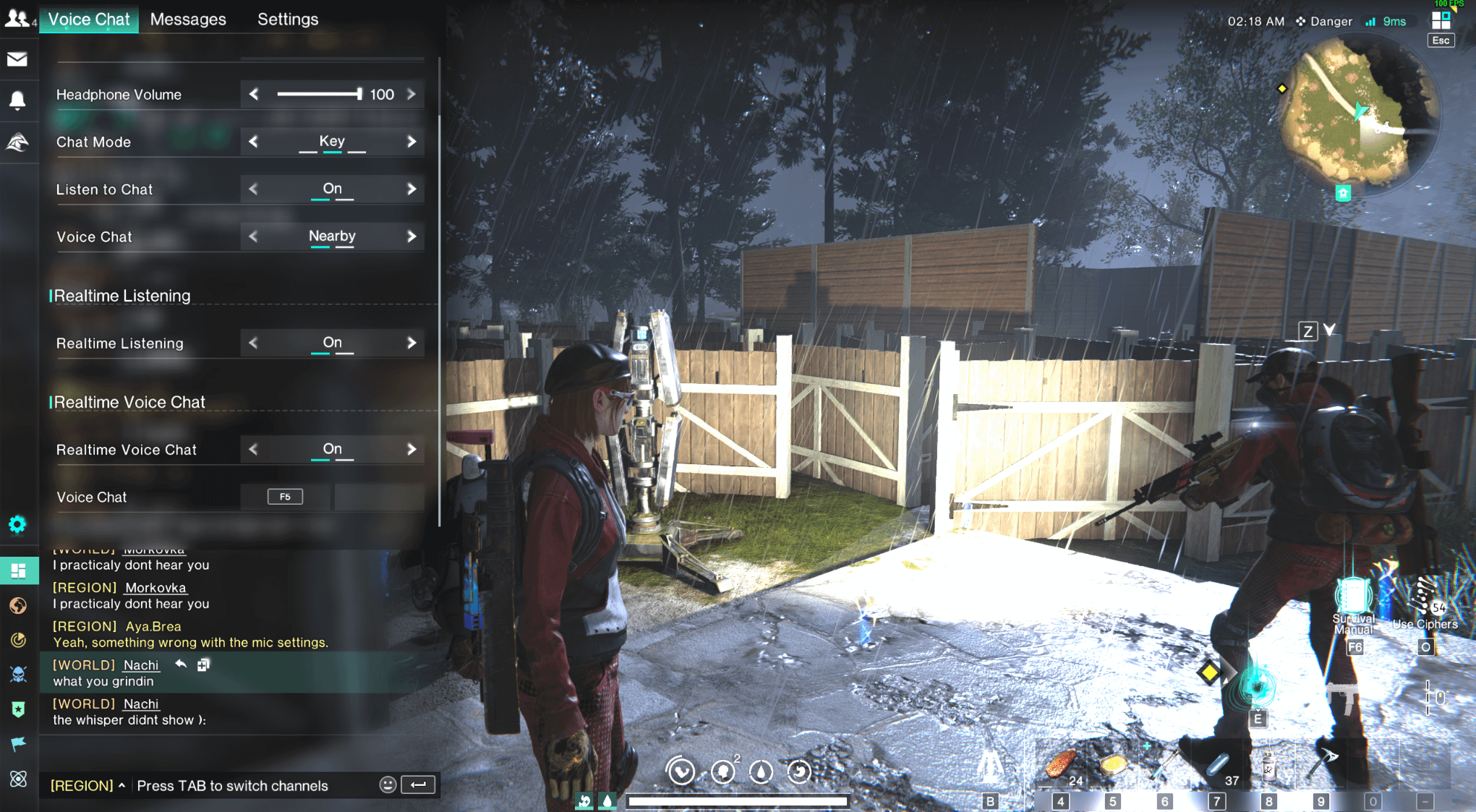
Misconfigured voice options lead to settlement open-mic chatter and missed callouts. Once Human routes both input device selection and voice communication modes through its settings menu.
Setup documentation from Voice.ai notes that players must enable voice chat in Audio settings and explicitly select their hardware microphone from the input list. Leaving this set to the system default often causes Once Human to pull audio from secondary inputs, such as webcam microphones or virtual cables.
PC players should also verify keybind assignments. Per control data compiled by BisectHosting, the default keyboard binding for voice chat on PC is F5. If you use Push-to-Talk, rebind this key to an accessible mouse side button so you can communicate without lifting your fingers from movement keys during a firefight.
Troubleshooting missing console audio
Console players encountering absent or silent audio tracks should not immediately assume a hardware failure. System-level audio routing glitches can mute game channels entirely.
When game audio drops, troubleshooting documentation from Timesaver.gg points to three immediate checks:
- Check in-game sliders: Verify that Master, Effects, and Music sliders have not zeroed out in Once Human's audio tab.
- Verify output routing: Confirm whether your console is routing audio to HDMI, a wireless headset, or a controller 3.5mm jack. Toggling the console's output device away from and back to your headset often forces the audio engine to re-establish the connection.
- Full game relaunch: Fresh console ports can suffer audio engine desyncs that persist through standby mode. Fully exit the application and perform a cold restart to clear the sound buffer.
Frequently asked questions
How do you mute radio music and settlement broadcasts in Once Human?
Open [Settings] -> [Audio] -> [Radio] and drag the slider to zero. As detailed by the Once Human Development Team, this slider controls territory radios, settlement broadcasts, and vehicle music.
What is the default PC keybind for voice chat in Once Human?
The default PC keyboard binding for voice communication is F5, according to BisectHosting.
How can you turn off repetitive Pollution Zone warning sounds?
Open the in-game Settings menu and toggle off the Pollution Zone sound effect option. The development team implemented this toggle as a direct workaround for repetitive zone entry chimes.






Comments