
Shadowverse Worlds Beyond Top Up: Direct Crystals Delivery
Shadowverse Worlds Beyond introduces an expanded strategic card battle experience featuring updated mechanics, rich visuals, interactive guild lobbies, and a competitive ranked ladder. To stay ahead of the meta, build tier-one competitive decks, and acquire exclusive cosmetics, having an adequate reserve of Crystals is essential.
Crystals serve as the primary premium currency in Shadowverse Worlds Beyond. They allow you to pull card packs from the newest expansions, acquire card crafting resources, purchase the premium tier of the Battle Pass, and customize your profile with unique leader skins, battle tables, and lobby avatar cosmetics. ArcTopup provides a direct and reliable way to top up your account balance using only your player Link, ensuring full account security without password sharing.
How to Top Up Shadowverse Worlds Beyond Crystals on ArcTopup
Adding Crystals to your account through ArcTopup is straightforward. Follow these steps to complete your purchase:
- Select Your Package: Choose the amount of Crystals you wish to purchase from the product catalog above.
- Provide Your Link: Enter your exact Shadowverse Worlds Beyond Link in the input field.
- Select Payment Method: Pick your preferred payment option available at checkout.
- Review and Confirm: Double-check your entered Link and total price, then proceed to complete the payment.
- Check In-Game Balance: Once the transaction completes, open Shadowverse Worlds Beyond on your device. Your Crystals will be credited directly to your account balance.
All package prices and current rates are displayed on the live checkout screen before you finalize your order.
Where to Find Your Shadowverse Worlds Beyond Link
To ensure your Crystals arrive in your profile without delay, you must provide your correct in-game Link. Follow this quick guide to locate it:
- Launch Shadowverse Worlds Beyond on your mobile device or PC client.
- On the main lobby or home screen, click or tap the Menu / Profile icon located in the upper corner.
- Open your user settings or account overview tab.
- Locate the Link or account identification string displayed on the screen.
- Copy the string directly to your clipboard to prevent manual typo errors.
- Paste the Link into the required field on the ArcTopup checkout page.
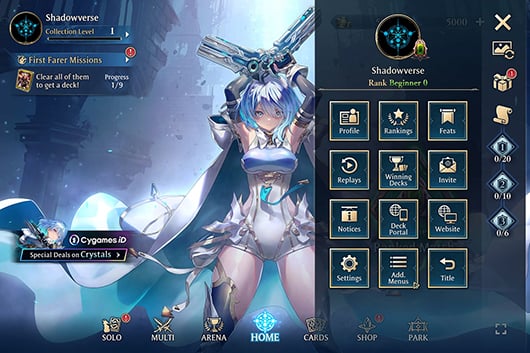
Double-check that the characters match your profile precisely before submitting your order.
Paid Crystals vs Unpaid Crystals: Best Uses and Value
Shadowverse Worlds Beyond differentiates between Paid Crystals (acquired through top-up services like ArcTopup) and Unpaid / Free Crystals (earned via gameplay, missions, achievements, and maintenance compensation). Understanding how each type functions helps you optimize your in-game spending.
| Feature / Purchase Item | Paid Crystals | Unpaid / Free Crystals |
|---|---|---|
| Standard Card Expansion Packs | Yes | Yes |
| Daily 50-Crystal Discount Single Pack | Yes (1 per day) | No |
| Premium Battle Pass Track Unlock | Yes | No (Select promotions only) |
| Exclusive Collaboration Leader Skins | Yes | No |
| Lobby Avatars & Furniture Sets | Yes | Select Basic Items Only |
| Grand Prix / Arena Entry Fees | Yes | Yes |
Daily Discounted Single Pulls
Paid Crystals enable you to draw a card pack once per day for a fraction of the standard price (typically 50 Crystals instead of 100). Taking advantage of this daily discount allows you to steadily build your card collection over time while spending far fewer total Crystals.
Battle Pass Progression
Unlocking the premium track of the Battle Pass with Paid Crystals grants high-tier rewards as you earn battle points throughout the season. These include exclusive animated card sleeves, alternate-art legendaries, vials for card crafting, and special cosmetic titles not obtainable through standard card packs.
Exclusive Leader Skins and Lobby Items
Customizing your favorite craft leader with fully voiced alternate skins, victory animations, and special emotes requires Paid Crystals. If you want your deck to stand out in ranked matches and guild lobbies, allocating your top-up balance toward leader packs or direct cosmetic bundles is the most efficient route.
Data Transfer from Original Shadowverse to Worlds Beyond Explained
Players transitioning from the original Shadowverse can link their historical game data to Shadowverse Worlds Beyond. Understanding how data transfer works ensures you carry over your earned loyalty rewards without confusion:
- Cosmetics and Titles: Linking your original Shadowverse account unlocks exclusive veteran player titles, historical card sleeves, and select emblem crossovers in Worlds Beyond based on your past achievements and collection milestones.
- Card Collections: Because Shadowverse Worlds Beyond operates on completely redesigned game systems, refined card balances, and updated rule engines, individual card collections do not transfer directly as playable cards. Instead, linked accounts receive bonus resources to jumpstart collection building in the new environment.
- In-Game Currencies: Premium currencies remain separate between titles. Crystals topped up for Shadowverse Worlds Beyond apply specifically to your Worlds Beyond profile and cannot be shifted backward to the legacy client.
Completing the data link early ensures your profile receives all qualifying loyalty bonuses as you begin building your new deck collection.
Safe Top-Up Practices: Protecting Your Cygames Account
Account safety is critical when purchasing game currency online. ArcTopup uses a direct-to-account delivery method that relies solely on your public player Link.
- No Passwords Required: You never need to supply your Cygames ID password, email credentials, or two-factor authentication codes to top up on ArcTopup.
- No Account Sharing: Avoid services that request direct login access to your game client. Sharing account logins violates game terms of service and exposes your data to unauthorized access.
- Secure Payment Channels: ArcTopup utilizes encrypted processing systems so your sensitive payment information remains protected throughout the transaction.
By keeping your password confidential and using only verified Link-based top-ups, your card collection and profile remain secure.
Why Choose ArcTopup for Shadowverse Worlds Beyond
ArcTopup delivers a focused, player-friendly experience designed to get your Crystals into your balance quickly and securely:
- Link-Only Verification: Simply provide your account Link to complete your order—no complex account handoffs or password inputs.
- Transparent Live Pricing: View exact package costs directly on the product page before you buy, with clear currency options.
- Multiple Payment Options: Choose from a broad range of convenient payment methods suited to your region.
- Dedicated Customer Support: If you ever have a question about entering your Link or verifying an order status, the ArcTopup customer service team is available 24/7 to help.
Frequently Asked Questions
How do I top up Shadowverse Worlds Beyond Crystals with my Link?
Select your desired Crystal amount on ArcTopup, type your account Link into the required player field, choose your payment method, and complete the order. Once processed, the Crystals will be added directly to your in-game balance.
Do I need to share my Cygames account password to top up on ArcTopup?
No. ArcTopup never asks for your password, login credentials, or security codes. All transactions are completed using only your public player Link, keeping your account safe.
How can I transfer data from Shadowverse to Worlds Beyond?
Open the data transfer or account link menu inside Shadowverse Worlds Beyond, select the option to link your original Shadowverse / Cygames ID, and follow the on-screen confirmation steps. This links your account to claim eligible veteran rewards and cosmetic crossover perks.
How do I get more cards in Shadowverse: Worlds Beyond?
You can acquire new cards by purchasing expansion card packs with Crystals or rupies, crafting specific cards using vials generated from liquefying extra copies, completing story chapters, and progressing through the seasonal Battle Pass.
What is the difference between Paid Crystals and Unpaid Crystals?
Paid Crystals are purchased via top-ups on ArcTopup and can be spent on everything in the game, including daily half-price single draws, premium Battle Pass tracks, and exclusive leader skins. Unpaid Crystals are earned through gameplay achievements, daily missions, and events, and can be used for standard card pack purchases and arena entry fees.
What should I do if my Shadowverse Worlds Beyond Crystals have not arrived?
First, restart your Shadowverse Worlds Beyond game client to refresh your balance display. If your Crystals do not appear after a short period, check your order history on ArcTopup to confirm your payment cleared and verify that the submitted Link matches your profile. Contact ArcTopup 24/7 customer support with your order number for immediate assistance.
Current packages and prices
Current base prices exclude Tax. Tax, payment fees and coupon adjustments are shown at checkout.
| Package | Price |
|---|---|
| First Farer Box | USD 1.31 |
| 490 Crystals | USD 6.52 |
| 990 Crystals | USD 13.05 |
| Starter Bundle | USD 14.21 |
| 1,500 Crystals | USD 19.58 |
| 2,600 Crystals | USD 32.63 |
| Deckboost Bundle | USD 32.63 |
| Special Deckboost Bundle | USD 32.63 |
| 5,500 Crystals | USD 65.25 |
| Crystals + Visage Bundle | USD 65.25 |






























































