Love and Deepspace Top Up Guide: Purple Crystals and Aurum Pass
Acquiring Purple Crystals and maintaining an active Aurum Pass are the most effective ways to progress in Love and Deepspace. Whether you want to pull limited-edition 5-star Memories on the latest Deepspace Wish banners, unlock exclusive companion outfits, or secure a steady stream of daily Diamonds and stamina, topping up gives you direct access to key resources.
ArcTopup provides a direct recharge service for Love and Deepspace players worldwide. With transparent live pricing displayed right on the checkout page, you can choose the exact bundle or pass you need and complete your purchase securely in minutes.
How to Top Up Love and Deepspace Crystals & Aurum Pass on ArcTopup
Recharging your Love and Deepspace account is simple and does not require sharing private account credentials. Follow these straightforward steps to place your order:
- Select Your Item: Choose the Purple Crystal denomination or Aurum Pass pack you wish to purchase from the selection menu.
- Provide Your Hunter ID: Enter your numeric Hunter ID in the input field. Make sure to double-check the digits to ensure direct delivery to your specific profile.
- Review Order & Select Payment: Check your order summary and the live checkout price, then choose your preferred payment method from the available local and international options.
- Complete Checkout: Finalize your transaction. Your order will be processed immediately, sending your items directly to your in-game account.
- Confirm In-Game: Launch Love and Deepspace on your device to confirm your new Crystal balance or Aurum Pass status.
How to Find Your Love and Deepspace Hunter ID
Your Hunter ID is a unique numeric identifier linked to your player profile. Because ArcTopup uses a direct ID-based delivery system, this is the only piece of information needed to process your recharge.
Here is how to locate your Hunter ID inside the game client:
- Open Love and Deepspace on your mobile device and log in to your account.
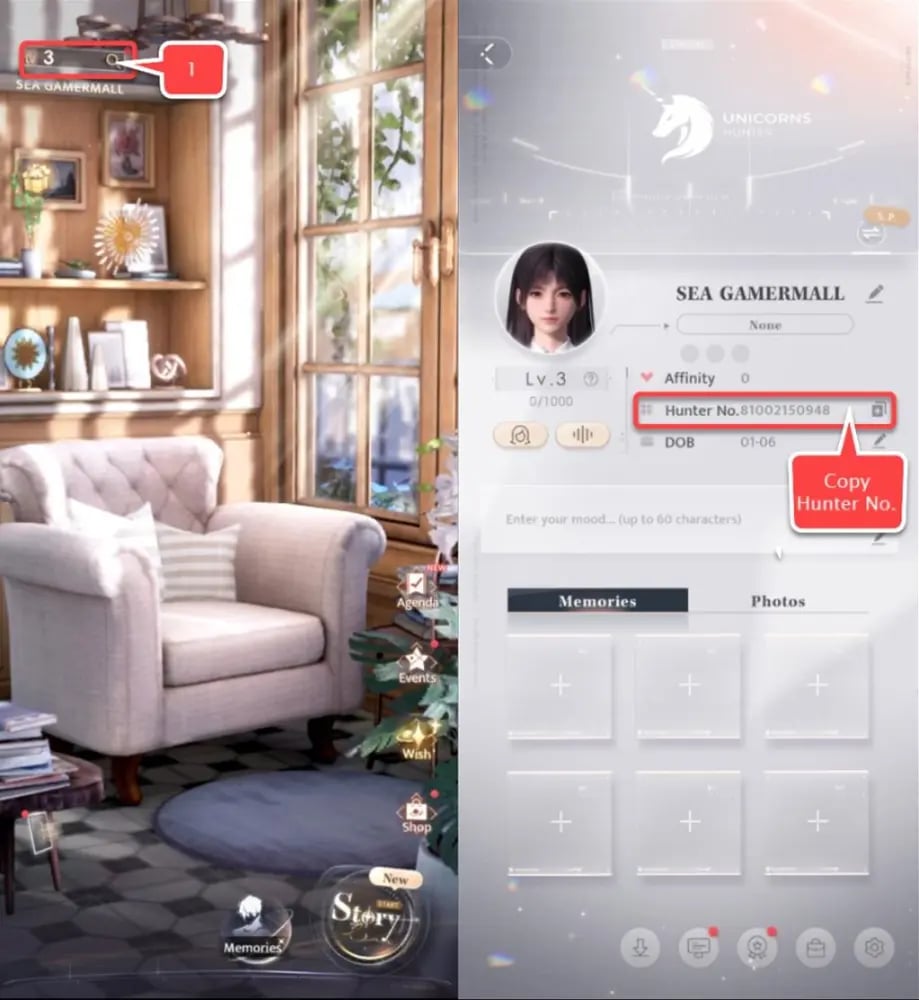
- From the main lobby screen, tap your Profile Avatar located in the upper-left corner.
- On your Hunter Profile screen, locate your numeric Hunter ID displayed directly beneath your player nickname.
- Tap the Copy button next to your Hunter ID to copy the number to your clipboard.
- Paste the copied ID into the Hunter ID field on ArcTopup during checkout.
Always verify that your Hunter ID matches your active game profile before confirming payment to prevent delays.
Aurum Pass vs Purple Crystals: Value Breakdown and Perks
Choosing between an Aurum Pass subscription and a direct Purple Crystal top-up depends on your gameplay goals and spending strategy.
| Feature / Perk | Aurum Pass (30 Days) | Purple Crystals Top-Up |
|---|---|---|
| Immediate Delivery | 300 Crystals (or Diamond equivalent) instantly | Full Crystal quantity credited immediately |
| Daily Rewards | 100 Diamonds + 60 Stamina every day (3,000 Diamonds total) | None (one-time purchase) |
| Pass Duration | 30 consecutive calendar days | Permanent balance until spent |
| Bonus Privileges | Stamina purchase discount, increased stamina storage cap | First-time purchase bonus on select packs |
| Best Usage | Long-term savings for upcoming Wish banners and daily stamina | Immediate banner pulls, limited outfit packs, battle passes |
Why Choose the Aurum Pass?
The Aurum Pass provides the highest overall resource return per spend over a 30-day period. By logging in each day to claim 100 Diamonds and 60 Stamina, you accumulate enough resources to execute multiple 10-pulls on event Wish pools while steadily leveling up your Memories and completing daily Hunter tasks.
Why Choose Purple Crystals?
Purple Crystals are the premium currency in Love and Deepspace. Unlike standard Diamonds, Purple Crystals can be converted directly to Red Diamonds at a 1:1 ratio, used to buy limited-edition character outfits, or spent on exclusive upgrade bundles in the shop. If a special limited banner is ending soon and you need immediate pulls, a direct Crystal top-up delivers instant resources.
Account Security: Safe Top-Ups with Hunter ID Only
Account safety is a top priority when purchasing digital game currency. Traditional third-party methods that ask for game passwords, social logins, or verification codes expose your personal data and violate terms of service.
ArcTopup operates strictly on a Hunter ID-only model:
- No Passwords Required: You never share your login credentials, email address, or third-party login tokens.
- Zero Account Takeover Risk: Because only the public player ID is used, your account ownership remains completely in your hands.
- Encrypted Checkout: All payment transactions are processed over secure, encrypted protocols.
- Direct System Delivery: Items are routed directly to your in-game UID without manual account intervention.
Delivery Troubleshooting and In-Game Item Collection
Once your transaction is marked complete on ArcTopup, your items should appear in Love and Deepspace shortly. Use the following guide to verify your items:
- Purple Crystals: Added directly to your top currency balance on the main interface. You do not need to claim them from the mailbox.
- Aurum Pass: Activates automatically upon delivery. Access the Aurum Pass menu in-game to collect your first daily 100 Diamonds and 60 Stamina.
What to do if your top-up has not appeared:
- Restart the Game Client: Fully close the Love and Deepspace application from your device task manager and reopen it to force a server balance refresh.
- Check Your In-Game Mailbox: Special event bonuses or purchase receipts are sometimes delivered to your Hunter Mailbox. Open the menu and tap Claim All.
- Verify Your Hunter ID: Check your order confirmation on ArcTopup to confirm you entered the correct Hunter ID numbers.
- Contact ArcTopup Support: If your balance does not update after restarting, reach out to customer support with your ArcTopup Order ID for assistance.
Frequently Asked Questions
Where can I top up Love and Deepspace Crystals and Aurum Pass online?
You can top up Love and Deepspace Crystals and Aurum Pass online directly through ArcTopup. Select your package, submit your Hunter ID, and proceed through checkout to receive your items directly in-game.
How do I find my Hunter ID in Love and Deepspace?
Open the game, tap your Profile Avatar in the top-left corner of the main lobby, and look directly below your hunter name. Tap the copy icon next to the number to copy your Hunter ID.
Do I need to provide my game account password to top up on ArcTopup?
No. ArcTopup only requires your in-game Hunter ID. You never need to share your password, email login, or security codes.
What rewards and perks are included with the Love and Deepspace Aurum Pass?
The Aurum Pass grants an immediate 300 Crystal value upon purchase, followed by 100 Diamonds and 60 Stamina each day you log in for 30 days (totaling 3,000 Diamonds and 1,800 Stamina). It also includes perks like stamina cap increases and daily stamina purchase discounts.
Can I stack multiple Aurum Pass purchases for extended duration?
Yes. When you purchase multiple Aurum Passes, the 30-day duration extends consecutively. Each additional pass immediately grants its instant bonus and adds 30 days to your active daily claim period.
How long does it take for Crystals or Aurum Pass to reflect in Love and Deepspace?
Deliveries are processed directly after payment verification. In most cases, items reflect in your account within moments. Restarting your game client will refresh your balance immediately.
Current packages and prices
Current base prices exclude Tax. Tax, payment fees and coupon adjustments are shown at checkout.
| Package | Price |
|---|---|
| 60 Crystals | USD 0.73 |
| 300 + 30 Bonus Crystals | USD 3.66 |
| Aurum Pass | USD 3.66 |
| 450 + 90 Bonus Crystals | USD 5.12 |
| 980 + 150 Bonus Crystals | USD 11.41 |
| Companionship Pack | USD 13.70 |
| 1980 + 360 Bonus Crystals | USD 22.86 |
| 3280 + 720 Bonus Crystals | USD 36.61 |
| 6480 + 1600 Bonus Crystals | USD 73.27 |
| All-In-One Bundle | USD 153.65 |