Top War Gold Bricks Top Up: What Are Gold Bricks and What Can You Buy?
Top War Gold Bricks serve as the primary premium universal currency in Top War: Battle Game. Unlike direct bundle purchases tied to single storefront transactions, Gold Bricks give commanders complete flexibility to acquire in-game packs, hero recruitments, upgrade materials, and limited-time event rewards on their own schedule.
When you top up Gold Bricks, your balance is credited directly to your account wallet inside Top War. You can then convert these bricks into almost any standard commercial pack available in the game store, including:
- Daily Specials and Value Bundles: Instantly purchase daily resource kits, component chests, and training speed-ups.
- Hero Shards and Recruitment Tokens: Secure premium hero vouchers and exclusive SSR hero shards during custom recruit events.
- Growth Funds and Privilege Cards: Activate monthly passes, gathering bonuses, and builder queues to accelerate base expansion.
- Special Event Crates: Participate in seasonal alliance confrontations, Capital Wars, and cross-server events without needing to initiate separate payment transactions each time.
Some players refer to this currency as Gold Blocks, but within the official game ecosystem, Gold Bricks function as the standard 1:1 token replacement for direct pack checkouts.
How to Find Your Top War Player ID in 3 Easy Steps
To ensure your Gold Bricks arrive at the correct account, you only need to provide your unique numerical Player ID. You do not need to share any login credentials or link external social accounts.
- Open Top War: Battle Game on your mobile device or desktop emulator.
- Tap your Avatar icon located in the top-left corner of the main command screen.
- Locate your numerical Player ID (UID) displayed on your Commander Information profile. Tap the Copy icon next to the number to copy it to your clipboard.
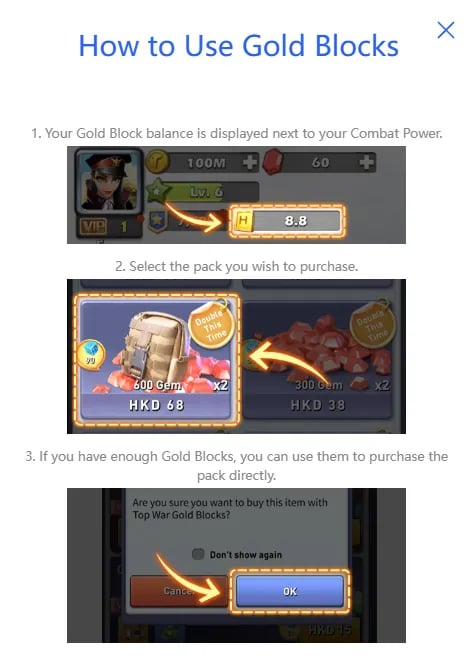
Your Player ID is a permanent numerical string assigned to your character. You do not need to specify your server number separately during order placement, as your unique Player ID automatically maps directly to your active server and commander profile.
How to Top Up Top War Gold Bricks on ArcTopup
Ordering Gold Bricks through ArcTopup is straightforward, requiring only your Player ID to process the delivery.
- Select Your Gold Bricks Denomination: Review the available Gold Bricks packages listed on the live checkout interface and choose the amount that fits your in-game goals.
- Enter Your Player ID: Paste your numerical Top War Player ID into the designated input field (
playerid). Confirm that there are no accidental spaces before or after the numbers. - Review and Confirm: Check your selection and verify the entered account information.
- Complete the Transaction: Choose your preferred payment option and finish the checkout process.
- Check Your In-Game Balance: Launch Top War. Your Gold Bricks balance will update directly in your commander account inventory.
All package pricing, regional currency conversions, and denomination options are displayed in real time on the ArcTopup live product selection interface.
Top War Gold Bricks vs. In-Game Packs: Maximizing VIP EXP in 2026
One of the most critical aspects of upgrading your account in Top War is building VIP points. VIP progression unlocks permanent passive boosts, including increased march speed, faster research rates, expanded training capacity, and daily free VIP chests containing valuable hero skills and components.
When you top up Gold Bricks and spend them on in-game bundles, you receive the full intended VIP EXP progression. Converting Gold Bricks into packs yields the identical VIP value as standard in-app purchases.
| Purchase Method | Delivery Type | Account Safety | VIP EXP Accumulation | Strategic Flexibility |
|---|---|---|---|---|
| Gold Bricks Top-Up | Direct account credit via Player ID | High (No password required) | Full 1:1 VIP EXP when spent on bundles | High (Store bricks and buy event packs as needed) |
| Direct App Store Bundle | Immediate single pack activation | High | Full VIP EXP on single purchase | Low (Bound to individual bundle selection at checkout) |
| Third-Party Account Login | Manual login / account takeover | Extremely Risky (Violates terms) | Variable | Low (High risk of account suspension) |
By holding a reserve of Gold Bricks on your account, you can instantly trigger limited-time flash sales, hero shard bundles, or alliance event packs the moment they appear in game events, without waiting to process separate payments under tight event deadlines.
Is It Safe to Recharge Top War Gold Bricks with Only a Player ID?
Security is paramount when managing your commander account. ArcTopup processes Top War Gold Bricks recharges using strictly your public Player ID.
- Zero Password Requirements: You will never be asked for your Apple ID, Google Play credentials, Facebook login, or game password.
- No Account Sharing: Your account remains completely in your control. No third party ever accesses your profile or modifies your settings.
- Safe Account Crediting: Player ID top-ups utilize standard direct-delivery channels that credit your game wallet safely without triggering unauthorized login flags or account lockouts.
Keeping your login information private is the safest way to maintain your base progress, heroes, and alliance leadership standing.
Troubleshooting Delivery Delays and Account Validation
If your Gold Bricks do not appear in your balance immediately after completing your order on ArcTopup, follow these troubleshooting steps:
- Restart the Game Client: Completely force-close Top War on your device and relaunch it. This forces the game to fetch the latest balance data from the game server.
- Check In-Game Mail: In certain server events or specific bundle conversions, tokens or confirmation receipts may arrive inside your in-game system mailbox.
- Verify Your Player ID: Double-check that the Player ID entered during checkout matches the UID on your Commander Profile. Be careful not to submit an Alliance ID or War Zone number instead of your personal Player ID.
- Check Server Maintenance: If Top War is undergoing scheduled server updates or cross-server maintenance, balance synchronization may experience temporary delays until maintenance concludes.
If you have verified your details and still require assistance, ArcTopup customer support is available to review your order reference number and ensure your Gold Bricks reach your commander account.
Frequently Asked Questions About Top War Gold Bricks Top Up
What are Top War Gold Bricks used for in the game?
Top War Gold Bricks are the universal premium currency used to purchase daily packs, hero recruitment shards, monthly privilege cards, speed-up bundles, and event-specific chests directly inside the in-game store.
Where can I find my Top War Player ID?
Tap your Avatar in the top-left corner of the Top War main screen. Your numerical Player ID is located under your commander name on your profile page.
Do I need to provide my Top War login password to top up Gold Bricks?
No. Top-ups on ArcTopup require only your numerical Player ID. You never need to share passwords, verification codes, or linked social media login details.
Do purchases of Top War Gold Bricks count toward VIP EXP?
Yes. When you use your Gold Bricks to purchase packs and items inside Top War, your account receives full VIP EXP points corresponding to the value of the acquired packs.
How long does it take for Top War Gold Bricks to arrive after top up?
Under normal server conditions, Gold Bricks are credited directly to your account shortly after payment processing is confirmed. Restarting the game app helps refresh your balance immediately.
Can I buy Top War Gold Bricks for a friend using their Player ID?
Yes. Because the top-up process only requires a Player ID, you can enter any valid commander's Player ID at checkout on ArcTopup to send Gold Bricks directly to their account.
Current packages and prices
Current base prices exclude Tax. Tax, payment fees and coupon adjustments are shown at checkout.
| Package | Price |
|---|---|
| 5 Gold Bricks | USD 4.16 |
| 10 Gold Bricks | USD 8.32 |
| 30 Gold Bricks | USD 24.76 |
| 60 Gold Bricks | USD 48.86 |
| 100 Gold Bricks | USD 80.95 |