Want early access to experimental mechanics in Top War? Learn how to join top war pioneer test server builds, grab 2026 invites, and avoid wipe traps.
Spotting combat rebalances, unit merge shifts, and alliance warfare tweaks before the wider player base provides an immediate strategic advantage. Yet finding legitimate client files or active registration forms routinely frustrates commanders.
Most search results lead straight to malware or dead links. RiverGame distributes preview builds through tightly controlled, verified pipelines. If you know where those pipelines sit, you can get in.
The Pioneer Server Confusion: Test Environment or Transfer Tier?
Stop searching for download links until you understand a critical distinction: the community constantly mixes up two separate systems.
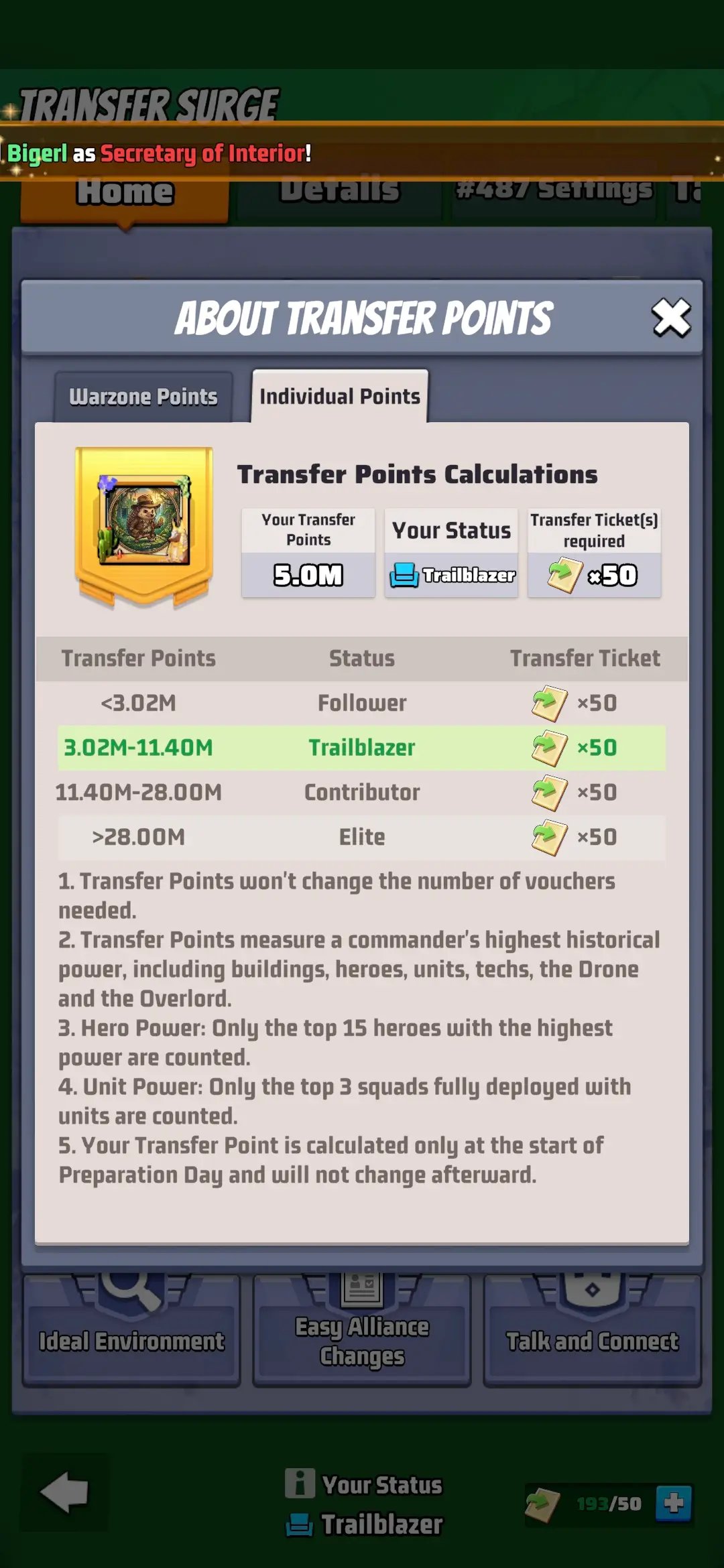
In general mobile gaming, "Pioneer Server" refers to a public test server where developers test experimental patches. Inside Top War: Battle Game, "Pioneer" is simply a player strength tier used during seasonal Transfer Surge migrations. When transfer windows open across a cluster of 64 warzones, accounts are divided into Follower, Pioneer, Contributor, and Elite. Every bracket requires 50 Transfer Vouchers to move, and each faces rigid migration quotas.
When alliance members celebrate securing a "Pioneer spot," they almost certainly earned a migration seat into a neighboring warzone. Genuine pre-release testing uses closed developer builds distributed via Apple TestFlight or targeted pilot warzones.


How to Secure 2026 Apple TestFlight Beta Invites
Apple blocks side-loading unverified installation packages, meaning iOS preview builds run exclusively through Apple TestFlight. You will never find legitimate standalone iOS setup files on external websites.
Invitations arrive through two routes: direct emails sent to registered Apple IDs, or public TestFlight URLs dropped without notice in the official Top War Discord and Facebook groups. Public enrollment caps fill within minutes.
Running an iOS beta build requires meeting definite technical criteria:
- Operating System Baseline: Your iPhone or iPad must run iOS 16 or iPadOS 16 or later. Devices on legacy operating systems cannot install current TestFlight packages.
- Build Expiration Windows: Every beta build published through TestFlight has a hard lifetime limit of 90 days. Once the 90-day timer runs out, the build expires and cannot be launched until a new build is uploaded or you revert to the App Store client.
- Device Coverage: A single tester account can install the designated beta build on up to 30 compatible devices linked to that Apple ID.
- Feedback Reporting: Testers can submit crash logs and interface screenshots directly through the TestFlight app interface to flag merge bugs or performance drops.
Close any site offering a third-party "iOS test profile." Those configuration files compromise your device.
Client Specifications and Test Server Rules
Preview software demands baseline hardware and operational boundaries to function correctly.
| Environment Metric | Platform Requirement | Practical Operational Impact |
|---|---|---|
| Apple TestFlight OS Baseline | iOS 16 / iPadOS 16 or later | Older Apple hardware cannot launch preview clients. |
| Build Expiration Window | 90 days maximum | The app shuts down automatically unless refreshed by developers. |
| Hardware Allocation | Up to 30 linked devices | Allows simultaneous testing across multiple phones and tablets. |
| In-App Purchase Sandbox | Free simulated purchases | Zero progression, items, or currency carry over to live servers. |
| Android Baseline | Android 7.0 or higher | Minimum standard for testing local APK packages or live updates. |
Test builds run on isolated sandbox loops. Progress, unlocks, and purchases vanish once the 90-day timer expires.
Android Installation and Client Setup via Official Channels
Sideloading grants Android players faster access, but exposes devices to malicious files. Finding an authentic top war beta test download apk requires tracking RiverGame's direct distribution channels.
Top War isolates its core combat logic from auxiliary cloud microservices. Real-time chat translation across global servers, for example, runs through Alibaba Cloud Serverless FC instances. Because the backend connects directly into production databases, authentic test APKs require verified authorization tokens to contact staging servers.
Your phone or tablet must run Android 7.0 or higher. Verified APK links drop solely inside recruitment notices on the official Discord. Avoid web aggregators hosting re-signed packages; they frequently embed credential stealers.
If you want greater precision during troop merging, run the Android client on PC through desktop emulation. Mapping keyboard shortcuts speeds up base organization and maintains stable connections during heavy cross-server combat.
Experimental Feature Rollouts: How Pilot Warzones Function
RiverGame rarely operates permanent public test servers. Instead, developers deploy experimental mechanics directly into designated live warzones.
This rollout strategy introduces balance tweaks, radar system updates, and alliance management tools to active players facing real economic costs and server rivalries.
Cross-server features like Eternal Land demand this live-fire validation. In Eternal Land, 8 warzones collide across an extensive regional map. Closed beta clients cannot simulate the network loads or troop pathing calculations generated by 8 active servers battling simultaneously. Rolling updates out to pilot warzones ensures technical stability before worldwide distribution.
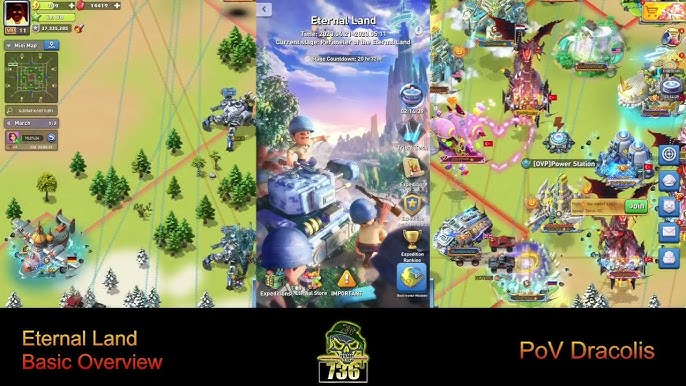
Unless your base sits on a designated pilot warzone, you cannot access these features ahead of schedule without transferring. Read developer patch announcements closely; they explicitly list which warzones receive early feature access.
2026 Feature Roadmap: Confirmed, Likely, and Rumors
Separating verified developer builds from speculative forum chatter keeps you from wasting resources on unconfirmed shifts.
| Feature or System | Deployment Status | Source Type | Verification Level | | :--- | :--- | :--- | | Select Warzone Pilot Rollouts | Confirmed | Official Patch Notes | High Confidence | | TestFlight 90-Day Build Cycles | Confirmed | Apple Platform Framework | High Confidence | | Eternal Land 8-Warzone Battles | Confirmed | Live Server Mechanics | High Confidence | | Serverless Translation Services | Confirmed | Cloud Architecture Papers | High Confidence | | Standalone Permanent Public PTR | Rumor | Community Speculation | Low (Unconfirmed) | | Beta Purchase Account Carryover | Disproven | TestFlight Platform Policy | Confirmed False |
Confirm whether an upcoming change is an official pilot rollout or pure community chatter before reallocating your hero development materials.
Decoding the Pioneer Transfer Surge and Seat Quotas
Warzone migration explains why queries for "Pioneer server access" spike throughout the year.
Seasonal Transfer Surge events allow commanders to change battlefields by spending 50 Transfer Vouchers. Each migration window spans 14 days across four strict operational stages:
- Preparation Phase (7 days): Warzones assess collective strength and establish recruitment criteria.
- Application Phase (4 days): Individual commanders submit migration requests based on their combat rating bracket.
- Transfer Phase (1 day): Approved accounts are processed and relocated to their destination warzone.
- Display Phase (2 days): Final server rosters and leaderboards are locked for public view.
Account strength metrics assign you to Follower, Pioneer, Contributor, or Elite. The Pioneer bracket holds the mid-to-high power players who drive alliance frontline operations. Because these accounts heavily sway warzone balance, receiving servers enforce rigid admission limits.
| Destination Warzone Status | Available Pioneer Seats | Eligible Warzone Cluster | Required Transfer Items | | :--- | :--- | :--- | | Fully Open Warzone | 60 Pioneer Seats | 64 Warzones | 50 Transfer Vouchers | | Semi-Open Warzone | 40 Pioneer Seats | 64 Warzones | 50 Transfer Vouchers | | Limited Open Warzone | 30 Pioneer Seats | 64 Warzones | 50 Transfer Vouchers |
Target servers cap Pioneer arrivals at 30 to 60 seats. Submit your transfer request the moment the 4-day application window goes live.
Missing that window delays migration until the next season. Collect your 50 Transfer Vouchers before the Preparation Phase begins.
In-App Purchases, Test Wipes, and Main Account Progression
Preview clients run under completely different financial and data rules than production servers.
TestFlight in-app purchases use sandbox simulation. Tapping a gem bundle simulates a checkout without billing your Apple ID. None of those assets carry over. The moment the test wraps or the 90-day counter hits zero, developers wipe test account data entirely.
Pouring time into character progression on a beta profile is wasted effort. Direct your resources into your permanent warzone account. When preparing for alliance clashes, acquiring Top War Gems through verified channels guarantees your profile avoids disciplinary flags.
RiverGame flags unauthorized payment patterns immediately. Grey-market sellers risk permanent account bans and currency rollbacks. If your goal is accumulating VIP points toward VIP 16 perks, purchasing Top War balance packages shields your base from administrative actions.
Unlocking VIP 16 demands 300,000 VIP points—equal to roughly $50,000 in diamond equivalent at base rates. That tier yields major boosts to construction speed, march velocity, and unit production. Risky APKs and discount scams put that investment on the line. Buying direct Top War top-ups prevents billing chargebacks and keeps your upgrades intact.
Beware of external gift code scams. Promo codes redeem exclusively in-app: tap your avatar, open Settings, and select Gift Code. Permanent codes like topwar888 and TOPWAR666 reward 200 Gems each, while seasonal codes expire in about two weeks. Any website requiring login credentials to claim "beta rewards" is phishing for your password.
Community Recruitment: Official Discord and Social Channels
Official Discord and Facebook communities provide the only verified gateway into private testing phases.
When developers seek feedback on unreleased systems, they post intake surveys outlining testing scope, OS criteria, and participation schedules. You must provide your device model, current warzone number, headquarters level, and weekly playtime.
To improve your chances during selection rounds:
- Maintain Daily Playtime: Inactive commanders get skipped. Evaluators look for active accounts familiar with ongoing meta matchups.
- Preserve Account Standing: Accounts flagged for toxicity, chargebacks, or past suspensions face automatic rejection.
- Set Discord Alerts: Enable push notifications on developer announcement channels to apply within the initial registration wave.
- File Clear Bug Reports: Detailed reproduction steps and interface logs keep you on preferred tester rosters for subsequent test cycles.
Spots remain scarce. Thousands apply for every handful of openings. Even without an invite, following developer announcements alerts you to impending balance shifts well before global patch day.
Frequently Asked Questions
What is the Top War Pioneer test server?
Top War does not maintain an open, permanent public test client called Pioneer. Players frequently confuse closed developer preview builds with the seasonal Pioneer warzone transfer tier, which is an account strength bracket used during 14-day server migration events.
How do I get a 2026 beta invitation for Top War on iOS?
Official iOS beta access is managed through Apple TestFlight using direct email invites or public join links shared on Top War's official Discord and Facebook pages. You must have an iPhone or iPad running iOS 16 or later with the TestFlight app installed.
How long do TestFlight preview builds stay active?
TestFlight preview builds remain functional for up to 90 days from the initial upload date. Once that 90-day window closes, the beta application will no longer boot, requiring you to update to a newly deployed test build or return to the standard App Store release.
Do purchases in beta or test environments carry over to live servers?
No, all in-app transactions inside TestFlight testing builds run in an isolated sandbox environment and do not transfer to live accounts. Any progression, unlocked heroes, or experimental items acquired on a test client will be wiped when the test phase ends.
How can I access experimental features before other players in 2026?
Keep an eye on official patch announcements to see which select warzones are designated as pilot servers for upcoming content rollouts. Alternatively, watch the official Discord recruitment channels to apply for private developer testing groups when recruitment forms go live.
Can I test Top War on PC?
Yes, you can run the Top War Android client on a desktop computer using popular Android emulation software. This allows you to test troop formations, manage alliance operations, and redeem valid gift codes using a keyboard and mouse setup.
Where do I redeem gift codes in Top War?
Gift codes must be redeemed directly within the mobile application by tapping your character avatar, opening the Settings menu, and selecting the Gift Code field. There is no web-based redemption portal, so never enter your account credentials on third-party websites claiming to offer code redemption.
Real Verdict on Top War Beta Testing
Searching for a standalone "Pioneer test server" APK wastes time. External sites promising direct test downloads almost universally host outdated builds or credential stealers. Real preview testing happens strictly through 90-day Apple TestFlight windows or developer-designated pilot warzones.
Control what you can. Track Discord announcements for upcoming TestFlight signups, monitor patch notes from pilot warzones, and stash your 50 Transfer Vouchers early if you intend to move during the Transfer Surge. Securing your investments on production servers puts you miles ahead of rivals when major updates drop.






Comments