How to Top Up Ludo Club Cash and Coins on ArcTopup
Getting more resources for your board matches takes only a few quick steps on ArcTopup. The direct top-up system connects straight to your player account using your User Identification number (UID), meaning you do not need to link social media profiles or provide passwords.
Follow these steps to complete your purchase:
- Select the quantity of Ludo Club Cash (Gems) or Coins you want from the package menu.
- Enter your numerical Ludo Club UID into the required player information box.
- Verify that the entered UID matches your in-game account.
- Select your preferred payment method at checkout.
- Complete the payment to receive your balance directly in your Ludo Club account.
All current bundle options, regional variations, and package rates appear in the live catalog above so you can review real-time availability before confirming your order.
Step-by-Step Guide: How to Find Your Ludo Club UID
To ensure your purchased Coins and Cash arrive at the correct game profile, you must provide your exact in-game Player UID. Finding this number takes only a few seconds inside the Ludo Club application.
- Launch the Ludo Club application on your mobile device.
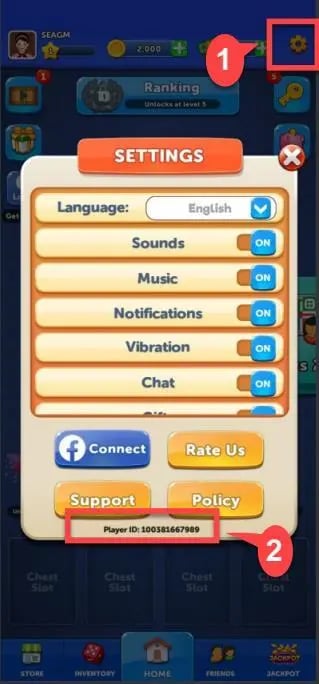
- Stay on the main lobby screen and tap your profile avatar or the settings gear located in the corner of the display.
- Open your profile overview panel.
- Locate your numeric User ID displayed near the bottom of the window.
- Copy the number or write it down carefully to paste directly into the ArcTopup order field.
| Profile Element | Screen Location | Function |
|---|---|---|
| Profile Avatar | Top corner of the lobby screen | Opens your account profile and stats |
| Player UID | Bottom of Settings / Profile panel | Unique numeric account identifier for direct top-up |
| Display Name | Below profile picture | Nickname used to verify account identity |
Double-check that all digits are accurate before finalizing checkout. Providing the correct UID prevents processing delays and ensures the items land in the right inventory.
What Are Ludo Club Cash and Coins Used For?
Ludo Club features two primary currencies that serve distinct purposes during online matches, tournament progression, and visual customization.
| Currency | Primary Function | Typical In-Game Uses |
|---|---|---|
| Ludo Club Coins | Core match currency | Table entry stakes, friend challenge bets, standard lobby games |
| Ludo Club Cash (Gems) | Premium utility currency | Exclusive dice skins, profile frames, lucky re-rolls, bonus bundles |
Ludo Club Coins
Coins represent the primary circulating currency in Ludo Club. Every standard match—whether you play in Classic Mode or Rush Mode—requires a coin entry fee. Higher-tier cities and tables (such as Jakarta, London, or Cairo) require larger coin stakes but reward substantially bigger prize pools upon victory. If your coin balance runs out, you are restricted to lower-tier tables or practice games until you replenish your balance.
Ludo Club Cash (Gems)
Cash acts as the premium in-game asset. Players use Cash to acquire distinctive cosmetic enhancements, including custom dice designs, rolling animations, and board tokens that stand out in competitive matches. Cash also allows you to purchase extra rolls in special lucky events, enter high-stakes tournaments, or convert directly into coin packs whenever you need immediate match liquidity.
Safe and Secure UID-Only Checkout (No Password Required)
Account safety is essential when purchasing digital game currencies. ArcTopup uses a direct UID fulfillment system that protects your personal data from unauthorized access.
- No Login Credentials Needed: You never have to share your Google Play, Apple ID, Facebook, or phone login credentials. Only your public numeric Player UID is required.
- Zero Password Sharing: Legitimate top-up services never ask for account passwords or two-factor authentication codes. Keep your sensitive access data private.
- Direct Delivery: Orders are processed straight to the game server, sending the purchased Cash or Coin package directly to the specified account profile.
This checkout architecture ensures that your private credentials remain under your full control while allowing friends or family to recharge an account without needing direct access to it.
Supported Payment Methods and Global Checkout Options
ArcTopup supports a broad selection of global and regional payment channels, giving players worldwide straightforward access to game recharges. Depending on your country and device, you can select from available credit cards, debit cards, digital wallets, bank transfers, and local payment methods during checkout.
Prices and available payment channels are updated in real time on the order screen. The final amount shown at the live checkout represents the exact total, ensuring transparent transactions with no hidden fees.
Gifting Ludo Club Cash and Coins to Friends
You can easily surprise a friend or teammate with Ludo Club resources on ArcTopup. Because the checkout system relies strictly on player UIDs, you do not need access to your friend's device or login details to send them a pack.
To send a gift:1. Ask your friend to provide their Ludo Club UID from their profile menu.2. Choose the Cash or Coins bundle you want to send them.3. Paste your friend's UID into the player details field on ArcTopup.4. Complete the checkout.
The purchased currency will appear in their game balance automatically once the transaction processes.
Frequently Asked Questions for Ludo Club Top-Ups
How do I find my Ludo Club UID for top-up?
Open the Ludo Club app, tap on your profile picture or the settings icon on the main menu, and look at the bottom of the profile window. Your unique numeric UID is listed there. Copy or write down this number to use during checkout on ArcTopup.
Do I need to share my Ludo Club password to top up?
No. ArcTopup only requires your numeric Player UID to credit Cash or Coins to your account. You should never share your account password, email login, or verification codes with anyone.
What is the difference between Ludo Club Cash and Coins?
Coins are the standard in-game currency used to pay table entry fees for Classic and Rush matches. Cash is the premium currency used to purchase rare dice skins, profile frames, lucky dice re-rolls, and special event entries.
Can I buy Ludo Club Cash or Coins for a friend?
Yes. You only need your friend's numeric Player UID. Enter their UID in the player field on ArcTopup, select the desired package, and complete payment. The currency will be credited directly to their game account.
How long does it take to receive my Ludo Club top-up?
Direct UID orders are processed automatically once your payment is confirmed. Most orders reflect in your in-game balance shortly after transaction completion. You can check your updated totals by refreshing or restarting the Ludo Club app.
What should I do if my Ludo Club Cash or Coins do not appear?
If your balance does not update right away, close the Ludo Club app completely and reopen it to force a server refresh. If the currency still does not show, confirm that the payment went through and verify that the UID entered during checkout was accurate. You can then reach out to ArcTopup customer support with your order number for assistance.
Current packages and prices
Current base prices exclude Tax. Tax, payment fees and coupon adjustments are shown at checkout.
| Package | Price |
|---|---|
| 120 Cash | USD 0.56 |
| 37,500 Coins | USD 0.56 |
| 190,000 Coins | USD 1.12 |
| 250 Cash | USD 1.12 |
| 700 Cash | USD 2.80 |
| 1,300,000 Coins | USD 5.60 |
| 3,300,000 Coins | USD 7.84 |
| 3,200 Cash | USD 11.20 |
| 13,500,000 Coins | USD 16.79 |
| 10,800 Cash | USD 33.59 |
| 70,000,000 Coins | USD 50.38 |
| 20,000 Cash | USD 55.97 |






























































