
MIGO Live Gold Top Up: What It Is and How It Works
MIGO Live is an interactive global live streaming and voice-chat application connecting content creators, voice hosts, and audiences around the world. At the center of the platform's interactive features is MIGO Live Gold, the primary virtual currency used across stream rooms and audio channels.
Gold enables viewers to interact directly with broadcasters, trigger full-screen dynamic gift animations, join private voice rooms, and unlock exclusive community perks. Depending on the version or language setting of your app, you may see this currency referred to as Gold, Coins, or Gold Coins. These terms describe the exact same in-app balance used to purchase gifts and visual effects.
Broadcasters receive these virtual items during live streams and audio shows, which the MIGO Live platform converts into Diamonds or creator points. Topping up your Gold balance ensures you can participate in live room events, support your favorite streamers during competitive broadcast battles, and access premium profile customizations without interruption.
| Currency Term | Where It Appears | Primary Purpose | How It Is Obtained |
|---|---|---|---|
| Gold / Coins | User Account Balance | Sending virtual gifts, room entry effects, fan club badges | Purchased via ArcTopup top up |
| Diamonds / Beans | Host Earnings Wallet | Measuring creator popularity, cash-out reward milestones | Received from viewers as gifts |
Benefits of Topping Up MIGO Live Gold for Streams and Gifts
Having an active Gold balance gives you access to the full spectrum of interactive features across MIGO Live streams and audio rooms:
- Dynamic Virtual Gifts: Send animated presents ranging from small chat reactions to luxury full-screen animations like sports cars, rockets, and castles that light up the broadcast room.
- PK Battle Support: Help your favorite host win timed Player Knockout (PK) battles against rival creators by sending gift combos that boost their battle score.
- Fan Club Badges and Ranking: Stand out on the stream leaderboard. Active gifters earn exclusive colored nameplates, room entry animations, and badges that display next to every chat message.
- Voice Room Interaction: Unlock special seat privileges, microphone priority, and sound effects in multi-guest audio channels.
- Direct Broadcaster Support: Virtual gifts provide measurable support to content creators, motivating them to produce consistent live entertainment and personalized content.
How to Locate Your Migo ID in the MIGO Live App
To ensure your Gold is credited directly to your account, you only need your unique numeric Migo ID. You do not need to provide passwords or link social media accounts.
Follow these steps to find your Migo ID:
- Open the MIGO Live application on your iOS or Android mobile device.
- Tap the Profile / Me icon located in the bottom-right corner of the main navigation bar.
- Your profile page will load, displaying your avatar, display name, and follower statistics.
- Look directly underneath your profile nickname to find your Migo ID (a series of numeric digits).
- Tap the small Copy icon next to the number to copy your ID directly to your clipboard.
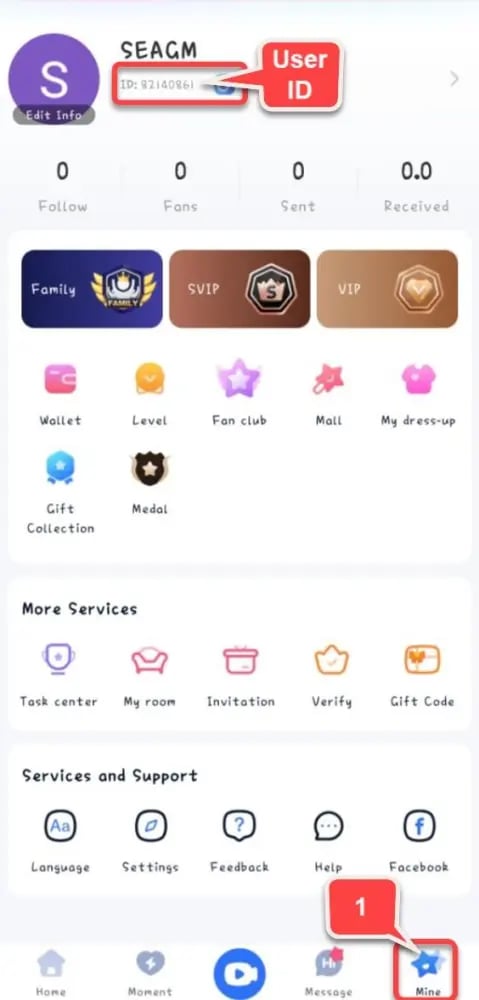
Double-check that the copied ID matches your profile number before submitting your order on ArcTopup.
How to Top Up MIGO Live Gold on ArcTopup
Recharging your MIGO Live account on ArcTopup is straightforward and takes only a few moments:
- Select Your Package: Choose the amount of MIGO Live Gold you wish to purchase from the product denomination list on this page.
- Enter Your Migo ID: Paste your numeric Migo ID into the required input field.
- Confirm Order Details: Check the live price and verify that your entered Migo ID is completely accurate.
- Complete Payment: Select your preferred payment method and finalize your transaction.
- Check In-App Balance: Open your MIGO Live app, navigate to your wallet or profile screen, and your updated Gold balance will be ready to spend.
Prices and available payment options reflect current checkout rates in real time.
Safety and Account Security: ID-Only Recharge
Account security is essential when purchasing digital goods online. ArcTopup uses a direct ID-only top-up process designed to keep your MIGO Live profile protected at all times:
- No Password Required: ArcTopup never asks for your login credentials, phone verification codes, or linked social media passwords. Your login data remains private.
- No Account Sharing: The recharge is credited straight to your public Migo ID, eliminating any need for third-party access to your device or profile.
- Direct Balance Updates: Funds are applied directly to the official platform servers, ensuring your balance remains compliant with MIGO Live terms of service.
- Encrypted Transactions: Every checkout is processed through secure, industry-standard payment channels to protect your billing information.
Troubleshooting Common MIGO Live Recharge Issues and Order Status
If you experience any delay or issue with your MIGO Live Gold delivery, follow these diagnostic steps:
- Restart the MIGO Live App: In some instances, the local app cache does not refresh immediately. Close the app completely, reopen it, and check your wallet balance again.
- Verify Your Migo ID: Ensure the numeric ID submitted during checkout matches your active MIGO Live profile. An incorrect digit can route the order to another account.
- Confirm Payment Completion: Check your payment receipt or banking app to ensure the transaction was processed successfully.
- Contact 24/7 Support: If your payment is confirmed and your Gold has not appeared after a short waiting period, reach out to the ArcTopup customer support team with your order number and Migo ID for fast assistance.
Frequently Asked Questions
What is Migo Live Gold used for?
MIGO Live Gold is the in-app currency used to send virtual gifts to live streamers and voice-room hosts, purchase room entry effects, unlock fan club badges, and boost broadcasters during PK battles.
How do I find my Migo ID for a top-up?
Open the MIGO Live app, tap the Profile (Me) tab in the bottom right corner, and look below your display name. Your Migo ID is the number shown right under your nickname. Tap the copy icon next to it to paste it into ArcTopup.
Do I need to share my Migo Live account password?
No. ArcTopup only requires your public Migo ID to process your top-up. Never share your account password, email login, or verification codes with anyone.
How long does it take to receive MIGO Live Gold after payment?
Gold is delivered automatically to your Migo ID once payment is confirmed. In most cases, the balance reflects in your account within a few moments after checkout.
What should I do if I entered the wrong Migo ID?
Because digital currency deliveries process automatically to the ID provided, always verify your Migo ID before paying. If you notice an error immediately before completion, contact ArcTopup customer support with your transaction details.
Can creators earn rewards from Migo Live gifts sent using Gold?
Yes. When you send gifts using Gold, the receiving host accumulates creator points or Diamonds. Broadcasters can convert these platform earnings into real-world rewards according to MIGO Live host compensation policies.
Current packages and prices
Current base prices exclude Tax. Tax, payment fees and coupon adjustments are shown at checkout.
| Package | Price |
|---|---|
| 14,000 Gold Coins | USD 1.53 |
| 28,000 Gold Coins | USD 3.07 |
| 56,000 Gold Coins | USD 6.13 |
| 65,000 Gold Coins | USD 7.12 |
| 93,500 Gold Coins | USD 10.24 |
| 112,000 Gold Coins | USD 12.27 |
| 130,000 Gold Coins | USD 14.24 |
| 224,000 Gold Coins | USD 24.53 |
| 260,000 Gold Coins | USD 28.47 |
| 325,000 Gold Coins | USD 35.59 |
| 336,000 Gold Coins | USD 36.80 |
| 650,000 Gold Coins | USD 71.18 |
| 672,000 Gold Coins | USD 73.59 |
| 1,344,000 Gold Coins | USD 147.19 |






























































