Avoid common checkout mistakes when topping up
Gems in Brawl Stars are the primary currency used to unlock Brawlers, grab exclusive skins, purchase Star Drops, or activate seasonal progression through the Brawl Pass. Most recharge issues happen when players mistype their profile identifier or submit an inactive contact address, leading to unexpected fulfillment delays. To keep your order smooth, double-check your account details before submitting payment, and verify that your provided Email address is active so you receive order updates. By processing recharges strictly via your identifier rather than demanding account credentials, your profile remains protected while your balance updates seamlessly.
Secure your Brawl Stars recharge in a few simple steps
Getting your extra balance or seasonal pass onto your account requires minimal effort:
- Select the specific Gem option or Pass tier you want to receive from the list below.
- Input your account Tag along with your valid Email in the checkout fields.
- Select your preferred payment option, such as Visa, Mastercard, Apple Pay, Google Pay, cryptocurrency, or regional e-wallets.
- Complete the transaction and launch the game to review your updated Gem balance.
Locate your Brawl Stars Player Tag inside the game
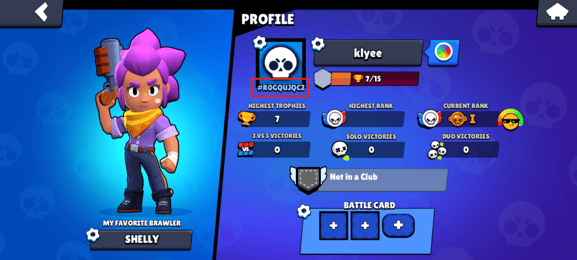
If you are unsure where to find your unique Tag, follow these quick steps:
- Open Brawl Stars and let the home screen load.
- Tap your profile avatar located in the top-left corner of the screen.
- Look directly beneath your main profile icon to find your code starting with a hashtag symbol (for example, #2YV0PCJL).
- Copy the full string including the hashtag and paste it directly into the checkout form alongside your Email.
Choose from available Gem bundles and passes
Our store offers a wide array of options designed for casual brawlers and dedicated collectors alike:
- 30 Gems
- 80 Gems
- 170 Gems
- 360 Gems
- 950 Gems
- Brawl Pass
- Brawl Pass Plus
- Brawl Pass Plus Upgrade
- Pro Pass Plus
- Starter Pack! Brawl like a pro!
- Collector's Pack
- Ultimate Collector's Pack
Understand order processing and payment options
Once your transaction is processed, orders generally arrive within 1 to 10 minutes. Your Brawl Pass or Gem addition applies directly to your account balance without requiring account passwords or complicated manual redemptions. We accept major credit cards like Visa and Mastercard, digital options including Apple Pay and Google Pay, various cryptocurrencies, and local e-wallets. If your order exceeds 15 minutes, reach out with your order reference number for rapid assistance.
Frequently asked Brawl Stars recharge questions
What items can I purchase with Brawl Stars Gems?
Gems allow you to unlock new Brawlers, cosmetics, Star Drops, special event offers, and seasonal passes directly from the in-game shop.
Will I need to share my account password during checkout?
No credentials or account passwords are ever required. You only need to enter your Email and Player Tag to process your order.
What should I do if my Gems do not show up?
Most transfers complete in 1 to 10 minutes. If your balance does not reflect the change after 15 minutes, check your Email receipt for your reference number and contact customer assistance.
Current packages and prices
Current base prices exclude Tax. Tax, payment fees and coupon adjustments are shown at checkout.
| Package | Price |
|---|---|
| 30Gems | USD 1.61 |
| Starter Pack! Brawl like a pro! | USD 2.42 |
| 80Gems | USD 4.04 |
| Brawl Pass Plus Upgrade | USD 4.04 |
| Brawl Pass | USD 7.28 |
| 170Gems | USD 8.09 |
| Brawl Pass Plus | USD 10.52 |
| 360Gems | USD 16.19 |
| Pro Pass Plus | USD 20.23 |
| Ultimate Collector's Pack | USD 21.86 |
| Collector's Pack | USD 22.67 |
| 950Gems | USD 40.48 |
| 2000Gems | USD 80.97 |