How to Top Up Magic Chess: Go Go Diamonds Using User ID and Zone ID
Recharging your balance on ArcTopup takes only a few quick steps. Because the process relies entirely on direct player identifiers, you never need to share sensitive login credentials. Follow this guide to complete your Magic Chess: Go Go Diamonds top up:
- Select Your Item: Choose your preferred Diamond denomination, Weekly Pass, or bundle from the selection menu above. Live pricing and active package options are shown directly on the checkout selector.
- Enter Your User ID: Type your numeric account User ID into the designated field.
- Enter Your Zone ID: Type your 4-digit or 5-digit Zone ID (Server ID) into the secondary field.
- Pick a Payment Option: Select from the available secure local and international payment methods supported in your region.
- Confirm and Pay: Review your order summary and complete the checkout process.
- Receive Diamonds in Game: Once the transaction completes, the Diamonds or passes credit directly to your Magic Chess: Go Go game account.
How to Find Your Magic Chess: Go Go User ID and Zone ID
To ensure your recharge arrives without delay, verify your User ID and Zone ID directly inside the game client before placing an order:
- Launch the Magic Chess: Go Go application on your device.
- Tap your Avatar Profile icon located in the top-left corner of the main lobby screen.
- Open the Basic Info profile overview screen.
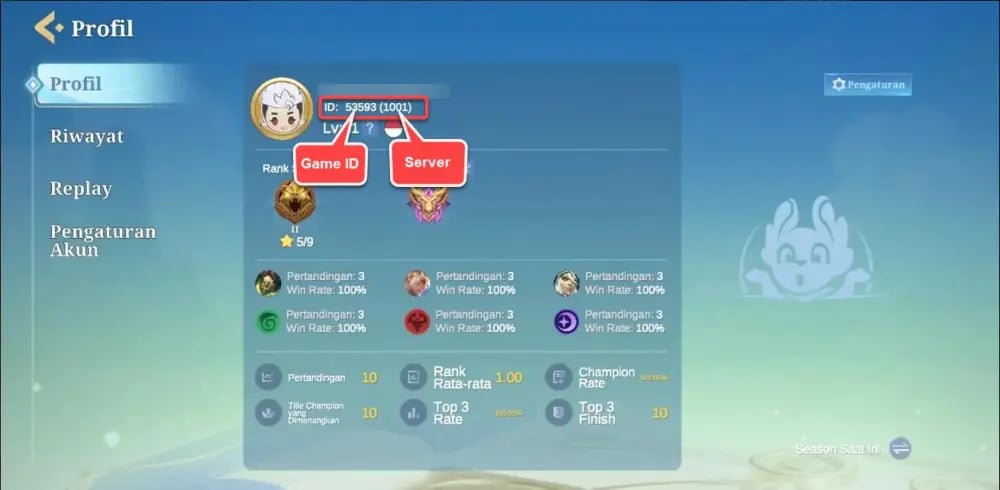
- Look directly underneath your player nickname and account level to locate your identification numbers.
- You will see a format structured like
User ID: 12345678 (1234). - The primary sequence of numbers before the parentheses is your User ID (e.g.,
12345678). - The 4-digit or 5-digit number inside the parentheses is your Zone ID (e.g.,
1234).
Double-check both numerical values before submitting your transaction to avoid misdelivery to another player's profile.
Magic Chess: Go Go Weekly Pass vs Diamond Bundles: Rewards Breakdown
Choosing between direct Diamond packs and ongoing membership passes depends on your playstyle and budget priorities. Review the breakdown below to decide which option matches your in-game goals:
| Item Type | Immediate Delivery | Extended / Daily Benefits | Best Suited For |
|---|---|---|---|
| Direct Diamond Bundles | Full Diamond amount credited instantly | None (one-time purchase) | Immediate commander unlocks, urgent gacha draws, and instant cosmetic purchases |
| Weekly Diamond Pass | Upfront Diamond burst upon purchase | Daily claimable Diamonds, bonus resources, and pass progression over 7 days | Consistent daily players seeking maximum Diamond-per-dollar value |
| Go Go Pass Upgrades | Instant access to premium seasonal reward track | Exclusive Commander skins, avatar borders, and milestones as you level up | Players actively completing seasonal quests and ladder milestones |
If you want instant access to a new Commander or limited-time shop drop, direct Diamond bundles provide immediate spending power. If you log in daily to complete ladder matches, the Weekly Pass offers substantial overall value across the active subscription period.
Unlocking the Go Go Pass, Commanders, and In-Game Cosmetics with Diamonds
Diamonds function as the primary premium currency in Magic Chess: Go Go. Recharging your Diamond balance lets you access multiple exclusive features and competitive upgrades:
- Little Commanders & Skills: Unlock new tactical Commanders who provide unique passive and active skills that alter board economy, shop probability, and combat strengths.
- Commander Skins: Customize your favourite commanders with distinct visual effects, victory animations, and lobby displays.
- Custom Chessboards: Acquire specialized arena boards and dynamic field skins that change battle effects during matchmaking rounds.
- Premium Go Go Pass: Upgrade your seasonal battle pass to unlock high-tier rewards, including commander chests, crystal fragments, and rare profile items.
- Gacha and Lucky Spins: Participate in limited-time prize pools to pull rare cosmetics, synergy recall effects, and custom damage counters.
Safe, Passwordless Direct Top-Up Experience on ArcTopup
Account safety is essential when purchasing in-game items. ArcTopup uses a direct server-level ID delivery system designed to keep your game profile protected at all times:
- 100% Password-Free: You only provide your public User ID and Zone ID. We never ask for your email login, social media credentials, passwords, or verification codes.
- No Account Sharing: Your account remains strictly in your hands on your own device, preventing authorization risks or accidental account flags.
- Secure Payment Processing: Every transaction on ArcTopup is encrypted using modern SSL security protocols to protect your billing information.
- Real-Time Delivery: Transactions process directly to the official game servers, reducing wait times and ensuring your Diamonds arrive promptly.
Order Delivery Tracking and Troubleshooting Diamond Recharges
If you encounter any issues after completing your payment on ArcTopup, review these troubleshooting steps:
- Restart the Game App: Completely close the Magic Chess: Go Go app and reopen it. This forces the game client to refresh its balance data from the game server.
- Check In-Game Mail: Some promotional bundles or event top-up rewards arrive as claimable items in your in-game mailbox rather than direct wallet balance increments.
- Verify Your Zone ID and User ID: Check your order confirmation receipt to verify that the User ID and Zone ID entered during checkout match your game profile.
- Check Server Maintenance: If the game is currently undergoing a scheduled maintenance patch, Diamonds will appear as soon as the servers return online.
- Contact ArcTopup Support: If your order remains uncredited after a few minutes, reach out to our customer support team with your ArcTopup Order ID and transaction receipt for rapid assistance.
Frequently Asked Questions
How to recharge diamonds in Magic Chess: Go Go?
To recharge, select your desired Diamond package or Weekly Pass on ArcTopup, enter your in-game User ID and Zone ID, choose your payment method, and complete the purchase. The Diamonds will be credited directly to your account.
Where can I find my Magic Chess: Go Go User ID and Zone ID?
Open Magic Chess: Go Go and tap your avatar profile in the top-left corner of the lobby. On the Basic Info screen, you will see your User ID followed by your Zone ID inside parentheses, formatted as User ID: 12345678 (1234).
Do I need to provide my account password to top up on ArcTopup?
No. ArcTopup never asks for passwords, verification codes, or login details. Recharges require only your public User ID and Zone ID.
What rewards do I get from the Magic Chess: Go Go Weekly Pass?
The Weekly Pass grants an immediate Diamond bundle upon activation, followed by daily claimable Diamonds and in-game progression rewards over a consecutive 7-day period.
How long does it take for Diamonds to reflect in my MCGG account?
Diamonds are processed automatically upon successful payment. In most cases, items reflect in your account balance within a few moments. If there is a slight delay, restart your game app to refresh the data.
Can I buy Magic Chess: Go Go Diamonds or passes for a friend?
Yes. Because top-ups only require the recipient's User ID and Zone ID, you can enter your friend's account numbers at checkout to send Diamonds or passes directly to their game account.
Current packages and prices
Current base prices exclude Tax. Tax, payment fees and coupon adjustments are shown at checkout.
| Package | Price |
|---|---|
| 70 Diamonds ( 64 + 6 Bonus ) | USD 1.04 |
| Weekly Pass | USD 1.85 |
| 140 Diamonds ( 127 + 13 Bonus ) | USD 2.08 |
| 284 Diamonds ( 254 + 30 Bonus ) | USD 4.15 |
| 355 Diamonds ( 317 + 38 Bonus ) | USD 5.18 |
| 429 Diamonds ( 383 + 46 Bonus ) | USD 6.22 |
| 716 Diamonds ( 633 + 83 Bonus ) | USD 10.36 |
| 1084 Diamonds ( 940 + 144 Bonus ) | USD 15.54 |
| 1446 Diamonds ( 1252 + 194 Bonus ) | USD 20.73 |
| 2976 Diamonds ( 2501 + 475 Bonus ) | USD 41.43 |
| 7502 Diamonds ( 6252 + 1250 Bonus ) | USD 103.58 |
| 59 Diamonds ( 53 + 6 Bonus ) | USD 0.91 |
| 86 Diamonds (78 + 8 Bonus) | USD 1.04 |
| 85 Diamonds ( 77 + 8 Bonus ) | USD 1.21 |
| 112 Diamonds ( 102 + 10 Bonus ) | USD 1.49 |
| Weekly Pass | USD 1.71 |
| 172 Diamonds (156 + 16 Bonus) | USD 2.10 |
| 170 Diamonds ( 154 + 16 Bonus ) | USD 2.41 |
| 223 Diamonds ( 203 + 20 Bonus ) | USD 2.98 |
| 257 Diamonds (234 + 23 Bonus) | USD 3.13 |
| 240 Diamonds ( 217 + 23 Bonus ) | USD 3.40 |
| Weekly Pass x2 | USD 3.41 |
| 296 Diamonds ( 256 + 40 Bonus ) | USD 4.02 |
| 344 Diamonds | USD 4.19 |
| 336 Diamonds ( 303 + 33 Bonus ) | USD 4.47 |
| Weekly Pass x3 | USD 5.12 |
| 408 Diamonds ( 367 + 41 Bonus ) | USD 5.76 |
| 514 Diamonds | USD 6.29 |
| Weekly Pass x4 | USD 6.82 |
| 570 Diamonds ( 504 + 66 Bonus ) | USD 7.45 |
| 568 Diamonds ( 503 + 65 Bonus ) | USD 7.88 |
| 706 Diamonds (625 + 81 Bonus) | USD 8.39 |
| Weekly Pass x5 | USD 8.53 |
| 875 Diamonds ( 774 + 101 Bonus ) | USD 12.13 |
| 1163 Diamonds ( 1007 + 156 Bonus ) | USD 14.90 |
| 1346 Diamonds | USD 15.72 |
| 1825 Diamonds | USD 20.96 |
| 2195 Diamonds (1860 + 335 Bonus) | USD 25.16 |
| 2010 Diamonds ( 1708 + 302 Bonus ) | USD 26.78 |
| 2398 Diamonds ( 2015 + 383 Bonus ) | USD 29.78 |
| 3688 Diamonds (3099 + 589 Bonus) | USD 41.92 |
| 4830 Diamonds ( 4003 + 827 Bonus ) | USD 62.77 |
| 5532 Diamonds (4649 + 883 Bonus) | USD 62.87 |
| 6042 Diamonds ( 5035 + 1007 Bonus ) | USD 74.45 |
| 9288 Diamonds (7740 + 1548 Bonus) | USD 104.80 |