Tango Live Coins Top Up: Direct Account Balance Credit
Tango Live is a global interactive live-streaming platform where creators share music, performances, and daily broadcasts with audiences around the world. To support your favorite broadcasters and participate actively in real-time shows, you need in-app currency. A Tango Live Coins top up gives you direct access to interactive features, animated gifts, and community perks without interrupting your viewing experience.
ArcTopup provides a direct recharge system that credits coins straight to your Tango account using only your User ID (UID). You never need to provide your account password or log in through third-party forms. Simply select your package, input your UID, complete your payment, and watch your coin balance update directly in the Tango app.
What Are Tango Live Coins and Their Uses
Tango Live Coins are the primary virtual currency used within the Tango application. They drive all direct creator support, premium interactions, and status enhancements on the platform.
Virtual Gifting and Visual Effects
Broadcasters rely on gifts to earn income and climb the platform rankings. Using your coin balance, you can send standard animated icons like roses and hearts, or trigger massive full-screen animations such as sports cars, private jets, yachts, and mythical beasts. These gifts highlight your profile in the stream feed and show direct appreciation to the performer.
Live PK Battles and Streamer Support Tiers
Tango regularly hosts head-to-head PK battles where two creators compete in a timed contest. Viewers vote and boost their chosen creator by sending gifts funded with Tango Coins. Higher contribution tiers help your favorite streamer win competitive rounds, earn tournament trophies, and gain visibility on the platform's global discovery page.
Unlocking Fan Badges and Chat VIP Status
Frequent gifting elevates your supporter rank. As you spend coins in a broadcaster's room, you unlock exclusive fan club badges, customized entry banners when entering a room, and highlighted text colors in the live chat feed. Broadcasters and moderators immediately recognize top supporters, giving your messages priority during busy streams.
Interactive Minigames and Premium Features
Coins also grant access to interactive games within live rooms, private broadcasts, and special community challenges hosted by creators.
Step-by-Step Guide: How to Find Your Tango Live UID
To ensure your coins arrive in the correct account, you must enter your exact Tango User ID (UID). Your UID is a unique identifier assigned to your profile.
- Launch the Tango Live application on your smartphone or tablet.
- Tap your Profile icon located in the top-left corner of the screen to open the user menu.
- Tap on your profile picture or user name to view your full account details.
- Look directly below your display name or within the account information section to locate your UID.
- Copy or carefully record the sequence without adding spaces or special characters.
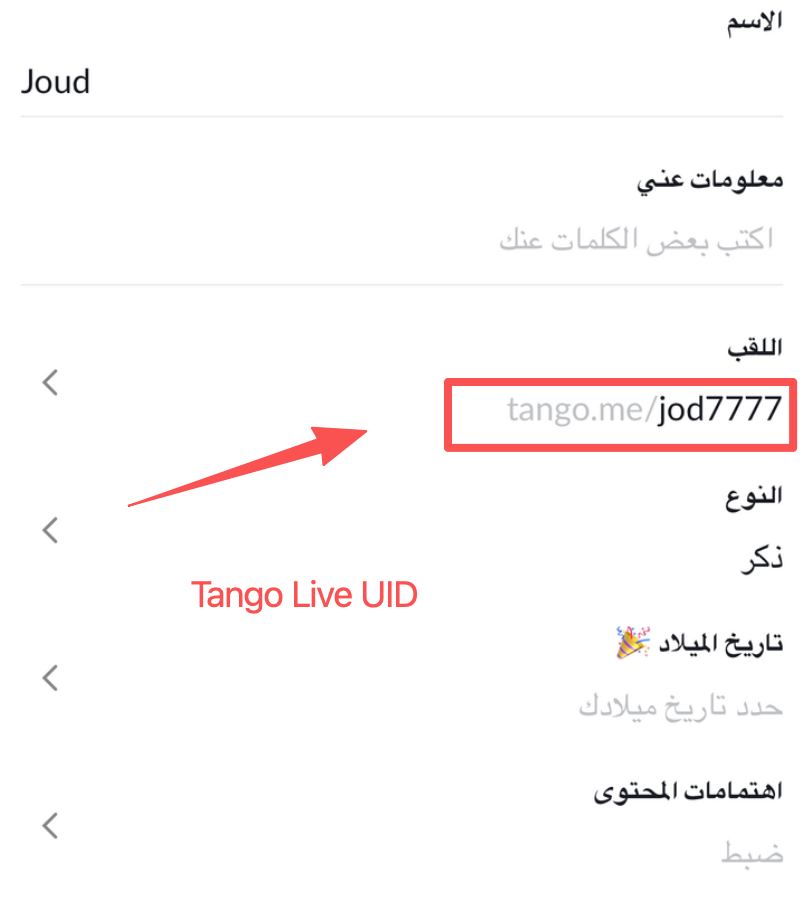
Always double-check your UID before proceeding to checkout on ArcTopup. Because digital recharges are processed automatically, sending coins to a mistyped UID cannot be reversed once completed.
How to Top Up Tango Live Coins on ArcTopup Using UID
Recharging your balance on ArcTopup takes only a few simple steps:
- Select Your Package: Review the available Tango Live Coin packages listed on the live checkout menu above and choose the amount you need.
- Enter Your UID: Paste your unique Tango User ID into the designated player field.
- Select Your Payment Method: Choose from the available secure checkout options displayed for your region.
- Confirm and Pay: Complete the transaction. The automated system processes the request and sends the coins directly to your Tango account balance.
- Check Your Balance: Re-open or pull down to refresh your Tango profile screen to verify your updated coin balance.
Direct UID Top Up vs. Tango Voucher Codes: Key Differences
There are two primary ways to add coins to a Tango account: direct UID top-ups and redeemable voucher codes. Understanding the difference helps you choose the most convenient option.
| Feature | Direct UID Top Up (ArcTopup) | Redeemable Voucher Codes |
|---|---|---|
| Delivery Method | Automatic direct credit to account balance | Manual code entry on redemption page |
| Account Password Required | No (UID only) | No |
| Risk of Code Expiry | None | Expiration dates may apply |
| Gifting to Friends/Streamers | Direct (enter recipient UID at checkout) | Requires sending raw code text to user |
| User Effort | One-step purchase and automated delivery | Multi-step purchase, copy, and manual redeem |
Direct UID top-ups on ArcTopup eliminate the friction of managing gift codes, typing long redemption strings, or dealing with expired vouchers. It is also the easiest method for surprising a streamer with coins, as you can input their UID directly without needing their personal contact information.
Available Tango Live Coin Packages and Denominations
ArcTopup offers a wide variety of coin package sizes to fit different spending plans. Whether you want a small coin bundle to send quick reactions during a single stream or a high-volume package to support a creator through a major multi-day PK tournament, you can pick the exact tier you need.
Live package selections, coin counts, and localized currency rates are listed in real time on the checkout module at the top of this page. Review the options on screen to select the bundle that matches your gifting goals.
Safety and Payment Options for Tango Recharge
Account safety is a core priority when buying digital items online. ArcTopup uses a direct UID delivery model designed to protect your personal data.
- 100% Password-Free: You never share your Tango login credentials, email password, or social sign-in details. Top-ups require only your public UID.
- No Account Sharing: Your account remains strictly in your hands, eliminating the risk of account compromise or unauthorized activity.
- Secure Transaction Channels: Every checkout is processed through encrypted payment gateways supporting modern data protection standards.
- Localized Payment Methods: ArcTopup integrates regional payment channels so you can complete purchases using the payment methods most convenient in your country.
Troubleshooting Tango Coin Top-Up Delivery and FAQs
If you encounter any delays or balance discrepancies after completing your order, follow these basic troubleshooting steps:
- Restart the Tango App: Close the Tango application completely from your device multitasking view and reopen it. This forces the app to fetch an updated balance from the Tango servers.
- Verify Your UID: Check your order confirmation to ensure the UID entered matches your profile identifier exactly.
- Confirm Payment Status: Check your payment account to ensure the transaction completed successfully and was not flagged or refunded by your payment provider.
How do I find my Tango Live UID to complete a top up?
Open the Tango app, tap your profile avatar in the upper-left corner, and open your profile page. Your UID is displayed beneath your display name. Copy this number to use during checkout on ArcTopup.
Do I need to share my Tango password to recharge coins?
No. ArcTopup only requires your public Tango UID. Never share your password or verification codes with anyone.
How long does it take for Tango Live Coins to reflect in my balance?
Orders placed on ArcTopup are processed through an automated fulfillment system. In most cases, coins appear in your account balance shortly after payment confirmation.
What can I use Tango Live Coins for?
Tango Coins allow you to send animated virtual gifts to streamers, support creators during competitive PK battles, unlock VIP chat flair, earn fan club badges, and join special interactive broadcast features.
Can I recharge Tango Coins for a friend or streamer using their UID?
Yes. You can enter any valid Tango UID during checkout on ArcTopup. The purchased coins will be delivered directly to that user's account balance, making it a simple way to reward favorite creators or surprise friends.
What should I do if my Tango Coins have not arrived after payment?
First, refresh or restart your Tango app to force a balance sync. If the coins do not display, verify that your payment went through and check the UID on your receipt. Contact ArcTopup customer support with your order reference number and UID for assistance.
Current packages and prices
Current base prices exclude Tax. Tax, payment fees and coupon adjustments are shown at checkout.
| Package | Price |
|---|---|
| 750 Coins | USD 3.67 |
| 1500 Coins | USD 7.35 |
| 3750 Coins | USD 18.38 |
| 7500 Coins | USD 36.75 |
| 15000 Coins | USD 73.50 |
| 30000 Coins | USD 147.01 |
| 37500 Coins | USD 183.76 |