MICO Coins Top Up: Complete Guide and Overview
MICO Live is a global social platform connecting millions of users through live streaming, group voice chat rooms, interactive mini-games, and real-time social matching. To fully participate in the community, send animated gifts, and support your favorite broadcasters, you need in-app balance. A MICO Coins top up credits your account balance so you can immediately interact with hosts and access premium social features.
MICO Coins serve as the primary virtual currency on MICO Live. When you send gifts during live broadcasts or audio party rooms, these coins convert into Diamonds or Beans for the content creator, allowing them to monetize their streams. To keep your streaming sessions uninterrupted, ArcTopup provides direct Mico Coins recharge options that require only your numerical Mico ID.
What Are MICO Coins and What Are They Used For?
MICO Coins are versatile virtual tokens designed to enrich your user experience across the MICO Live mobile ecosystem. They enable a wide variety of social interactions and account customizations:
- Broadcaster Gifting: Send standard and animated 3D visual gifts during live streams. Gifting increases your fan club rank and helps broadcasters climb leaderboard rankings.
- Voice & Video Chat Rooms: Use coins to tip participants, trigger room effects, or start interactive games in multi-guest party rooms.
- VIP Badges & Privilege Systems: Purchase temporary or recurring VIP status to display exclusive entrance banners, custom chat bubbles, and unique profile frames.
- Direct Messaging Privileges: Connect with new users and broadcasters by unlocking instant direct messaging tokens.
- Interactive Mini-Games: Join community mini-games within the app using coin entries to win in-app rewards and special display medals.
How to Find Your MICO ID in the MICO Live App
To complete an order on ArcTopup, you only need to provide your exact numerical Mico ID. Do not confuse your Mico ID with your custom display name, as display names can be changed and are not unique in the system database.
Follow these steps to locate your Mico ID:
- Open the MICO Live app on your iOS or Android mobile device.
- Tap the Profile icon (labeled "Me") in the bottom right corner of the main screen.
- Look directly beneath your profile picture and nickname at the top of the profile page.
- Find the label ID: followed by a string of numbers (typically 6 to 10 digits).
- Tap the Copy icon next to the number or write it down carefully for checkout.
How to Top Up MICO Coins on ArcTopup Step-by-Step
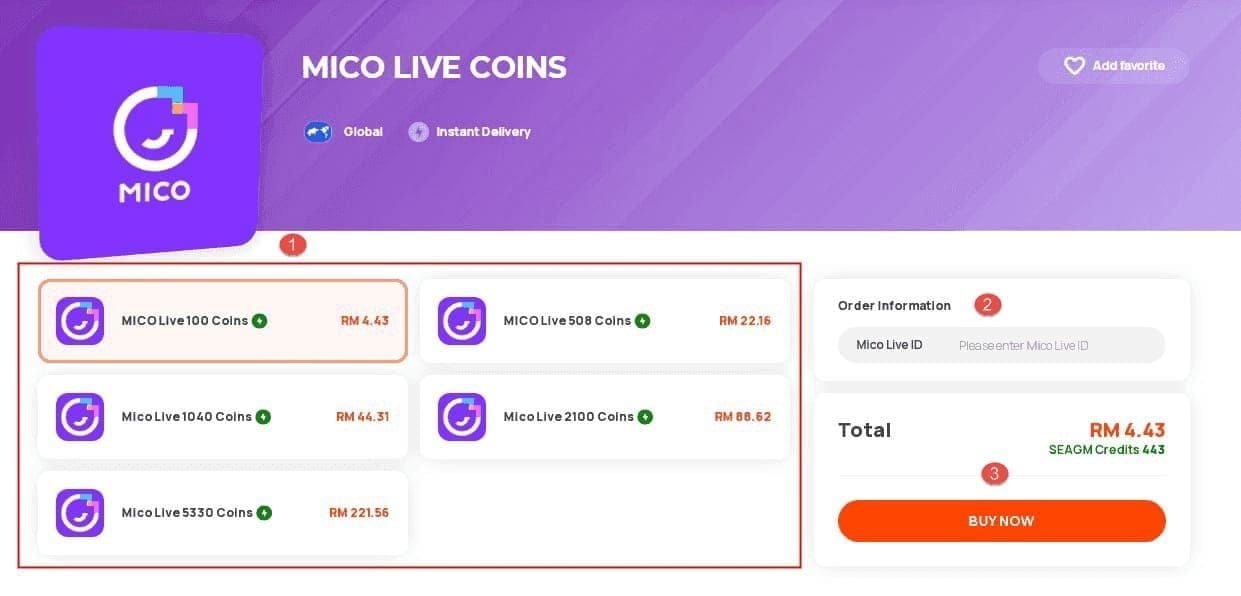
Recharging your MICO balance on ArcTopup takes only a few moments. Follow this straightforward purchase process:
- Select Your Package: Choose the denomination of MICO Coins that fits your gifting and streaming needs from the available options.
- Enter Your Mico ID: Type or paste your numerical Mico ID into the required account input field. Double-check the numbers to avoid miscrediting another profile.
- Review Your Order: Verify the selected coin quantity and the target Mico ID before proceeding.
- Choose Payment & Confirm: Select your preferred payment method on the checkout screen and complete the transaction.
- Check In-App Balance: Once payment processing finishes, open MICO Live and check your profile wallet to see your updated coin balance.
MICO Coins Packages and Denominations (2026)
ArcTopup offers multiple coin denominations suitable for casual viewers and active supporters. Select a tier matching your planned gifting activity. Current live prices and promotional rates are displayed in real time on the checkout module above.
| Package Tier | Coin Amount | Primary In-App Use Case |
|---|---|---|
| Starter Pack | 560 Coins | Direct messaging, entry-level room tips, basic chat gifts |
| Popular Pack | 2,800 Coins | Joining mid-tier fan clubs, animated broadcast gifts |
| Gamer Pack | 5,600 Coins | Multi-guest party effects, host support, room games |
| Supporter Pack | 11,200 Coins | Custom profile frames, entrance animations, host rank boosts |
| VIP Pack | 28,000 Coins | Elite leaderboard push, high-tier 3D gifts, VIP privileges |
| Master Pack | 56,000+ Coins | Large-scale event gifting, top fan badges, broadcast sponsor gifts |
Note: Exact pricing, currency conversions, and available package sizes are managed dynamically on the ArcTopup order selection panel.
Regional Restrictions & Server Information for MICO Recharge
MICO Live operates global servers serving regions including North America, Europe, Southeast Asia, Latin America, and the Middle East (MENA). Direct Mico ID top-up systems work across standard global accounts.
- Global Account Compatibility: As long as your numerical Mico ID is active and correctly registered in the MICO Live application, the recharge will process directly to your central profile wallet.
- Regional Price Adjustments: ArcTopup automatically converts checkout totals to your preferred regional currency without requiring you to switch regional app store accounts.
- Account Status Requirements: Ensure your account is in good standing and not temporarily suspended or restricted by MICO Live moderation before initiating a top-up.
Account Safety: Why UID-Only Top-Up Protects Your Account
Security is paramount when buying digital currency online. ArcTopup uses a direct UID-only recharge protocol to safeguard your personal data.
- No Passwords Required: You never need to share your account password, email login, Apple ID, Google credentials, or social media bindings.
- Zero Third-Party Account Access: Nobody logs into your MICO app. The top-up occurs externally via public player identification numbers.
- Safe Transaction Protocol: UID recharges eliminate the risk of account takeovers, unauthorized profile edits, or accidental bans caused by suspicious login locations.
How MICO Coins Fuel Creator Gifting, VIP Perks, and Live Streams
Using MICO Coins directly enhances how you experience the MICO Live community:
Supporting Content Creators
When you send gifts using MICO Coins, the platform calculates revenue shares for broadcasters in the form of Diamonds. High gift volume helps your favorite hosts achieve official talent agency status, hit monthly targets, and qualify for global MICO Live showcase events.
Leaderboard Standings and Fan Club Badges
Broadcasters maintain daily, weekly, and monthly contributor leaderboards. Recharging coins allows you to compete for the top contributor spot, giving your profile maximum visibility inside the streamer's chat room and earning you special fan badges that display beside your username.
Exclusive Entrance and Room Effects
High-tier coin holders and VIP members trigger dynamic entry banners when joining any live stream or party room. These visual notifications signal your presence to both the host and other room attendees, making group chats and video sessions more engaging.
Troubleshooting Delivery Delays and Payment Inquiries
While most MICO Coin recharges complete immediately, occasional network delays can occur. Use these steps if your balance does not update right away:
- Refresh the App: Fully close the MICO Live application from your device's multitasking menu, restart it, and tap Me > Wallet to refresh cached account data.
- Check Your Mico ID Submission: Review your order receipt on ArcTopup to confirm you did not enter a typo in your Mico ID field.
- Verify Payment Status: Check your bank, card, or e-wallet account to confirm the transaction went through successfully.
- Contact Customer Support: If your payment is processed but coins do not appear within 15 minutes, reach out to the ArcTopup 24/7 customer support team with your Order ID and Mico ID for immediate manual verification.
Frequently Asked Questions About MICO Coins Recharge
Where can I buy MICO Coins recharge online?
You can buy MICO Coins online safely on ArcTopup. Select your desired coin bundle, provide your Mico ID, and complete payment through our secure checkout system.
What details do I need to top up MICO Coins?
You only need your numerical Mico ID, which can be found directly beneath your profile avatar in the MICO Live app. You never need to supply passwords, verification codes, or login credentials.
What are MICO Coins used for on MICO Live?
MICO Coins are used to purchase digital gifts for live broadcasters, join interactive voice party games, unlock VIP privileges, customize profile banners, and send direct messages to other users.
Is it safe to recharge MICO Coins using only a Mico ID?
Yes. Recharging via Mico ID is the safest method available because it requires no account access, password sharing, or third-party device logins. The coins are credited directly to your player profile via public identifier.
How long does it take for MICO Coins to arrive after payment?
Coin delivery typically occurs shortly after your payment is confirmed. In rare instances of network congestion, delivery may take a few extra minutes.
What should I do if my MICO Coins do not show up in my balance?
First, force-restart your MICO Live application to refresh your in-app wallet balance. If the balance remains unchanged after several minutes, check your ArcTopup order status and contact our 24/7 customer support team with your order number.
What payment methods are supported for MICO Coins top up?
ArcTopup supports a wide selection of international and local payment options, including major credit/debit cards, digital e-wallets, and regional payment methods displayed at checkout.
Current packages and prices
Current base prices exclude Tax. Tax, payment fees and coupon adjustments are shown at checkout.
| Package | Price |
|---|---|
| 445 Mico Coins | USD 3.57 |
| 500 Mico Coins | USD 4.01 |
| 900 Mico Coins | USD 7.21 |
| 1,100 Mico Coins | USD 8.81 |
| 2,200 Mico Coins | USD 17.62 |
| 2,730 Mico Coins | USD 21.86 |
| 3,300 Mico Coins | USD 26.43 |
| 4,400 Mico Coins | USD 35.23 |
| 5,500 Mico Coins | USD 44.05 |
| 5,700 Mico Coins | USD 45.65 |
| 6,600 Mico Coins | USD 52.86 |
| 7,700 Mico Coins | USD 61.69 |
| 8,550 Mico Coins | USD 68.48 |
| 8,800 Mico Coins | USD 70.48 |
| 11,000 Mico Coins | USD 88.09 |
| 22,000 Mico Coins | USD 176.19 |
| 33,000 Mico Coins | USD 264.28 |
| 55,000 Mico Coins | USD 440.47 |