
Rememento: White Shadow Top Up Guide: Direct Glowing Memory Purchase
Acquiring Glowing Memory in Rememento: White Shadow allows you to recruit new characters, summon rare equipment, and secure essential resources to build your team. ArcTopup provides a direct top-up service designed for speed and account protection. You never need to share your login credentials, passwords, or social login links. Simply provide your unique in-game Player ID, select your preferred Glowing Memory package, and complete your purchase.
Step-by-Step Instructions to Top Up on ArcTopup
- Enter Your Player ID: Input your exact Rememento: White Shadow Player ID into the designated field at the top of this page.
- Select Your Currency Package: Choose the quantity of Glowing Memory or bundle pack you want to purchase. Current prices and package values are shown directly in the selection list above.
- Select Your Payment Method: Choose from our available payment gateways that match your location and currency preferences.
- Confirm Your Order: Review your Player ID to ensure every digit matches your game profile, then proceed through the secure checkout.
- Check Your In-Game Account: Once payment completes, launch Rememento: White Shadow to confirm your newly credited Glowing Memory balance.
How to Find Your Rememento: White Shadow Player ID in the Game Menu
To ensure your currency delivers to the right account, you must enter your exact Player ID. Do not confuse your public profile nickname with your system-generated ID number.
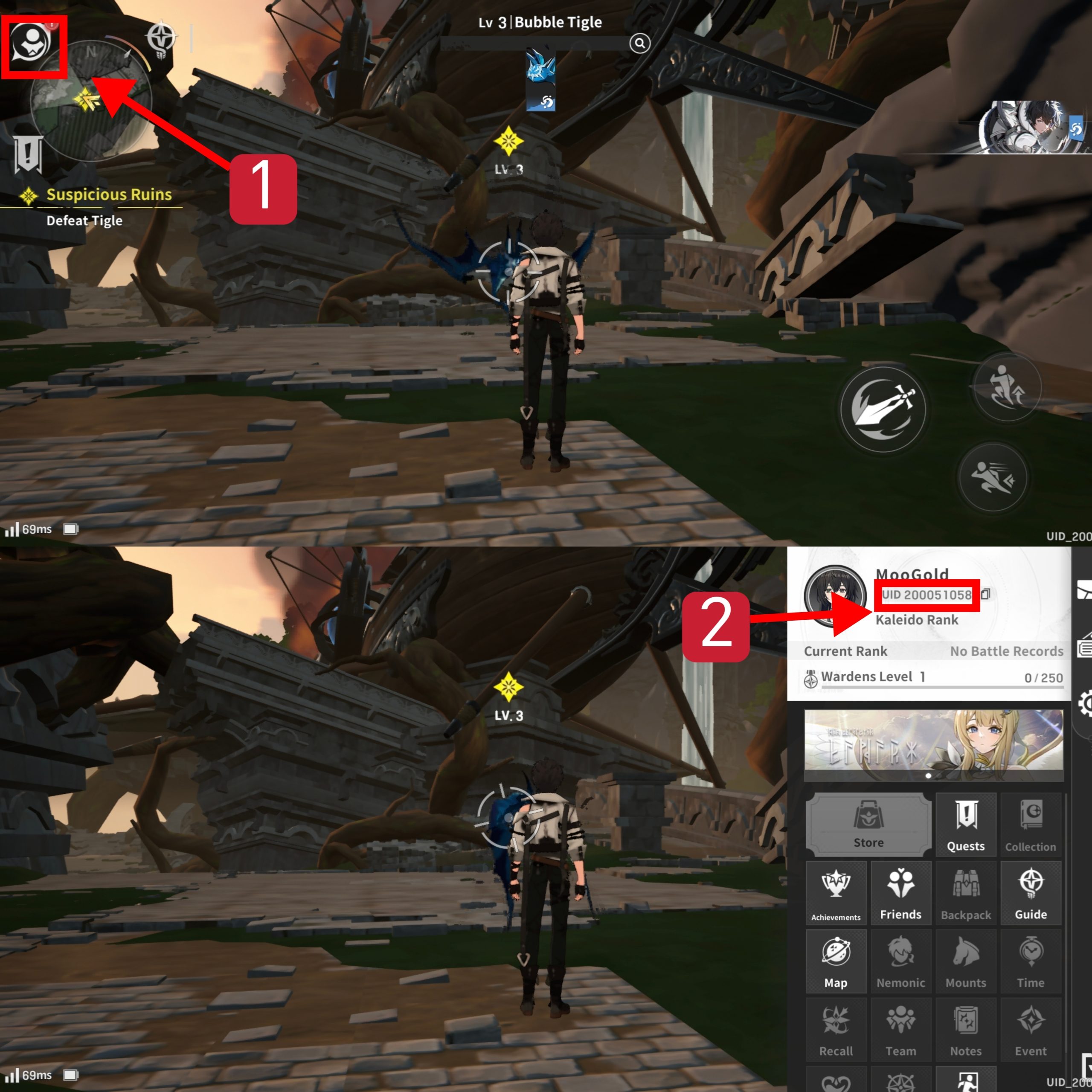
Follow these steps inside the game client to locate your Player ID:
- Launch Rememento: White Shadow on your mobile device or PC emulator and log into your game account.
- From the main game lobby screen, tap on your Avatar / Profile Icon located in the top-left corner.
- Open the User Profile / Information tab.
- Locate the numerical string labeled Player ID (or UID) positioned below your character avatar and nickname.
- Tap the Copy icon next to the number to copy the ID directly to your clipboard, preventing manual typing mistakes.
Paste this copied ID directly into the ArcTopup order field before choosing your package.
What is Glowing Memory and How to Use It for Gacha and Progression
Glowing Memory is the primary premium currency in Rememento: White Shadow. Managing your premium balance effectively accelerates your character roster expansion and daily progression efficiency.
Primary Uses of Glowing Memory
- Character & Memory Banners (Gacha Summons): Convert Glowing Memory into summon tickets to pull for limited-time banner heroes, signature memories, and rate-up characters.
- Stamina & Energy Refreshes: Refill your daily action points to farm upgrade catalysts, character EXP, gold stages, and skill enhancement materials.
- Shop Packs & Bundles: Purchase time-limited bundles, weekly discount boxes, breakthrough stone packs, and equipment refinement materials.
- Battle Pass Acceleration: Unlock premium reward tracks and level tiers to collect exclusive skins, profile cosmetics, and extra summoning resources.
| Currency / Item | Core Function | Best Value Usage |
|---|---|---|
| Glowing Memory | Premium currency bought via direct top-up | Converting to banner summon pulls and exclusive bundles |
| Summon Tickets | Direct gacha pulls for characters & weapons | Target rate-up banners for featured characters |
| Stamina Refills | Daily dungeon and stage energy replenishments | Event farming stages and rare breakthrough material runs |
| Growth Bundles | Packaged ascension and skill-level items | Quick progression for newly pulled 5-star units |
Why Choose ArcTopup for Safe Rememento: White Shadow Top-Ups
ArcTopup is built to provide players with a dependable, secure, and hassle-free top-up process.
- 100% Password-Free Security: We only require your in-game Player ID. ArcTopup will never ask for your account password, email access, two-factor authentication codes, or linked social media details.
- Direct Automated Delivery: Our fulfillment pipeline processes your order directly into the game servers using your Player ID, keeping order completion fast and direct.
- Global & Localized Payment Options: Choose from multiple payment methods, e-wallets, and banking options tailored to your local region.
- Transparent Checkout: The live checkout menu displays the exact prices and denominations available right now without hidden processing charges.
- Dedicated 24/7 Customer Support: Our support team is available around the clock to assist with payment confirmations, order status inquiries, and user ID verification.
Accepted Payment Methods and Direct Account Delivery
ArcTopup supports a comprehensive range of secure payment gateways so you can complete your purchase smoothly in your preferred local currency. Whether you pay via credit/debit card, regional digital wallets, or online banking, every transaction runs through encrypted security channels.
Because deliveries are routed directly to your account using your Player ID, you do not need to redeem external gift card codes or open manual web links. As soon as your payment processor approves the transaction, the order status updates in real time, and the purchased Glowing Memory is transmitted to your game account.
Rememento: White Shadow Top-Up Troubleshooting and Delivery Verification
If your Glowing Memory does not appear immediately after completing checkout, follow these verification steps:
- Check Your In-Game Mailbox and Direct Balance: In some cases, top-up items arrive directly in your balance counter at the top of the lobby, while promotional bundles or bonuses may be sent to your in-game mailbox. Check both areas.
- Restart the Game Client: Completely close the Rememento: White Shadow app and relaunch it. A fresh server handshake often synchronizes your updated balance immediately.
- Verify Your Order Status on ArcTopup: Check your order history on ArcTopup to confirm that your payment has successfully cleared.
- Verify Your Player ID: Double-check the Player ID entered during purchase. If you notice an error or if your currency has not arrived after restarting, contact our 24/7 customer support team with your ArcTopup Order ID for immediate assistance.
Frequently Asked Questions About Rememento: White Shadow Recharges
How do I top up Glowing Memory for Rememento: White Shadow?
To top up, enter your Player ID in the field at the top of this page, choose your desired Glowing Memory bundle, select your payment method, and complete the payment. The currency delivers directly to your in-game account.
Where can I find my Rememento: White Shadow Player ID?
Open Rememento: White Shadow, tap your profile avatar in the upper-left corner of the main lobby, and look for your numerical Player ID displayed under your character name. Tap the copy icon beside it to copy the exact number.
Do I need to provide my game account password to top up on ArcTopup?
No. ArcTopup uses a direct ID-only top-up system. You never need to share your game password, Google account, Apple ID, or third-party login details.
How long does it take for Glowing Memory to appear in my account after checkout?
Deliveries are processed automatically upon successful payment. The balance typically updates in your account within moments of transaction confirmation. In rare instances of network latency, restarting the game client will refresh your balance.
What should I do if I entered an incorrect Player ID during purchase?
Please check your Player ID carefully before completing checkout. Because digital currency top-ups are fulfilled automatically once processed, an order sent to a valid existing ID cannot be reversed. If you notice a typo before the transaction finalizes, reach out immediately to ArcTopup 24/7 customer support.
Can I top up Rememento: White Shadow for a friend using their Player ID?
Yes. You can purchase Glowing Memory for friends, guildmates, or family members. Simply obtain their in-game Player ID, paste it into the ID input field on ArcTopup, and complete the order. The currency will be credited directly to their game account.
Current packages and prices
Current base prices exclude Tax. Tax, payment fees and coupon adjustments are shown at checkout.
| Package | Price |
|---|---|
| 60 Glowing Memory | USD 0.68 |
| Pharos Special Gift | USD 0.68 |
| Pharos Support Kit | USD 1.32 |
| Welcome Pack I | USD 1.55 |
| Welcome Pack II | USD 2.40 |
| 300 Glowing Memory | USD 3.35 |
| Pharos Dawnstone Kit | USD 3.42 |
| Welcome Pack III | USD 6.54 |
| Welcome Pack V | USD 9.96 |
| Welcome Pack VI | USD 9.96 |
| 980 Glowing Memory | USD 9.97 |
| Welcome Pack IV | USD 18.82 |
| 1980 Glowing Memory | USD 19.99 |
| 3280 Glowing Memory | USD 33.55 |
| 6480 Glowing Memory | USD 67.24 |
































































