
Identity V Echoes Top Up: Currency Overview and In-Game Usage
Echoes serve as the primary premium currency in Identity V, NetEase's 1v4 asymmetrical multiplayer horror game. Players use Echoes to acquire exclusive cosmetic items, unlock playable characters, and participate in seasonal gacha events. Unlike Clues or Fragments, which accumulate slowly through regular gameplay, Echoes grant direct access to high-tier items directly from the Illusory Hall.
What You Can Unlock with Identity V Echoes
- Costumes and Skins: Purchase S-tier, A-tier, and B-tier skins for both Survivors and Hunters in the Illusory Hall.
- Character Unlocks: Instantly acquire newly released Survivors or Hunters without spending in-game Clues.
- Season Essences and Memory Spheres: Convert Echoes into Inspirations to open current Season Essences or past Memory Spheres for rare accessories, standby motions, and limited skins.
- Room Decor and Furniture: Buy custom lobby rooms, interactive furniture items, and room music tracks to customize your personal lobby space.
- Pets and Accessories: Equip unique cosmetic companions and character-specific accessories that alter carry animations or ability visuals.
- Dice and Experience Buffs: Purchase the 4-Sided Dice daily subscription to accelerate Logic Path progression each season.
Prices and available packs are displayed directly on the live checkout interface. Selecting an appropriate package on ArcTopup allows you to secure the exact balance required for your target item or event pull.
How to Top Up Identity V Echoes on ArcTopup
ArcTopup provides a direct recharge system that deposits Echoes straight into your game account using only your User ID (UID) and server region. No login credentials or account passwords are ever requested.
Follow these steps to complete your purchase:
- Select Your Echoes Package: Choose the denomination of Echoes you wish to purchase from the product catalog.
- Enter Your User ID (UID): Type your exact numerical in-game UID into the
UIDfield. - Select Your Server: Choose your active game server (
AsiaorNA / EU) from the dropdown menu. - Proceed to Payment: Review your order details and choose your preferred payment option from the checkout page.
- Receive Your Echoes: Once the transaction completes, Echoes are credited directly to your Identity V balance. Open or restart the game client to see the updated total.
How to Find Your Identity V UID and Server
To ensure your Echoes arrive without interruption, verify your in-game User ID and account server before submitting your order.
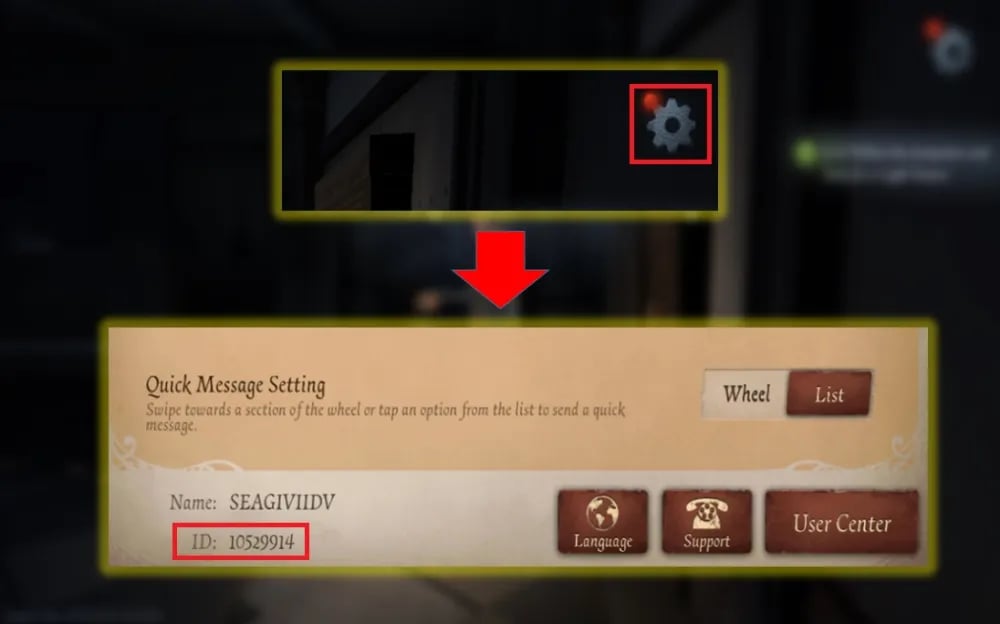
Locating Your UID Step-by-Step
- Open the Identity V app on your mobile device or PC client.
- On the title screen, take note of the server listed at the bottom center (
AsiaorNA / EU). - Tap the screen to enter the main lobby (the Manor).
- Tap your Profile Avatar in the top-right corner of the screen.
- In the User Center window, locate your User ID (UID). This is a sequence of numbers displayed under your in-game nickname.
- Tap the copy icon next to your UID to copy the digits directly to your clipboard, preventing manual typing errors.
Supported Identity V Servers: Asia vs NA / EU
Identity V maintains separate servers for its global player base. Player accounts, character rosters, and cosmetic inventories do not transfer between regional servers. Selecting the correct server during checkout is mandatory for your top-up to reach the right profile.
| Server Region | Target Geographic Areas | Account Data Compatibility | Required Input |
|---|---|---|---|
| Asia | Japan, Korea, Southeast Asia, Taiwan, Hong Kong, Macau | Isolated to Asia Server | UID + Server Selection |
| NA / EU | North America, South America, Europe, Oceania | Isolated to NA / EU Server | UID + Server Selection |
Double-check your login screen before placing an order. If your main account is registered on the NA / EU server, selecting Asia will either cause a delivery failure or credit an alternate account associated with that UID on the Asian server.
Security and Account Safety: Password-Free Top-Up
Account safety is a core priority when topping up in-game currency. ArcTopup utilizes a direct UID-based recharge system that ensures your personal account data remains protected at all times.
- Zero Password Sharing: You never need to provide your NetEase password, social login credentials, or email access. All transactions require only public profile identifiers.
- No Account Handover: Your account remains strictly in your hands. You do not need to log out, transfer tokens, or allow third parties into your account.
- Official Delivery Pipeline: Echoes arrive through standard direct delivery channels, keeping your account compliant with game rules and terms of service.
Troubleshooting Delivery and Order Issues
If you have completed your purchase on ArcTopup but do not see your Echoes immediately, follow these troubleshooting steps:
- Restart the Game Client: Completely close the Identity V application and reopen it. A fresh connection forces the game to fetch updated balance totals from the server.
- Check Your In-Game Mailbox: Certain promotional packages or bonus currencies may arrive as system mail attachments rather than instant balance additions.
- Verify UID and Server Entries: Check your ArcTopup receipt to confirm that the submitted UID and server match your active game profile exactly.
- Contact ArcTopup Support: If your balance does not update after restarting, reach out to the ArcTopup customer support team with your order reference number and payment confirmation for swift assistance.
Frequently Asked Questions
How do I find my Identity V UID and server?
Open Identity V and check the title screen to verify whether you play on the Asia or NA / EU server. Enter the lobby, tap your profile avatar in the upper right corner, and your numerical UID will appear directly beneath your player name. Use the copy button next to the numbers to copy your UID accurately.
Do I need to provide my NetEase or game password to top up Echoes?
No. ArcTopup only requires your numerical User ID (UID) and server selection. You do not need to share passwords, secondary verification codes, or login credentials under any circumstances.
Which Identity V servers are supported for top-up?
ArcTopup supports both global server regions for Identity V: the Asia server and the NA / EU (North America / Europe) server. Ensure you pick the specific server matching your game profile at checkout.
What can I purchase with Echoes in Identity V?
Echoes can be spent on Survivor and Hunter character unlocks, S-tier and A-tier costumes in the Illusory Hall, accessories, pets, room decorations, Logic Path dice packages, and Inspirations used to open Season Essences and Memory Spheres.
What happens if I submit an incorrect UID or server selection?
Recharge orders process automatically against the UID and server provided. If you enter an incorrect UID that belongs to another active player, the Echoes will be delivered to that account and cannot be reversed. If you notice a typo before the order processes, contact ArcTopup customer support immediately with your order details.
How can I check the status of my Identity V Echoes order?
You can track your order progress directly through your ArcTopup order history page. Once the status shows completed, relaunch your Identity V client to access your updated Echoes balance.
Current packages and prices
Current base prices exclude Tax. Tax, payment fees and coupon adjustments are shown at checkout.
| Package | Price |
|---|---|
| 60 + 6 Echoes | USD 0.79 |
| 185 + 18 Echoes | USD 2.44 |
| 305 + 30 Echoes | USD 4.04 |
| 690 + 69 Echoes | USD 8.09 |
| 2025 + 202 Echoes | USD 24.42 |
| 3330 + 333 Echoes | USD 40.54 |
| 6590 + 659 Echoes | USD 81.08 |































































