Heartopia Top Up: Fast, Safe, and Direct In-Game Recharge
Heartopia offers a charming slow-life simulation where players build dream homes, design cozy gardens, socialize with friends, and customize unique outfits. To access exclusive decorative items, stylish wardrobe pieces, and seasonal event items, you need Heart Diamonds—the primary premium currency in the game.
ArcTopup provides a direct, secure method for your Heartopia top up. By using only your Account ID, User ID, and game Server, you can recharge your account balance without sharing your password or private login details. The current prices and available diamond bundles are always displayed live on the order selection menu above.
How to Top Up Heartopia Heart Diamonds with Account ID & User ID
Recharging your Heartopia account on ArcTopup takes only a few straightforward steps:
- Select Your Currency Amount: Choose the Heart Diamonds denomination or package you wish to purchase from the product catalog.
- Enter Your Account ID: Type your Heartopia Account ID into the designated input field.
- Enter Your User ID: Provide your User ID precisely as shown in your in-game profile.
- Select Your Server: Pick your active game server from the dropdown list (Global, SEA, America, Asia, or TW,HK,MO).
- Proceed to Checkout: Review your order summary and complete payment using your preferred payment method.
- Receive Your Diamonds: Open Heartopia to verify your new Heart Diamonds balance or collect incoming delivery items from your in-game mailbox.
How to Find Your Heartopia Account ID and User ID
Finding your required identification numbers is simple and can be done entirely from inside the game client:
- Launch the Heartopia application on your mobile device or tablet.
- Log into your active character.
- Tap your Avatar / Profile Icon located in the top-left corner of the main screen.
- Open your Personal Info or Settings tab.
- You will see both your Account ID and User ID printed below your character name.
- Tap the copy icon next to each string to copy the numbers directly to your clipboard and paste them into the ArcTopup order fields.
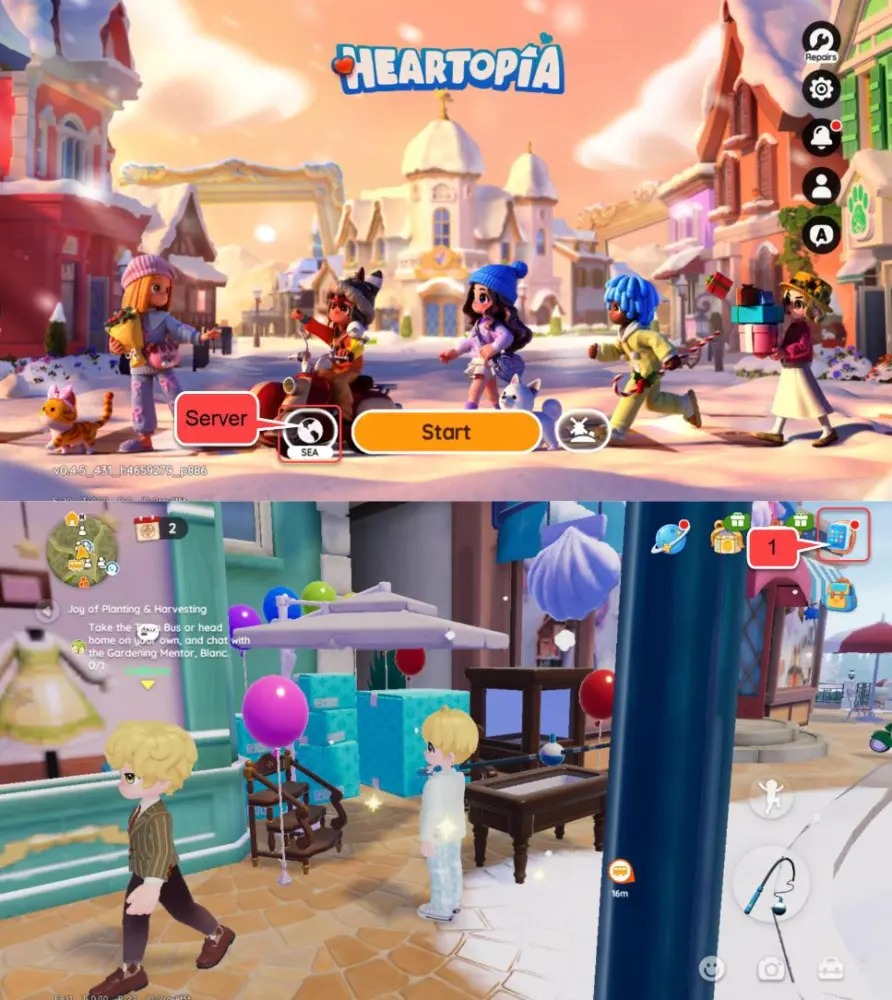
Supported Heartopia Servers: Global, SEA, America, Asia, TW/HK/MO
Heartopia organizes its community across distinct regional servers to ensure low-latency multiplayer interactions and localized event schedules. ArcTopup supports all major Heartopia regional clusters.
| Server Option | Target Regions Covered | Required Input Details | Credit Delivery Mode |
|---|---|---|---|
| Global | International & European players | Account ID + User ID | Direct Account Delivery |
| SEA | Southeast Asia (PH, ID, TH, MY, SG, VN) | Account ID + User ID | Direct Account Delivery |
| America | North America & South America | Account ID + User ID | Direct Account Delivery |
| Asia | East & South Asian territories | Account ID + User ID | Direct Account Delivery |
| TW,HK,MO | Taiwan, Hong Kong, Macau | Account ID + User ID | Direct Account Delivery |
Always double-check that your server selection matches where your character was created. Orders placed under an incorrect server cannot route diamonds to a character hosted on another region.
Heartopia In-Game Currencies: Heart Diamonds & Usage
Managing your economy in Heartopia is essential for personalizing your living space and participating in community activities. Here is a breakdown of what your recharge unlocks:
- Heart Diamonds (Premium Currency): Obtained through direct top-up. Used to purchase rare building blueprints, luxury furniture collections, premium fashion sets, hairstyle tickets, and limited-time gacha pulls.
- Seasonal Passes & Event Keys: Heart Diamonds can be exchanged for premium reward track progression, allowing you to unlock unique seasonal decor and collector outfits faster.
- Town & Farm Acceleration: Use diamonds to speed up production queues, expand garden plots, and acquire specialized crafting materials from the specialty market.
- Gifting & Social Items: Send gifts, greeting items, and festive props to neighborhood friends to increase friendship levels.
Safe & Passwordless Recharge: Protecting Your Heartopia Account
Account safety is our top priority. ArcTopup uses a direct ID-based delivery system:
- Zero Password Requirements: We never ask for your game password, Google account, Apple ID, or third-party login credentials.
- Direct System Crediting: Transactions are processed straight to your character using your Account ID and User ID.
- No Account Handover: You do not have to log out or hand your account to an unknown third party.
- Encrypted Checkout: All order information and payment processing data are protected through modern SSL encryption standards.
Troubleshooting Common Heartopia Top-Up & Order Issues
If you experience any delay or issue during your transaction, follow these troubleshooting checks:
- Verify Your IDs: Make sure you did not swap the Account ID and User ID fields. Both numbers are distinct and must be placed in their correct boxes.
- Check the Server Selected: Ensure the server chosen on ArcTopup matches your in-game region. Diamonds sent to a different server cluster will not appear on your primary character.
- Restart the Game Client: After completing checkout, force-close Heartopia and reopen it. This forces the client to sync with the server database and refresh your diamond counter.
- Inspect the In-Game Mailbox: Certain event packs or bonus items may arrive as an in-game attachment rather than directly increasing the on-screen diamond counter.
- Contact Customer Support: If your order status is completed but diamonds do not appear after 15 minutes, reach out to ArcTopup 24/7 customer support with your Order Number, Account ID, and User ID for immediate assistance.
Frequently Asked Questions About Heartopia Top-Up
Where can I find the cheapest Heartopia top-up?
ArcTopup offers competitive live rates for Heartopia Heart Diamonds with transparent pricing displayed directly on each package. You can compare denominations on the live checkout screen to find the best value for your budget without hidden processing fees.
How to buy heart diamonds in Heartopia?
To buy Heart Diamonds, choose your desired bundle on ArcTopup, input your Heartopia Account ID and User ID, select your active server, and complete the payment. Your diamonds will be credited directly to your character.
Where do I find my Heartopia Account ID and User ID?
Open Heartopia, tap your profile avatar in the upper-left corner of the screen, and open the personal settings screen. Both your Account ID and User ID will be clearly visible below your character profile name.
Do I need to provide my Heartopia password for a top-up?
No. ArcTopup only requires your public Account ID, User ID, and Server. You should never share your account passwords or login credentials with anyone.
Which Heartopia servers are supported for recharge?
ArcTopup supports all official game servers: Global, SEA, America, Asia, and TW,HK,MO. Simply choose your server from the dropdown before placing your order.
What should I do if my Heartopia Heart Diamonds do not arrive immediately?
First, restart the Heartopia app to refresh your data. Next, check your in-game mailbox for any uncollected attachments. If the currency still does not reflect, provide your ArcTopup Order ID and account information to ArcTopup customer support for rapid verification.
Current packages and prices
Current base prices exclude Tax. Tax, payment fees and coupon adjustments are shown at checkout.
| Package | Price |
|---|---|
| 60 Heart Diamonds | USD 0.99 |
| 300 + 20 Heart Diamonds | USD 5.00 |
| 680 + 50 Heart Diamonds | USD 11.45 |
| 1280 + 90 Heart Diamonds | USD 19.86 |
| 1980 + 150 Heart Diamonds | USD 31.84 |
| 3280 + 270 Heart Diamonds | USD 49.87 |
| 6480 + 570 Heart Diamonds | USD 101.92 |