
Xena Live Coins Top Up: Perks, Voice Chat Gifts, and PK Battles
Xena Live is a popular interactive group voice chat and live entertainment community where users connect across multi-guest audio rooms, play mini-games, and host live talent showcases. To participate fully in the social experience, Xena Live Coins serve as the platform's primary in-app currency. Users spend coins to send animated digital gifts to room hosts, activate visual profile customizations, and influence live competitions.
Recharging your Xena Live Coins balance grants immediate access to several premium interactions:
- Animated Virtual Gifting: Send luxury gifts ranging from simple roses and coffee cups to room-wide animated supercars, castles, and crown effects. Gifting rewards your favorite hosts and boosts your contributor ranking on daily and weekly room leaderboards.
- Live PK Battles Support: During real-time host PK battles, users send gifts to back their preferred creator. Every coin spent contributes directly to the host battle bar, helping them secure victory against competing rooms.
- VIP Badges and Chat Customizations: Spending coins enables access to exclusive VIP subscription tiers, customized microphone entrance banners, animated speech bubbles, and glowing avatar frames that help your messages stand out in crowded voice rooms.
- Interactive Games and Room Raffles: Join host-run lucky draws, coin boxes, and community mini-games available directly inside active voice channels.
ArcTopup provides a direct top up channel for Xena Live Coins. All orders process via your public numeric User ID (UID), ensuring fast delivery without requiring sensitive login credentials.
Understanding the Xena Live Economy: Coins vs Beans
A common point of confusion among new Xena Live users is the functional difference between Coins and Beans. Both currencies play vital roles inside the voice chat ecosystem, but they serve completely different purposes.
- Xena Live Coins (User Spending Currency): Coins are purchased with real money through top-up platforms like ArcTopup. Coins can only be spent; they cannot be withdrawn or converted back into real-world currency by regular users. You use them to buy gifts, enter events, and customize your profile.
- Xena Live Beans (Creator Earnings Currency): When a broadcaster or room host receives gifts from supporters, those gifts convert automatically into Beans in the host's wallet. Beans represent creator revenue. Qualified hosts can accumulate Beans and withdraw them for real money according to platform payout schedules, or convert portions back into coins for room promotions.
| Feature | Xena Live Coins | Xena Live Beans |
|---|---|---|
| Primary Role | Consumer spending and gifting | Broadcaster earnings and revenue |
| How to Obtain | Top up via ArcTopup with UID | Receive gifts from room listeners |
| Cash Withdrawal | Non-withdrawable | Withdrawable by verified hosts |
| In-App Usage | Voice gifts, VIP frames, PK points | Host balance tracking, tier advancement |
How to Find Your Xena Live Numeric UID
To ensure your Xena Live Coins recharge arrives without delay, you must provide your exact numeric User ID (UID). Do not confuse your permanent numeric UID with your custom nickname or a temporary Room ID number.
Follow these steps to locate your UID inside the app:
- Launch the Xena Live app on your mobile device and log in to your account.
- Tap the Profile or Me icon located in the bottom right corner of the main screen.
- On your profile page, locate your avatar and display name at the top.
- Directly below your username, find the line labeled ID: followed by a sequence of numbers (e.g.,
87654321). - Tap the Copy icon next to the number to copy your numeric UID to your clipboard.
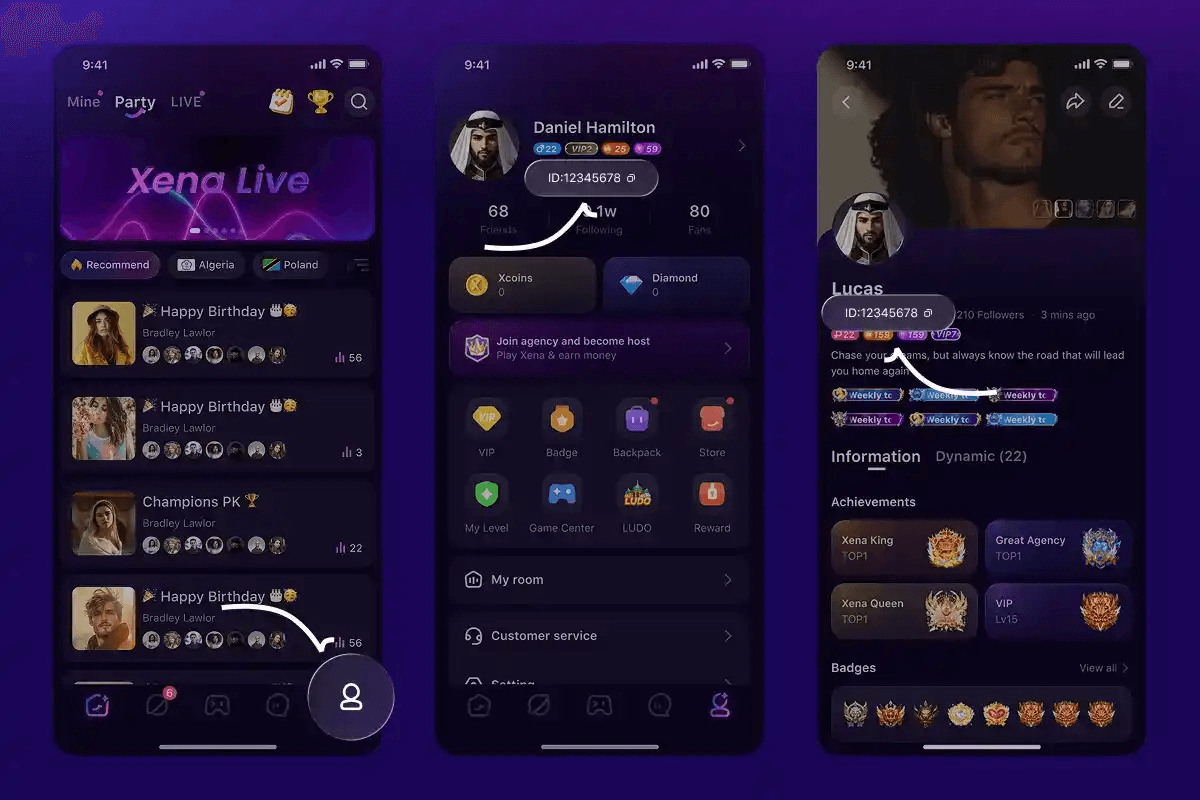
Important: Always copy the numeric ID directly from your personal profile. Submitting a Room ID or an alphanumeric custom handle will cause your order to fail or route coins to an incorrect user.
Step-by-Step Guide to Top Up Xena Live Coins on ArcTopup
Recharging your Xena Live account on ArcTopup requires only your UID and takes just a few steps:
- Select Your Package: Browse the available coin bundles on the ArcTopup Xena Live product page. Review real-time pricing and choose the bundle that matches your gifting plans.
- Enter Your User ID: Paste your numeric Xena Live UID into the input field. Confirm that the numbers match your in-app profile precisely.
- Choose a Payment Channel: Pick from the list of supported local payment options, bank transfers, e-wallets, or card methods available for your country.
- Complete Checkout: Follow the on-screen instructions to finalize your payment securely.
- Check Your In-App Balance: Reopen Xena Live, visit your profile wallet, and verify your updated coin total.
Live package prices and seasonal pack options are displayed directly on the product selection grid at checkout.
Why UID-Only Top Up Protects Your Xena Live Account
Account safety is a top concern when purchasing digital currency. ArcTopup uses a direct UID top-up system that guarantees security through strict separation of account access and payment processing:
- Zero Password Sharing: You never need to reveal your account password, linked social media credentials (Google, Apple, Facebook), or SMS verification codes. Your login details remain entirely private.
- No Account Hijacking Risk: Because third-party access is never granted, your friend lists, host management permissions, agency affiliations, and stored Beans remain secure from unauthorized modifications.
- Official System Routing: Direct UID delivery pushes coin credits straight through the standard user routing infrastructure, preventing policy flags or account bans associated with unauthorized account-sharing practices.
Troubleshooting Balance Updates and Order Delays
If you completed your order on ArcTopup and your coins have not yet reflected in your balance, use the following troubleshooting steps to resolve the issue:
- Refresh the App: Close the Xena Live app completely and swipe it away from your device's recent apps screen. Relaunch the application to force the client to retrieve fresh wallet data from the servers.
- Verify the Submitted UID: Check your ArcTopup transaction confirmation email and verify the UID you typed during purchase. Ensure no numbers were omitted or swapped.
- Confirm Payment Clearance: Check your payment provider or banking app to ensure the transaction completed successfully and was not held for additional verification.
- Check Network Connectivity: A weak Wi-Fi or mobile data connection can prevent the live room wallet from synchronizing. Switch connection modes and check your profile again.
- Contact ArcTopup Support: If your balance does not update after several minutes, reach out to the ArcTopup customer support team with your Order Number and numeric UID. Support agents can track the order queue directly.
Frequently Asked Questions About Xena Live Coins Top Up
What is the difference between Xena Live Coins and Beans?
Xena Live Coins are the spending currency purchased by users to send gifts, purchase VIP badges, and support hosts in PK battles. Beans are the earning currency received by broadcasters when users send them gifts. Beans can be accumulated and cashed out by hosts, whereas Coins cannot be withdrawn.
How do I find my Xena Live numeric UID for top up?
Open Xena Live, tap the Profile (Me) tab in the bottom right corner, and look below your profile picture. You will see an ID number consisting of digits. Tap the copy icon next to the number and paste it directly into the UID box on ArcTopup.
Do I need to provide my Xena Live password to recharge coins?
No. ArcTopup requires only your public numeric UID to deliver your coin package. You should never share your account password, OTP codes, or linked social media login details with any top-up service.
What can I unlock with Xena Live Coins in voice rooms?
With Xena Live Coins, you can send static and animated room gifts, trigger full-screen entrance banners, unlock exclusive microphone frames and chat bubbles, boost your standing on contributor leaderboards, and support creators during competitive live PK battles.
Can Xena Live Coins be withdrawn as real money?
No. Coins are strictly consumer utility tokens designed for in-app gifting and customization. Only Beans earned by creators through received gifts can be converted or withdrawn as real-world revenue under the platform's host guidelines.
What should I do if my Xena Live Coins do not appear immediately?
First, restart your Xena Live app to refresh your wallet balance. Next, double-check your order receipt to verify that you entered the correct numeric UID. If your balance does not update shortly after payment confirmation, contact ArcTopup customer service with your order details for assistance.
Current packages and prices
Current base prices exclude Tax. Tax, payment fees and coupon adjustments are shown at checkout.
| Package | Price |
|---|---|
| 33,500 Xena Coins Bundle | USD 3.28 |
| Xena Coins * 67500 | USD 6.60 |
| 202,500 Xena Coins Bundle | USD 19.80 |
| 406,800 Xena Coins Bundle | USD 39.78 |
| 680,000 Xena Coins Bundle | USD 66.49 |
| 1,000,000 Xena Coins Bundle | USD 97.79 |
| 3,350,000 Xena Coins Bundle | USD 327.58 |
| XENA Live-33500 Coins | USD 3.92 |
| XENA Live-67500 Coins | USD 7.83 |
| XENA Live-202500 Coins | USD 23.50 |
| XENA Live-406800 Coins | USD 47.01 |
| XENA Live-680000 Coins | USD 78.35 |






























































