
Crush Live Top Up: Direct Coin Recharge Guide
Crush Live is an interactive social live-streaming platform where users connect with broadcasters, participate in audio party rooms, and initiate one-on-one video calls. In-app coins serve as the primary currency across the app, enabling viewers to send virtual gifts, gain exclusive room badges, and unlock interactive communication tools.
Performing a Crush Live top up on ArcTopup allows you to reload your account balance quickly using only your public User ID (UID). Because our platform processes digital recharges directly to your account identifier, you never need to hand over sensitive account passwords or link third-party social logins. Browse the live checkout catalog, choose your required coin denomination, and complete your purchase securely.
Step-by-Step Guide to Top Up Crush Live Coins on ArcTopup
Adding coins to your Crush Live account through ArcTopup is straightforward. Follow these steps to complete your order:
- Select the Coin Package: Choose the coin denomination that meets your gifting and streaming needs from the available options on the live checkout screen.
- Enter Your User ID (UID): Type or paste your Crush Live numeric UID into the designated account field. Ensure there are no extra spaces or typographical errors.
- Review Your Selection: Verify that the selected coin amount and entered UID match your intended account details.
- Choose Payment Method: Pick your preferred local or international payment option displayed on our secure gateway.
- Complete Checkout: Follow the on-screen payment instructions to finalize the transaction.
- Check In-App Balance: Open Crush Live on your mobile device, head to your profile wallet, and confirm your updated coin total.
How to Find Your Crush Live UID
Your Crush Live UID is a unique numeric code assigned to your profile upon registration. You do not need to share your login email, phone number, or password. Follow these steps to locate your UID inside the app:
- Launch the Crush Live application on your mobile device.
- Tap the Profile icon located in the bottom right corner of the home navigation bar.
- Look directly beneath your profile photo and display username.
- Find the numeric string labeled ID or UID.
- Tap the copy icon beside the digits to copy the UID directly to your clipboard.
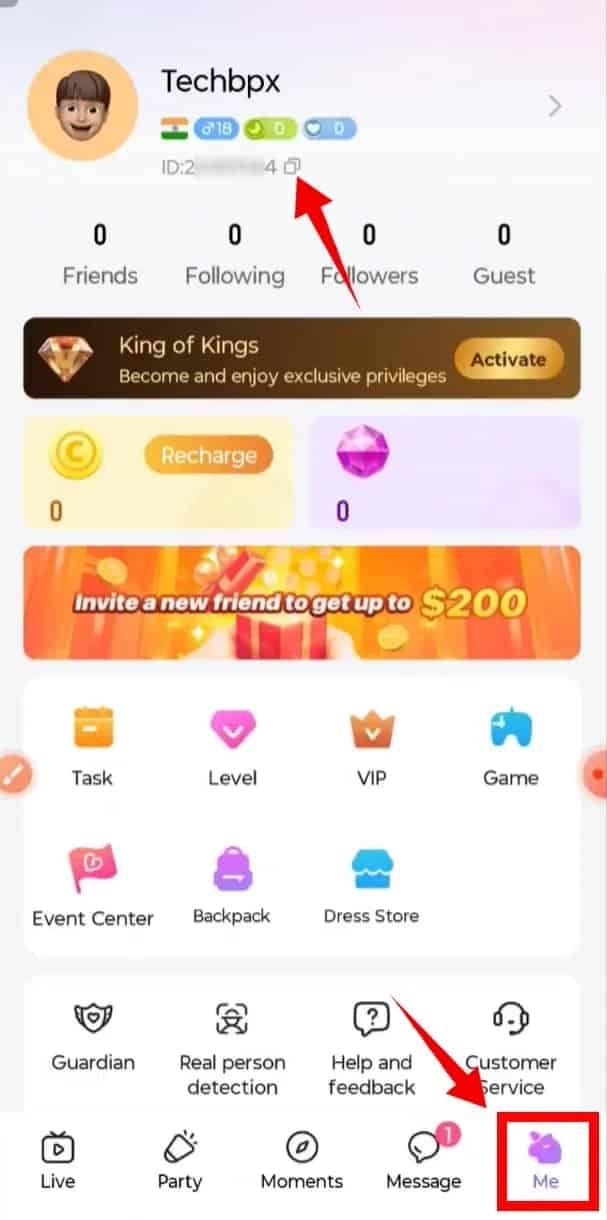
Always double-check the copied digits before submitting your order on ArcTopup to guarantee that your coins reach the correct profile.
Crush Live Coins: Features, Gifting, and Party Rooms
Coins are the core driver of interactivity in Crush Live. Having an available coin balance gives you access to multiple engagement features across broadcasts and community spaces.
Virtual Gifts and Streamer Support
Viewers use coins to send dynamic, animated gifts to their favorite hosts during live broadcasts. Gifting increases host popularity rankings, triggers celebratory on-screen effects, and boosts your viewer status on the channel leaderboard.
Private Video and Audio Calls
Crush Live allows users to connect directly with broadcasters through 1-on-1 private video and voice chat sessions. Initiating or extending these private interactions requires an active coin balance billed per session or minute.
Audio Party Rooms and Interactive Mini-Games
In multi-guest audio party rooms, coins allow you to take special microphone seats, distribute community gift boxes to multiple participants at once, and join interactive mini-games hosted by room moderators.
Profile Badges and Entrance Effects
Frequent spenders unlock customized avatar frames, chat text colors, and dynamic entrance banners that announce your arrival whenever you enter a live stream room.
| Feature | Coin Utility | Profile Impact |
|---|---|---|
| Virtual Gifts | Animated roses, luxury cars, custom effects | Improves host leaderboard position and viewer ranking |
| Private Calls | 1-on-1 direct video and voice communication | Unlocks direct communication with broadcasters |
| Party Rooms | Group gifting, mic privileges, in-room games | Grants higher visibility among room participants |
| VIP Effects | Special entry banners, frames, and badges | Distinguishes your account inside crowded live chats |
Secure Checkout: Why UID-Only Top-Up Keeps Your Account Safe
Account safety is a critical priority when buying digital currencies online. ArcTopup uses a direct UID recharge architecture designed to protect your personal information:
- No Passwords Requested: We never ask for your account password, email credentials, or phone verification codes.
- No Third-Party Logins: You do not need to link your Google, Apple, or social media accounts to our checkout.
- Zero Risk of Account Takeover: Because only your public UID is used to route the order, your account security remains under your control.
- Encrypted Payment Channels: All checkout transactions pass through encrypted payment processing systems that protect financial data.
- Transparent Live Pricing: Product prices and available options are updated directly on the live checkout interface with no hidden fees.
Troubleshooting Crush Live Recharge Delays and Errors
If your coins do not reflect immediately in your in-app wallet after completing a top-up on ArcTopup, review the following troubleshooting steps:
1. Refresh Your In-App Profile
Sometimes the Crush Live application caches account balances locally. Close the app completely from your device's app switcher and relaunch it. Check your profile wallet again to see if the balance has updated.
2. Verify Your Entered UID
Check your ArcTopup transaction confirmation receipt and compare the entered UID against the ID displayed on your Crush Live profile. If the digits do not match, the delivery was sent to the submitted UID.
3. Check Payment Status
Confirm that your payment was successfully debited from your card, e-wallet, or bank account. If the transaction is marked as pending by your payment provider, the recharge will finalize once the funds clear.
4. Contact ArcTopup Customer Support
If your payment cleared and your UID was entered correctly, but your balance has not updated after a short wait, reach out to ArcTopup support. Provide your order number, payment reference, and your Crush Live UID for prompt investigation and resolution.
Crush Live Top-Up Frequently Asked Questions
How to recharge on Crush Live using UID?
Select your desired coin package on the ArcTopup Crush Live page, type your numeric UID into the account field, select your payment method, and complete the payment. Your coins will be credited directly to your Crush Live account.
How do I find my Crush Live User ID (UID)?
Open the Crush Live app, tap the Profile icon in the bottom right corner, and locate the numeric ID displayed under your profile avatar and username. Tap the copy icon next to it to copy your UID.
Do I need to share my Crush Live account password to top up?
No. ArcTopup only requires your numeric UID. You should never share your account password, SMS verification codes, or login tokens with anyone.
What can I use Crush Live coins for?
Crush Live coins are used to send animated gifts to broadcasters, access 1-on-1 private video calls, participate in party room activities, and unlock dynamic profile badges and room entrance effects.
How long does it take for Crush Live coins to arrive after purchase?
Recharges are processed directly through automated digital delivery systems. In most cases, your coins update in your Crush Live balance shortly after payment confirmation.
What should I do if I entered the wrong UID during top up?
Top-up transactions are processed automatically based on the UID submitted at checkout. If an incorrect UID was entered, the delivery cannot be reversed if already completed. If you notice an error immediately before payment processing finishes, contact ArcTopup support right away with your order details.
Current packages and prices
Current base prices exclude Tax. Tax, payment fees and coupon adjustments are shown at checkout.
| Package | Price |
|---|---|
| 15000 | USD 1.40 |
| 20000 | USD 1.86 |
| 25000 | USD 2.33 |
| 50000 | USD 4.66 |
| 100000 | USD 9.32 |
| 500000 | USD 46.59 |
| 1000000 | USD 93.19 |
| 10000 | USD 0.93 |






























































