Pawa Live Top Up: Fast Voice Chat Coins Delivery
Pawa Live is a social entertainment and live audio platform where users interact in multi-guest voice chat rooms, watch live broadcasts, and build communities. Coins serve as the primary in-app currency, enabling you to send virtual gifts, activate premium entrance effects, customize your profile, and support your favorite room hosts.
A direct Pawa Live top up on ArcTopup provides an efficient way to keep your coin balance ready for every live stream and group chat. By using only your public user ID (UID), you can reload your account safely without sharing sensitive login details. Select your desired coin package, submit your UID, and complete your order to receive your coins directly in your Pawa Live account.
How to Top Up Pawa Live Coins Using Your UID
Recharging your Pawa Live coin balance on ArcTopup requires only a few steps. Follow this direct guide to place your order:
- Select Your Coin Package: Review the available coin denominations listed in the selection catalog on this page. Click on the package that matches your balance needs.
- Enter Your Pawa Live UID: Type your numeric Pawa Live user ID into the required UID field. Double-check the numbers to ensure accuracy.
- Choose a Payment Option: Select your preferred payment method from the checkout options available on the platform.
- Confirm and Pay: Review your order details and finalize your payment through the secure checkout screen.
- Check Your In-App Balance: Open the Pawa Live app, go to your profile or wallet tab, and verify that your new coin total is reflected.
How to Find Your Pawa Live UID
Your Pawa Live UID is a unique numeric identifier linked directly to your account. You need this number to direct your coin delivery accurately. Follow these steps inside the mobile app to find it:
- Launch the Pawa Live app on your mobile device.
- Ensure you are logged into the account you wish to recharge.
- Tap the Profile icon (labeled Me) located in the lower right corner of the screen.
- Look directly below your profile photo and nickname on the main profile screen.
- Locate the numeric code labeled ID or UID.
- Tap the copy icon next to your ID to copy the digits directly to your clipboard.
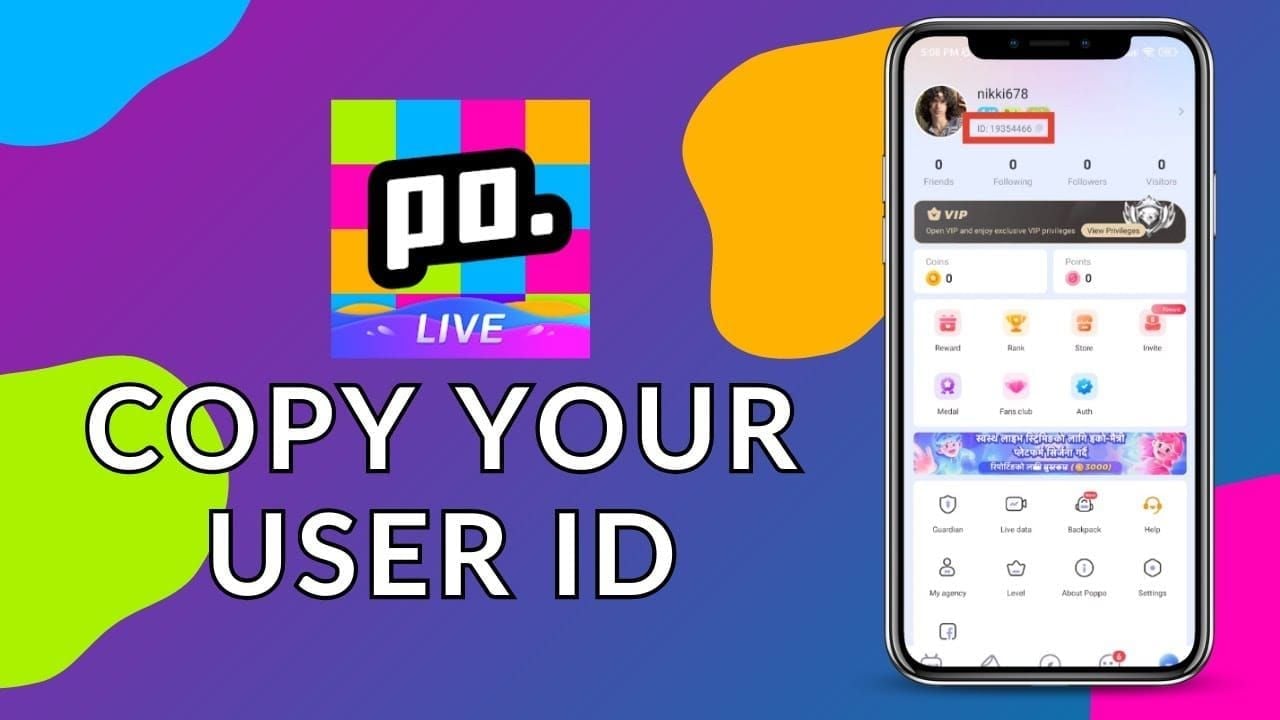
Copying the UID directly from your app reduces the chance of typos during checkout.
What You Can Purchase with Pawa Live Coins
Pawa Live coins grant access to interactive features across audio rooms and live streams:
- Animated Virtual Gifts: Send special gifts ranging from simple tokens of appreciation to full-screen 3D animations that reward broadcasters and elevate your standing in chat rooms.
- Entrance Vehicles and Special Effects: Display custom entry banners, arrival animations, and audio effects whenever you enter a popular voice room.
- VIP Badges and Avatar Frames: Customize your public profile with exclusive borders, title badges, and colored chat bubbles to stand out in active discussions.
- Host Battle Support (PK): Back your favorite creators during live PK competitions and seasonal community events by sending score-boosting items.
- Interactive Room Tools: Unlock custom audio clips, interactive room mini-games, and atmospheric soundboards to make group voice chats more engaging.
Safe and Secure UID Top Up Without Password Sharing
Protecting your personal data is essential when recharging digital currencies. ArcTopup uses a direct-to-UID delivery model that safeguards your personal account details:
- No Password Required: You never need to disclose your Pawa Live account password, connected social media credentials, or phone verification codes.
- Zero Third-Party Account Access: Because no external party logs into your profile, your account avoids security flags, suspicious location alerts, or unintended login lockouts.
- Data Privacy: Your personal messages, friend lists, and private account settings remain secure on your device.
Never share your login credentials or one-time SMS passwords with third-party sellers. ArcTopup processes all orders solely through your public UID.
Accepted Payment Methods and Delivery Process
ArcTopup provides a straightforward checkout system designed for buyers worldwide:
- Live Price Details: Current prices and available coin denominations are shown directly in the product selection panel above. What you select is what you pay at checkout.
- Multiple Payment Channels: Complete your purchase using globally recognized credit cards, regional digital wallets, or trusted local payment options available during checkout.
- Direct Digital Delivery: Once your payment clears, our automated system transfers the coins directly to the Pawa Live UID specified in your order. You do not need to manually redeem vouchers or enter coupon codes.
Troubleshooting Common Pawa Live Top Up Errors
If you complete a top up and do not see your updated balance right away, use the following checklist to resolve the issue:
- Restart the Application: Mobile apps often cache balance data. Force close Pawa Live and reopen it to trigger a fresh data sync with the server.
- Check Your Order Receipt: Review the order confirmation email from ArcTopup and verify that the UID you entered matches your in-app profile ID exactly.
- Confirm Payment Status: Check your payment provider or digital wallet to confirm that the transaction was processed successfully and not marked as pending.
- Verify Internet Connection: Switch between mobile data and Wi-Fi to ensure your app is communicating properly with Pawa Live servers.
- Contact Customer Support: If your balance does not update after taking these steps, reach out to ArcTopup customer support with your order number and UID for assistance.
Frequently Asked Questions
How do I find my Pawa Live UID for top up?
Open the Pawa Live app, tap the Me or Profile icon in the bottom right corner, and look right below your username and avatar. Your UID is the series of numbers displayed there. Tap the copy icon next to the number to copy it.
Do I need to give my Pawa Live password to recharge coins?
No. ArcTopup only requires your public Pawa Live UID to deliver coins. You should never share your account password, email login, or SMS verification codes.
How quickly will the coins appear in my Pawa Live account?
Coins are credited directly to your UID via automated processing shortly after your payment is successfully confirmed. In most cases, restarting the Pawa Live app will display your updated balance immediately.
What can I use Pawa Live coins for?
You can spend Pawa Live coins to send animated gifts to room hosts, purchase dynamic entrance effects, unlock profile frames, send premium chat messages, and support creators during live PK battles.
What happens if I enter the wrong UID during checkout?
Because digital coin deliveries to valid UIDs are processed automatically, orders delivered to an incorrect, active account cannot be reversed. Always double-check your UID before confirming payment. If you notice an error before the order completes, contact ArcTopup customer support immediately.
Can I recharge Pawa Live coins for a friend using their UID?
Yes. You can send coins to friends or favorite streamers by entering their Pawa Live UID in the input field during checkout. The coins will be delivered directly to their in-app balance once payment is finished.
Current packages and prices
Current base prices exclude Tax. Tax, payment fees and coupon adjustments are shown at checkout.
| Package | Price |
|---|---|
| Pawa Live - Pawa Live*20000 | USD 1.48 |
| Pawa Live - Pawa Live*25000 | USD 1.85 |
| Pawa Live - Pawa Live*50000 | USD 3.69 |
| Pawa Live - Pawa Live*100000 | USD 7.38 |
| Pawa Live - Pawa Live*500000 | USD 36.92 |
| Pawa Live - Pawa Live*1000000 | USD 73.84 |
| Pawa Live - Pawa Live*5000000 | USD 369.18 |
| Pawa Live - Pawa Live*15000 | USD 1.11 |






























































