
Pota Live Top Up: Quick & Secure Coin Recharge Online
Pota Live is an interactive live streaming and audio community platform where users connect through real-time voice chat rooms, talent broadcasts, and multiplayer group activities. To participate fully in the community, send virtual gifts to your favorite hosts, unlock exclusive chat room effects, and boost your profile level, you need Pota Live Coins.
ArcTopup provides a direct, secure channel to complete your Pota live top up without logging into your personal social accounts or revealing private credentials. By simply entering your numeric User ID (UID), you can select your preferred coin package and receive your balance directly in your app wallet.
What Are Pota Live Coins and How Are They Used?
Pota Live Coins serve as the primary in-app currency within the Pota Live ecosystem. When you recharge coins, you gain access to premium interaction features that enhance your streaming experience.
Key Uses for Pota Live Coins
- Virtual Gifting: Send animated 2D and 3D gifts to live streamers and audio room hosts to show support and climb the room contributor leaderboards.
- Interactive Voice Room Effects: Purchase room entry effects, custom chat bubbles, and spotlight frames to stand out in crowded audio lounges.
- Host PK Battles: Support your favorite broadcaster during competitive PK matches against other creators to help them secure victory.
- VIP Privilege Subscriptions: Activate exclusive status badges, special avatar frames, and priority seating in high-traffic party rooms.
- In-App Mini-Games & Events: Use coins to enter seasonal community events and community games hosted inside live audio channels.
| Feature / Usage | In-App Coin Benefit | User Impact |
|---|---|---|
| Live Stream Gifting | Sends animated gifts to hosts | Increases host popularity and your supporter rank |
| Audio Party Rooms | Unlocks mic frames and custom entrance banners | Distinguishes your profile in multi-guest voice chats |
| Creator PK Contests | Boosts live score during battle rounds | Helps hosts win seasonal platform rankings |
| VIP Profiles | Enables exclusive badges and color chat text | Gives profile visibility across public feeds |
Step-by-Step Guide: How to Top Up Pota Live Coins Online
Recharging your Pota Live account on ArcTopup is straightforward and requires only your numeric UID. Follow these steps to complete your order:
- Select Your Coin Package: Browse the available Pota Live coin denominations on the ArcTopup product page and choose the amount that fits your needs. Current coin amounts and total checkout costs are clearly displayed in real time.
- Enter Your Pota Live UID: Type your numeric User ID into the required account field. Double-check the digits against your profile page in the app.
- Select Your Payment Method: Pick from the available secure payment channels provided at checkout.
- Confirm and Pay: Review your order summary and complete the transaction through the secure payment gateway.
- Check Your In-App Balance: Open Pota Live, go to your profile or wallet tab, and verify that your updated coin balance is reflected.
How to Find Your Pota Live User ID (UID)
Your Pota Live User ID is a unique numeric identifier assigned to your account upon registration. Because ArcTopup uses direct UID routing, you do not need to share passwords or link third-party social accounts.
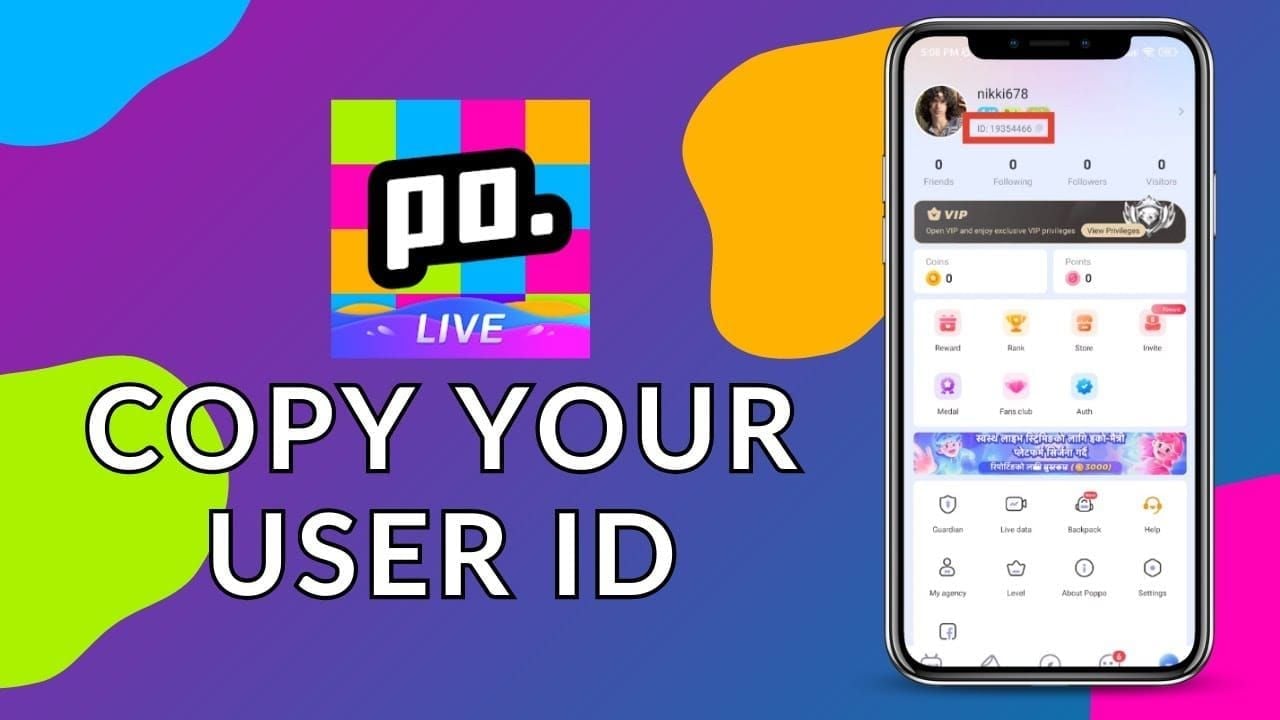
Steps to Locate Your Numeric UID:
- Open the Pota Live app on your mobile device.
- Tap the Profile / Me icon located in the bottom-right corner of the main screen.
- Look directly beneath your profile picture and display name at the top of the screen.
- Locate the label marked ID: followed by a sequence of numbers.
- Tap the Copy icon next to the number (or write down the digits carefully) to ensure 100% accuracy during checkout on ArcTopup.
Important Check: Make sure not to confuse your customized display name with your numeric UID. Only the numeric UID can route the coin balance to your specific account.
Safe & Fast UID Recharge: No Password Needed
Account safety is a major priority when buying digital currencies online. Traditional top-up methods that require account login credentials, verification codes, or linked Facebook/Google passwords expose users to security vulnerabilities.
Why Direct UID Top-Up Is Safer on ArcTopup:
- Zero Password Exposure: You never enter your password, recovery email, or phone number. Your account remains in your hands at all times.
- No 2-Factor Authentication Interruption: You do not need to generate temporary verification codes or disable two-factor security to receive coins.
- Send Coins to Any Account: Because only the UID is required, you can easily top up coins for friends, family members, or your favorite content creators as a surprise gift.
- Automated Processing: UID-based transactions route directly into the system, minimizing human error and ensuring clean delivery to the correct profile.
Supported Payment Methods for Pota Live Coin Purchases
ArcTopup supports a wide selection of regional and international payment methods, allowing you to complete your Pota Live coin recharge quickly and conveniently. Available options depend on your local billing region and can include:
- Credit and Debit Cards: Major international bank cards.
- E-Wallets: Popular digital wallets tailored for mobile-first transactions.
- Direct Online Banking / Local Bank Transfers: Secure local financial channels suited to specific territories.
- Regional Cash & QR Payment Systems: Instant QR-based and convenience payment rails.
Live pricing, local currency conversions, and available payment processors are calculated automatically on the checkout screen so you always know the exact total before confirming.
Troubleshooting Delivery Issues and Coin Balance Checks
In most instances, Pota Live coin top-ups process immediately once your payment is confirmed. If you experience a slight delay in viewing your coins, follow this troubleshooting workflow:
- Refresh the Pota Live App: Fully close the Pota Live application from your device app switcher and restart it. This forces the app to pull your latest balance from the server.
- Check Your In-App Wallet: Navigate to your Me / Profile page, tap on Wallet or My Coins, and confirm whether the transaction has registered.
- Verify Your Order Confirmation: Check your ArcTopup order status to ensure payment went through successfully.
- Review the Submitted UID: Check your purchase receipt to ensure that the UID entered matches your in-app profile ID exactly.
- Contact ArcTopup Customer Support: If your balance has not refreshed after completing the steps above, reach out to the ArcTopup customer support team with your ArcTopup Order ID, payment receipt, and Pota Live UID. Our support staff will trace the order status and assist you promptly.
Frequently Asked Questions About Pota Live Recharge
How do I find my Pota Live User ID (UID)?
Open the Pota Live app, tap the Me or Profile icon in the bottom right corner, and locate the numeric ID displayed under your profile avatar and display name. You can copy the digits directly by tapping the copy icon next to the number.
Do I need to share my Pota Live password to recharge coins?
No. ArcTopup only requires your numeric Pota Live UID. You never need to share passwords, SMS codes, or linked social media login credentials.
What are Pota Live Coins used for in the app?
Pota Live Coins are used to purchase virtual gifts for streamers, unlock animated entrance effects, activate VIP badges, participate in voice room games, and boost broadcasters during live PK competitions.
Can I recharge Pota Live Coins for a friend using their UID?
Yes. Because the top-up process only requires a valid numeric UID, you can enter your friend's Pota Live UID at checkout on ArcTopup, and the coins will be delivered directly to their profile.
What should I do if my Pota Live Coins are not credited immediately?
First, close and reopen the Pota Live app to refresh your account wallet. If the coins still do not appear, verify that the UID you entered was correct and contact ArcTopup customer support with your Order ID for rapid verification.
Which payment options are accepted for Pota Live top-up?
ArcTopup provides multiple payment channels, including major credit/debit cards, regional e-wallets, and local banking solutions. Check the checkout page to view the specific methods available for your region.
Current packages and prices
Current base prices exclude Tax. Tax, payment fees and coupon adjustments are shown at checkout.
| Package | Price |
|---|---|
| Pota live - Pota live*100000 | USD 2.27 |
| Pota live - Pota live*500000 | USD 11.37 |
| Pota live - Pota live*1000000 | USD 22.73 |
| Pota live - Pota live*5000000 | USD 113.67 |
| Pota live - Pota live*10000000 | USD 227.34 |
| Pota live - Pota live*50000 | USD 1.14 |






























































