
Hiya Coins Top Up: What Are Hiya Coins and How to Use Them
Hiya is an interactive voice chat, live streaming, and social gaming platform. Hiya Coins, also known as Hiya Gold Coins, serve as the primary premium virtual currency across the app. Purchasing Hiya Coins allows you to participate in community activities, support broadcasters, and unlock special account privileges.
Key ways to use your Hiya Coins include:- Sending animated virtual gifts to room hosts, broadcasters, and party room members.- Unlocking personalized profile frames, distinctive entrance effects, and chat bubbles.- Starting direct private chats and voice sessions with popular creators.- Participating in seasonal voice room events, lucky draws, and interactive mini-games.- Increasing your profile Wealth Level to gain chat badges and room prestige.
How to Top Up Hiya Coins on ArcTopup via UID
Refilling your Hiya account on ArcTopup is straightforward and requires only your public account ID. Follow these steps to complete your transaction:
- Select the desired Hiya Coins denomination from the available packages above.
- Enter your numerical Hiya User ID (UID) into the input field.
- Verify that the entered UID corresponds exactly to your in-app account.
- Select your preferred payment method and proceed to the checkout screen.
- Complete the payment. Your Hiya Coins will credit directly to your in-app balance once the transaction processes.
How to Locate Your Hiya User ID (UID)
Finding your Hiya UID takes only a few seconds inside the app on your mobile device. You do not need to link phone numbers or reveal account credentials to find it.
- Open the Hiya application on your iOS or Android device.
- Tap the Profile (or Me) icon located in the bottom-right corner of the main screen.
- Look directly beneath your profile photo and display name.
- Find the numerical sequence labeled ID or UID.
- Tap the copy icon next to the number to copy your UID directly to your clipboard.
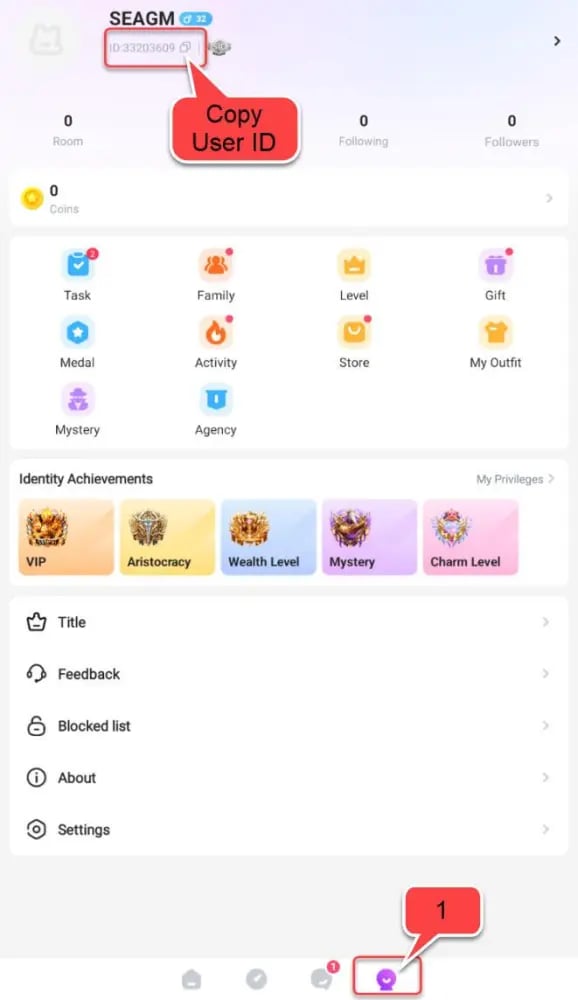
Paste this copied UID into the ArcTopup order field before submitting your order.
Hiya Virtual Gifts, Private Chats, and Profile Customization
Hiya Coins drive social interaction within the app's voice rooms and community channels. Gifting animated presents to room hosts triggers dynamic screen animations and community banners, showing appreciation for content creators and party hosts.
Coins also allow extensive customization for your account identity. You can purchase exclusive entrance vehicles that announce your arrival when you join a voice room, dynamic chat frames, and specialty profile tags. Coins can also be used to unlock direct messaging slots with other members, making private communication accessible.
Hiya Wealth Level and EXP Acceleration System
Every Hiya Coin you spend on gifts and in-room features awards Wealth Experience Points (EXP) to your profile. As your EXP accumulates, your account reaches higher Wealth Levels that display custom status icons next to your name.
| Wealth Tier | Key Features & Unlocks | EXP Method |
|---|---|---|
| Tier 1: Novice (Levels 1–10) | Standard gift animations, basic profile badges | 1 EXP per 1 Coin spent |
| Tier 2: Active (Levels 11–25) | Custom message bubbles, entry alert tags | In-room gifting and party activities |
| Tier 3: Elite (Levels 26–50) | Animated vehicle entrances, priority chat display | High-tier room gifting and event participation |
| Tier 4: VIP (Levels 51+) | Exclusive VIP badges, full-screen entry effects, special flair | Top-tier gifting and event rankings |
Higher Wealth Levels give you increased visibility across popular voice rooms, allowing other users and hosts to instantly recognize your active community standing.
Account Safety and Password-Free Top-Up Protection
ArcTopup processes all Hiya Coin recharges through direct UID verification. Your account security remains protected at all times:
- Zero Password Requirement: You only need to provide your public UID. ArcTopup will never ask for your account password, email access, or SMS verification codes.
- No Account Sharing: You do not need to log out or hand over your login credentials. Your account remains safely logged into your personal device.
- Safe Transaction Flow: Credits are processed through standard top-up interfaces, ensuring your account stays in full compliance with platform terms.
Regional Compatibility and Account Verification
Before finalizing your Hiya Coins recharge on ArcTopup, keep the following account details in mind:
- Active Account Status: Ensure your Hiya profile is active and in good standing. Inactive or banned accounts cannot receive coin refills.
- UID Accuracy: Always verify that your UID has no extra spaces or missing digits. Orders sent to a mistyped but valid UID cannot be reversed once processed.
- Live Checkout Pricing: Available coin denominations and regional pricing are clearly displayed on the checkout interface before you pay.
Order Processing and Delivery Troubleshooting
Top-ups are processed automatically after payment confirmation. If your coin balance does not update right away, follow these troubleshooting steps:
- Restart the Hiya App: Force-close the Hiya app completely from your device's app switcher and relaunch it.
- Check Your In-App Wallet: Navigate to your profile and open your Wallet or Coins section to trigger a manual balance refresh.
- Inspect In-App Notifications: Check your Hiya system messages for an automated delivery receipt.
- Verify Your Order Confirmation: Review the order receipt sent to your email to confirm that the UID entered matched your profile ID.
- Contact ArcTopup Support: If your balance has not updated after restarting the app, reach out to ArcTopup customer support with your Order ID and UID for assistance.
Frequently Asked Questions
What are Hiya Coins used for in the app?
Hiya Coins are used to purchase virtual animated gifts for voice room hosts, unlock custom avatar frames and vehicle entrance effects, send direct messages, join mini-games, and increase your profile Wealth Level.
What details do I need to provide to top up Hiya Coins?
You only need to provide your numerical Hiya User ID (UID). You do not need to provide your password, email, or phone verification codes.
Where can I find my Hiya User ID (UID)?
Open the Hiya app, tap the Profile (Me) tab in the bottom right corner, and find your numerical ID displayed beneath your avatar and display name. Tap the copy icon next to it to copy the UID.
Do I need to share my Hiya password to recharge coins?
No. ArcTopup recharges Hiya accounts strictly via UID. Never share your password or verification codes with anyone.
How long does it take for Hiya Coins to credit to my account?
Top-ups are processed automatically after payment is verified. Coins are delivered directly to your in-app wallet balance shortly after completing checkout.
What should I do if my Hiya Coins balance has not updated?
Force-close and reopen the Hiya app to refresh your wallet balance. If the coins do not display, verify the UID on your order confirmation receipt and contact ArcTopup customer support with your Order ID.
Are Hiya Coin top-ups restricted to specific regions?
Hiya Coin top-ups support active accounts across international server regions. Check the product selection menu on ArcTopup to view all currently supported denominations and localized pricing options.
Current packages and prices
Current base prices exclude Tax. Tax, payment fees and coupon adjustments are shown at checkout.
| Package | Price |
|---|---|
| 3,000 Hiya Coins | USD 2.91 |
| 5,000 Hiya Coins | USD 4.84 |
| 6,000 Hiya Coins | USD 5.81 |
| 9,000 Hiya Coins | USD 8.72 |
| 12,000 Hiya Coins | USD 11.62 |
| 15,000 Hiya Coins | USD 14.53 |
| 30,000 Hiya Coins | USD 29.05 |
| 50,000 Hiya Coins | USD 48.42 |
| 100,000 Hiya Coins | USD 96.84 |






























































