
SUGO Coins Top Up: What Are Coins and How Do They Work?
SUGO is an interactive voice chat and social party platform where users connect in live audio rooms, share discussions, play mini-games, and build online communities. SUGO Coins serve as the primary in-app virtual currency required to access premium social features, support room hosts, and customize your profile presence.
When you top up SUGO Coins, you can use them across multiple in-app functions:
- Virtual Gifting: Send animated gifts ranging from simple flowers to luxury vehicles and customized party animations to room hosts, speakers, or friends.
- Entrance Effects and Badges: Activate distinct room entry animations and badges that showcase your arrival in popular voice channels.
- VIP Progression: Accumulate gifting activity to advance your user wealth tier and VIP rank, which grants profile perks and exclusive chat bubble themes.
- Interactive Games: Participate in casual in-room entertainment and reward events hosted within public audio spaces.
Recharging your coin balance ensures uninterrupted access to voice party interactions, gifting battles, and special room celebrations.
How to Top Up SUGO Coins on ArcTopup
To recharge SUGO coins online quickly and securely, follow these simple steps on ArcTopup:
- Select Your Coin Package: Browse the available SUGO Coin denominations and pick the bundle that fits your gifting or social needs.
- Enter Your SUGO UID: Type your numeric SUGO User ID accurately into the required field.
- Select Payment Method: Choose from the available regional or global payment options listed during checkout.
- Review and Complete Payment: Confirm your UID and order details, then complete the transaction.
- Check Your In-App Balance: Once payment processing finishes, open the SUGO app to verify that your coins have been credited to your wallet balance.
How to Find Your SUGO User ID (UID)
Finding your numeric User ID in the SUGO app takes only a few seconds. Follow these steps to ensure you copy the correct account number:
- Open the SUGO app on your mobile device.
- Tap the Me or Profile icon located at the bottom-right corner of the main navigation bar.
- Locate your profile picture and display name at the top of the screen.
- Find the numeric ID displayed directly below your username.
- Tap the Copy icon next to your UID to copy the digits directly to your clipboard.
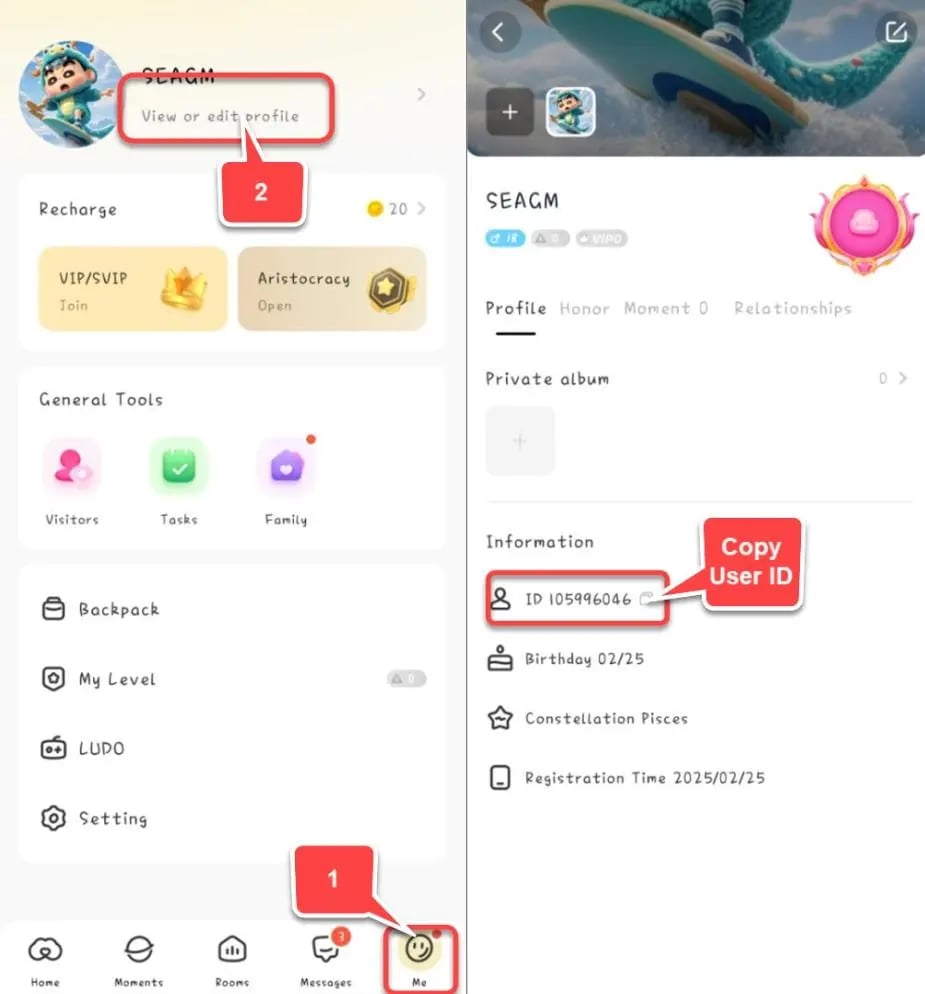
Always double-check your UID before finalizing an order to ensure your coins arrive directly in your account.
Why UID-Only SUGO Coins Recharge Is Safer
Protecting your private social account from security risks is essential when purchasing digital items online. ArcTopup uses a direct UID-only top-up system that provides major safety advantages over account-sharing methods.
| Security Feature | Direct UID Top Up on ArcTopup | Login / Password Sharing Services |
|---|---|---|
| Account Password Required | No | Yes (High Risk) |
| Personal Chat Privacy | Completely Protected | Exposed to third-party operators |
| Account Ban Risk | Zero (Compliant with direct API delivery) | High (Violates account sharing rules) |
| Payment Security | Encrypted checkout interface | Unverified manual transactions |
| Speed of Delivery | Direct automated crediting | Manual queue delays |
By requiring only your public numeric UID, ArcTopup removes the risk of compromised passwords, unauthorized account modifications, or personal privacy leaks.
SUGO Coin Bundles and Global Availability in 2026
In 2026, SUGO voice party communities span across diverse international regions. ArcTopup offers a full spectrum of coin packages designed to accommodate casual chatters and active room hosts alike.
| Package Category | Typical Use Case | In-App Benefits |
|---|---|---|
| Starter Bundles | Casual room visits and basic social greetings | Small interactive gifts, basic chat participation |
| Popular Bundles | Daily voice room interactions and regular host support | Medium animated gifts, room mini-games |
| VIP Bundles | Competitive gifting battles and room rankings | Premium entrance effects, VIP rank progression |
| Mega Bundles | Major party hosting, guild competitions, and top-tier events | Exclusive animated gifts, top-ranking room leaderboards |
Note: Current live prices, localized currencies, and promotional bundle rates are displayed directly on the ArcTopup checkout selector.
Troubleshooting: Handling Delays and In-App Verification
If your coins do not reflect immediately in your SUGO profile, use the following troubleshooting checklist to resolve the issue:
- Verify In-App Coin History: Open SUGO, go to your Me tab, open your Wallet, and review your Coin Transaction History. Deliveries often credit in the background before the main balance display updates.
- Restart the App: Force-close SUGO completely from your device's active app switcher and relaunch it to refresh your server connection.
- Check Your Submitted UID: Review your ArcTopup receipt to confirm that the numeric UID entered matches your actual SUGO account.
- Contact Support: If your balance has not updated after a short wait, prepare your ArcTopup Order ID and contact customer support for prompt status verification.
Frequently Asked Questions
How can I buy SUGO coins online?
You can buy SUGO coins on ArcTopup by selecting your preferred coin bundle, entering your numeric SUGO User ID (UID), and completing your purchase through the checkout screen. Your balance is credited directly to your profile.
How do I find my SUGO UID for a top-up?
Open SUGO, tap the Me profile tab in the bottom-right corner, and locate the numeric ID directly underneath your profile name and avatar. Tap the copy icon next to it to copy your UID accurately.
Do I need to share my SUGO password to recharge coins?
No. ArcTopup only requires your public numeric SUGO UID. You should never share your password, phone number, or verification codes with any third-party top-up service.
Can I recharge my SUGO coins online from anywhere in the world?
Yes. ArcTopup supports global recharge for SUGO users across multiple regions, allowing you to top up using international and local payment solutions.
How long does it take for SUGO Coins to arrive after payment?
Coin orders processed through ArcTopup are sent directly to the SUGO server. In most cases, coins appear in your in-app wallet immediately after your payment is confirmed.
What can I do with SUGO Coins in the app?
SUGO coins let you send animated gifts to room hosts, trigger custom room entrance banners, raise your VIP wealth level, unlock exclusive chat frames, and join interactive social room activities.
What should I do if I entered the wrong UID during top-up?
Because digital top-up transactions are processed automatically to the provided UID, balance transfers to incorrect accounts cannot be reversed once completed. Always verify every digit of your UID before submitting payment. If the transaction has not yet been processed, contact ArcTopup customer support immediately with your order details.
Current packages and prices
Current base prices exclude Tax. Tax, payment fees and coupon adjustments are shown at checkout.
| Package | Price |
|---|---|
| 1200 Coins | USD 0.71 |
| 2400 Coins | USD 1.43 |
| 6250 Coins | USD 3.67 |
| 12500 Coins | USD 7.34 |
| 37500 Coins | USD 22.04 |
| 65000 Coins | USD 37.34 |
| 130000 Coins | USD 74.71 |






























































