Find your UID in 10 seconds and finish your Haikyu Fly High recharge for Diamonds on any server without hitting region-locked payment errors.
Why Global Players Get Blocked and Why UID Recharge Fixes It
HAIKYU!! FLY HIGH is a team strategy volleyball RPG published by Garena International II where Star Gems and Diamonds are the currencies for recruit tickets and packs. Almost everything you want — Ultra Recruit tickets, Memory shards, limited bundles — costs those currencies.
The native store blocks you. Play JP or SEA from outside the region and your card declines, your wallet says not supported, or the price shows in yen and still fails at checkout. The mismatch is simple: account region and payment region don't line up. Happens on iOS and Android the same way.
A haikyu fly high top up by UID skips the app store. Paste your Player ID, pick the server, pay with a local method, Diamonds land on that account. No store switch. No VPN.
Listings split two ways: message-a-seller after payment, or instant UID credit. For a gacha where you want the pull now, the second is the only one I use — it credits directly and leaves a clear order record.

Memory Recruit Special I
 Memory Recruit Special IUSD 0.81Buy Now
Recruit Ticket x1
Recruit Ticket x1USD 0.65Buy NowStarter Pack
Starter PackUSD 0.70Buy NowUltra Recruit Special I
Ultra Recruit Special IUSD 0.81Buy NowUltra Recruit Ticket x1
Ultra Recruit Ticket x1USD 0.65Buy Now60 Star Gems
60 Star GemsUSD 0.71Buy NowStamina Boost Pack I
Stamina Boost Pack IUSD 1.61Buy NowMemory Recruit Special II
Memory Recruit Special IIUSD 4.03Buy NowStamina Boost Pack II
Stamina Boost Pack IIUSD 4.03Buy NowUltra Recruit Special II
Ultra Recruit Special IIUSD 4.03Buy NowRecruit Ticket x5
Recruit Ticket x5USD 3.25Buy NowUltra Recruit Ticket x2
Ultra Recruit Ticket x2USD 3.25Buy Now300 Star Gems
300 Star GemsUSD 3.60Buy NowFirst Cheer Bundle
First Cheer BundleUSD 4.91Buy NowLevel Up Bonus Pack
Level Up Bonus PackUSD 7.63Buy NowMemory Recruit Special III
Memory Recruit Special IIIUSD 8.09Buy NowUltra Recruit Special III
Ultra Recruit Special IIIUSD 8.09Buy NowRecruit Ticket x10
Recruit Ticket x10USD 8.45Buy NowUltra Recruit Ticket x3
Ultra Recruit Ticket x3USD 8.45Buy NowMemory Recruit Special IV
Memory Recruit Special IVUSD 12.13Buy NowUltra Recruit Special IV
Ultra Recruit Special IVUSD 12.13Buy Now980 Star Gems
980 Star GemsUSD 10.84Buy NowFirst Memory Bundle
First Memory BundleUSD 17.67Buy NowFirst Growth Bundle
First Growth BundleUSD 21.22Buy NowRecruit Ticket x20
Recruit Ticket x20USD 19.53Buy NowUltra Recruit Ticket x4
Ultra Recruit Ticket x4USD 19.53Buy Now1980 Star Gems
1980 Star GemsUSD 21.68Buy NowRecruit Ticket x30
Recruit Ticket x30USD 32.53Buy NowUltra Recruit Ticket x5
Ultra Recruit Ticket x5USD 32.53Buy Now3280 Star Gems
3280 Star GemsUSD 36.14Buy NowRecruit Ticket x55
Recruit Ticket x55USD 65.08Buy NowUltra Recruit Ticket x6
Ultra Recruit Ticket x6USD 65.08Buy Now6480 Star Gems
6480 Star GemsUSD 72.30Buy Now
How to Find Your Haikyu Fly High UID in 10 Seconds
Your Player ID is the only number that matters. Not nickname. Not team name.
- Log in to the correct server. Check the login screen banner — JP, SEA, or Global — before you tap start.
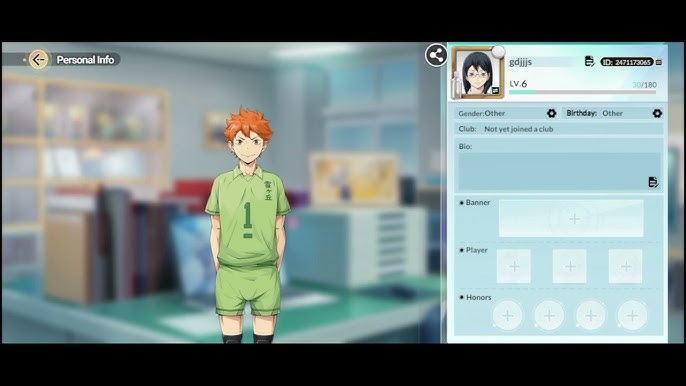
- On the main lobby, tap the Avatar icon in the top-left corner.
- Your Player ID shows on that profile card. Tap copy. It is a string of numbers.
- Paste it into Notes and double-check. One wrong digit sends the Diamonds elsewhere.
Copy errors I see most: grabbing the display name with special characters, leaving a trailing space, or pulling the UID from the wrong server account. I screenshot the profile after copying — proof of ID and server in one image.
Run two accounts for rerolls? Label them. The game switches accounts fast, which is exactly when the wrong UID gets pasted.
How to Complete Your Haikyu Fly High Diamonds Top Up Step by Step
The flow I use for a haikyu fly high diamonds top up takes about a minute once you have the UID.
- Step 1: Select your server and paste your Player ID. The system usually shows your nickname for confirmation — verify it matches.
- Step 2: Choose the pack. Diamonds and Star Gems buy recruit tickets and bundles, so pick the amount that matches the pack you plan to buy in-game.
- Step 3: Pick payment. Wallets like GCash, GrabPay, PayMaya, and ShopeePay set their own region rules, and card networks require 3DS OTP verification for many cross-border charges. If a method does not appear for your country, that is the wallet or card network blocking it, not the game.
- Step 4: Confirm the total on the checkout page. Most reputable stores show the final amount, fees, and currency before you pay — review it.
- Step 5: Pay and check your mailbox in-game. Relog if the balance does not update immediately.
Step 1 deserves the extra second. A haikyu fly high recharge credited to the wrong UID can't be pulled back yourself. To see live pack options and totals before you commit, check current Diamonds bundles on the dedicated Haikyu Fly High top up page and confirm your UID on that checkout screen. Buy Diamonds first, then buy the Recruit ticket bundle inside the game — that keeps any bonus Diamonds free for the next banner instead of locked to one ticket pack.
How Much Do Star Gems and Recruit Packs Cost Right Now?
Prices move by region and by store, so treat any number you see elsewhere as a reference. For current pricing, always check the live product page.
Public listings observed in August 2026 give a useful baseline for Star Gems:
| Pack | Listed Price | Note |
|---|---|---|
| 60 Star Gems | ₱60.5 | Reference listing, August 2026 |
| 6480 Star Gems | ₱6,160.86 | Reference listing, August 2026 |
Small top-ups cover a daily pull, while the 6480 bundle lowers the per-Gem cost (divide price by Gems to compare). I only grab 60 when I need one ten-pull to pity.
Recruit specials were listed separately from raw Gems and are worth comparing if you only want pulls:
| Pack | Listed Price | Note |
|---|---|---|
| Ultra Recruit Special 1 | ₱54.9 | Reference listing, August 2026 |
| Memory Recruit Special 2 | ₱276.73 | Reference listing, August 2026 |
| Ultra Recruit Ticket 6 | ₱5,545.79 | Reference listing, August 2026 |
To judge ticket value, divide the ticket pack price by the pulls it gives and compare that to the Gem cost for the same pulls — whichever is lower wins for that banner.
One more quirk: some regional point-card systems only sell fixed denominations like 30, 90, 450, and 1490 points. That is a point-card provider rule, not a store rule, which is why UID recharge with flexible amounts feels easier than hunting a card that matches your pack.
Which Pack Should You Actually Buy? My Tiered Picks
I split buys by how deep I am on a banner.
F2P or light spender: Redeem gift codes first — codes like THEADVISOR, MARFLYHIGH, and FLYHIGHNOW have granted gems and tickets in the past, entered via the gear icon in the top-left and the gift code button. Then, if you need one more multi, Ultra Recruit Special 1 at the low price point is the most efficient single buy. Skip the 6480 bundle here.
Mid spender chasing a specific SSR: Pair a small Gem pack with a targeted ticket bundle. Example: 60 Star Gems for the daily discounted pull plus Memory Recruit Special 2 if you are building memories for your core six. This keeps you under the point-card traps and avoids overbuying Gems that expire with the banner. You can compare the mid-range value on the fast Haikyu Fly High recharge option to see which combo hits your pull target.
Heavy spender or pity guarantee: Go raw Gems. The 6480 Star Gems bundle and larger ticket bundles like Ultra Recruit Ticket 6 fit players who will pity and then spark. Raw Gems let you pivot between Ultra Recruit and Memory banners without being stuck with the wrong ticket type.
If you still have free pulls banked from early missions, the second and third copies of a ticket bundle add less — I stop at the first special unless I'm committed to pity for constellations.
Safe vs Scam: What a Legit Top Up Will (and Won't) Ask For
Legit stores need three things. Scams ask for the rest.
A legitimate haikyu fly high recharge asks for: - Your Player ID and server selection - The pack you want - Payment on a checkout page where the wallet or card network handles verification
A scam asks for: - Your game password, email login, or 2FA/OTP code - To log in for you, screen-share, or install remote tools - Payment outside the checkout, like a direct transfer to a personal account
I never give my password for currency — no real recharge needs it. If a page asks for your game password or email OTP, close it. If someone says you must message them privately to release Gems after payment, that's not a direct top-up, that's a peer trade with extra risk.
FAQ
Where can I find my Player ID for Haikyu Fly High top-ups?
Log in and tap the Avatar icon in the top-left corner of the main screen. Your Player ID appears on the profile card and you can copy it directly. Paste it without spaces and confirm the nickname matches before paying.
How do I redeem gift codes in Haikyu Fly High?
Open the settings menu via the gear icon in the top-left corner and select the gift code button. Enter the code exactly as shown — codes are case-sensitive — and check your in-game mail. Past working codes have included THEADVISOR, MARFLYHIGH, FLYHIGHNOW, and SPIKE4WIN, which gave items like gold, potential essence, gems, and tickets.
Are there region locks when paying?
Yes. Available methods vary by location, and you must select the correct region and channel on the payment page. Wallets like GCash, GrabPay, PayMaya, and ShopeePay, plus card networks that require 3DS OTP, enforce those rules. If your usual card fails, try a local wallet that your region actually supports.
What currencies and items are used in Haikyu Fly High?
Star Gems and Diamonds are the premium currencies used to acquire high-value packs, character shards, and recruitment tickets. You spend them on Ultra Recruit and Memory Recruit banners to pull characters and memories. Check the in-game shop for the exact pack contents before you buy.
What if my Diamonds don't show up after a haikyu fly high diamonds top up?
First, confirm you pasted the correct UID and selected the right server. Then relog and check mail — some packs deliver there. If it is still missing, keep your order number and the UID screenshot and contact the store's support with both.
Can I use one UID recharge for a different server account?
No. The UID is tied to one server. If you play on both JP and SEA, each account has its own ID. You must run a separate recharge for each server and double-check the server toggle before you confirm payment.
My Verdict: The Recharge Setup I Use Now
Copy the UID from the Avatar menu. Buy Diamonds by UID instead of fighting the native store. Only buy the smallest ticket special unless I'm committed to pity.
That flow hasn't hit a region error for me and keeps spend tied to the banner I actually want. If you're ready to pull, verify your UID once more and review live pricing on the official Haikyu Fly High diamonds top up store so you see the final total for your server before you pay. Get the UID right, buy the pack that matches your tier, and save the rest for the next banner.






Comments