Free Fire Top Up Using Your Player UID
Topping up your Free Fire account with diamonds gives you direct access to the latest weapon skins, character bundles, Booyah Pass rewards, and exclusive in-game events. ArcTopup provides a direct recharge system that processes your order using only your in-game Player UID.
You never need to share sensitive account login details, social media credentials, or passwords. Simply select your preferred diamond denomination, enter your numeric Free Fire UID, and complete your purchase through our secure payment gateway. Your diamonds are delivered straight to your account balance so you can jump back into the battle royale without delay.
How to Top Up Free Fire Diamonds on ArcTopup
Refilling your diamond balance takes just a few clicks. Follow this step-by-step guide to complete your recharge:
- Select Your Diamond Package: Choose the diamond denomination you want to add to your account from the live catalog above.
- Enter Your Free Fire UID: Input your numeric Player ID into the designated UID field. Double-check your numbers to ensure accurate delivery.
- Proceed to Checkout: Click the purchase button to view all available local and international payment options with real-time pricing.
- Complete the Transaction: Follow the instructions on the screen to finalize your payment through our encrypted checkout.
- Verify In-Game Balance: Open the Free Fire app on your device, check the top diamond counter on the home screen, and start unlocking your rewards.
Where to Find Your Free Fire Player UID in the App
Your Free Fire Player UID is a unique sequence of numbers assigned to your account. ArcTopup uses this identifier to credit diamonds directly without accessing your profile login.
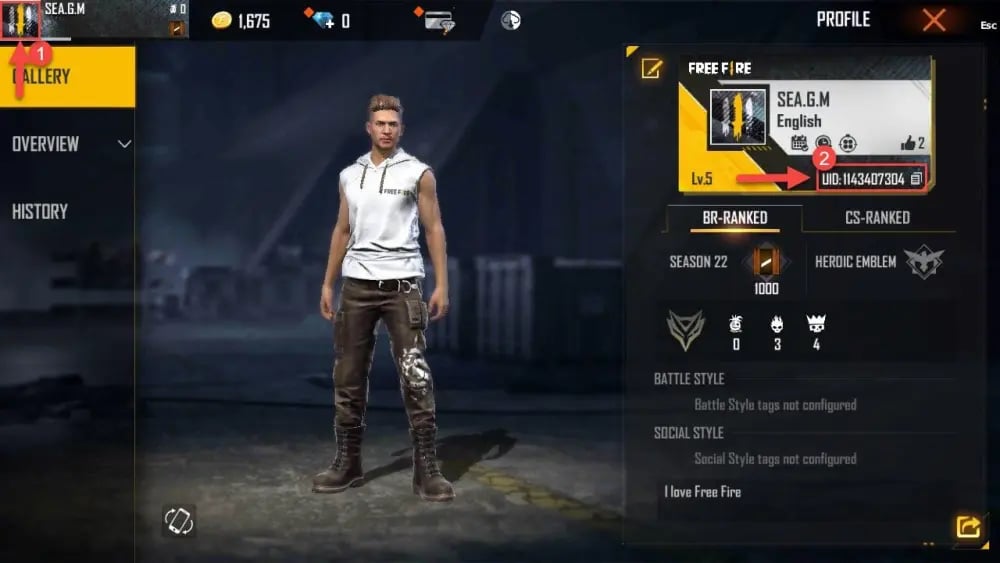
To locate your Player UID quickly:
- Launch the Free Fire application on your mobile device or emulator.
- Tap your Profile Banner / Avatar located in the top-left corner of the main lobby screen.
- Stay on the Basic Info tab (the default profile overview screen).
- Locate your UID displayed below your in-game nickname on the left side of the profile card.
- Tap the small Copy Icon next to the numeric UID to copy it directly to your clipboard, preventing manual typos.
Free Fire Diamond Packages and In-Game Utility
Diamonds are the premium currency in Free Fire. Having an active diamond balance allows you to participate in limited-time events and customize your battle experience.
| Diamond Utility | What You Can Unlock |
|---|---|
| Booyah Pass | Monthly seasonal tiers, exclusive outfits, vehicle skins, and custom emotes |
| Weapon Royale & Incubator | Upgradable gun skins featuring enhanced damage, fire rate, and reload attributes |
| Character & Pet Unlocks | Unique active/passive survival skills and companion bonuses |
| Luck Royale Spins | Rare legendary bundles, weapon crates, and token exchange rewards |
| Store Cosmetics | Parachutes, surfboards, loot crates, name change cards, and room cards |
All package pricing, regional currency rates, and bonus diamond offers are calculated dynamically on the live ArcTopup checkout page.
Passwordless Top-Up Safety: Why ArcTopup Only Requests Your UID
Account safety is the top priority for every player. Traditional top-up methods that demand social account logins (such as Facebook, Google, VK, or Twitter) expose your account to potential security breaches, credential leaks, and platform suspensions.
ArcTopup operates strictly on a passwordless UID injection protocol:
- Zero Password Requirements: We never ask for your email, login password, or two-factor authentication codes.
- Official Server Delivery: Transactions credit diamonds directly to your account ID via standard game distribution systems.
- No Risk of Account Sharing Penalties: Because no third party logs into your profile from another location or device, your account remains 100% compliant with standard terms of service.
- Privacy Protection: Your personal credentials stay strictly with you on your private device.
Supported Payment Methods and Live Order Processing
ArcTopup supports a wide selection of payment channels to ensure quick transactions worldwide. Depending on your region, you can complete your Free Fire diamond purchase using:
- Major credit and debit cards
- Local e-wallets and direct mobile banking
- Instant bank transfer services
- Regional cash payment counters and localized digital payment networks
All real-time totals, local currency conversions, and processing details appear clearly on the checkout screen before you confirm payment. Transactions are processed instantly through encrypted channels to push diamonds to your game account without manual delays.
Troubleshooting Missing or Delayed Free Fire Diamond Deliveries
While most recharges reflect immediately, occasional server sync delays can happen during major game updates or peak event hours. If your diamonds have not appeared in your balance, use the following checklist:
- Restart the Game App: Completely close Free Fire from your device's recent apps menu and restart it to refresh your server connection.
- Check In-Game Mail: Some event rewards or bonus items accompanying top-ups are sent straight to your in-game mailbox instead of the top counter.
- Verify Your UID Input: Check your ArcTopup receipt to confirm that the UID entered matches your in-game profile ID.
- Check Regional Server Locks: Ensure your game account region matches the purchase region requirements if applicable.
- Contact ArcTopup Support: If your balance does not update after 10–15 minutes, reach out to customer support with your Order ID and UID for instant verification.
Frequently Asked Questions
How do I top up Free Fire diamonds using only my UID?
Select your diamond bundle on ArcTopup, paste your numeric Free Fire UID into the input box, and proceed to checkout. Once your payment clears, the diamonds will be credited directly to your account balance without requiring any account login.
Where can I find my Free Fire Player ID inside the game?
Open Free Fire and tap your avatar banner in the top-left corner of the lobby. Under the "Basic" tab, your numeric UID is displayed right next to your username. Use the copy button beside the number to copy it accurately.
Do I need to share my Garena password or Facebook login to recharge?
No. ArcTopup never asks for passwords, linked Google credentials, Facebook logins, or VK access. All recharges are completed securely using only your numeric Player UID.
How long does it take for Free Fire diamonds to arrive in my account?
Diamonds are processed automatically through direct delivery systems. In most cases, the currency appears in your in-game balance within moments after your payment is confirmed.
What should I do if I entered the wrong UID or diamonds are delayed?
If you realize an incorrect UID was entered, contact customer support immediately with your transaction receipt. If your UID was correct but the diamonds are delayed, restart your game app or wait a few minutes for server synchronization.
Can I top up Free Fire diamonds for a friend using their Player UID?
Yes. Because ArcTopup only requires a Player UID, you can send diamonds to friends or guildmates. Simply enter their numeric Free Fire UID in the player field and complete the checkout.
Current packages and prices
Current base prices exclude Tax. Tax, payment fees and coupon adjustments are shown at checkout.
| Package | Price |
|---|---|
| LATAM-Loot Box - Boxed Burger | USD 1.32 |
| LATAM-Grenade - Burger Bang | USD 1.32 |
| LATAM-Weekly Membership | USD 1.81 |
| LATAM-341 Diamonds | USD 1.87 |
| LATAM-Gloo Wall - Burger Bang | USD 1.94 |
| LATAM-Backpack - Strapped Sub | USD 1.94 |
| LATAM-572 Diamonds | USD 3.12 |
| LATAM-Booyah Pass Card | USD 3.20 |
| LATAM-1166 Diamonds | USD 5.73 |
| LATAM-Monthly Membership | USD 8.65 |
| LATAM-2398 Diamonds | USD 11.38 |
| LATAM-6160 Diamonds | USD 28.97 |
| Europe-100 Diamonds | USD 0.94 |
| Europe-Weekly Membership | USD 1.58 |
| Europe-310 Diamonds | USD 2.80 |
| Europe-520 Diamonds | USD 4.65 |
| Europe-Monthly Membership | USD 7.42 |
| Europe-1060 Diamonds | USD 9.30 |
| Europe-2180 Diamonds | USD 18.58 |
| Europe-5600 Diamonds | USD 44.38 |
| Middle East-110 Diamonds | USD 0.84 |
| Middle East-231 Diamonds | USD 1.68 |
| Middle East-583 Diamonds | USD 4.18 |
| Middle East-1188 Diamonds | USD 8.32 |
| Middle East-2420 Diamonds | USD 16.63 |
| Thailand-172 Diamond | USD 1.36 |
| Thailand-Weekly | USD 1.83 |
| Thailand-310 Diamonds | USD 2.42 |
| Thailand-517 Diamond | USD 4.04 |
| Thailand-690 Diamond | USD 5.24 |
| Thailand-Montlhy Pass | USD 7.76 |
| Thailand-1052 Diamond | USD 7.85 |
| Thailand-1801 Diamond | USD 13.08 |
| Thailand-3698 Diamond | USD 26.15 |
| Malaysia/Singapore-Weekly Membership | USD 1.45 |
| Malaysia/Singapore-Evo Access 30D | USD 2.09 |
| Malaysia/Singapore-310 Diamonds | USD 2.51 |
| Malaysia/Singapore-520 Diamonds | USD 4.19 |
| Malaysia/Singapore-Monthly Membership | USD 7.07 |
| Malaysia/Singapore-1060 Diamonds | USD 8.24 |
| Malaysia/Singapore-2180 Diamonds | USD 16.64 |
| Malaysia/Singapore-5600 Diamonds | USD 41.18 |
| Malaysia/Singapore-11500 Diamonds | USD 84.81 |
| Indonesia-120 Diamonds | USD 0.87 |
| Indonesia-140 Diamonds | USD 0.91 |
| Indonesia-125 Diamonds | USD 0.92 |
| Indonesia-130 Diamonds | USD 0.97 |
| Indonesia-145 Diamonds | USD 1.03 |
| Indonesia-150 Diamonds | USD 1.07 |
| Indonesia-160 Diamonds | USD 1.17 |
| Indonesia-170 Diamonds | USD 1.26 |
| Indonesia-210 Diamonds | USD 1.33 |
| Indonesia-190 Diamonds | USD 1.36 |
| Indonesia-180 Diamonds | USD 1.36 |
| Indonesia-200 Diamonds | USD 1.46 |
| Indonesia-Weekly Membershio | USD 1.46 |
| Indonesia-230 Diamonds | USD 1.65 |
| Indonesia-280 Diamonds | USD 1.76 |
| Indonesia-260 Diamonds | USD 1.85 |
| Indonesia-250 Diamonds | USD 1.85 |
| Indonesia-300 Diamonds | USD 2.13 |
| Indonesia-BP Card | USD 2.19 |
| Indonesia-355 Diamonds | USD 2.21 |
| Indonesia-350 Diamonds | USD 2.42 |
| Indonesia-360 Diamonds | USD 2.48 |
| Indonesia-375 Diamonds | USD 2.62 |
| Indonesia-405 Diamonds | USD 2.81 |
| Indonesia-400 Diamonds | USD 2.86 |
| Indonesia-425 Diamonds | USD 2.91 |
| Indonesia-420 Diamonds | USD 2.95 |
| Indonesia-455 Diamonds | USD 3.20 |
| Indonesia-475 Diamonds | USD 3.29 |
| Indonesia-495 Diamonds | USD 3.38 |
| Indonesia-512 Diamonds | USD 3.54 |
| Indonesia-510 Diamonds | USD 3.54 |
| Indonesia-515 Diamonds | USD 3.58 |
| Indonesia-520 Diamonds | USD 3.64 |
| Indonesia-545 Diamonds | USD 3.77 |
| Indonesia-565 Diamonds | USD 3.88 |
| Indonesia-600 Diamonds | USD 4.22 |
| Indonesia-635 Diamonds | USD 4.37 |
| Indonesia-Monthly Membership | USD 4.38 |
| Indonesia-720 Diamonds | USD 4.41 |
| Indonesia-645 Diamonds | USD 4.46 |
| Indonesia-655 Diamonds | USD 4.55 |
| Indonesia-710 Diamonds | USD 4.84 |
| Indonesia-725 Diamonds | USD 4.89 |
| Indonesia-700 Diamonds | USD 4.89 |
| Indonesia-740 Diamonds | USD 5.04 |
| Indonesia-770 Diamonds | USD 5.23 |
| Indonesia-790 Diamonds | USD 5.33 |
| Indonesia-800 Diamonds | USD 5.43 |
| Indonesia-820 Diamonds | USD 5.62 |
| Indonesia-840 Diamonds | USD 5.72 |
| Indonesia-860 Diamonds | USD 5.81 |
| Indonesia-1000 Diamonds | USD 6.17 |
| Indonesia-910 Diamonds | USD 6.19 |
| Indonesia-930 Diamonds | USD 6.30 |
| Indonesia-925 Diamonds | USD 6.35 |
| Indonesia-1050 Diamonds | USD 7.16 |
| Indonesia-1075 Diamonds | USD 7.26 |
| Indonesia-1060 Diamonds | USD 7.26 |
| Indonesia-1080 Diamonds | USD 7.31 |
| Indonesia-1125 Diamonds | USD 7.65 |
| Indonesia-1145 Diamonds | USD 7.74 |
| Indonesia-1200 Diamonds | USD 8.18 |
| Indonesia-1215 Diamonds | USD 8.24 |
| Indonesia-1450 Diamonds | USD 8.82 |
| Indonesia-1300 Diamonds | USD 8.86 |
| Indonesia-1440 Diamonds | USD 9.68 |
| Indonesia-1490 Diamonds | USD 10.07 |
| Indonesia-1510 Diamonds | USD 10.16 |
| Indonesia-1580 Diamonds | USD 10.66 |
| Indonesia-1795 Diamonds | USD 12.15 |
| Indonesia-1800 Diamonds | USD 12.20 |
| Indonesia-1875 Diamonds | USD 12.58 |
| Indonesia-2020 Diamonds | USD 13.18 |
| Indonesia-2180 Diamonds | USD 13.23 |
| Indonesia-1975 Diamonds | USD 13.36 |
| Indonesia-2000 Diamonds | USD 13.51 |
| Indonesia-2005 Diamonds | USD 13.55 |
| Indonesia-2100 Diamonds | USD 13.64 |
| Indonesia-2140 Diamonds | USD 13.92 |
| Indonesia-2160 Diamonds | USD 13.97 |
| Indonesia-2190 Diamonds | USD 14.06 |
| Indonesia-2200 Diamonds | USD 14.16 |
| Indonesia-2210 Diamonds | USD 14.25 |
| Indonesia-2225 Diamonds | USD 14.38 |
| Indonesia-2280 Diamonds | USD 14.72 |
| Indonesia-2350 Diamonds | USD 15.17 |
| Indonesia-2355 Diamonds | USD 15.23 |
| Indonesia-2400 Diamonds | USD 15.46 |
| Indonesia-2575 Diamonds | USD 16.67 |
| Indonesia-2720 Diamonds | USD 17.65 |
| Indonesia-2750 Diamonds | USD 17.74 |
| Indonesia-3000 Diamonds | USD 19.37 |
| Indonesia-3310 Diamonds | USD 21.37 |
| Indonesia-3640 Diamonds | USD 22.05 |
| Indonesia-3620 Diamonds | USD 23.27 |
| Indonesia-3675 Diamonds | USD 23.60 |
| Indonesia-3800 Diamonds | USD 24.39 |
| Indonesia-4000 Diamonds | USD 25.65 |
| Indonesia-4050 Diamonds | USD 26.02 |
| Indonesia-5500 Diamonds | USD 35.33 |
| Indonesia-5600 Diamonds | USD 35.98 |
| Indonesia-6000 Diamonds | USD 38.55 |
| Indonesia-6480 Diamonds | USD 41.66 |
| Indonesia-6550 Diamonds | USD 41.99 |
| Indonesia-7290 Diamonds | USD 44.18 |
| Indonesia-6900 Diamonds | USD 44.27 |
| Indonesia-7295 Diamonds | USD 46.62 |
| Indonesia-7310 Diamonds | USD 46.76 |
| Indonesia-7340 Diamonds | USD 46.94 |
| Indonesia-7360 Diamonds | USD 47.03 |
| Indonesia-7430 Diamonds | USD 47.50 |
| Indonesia-7645 Diamonds | USD 48.90 |
| Indonesia-7650 Diamonds | USD 48.94 |
| Indonesia-8010 Diamonds | USD 51.23 |
| Indonesia-8730 Diamonds | USD 55.88 |
| Indonesia-9290 Diamonds | USD 59.65 |
| Indonesia-9800 Diamonds | USD 62.78 |
| Indonesia-14580 Diamonds | USD 93.13 |
| Brazil-310 + 31 Bonus Diamonds | USD 2.12 |
| Brazil-520 + 52 Bonus Diamonds | USD 3.17 |
| Brazil-1060 + 106 Bonus Diamonds | USD 6.80 |
| Brazil-2180 + 218 Bonus Diamonds | USD 13.15 |
| Brazil-5600 + 560 Bonus Diamonds | USD 31.40 |
| Global-Weekly Membership | USD 1.58 |
| Global-310 Diamonds | USD 2.74 |
| Global-520 Diamonds | USD 4.48 |
| Global-530 Diamonds | USD 4.51 |
| Global-Monthly Membership | USD 7.38 |
| Global-1060 Diamonds | USD 8.94 |
| Global-1080 Diamonds | USD 9.00 |
| Global-2180 Diamonds | USD 17.77 |
| Global-2200 Diamonds | USD 17.85 |
| Global-5600 Diamonds | USD 44.38 |
| Global-11500 Diamonds | USD 88.76 |
| Taiwan-Evo Access 3D | USD 0.90 |
| Taiwan-100 Diamonds | USD 0.90 |
| Taiwan-170 Diamonds | USD 1.34 |
| Taiwan-Weekly Card | USD 1.76 |
| Taiwan- Level Up Pass | USD 1.76 |
| Taiwan-Evo Access 7D | USD 1.77 |
| Taiwan-350 Diamonds | USD 2.69 |
| Taiwan-520 Diamonds | USD 4.28 |
| Taiwan-Booyah Pass | USD 5.33 |
| Taiwan-925 Diamonds | USD 6.72 |
| Taiwan-Evo Access 30D | USD 7.13 |
| Taiwan-Monthly Card | USD 7.68 |
| Taiwan-1060 Diamonds | USD 8.43 |
| Taiwan-1875 Diamonds | USD 13.45 |
| Taiwan-2180 Diamonds | USD 17.14 |
| Taiwan-3800 Diamonds | USD 26.89 |
| Taiwan-5600 Diamonds | USD 43.57 |
| Taiwan-7650 Diamonds | USD 59.05 |
| Taiwan-9800 Diamonds | USD 73.82 |
| Vietnam-283 Diamonds | USD 1.68 |
| Vietnam-566 Diamonds | USD 3.38 |
| Vietnam-1132 Diamonds | USD 6.74 |
| Vietnam-2830 Diamonds | USD 16.84 |
| CIS-100 Diamonds | USD 0.77 |
| CIS-Weekly Membership | USD 1.50 |
| CIS-310 Diamonds | USD 2.28 |
| CIS-520 Diamonds | USD 3.72 |
| CIS-Monthly Membership | USD 5.36 |
| CIS-1060 Diamonds | USD 7.44 |
| CIS-2180 Diamonds | USD 14.88 |
| CIS-5600 Diamonds | USD 37.67 |
| Global Vouchers-210 Diamonds | USD 1.76 |
| Global Vouchers-530 Diamonds | USD 4.37 |
| Global Vouchers-1080 Diamonds | USD 8.73 |
| Global Vouchers-2200 Diamonds | USD 18.03 |