
How to Top Up Lita Coins Using UID on ArcTopup
To complete a Lita Coins top up on ArcTopup, follow this direct step-by-step process:
- Select Your Coin Package: Choose the amount of Lita Coins you want to add to your account from the live price catalog displayed above.
- Enter Your Lita UID: Type your numeric User ID into the UID input field. Ensure every digit is accurate before proceeding.
- Select Your Preferred Payment Option: Pick from the available secure checkout methods on the page.
- Confirm Your Order: Review your details and complete the payment transaction.
- Check Your In-App Balance: Open the Lita app on your mobile device. Your new coin balance updates automatically once the payment clears.
ArcTopup processes transactions through an automated delivery system, transferring your coins directly to your account profile without manual waiting periods or complicated redemption vouchers.
Where to Find Your Lita User ID (UID)
Locating your Lita UID takes only a few seconds inside the mobile app. You do not need to share login credentials or link private accounts.
- Launch the Lita application on your iOS or Android device.
- Tap the Account icon (labeled Me or Profile) situated in the bottom right corner of the main screen.
- Locate your profile avatar at the top of the screen.
- Your UID is displayed directly underneath your profile name as a series of numeric digits.
- Tap the copy icon next to the number to copy your UID directly to your clipboard.
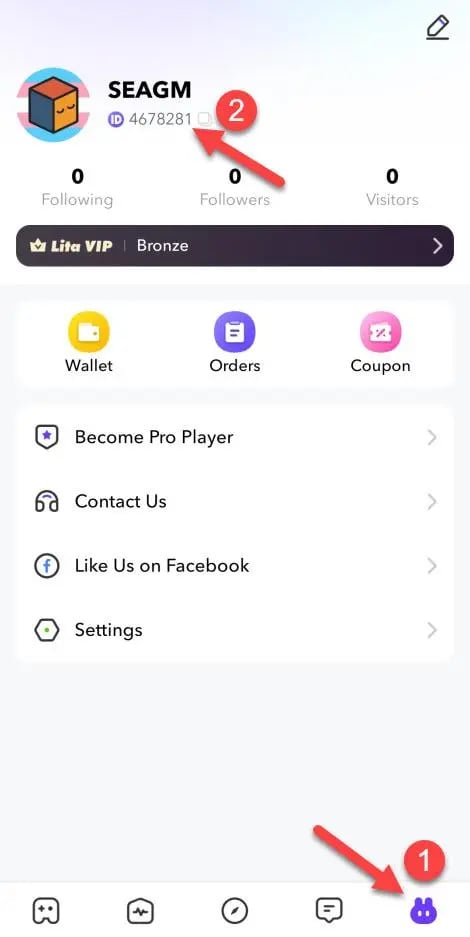
Paste this copied UID directly into the order field on ArcTopup to guarantee zero typing errors during checkout.
What Are Lita Coins and What Can You Use Them For?
Lita Coins serve as the primary in-app virtual currency for the Lita social gaming platform. Gamers use coins to book sessions with skilled gaming companions, connect with teammates across popular titles, and participate in interactive live audio spaces.
Primary Uses of Lita Coins:
- Hiring Gaming Companions: Order co-op sessions, duo queues, and coaching across titles like Mobile Legends: Bang Bang, PUBG Mobile, Valorant, Free Fire, and League of Legends.
- Sending Virtual Gifts: Reward voice room hosts, community broadcasters, and gaming partners with digital gifts during live audio sessions.
- 1-on-1 Voice Calls: Initiate private voice chats and direct consultations with verified creators and top-ranked players.
- Profile and Room Customization: Access chat bubbles, entrance effects, avatar frames, and community badges to personalize your in-app identity.
| Feature | Primary Purpose | Coin Requirement |
|---|---|---|
| Teammate Hiring | Book duo or squad gameplay with high-rank players | Set by individual companion hourly rate |
| Voice Room Gifting | Support hosts and community members in audio chats | Varies per animated gift item |
| 1-on-1 Audio Chat | Direct private voice calls and coaching discussions | Calculated per minute or per session |
| Profile Upgrades | Unlock badges, chat frames, and exclusive entrance visuals | Fixed package price in the store |
Safe & Secure Lita Coin Recharge Without Password Sharing
ArcTopup utilizes a UID-only direct recharge system. This approach provides key security advantages:
- No Password Required: You never have to share your Lita password, phone verification SMS codes, or third-party social logins (Google, Facebook, or Apple ID).
- Zero Risk of Account Takeover: Because ArcTopup only requires your public numeric UID, your private account access remains completely in your hands.
- Encrypted Checkout: All financial details entered during payment processing are protected with standard security encryption protocols.
- Direct Credit to Server: Coins are credited directly to your player profile via official server routing, keeping your account compliant with platform terms.
Troubleshooting Lita Coins Delivery and Common Mistakes
If your coins do not display immediately after completing a transaction, work through these standard verification steps:
1. Refresh the Lita App
Close the Lita app completely on your mobile device, remove it from your active background apps, and reopen it. Go to your Profile tab to check if the wallet balance refreshed.
2. Verify the Submitted UID
Check your ArcTopup receipt and verify that the numeric UID matches the one shown on your in-app profile. Entering an incorrect digit can send coins to another user profile or cause the transaction to stall.
3. Check Order Processing Status
Review your transaction confirmation page on ArcTopup to ensure your payment completed successfully and was not held by your payment provider.
4. Contact Customer Support
If your payment succeeded, your UID was typed correctly, and your balance has not updated after restarting the app, reach out to ArcTopup customer support with your order number and Lita UID for immediate assistance.
Regional Compatibility and Currency Notes
Lita operates across multiple international regions. ArcTopup supports global top-ups by routing coins directly through your player UID regardless of your regional store settings. Live coin prices, pack denominations, and payment availability are maintained directly on the checkout screen above. Always double-check your current UID inside the app prior to placing your order.
Frequently Asked Questions About Lita Coin Top-Ups
How do I find my Lita UID for top up?
Open the Lita app, tap the Profile or Me tab in the bottom right corner, and look below your username. Your numeric UID is listed there with a quick-copy icon next to it.
Do I need to provide my Lita password to purchase coins?
No. ArcTopup only requires your numeric Lita UID. You never need to provide your password, social login, or SMS verification codes.
How long does it take for Lita Coins to appear in my account?
Orders process automatically once payment confirmation is received. In most cases, your coins reflect in your in-app balance within moments after completing checkout.
What can I use Lita Coins for in the app?
You can use Lita Coins to hire game companions for duo or squad matches, join 1-on-1 voice calls, send animated gifts in voice chat rooms, and purchase profile cosmetics.
What should I do if I entered the wrong Lita UID?
Contact ArcTopup customer support immediately with your order ID. If the order has already been completed on the server to an existing active account, delivered coins cannot be reversed, so always double-check your UID before finalizing payment.
Can I top up Lita Coins for a friend using their UID?
Yes. You can purchase coins for friends or teammates by entering their numeric Lita UID into the UID field on ArcTopup during the checkout process.
Current packages and prices
Current base prices exclude Tax. Tax, payment fees and coupon adjustments are shown at checkout.
| Package | Price |
|---|---|
| 300 Lita Coins | USD 2.42 |
| 600 Lita Coins | USD 4.63 |
| 1,000 Lita Coins | USD 7.57 |
| 2,000 Lita Coins | USD 14.84 |
| 5,000 Lita Coins | USD 31.95 |
| 10,000 Lita Coins | USD 63.86 |































































