Yalla Live Gold Top Up: Fast, Direct, and Secure
Yalla Live Gold is the official virtual currency used across the Yalla voice chat and entertainment network. It allows users to send premium virtual gifts, support favorite broadcasters, customize personal profiles, and unlock exclusive VIP privileges inside chat rooms.
ArcTopup provides a direct User ID (UID) delivery system for Yalla Live Gold recharge. You do not need to share account passwords or link third-party social media profiles. Simply enter your numeric User ID, choose your Gold denomination, and complete payment. Your Gold balance updates directly inside your Yalla account.
What Is Yalla Live Gold and What Are Its Core Features?
Yalla Live brings together millions of users globally in interactive audio rooms, casual gaming sessions, and live entertainment streams. Gold powers every premium interaction within this ecosystem.
Core Uses of Yalla Gold:
- Sending Animated Virtual Gifts: Send luxury gifts ranging from roses and sports cars to yachts and castle animations to voice room hosts and friends.
- Activating VIP Tiers: Attain exclusive VIP badges, distinctive entrance animations, and high-priority seat positions on room microphones.
- Chat Room Customization: Upgrade room levels, apply specialized room wallpaper themes, and activate custom text bubble designs.
- In-App Mini-Games: Participate in social games like Ludo and Domino alongside other room members.
- Profile Customization: Display customized avatar frames, entrance banners, and exclusive honor badges that show your status across the community.
Yalla Live Gold Perks: VIP Status, Virtual Gifts, and Room Leveling
Investing in Yalla Live Gold provides tangible visual and social advantages across all public and private voice rooms.
1. VIP Badges and Entrance Effects
Higher VIP levels unlock custom entrance animations that announce your arrival when joining any chat room. These animations alert the host and room participants, setting your profile apart from standard guests.
2. Room Leveling and Wealth Growth
Every Gold coin spent inside a room contributes directly to that room's growth points. Higher room levels increase discovery ranking on the Yalla explore tab, bringing more organic traffic and community engagement to the room owner.
3. Exclusive Microphone Rings and Nameplates
Active supporters gain access to glowing microphone frames, custom nickname colors, and permanent status titles visible on their user profiles.
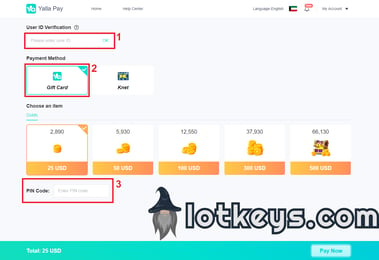
Direct ID Recharge vs. Digital PIN Redemption Explained
When purchasing Gold for Yalla Live, users typically encounter two distribution formats: direct User ID recharge and digital voucher PINs. ArcTopup uses direct ID recharge to ensure the fastest and safest credit delivery.
| Feature | Direct User ID Top-Up (ArcTopup) | Digital Code / PIN Redemption |
|---|---|---|
| Input Required | Numeric User ID only | Serial Number & Long PIN Code |
| Account Security | 100% password-free | External portal login often needed |
| Processing Steps | 1 Step: Select pack and enter UID | 2 Steps: Purchase code, manually redeem |
| Risk of Typing Errors | Profile validated directly | High chance of code input typos |
| Delivery Speed | Instant direct credit | Manual copy-pasting required |
| Gifting to Friends | Enter friend's UID directly | Must send raw code string to friend |
Direct ID recharge eliminates the friction of copying long alphanumeric strings or dealing with external redemption sites. Your Gold arrives straight to the destination wallet.
How to Locate Your Yalla Live User ID (UID)
To ensure your Gold reaches the correct account, you must locate your numeric Yalla User ID before ordering.
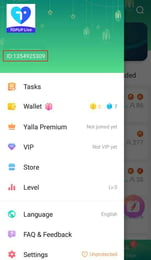
- Open the Yalla app on your smartphone.
- Tap the Profile tab (labeled "Me") in the bottom right corner of the home screen.
- Locate your profile avatar at the top of the screen.
- Your numeric ID is displayed directly below your nickname.
- Tap the Copy icon next to your ID number to copy it to your clipboard.
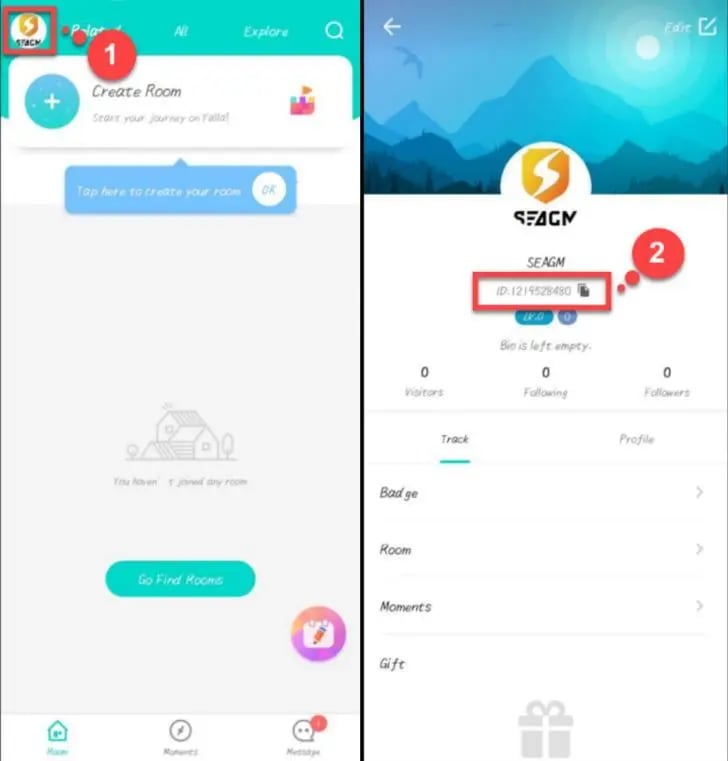
Tip: Always use the copy button rather than typing the numbers manually to prevent mistyping errors.
How to Top Up Yalla Live Gold on ArcTopup
Recharging your Gold wallet on ArcTopup requires only a few clear steps:
- Select Gold Package: Browse the available Yalla Live Gold denominations on this page and select the amount you wish to buy.
- Input User ID: Paste your numeric Yalla User ID into the designated player ID field.
- Proceed to Checkout: Review your selected package details and click the purchase button.
- Choose Payment Option: Pick your preferred payment method from the live options displayed on the checkout screen.
- Receive Your Gold: Once the transaction completes, open your Yalla app to view your updated Gold balance instantly.
Why Buy Yalla Live Gold on ArcTopup?
- Zero Password Requirement: We never ask for your account password, email access, or verification codes. Your login credentials remain completely private.
- Direct and Reliable Delivery: Orders are processed automatically through direct UID routing, sending Gold straight to your in-app balance.
- Live Checkout Transparency: All product denominations and payment totals are shown in real time during checkout with no hidden charges.
- Send Gold to Friends Easily: Simply enter your friend's User ID at checkout to surprise them with Gold directly in their room.
- Multi-Language Storefront: Browse and order comfortably with an interface designed to serve the global Yalla user base.
- Responsive Customer Support: Our dedicated help team is available to assist with order status checks or transaction inquiries.
Supported Global and Local Payment Methods
ArcTopup supports a wide selection of international and regional payment methods to accommodate users worldwide. Available options include major credit cards, debit cards, digital e-wallets, and regional banking channels.
All available payment options, exchange rates, and final checkout prices are calculated live and displayed clearly on the checkout page before you confirm your payment.
Common Mistakes When Recharging Yalla Live Gold and How to Avoid Them
To guarantee a smooth top-up experience, avoid these frequent errors:
- Entering Display Name Instead of UID: Yalla usernames and room nicknames can change at any time. Only the permanent numeric User ID can be used for recharge.
- Confusing Phone Number with User ID: Your linked mobile phone number is not your Yalla UID. Check the "Me" tab to retrieve your actual ID number.
- Recharging a Guest Account: If you are using a temporary guest account, bind it to an email or phone number in your Yalla settings before topping up to prevent losing access to your funded balance.
- Not Refreshing the App: If your balance does not update immediately after checkout, fully close and restart the Yalla app to refresh server data.
Frequently Asked Questions About Yalla Live Gold Recharge
What is Yalla Live Gold used for?
Yalla Live Gold is used to send virtual animated gifts to broadcasters, purchase VIP memberships, customize chat bubbles and profile frames, level up chat rooms, and join interactive mini-games like Ludo.
How do I find my Yalla Live User ID for recharge?
Open Yalla, tap the "Me" profile icon in the bottom menu, and locate the numeric ID listed under your avatar and display name. Tap the copy icon next to it.
Do I need to share my Yalla password to buy Gold?
No. ArcTopup requires only your public numeric User ID. You should never share your account password or login verification codes with anyone.
Can I recharge Yalla Live Gold for a friend using their ID?
Yes. Enter your friend's numeric Yalla User ID instead of your own during checkout. The Gold will be credited directly to their account once the order is finalized.
What is the difference between direct top-up and a Yalla gift card PIN?
Direct top-up sends Gold straight into your in-app wallet using your User ID without requiring any manual redemption. A gift card PIN requires you to visit an external website, log in, and enter a voucher code manually.
What should I do if my Yalla Live Gold balance does not update?
First, restart the Yalla application to refresh your account data. If the Gold still does not appear after a few minutes, check your ArcTopup order history to confirm your payment completed and verify that the submitted User ID was correct. Contact ArcTopup customer support with your order number if you need assistance.
Current packages and prices
Current base prices exclude Tax. Tax, payment fees and coupon adjustments are shown at checkout.
| Package | Price |
|---|---|
| 2890 Gold | USD 23.18 |
| 5930 Gold | USD 45.92 |
| 12550 Gold | USD 93.21 |