Paid for Yalla Gold but your balance shows zero? Follow this step-by-step 2026 checklist to fix pending transactions, sync errors, and missing top-ups.
You authorized a recharge in Yalla Live, your bank deducted the funds, but returning to the voice room reveals an empty balance.
A yalla live gold top up not received issue usually traces to three bottlenecks: local device synchronization hangs, app store verification holds, or an incorrect numeric User ID.
Here is how to locate where your payment is stalled, how long to wait, and how to recover missing Gold without submitting duplicate charges.
Immediate Sanity Checks: Is It a Delay or a Lost Order?
Before disputing charges with your card issuer, check the transaction timeline. Direct digital recharges typically clear within 1 to 5 minutes under standard operating conditions. High-traffic gifting competitions and room events can back up server queues.
Verify these three points first:
- Did the money actually clear or is it a pre-authorization hold? A banking notification does not guarantee the merchant captured the funds. If the network drops before completing handshake verification, the bank releases the pending hold within a few business days.
- How long does yalla gold recharge take right now? During large server-wide gifting events, allow 15 to 30 minutes for the queue to clear before escalating.
- Did you enter the right User ID? When purchasing through web portals rather than the in-app overlay, a single mistyped numeric UID routes the Gold to another profile or stalls delivery.
To bypass mobile app store markups and stuck in-app checkouts, a direct Yalla Live Gold recharge credits your account using your numeric ID.
Payment Initiated ➔ Bank Authorization ➔ App Store / Gateway Verification ➔ Yalla Server Credit ➔ Client App Sync
If any link in that chain fails, the transaction stalls while your money remains in transit.


Diagnosing the Common Causes of Undelivered Yalla Gold
Undelivered balances usually stem from one of four technical breakdowns:
1. Inaccurate User ID (UID) Entry
Your Yalla Live User ID is distinct from your display nickname. Nicknames change freely and cannot serve as unique database identifiers. Your UID is a fixed numeric string located beneath your avatar in the top-left profile drawer. Swapping even one digit in an 8-digit or 9-digit UID deposits the currency into another account.
2. Mobile In-App Purchase Listener Stalls
When purchasing directly inside Android or iOS, the OS billing service must alert the Yalla app listener that payment completed. A momentary network drop during the transition screen prevents the app from consuming the transaction token. The store captures the charge, but Yalla never receives the signal to credit your Gold.
3. Google Play and Apple Family Approvals
Accounts managed through Google Family Link or Apple Family Sharing do not clear instantly. The transaction remains paused until the designated family organizer approves the request from their device.
4. Device Clock and Network Out-of-Sync Errors
Mobile payment protocols require precise cryptographic timestamps. If your phone's manual clock drifts by even two minutes from network time, SSL and security certificate validation fails, blocking billing tokens from clearing.
Mobile Store Stalls: Android and iOS Troubleshooting Steps
If you purchased Gold directly via Google Play or the Apple App Store, client-side caching is the most common roadblock. Running basic device-level maintenance forces the unconsumed receipt to re-synchronize.
| Platform | Diagnostic Location | Corrective Action | Target Resolution |
|---|---|---|---|
| Android (Google Play) | Device Settings > Apps > Google Play Store | Clear Cache & Force Stop Yalla Live | Clears stuck billing queues and triggers pending purchase listeners. |
| Android (System Services) | Device Settings > Apps > Google Play Services | Clear Storage Cache | Resets outdated token handshakes with Google billing servers. |
| iOS (App Store) | Apple ID > Media & Purchases > Purchase History | Check if status reads "Pending" | Verifies if Apple has completed billing clearance on your card. |
| System Settings (All) | General / System > Date & Time | Enable "Set Automatically" | Resolves SSL handshake and payment timestamp validation errors. |
Use these diagnostic actions in sequence to clear local app errors before filing formal store disputes.
How to Force the In-App Purchase Listener on Android
- Exit Yalla Live completely.
- Open device Settings and select Apps.
- Find Yalla and tap Force Stop.
- Open Google Play Store, go to Storage, and tap Clear Cache.
- Launch the Google Play Store to refresh your account token.
- Open Yalla Live. The app checks the billing server on startup, consumes the pending token, and updates your balance.
Verifying Purchase Clearance on iOS
On iOS, a purchase may appear complete locally while Apple still marks it as pending. Open Settings, tap your Apple ID, select Media & Purchases, and review Purchase History. If the transaction is marked "Pending," Apple has not finalized the charge with your bank. App support cannot credit the Gold until this status updates to "Completed."
Third-Party Top-Ups, Direct UID Delivery, and 12-Digit PIN Cards
Buying Gold outside primary app stores avoids standard mobile platform markups. Understanding the delivery mechanics of each channel makes it easy to spot where an order is held up.
To bypass mobile device store caching, you can buy Yalla Live Gold online by selecting your required tier directly.
Standard baseline package tiers reflect these core volume increments:
| Gold Volume Tier | Standard Baseline Price | Typical In-App Use Case |
|---|---|---|
| 2,890 Golds Pack | $28.49 | Basic room entry, casual gifting, and chat micro-interactions. |
| 5,930 Golds Pack | $56.99 | Mid-tier voice room gifting and intermediate feature unlocks. |
| 12,550 Golds Pack | $113.99 | High-roller gifts, contest support, and VIP room status perks. |
Standard baseline values establish the baseline cost of virtual currency across official distribution platforms.
The Direct UID Top-Up Flow
Direct web recharges do not require app store logins. You enter your numeric UID, pick a bundle, and complete checkout. These systems use direct API injection, crediting your account within 1 to 5 minutes.
If you see a yalla id top up transaction pending message on a web store, check your receipt for a transaction hash or internal reference code. Pending web orders typically indicate the payment processor is running an automated anti-fraud check on your payment card.
Digital Gift Cards and 12-Digit Voucher PINs
Prepaid vouchers do not credit your Yalla Live balance automatically upon purchase.
You must redeem the voucher manually: 1. Navigate to the official Yalla Pay redemption page in your browser. 2. Enter your numeric Yalla User ID. 3. Choose the exact Gold package tier matching your voucher value. 4. Type your 12-digit PIN code. 5. Click Redeem and check your in-app wallet.
Voucher PINs can be region-locked. If you buy a voucher tied to a specific MENA currency while your Yalla account was registered in another region, the redemption portal will reject the PIN.
Filing a Support Ticket That Actually Gets Resolved
If clearing your cache, checking your UID, and waiting 30 minutes fails to deliver your Gold, submit an official support ticket.
Backend delivery delays can take multiple business days to resolve if you do not attach complete billing proof upfront. Messages stating only "missing gold" force support agents to ask for documentation, restarting the queue.
Support Ticket Checklist:
[ ] Exact Numeric User ID (UID)
[ ] In-app Display Nickname
[ ] Official Transaction Receipt / Invoice
[ ] 17-digit GPA Number (for Google Play purchases)
[ ] Exact Date, Time, and Timezone of Purchase
[ ] Screenshot of the in-app wallet showing missing balance
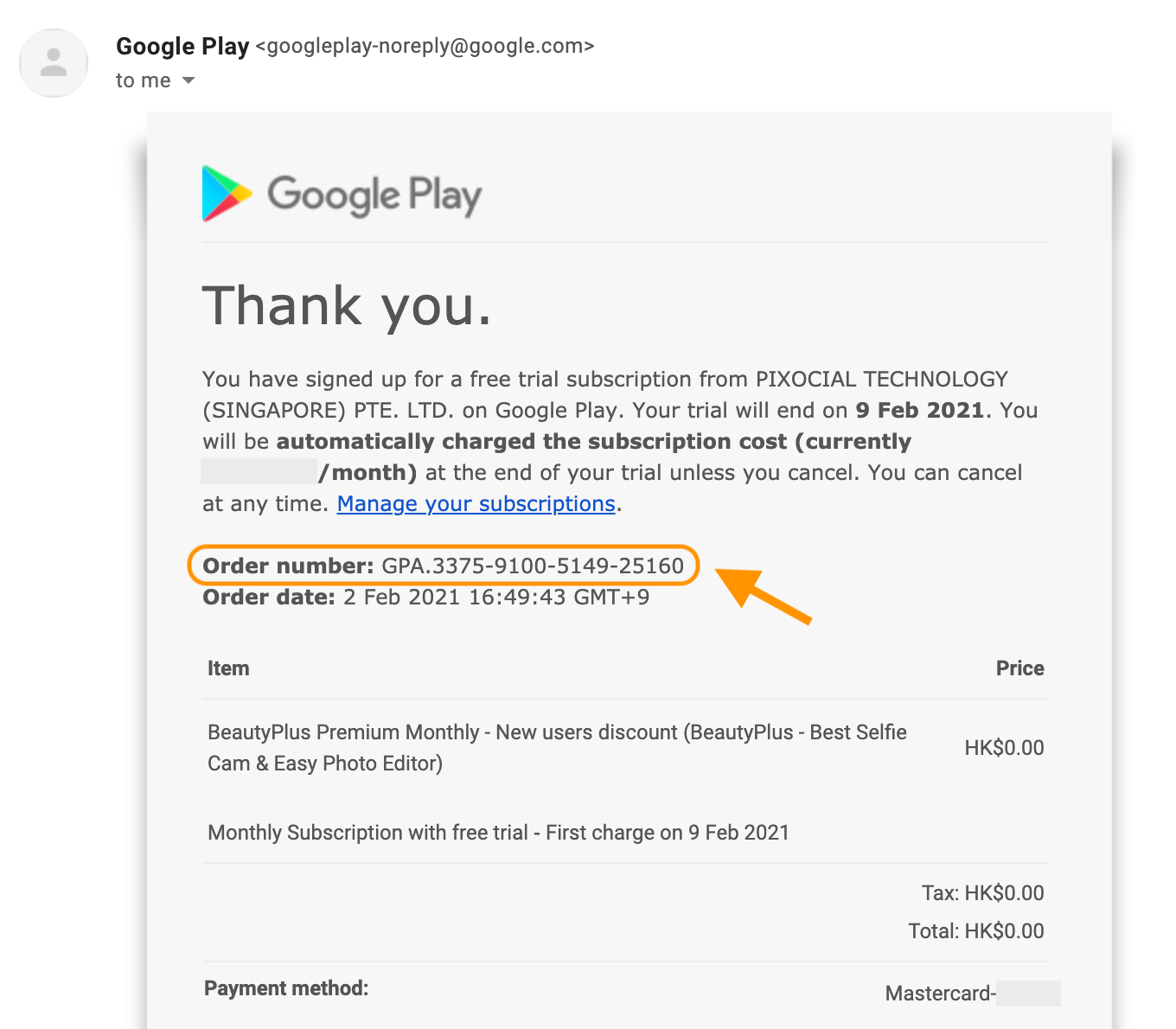
Finding Your 17-Digit Google Play GPA Number
On Android, Yalla support requires your official Google order number (formatted as GPA.1234-5678-9012-34567) to locate the stuck transaction.
To find it:
1. Open payments.google.com in your browser.
2. Sign in with the Google account used for the purchase.
3. Open the Activity tab and select the Yalla Live transaction.
4. Copy the GPA number listed at the bottom of the receipt.
Contacting Official Customer Support
Submit your case through the in-app feedback portal under profile settings or the official support helpdesk. Attach an uncropped screenshot of your store invoice displaying the timestamp, charge amount, and GPA or payment gateway reference code.
Do not submit multiple tickets for the same missing Gold transaction; duplicate tickets reset your position in support queues.
Refund Realities and Payment Channel Processing Times
If app support cannot manually credit the missing Gold, request a refund through the original payment processor. Settlement timelines depend on the payment channel used:
| Original Payment Source | Typical Refund Processing Window | Key Considerations |
|---|---|---|
| Google Play Balance | Instant upon approval | Credits directly back to your store balance without banking delays. |
| Credit / Debit Cards | 3 to 5 business days (up to 10 days) | Bank clearing policies determine when the returned credit displays. |
| Direct Carrier Billing | 1 to 2 months | Settlement follows cellular carrier statement and billing cycles. |
Refund turnaround windows depend strictly on payment infrastructure and cannot be accelerated by app support.
Smart Spending Tiers for Yalla Voice Rooms
Managing your virtual balance means aligning pack purchases with your room activity.
Light / Casual Users
Occasional gifters supporting friends in casual rooms should stick to smaller baseline packs. Avoid maintaining large unspent Gold balances in your mobile wallet. Top up only when sending gifts immediately to limit exposure to stuck billing sessions.
Mid-Tier Voice Room Participants
Users active in room leveling and community contests save on transaction overhead by choosing mid-tier options, such as the 5,930 Golds pack ($56.99). Save your numeric UID in a notes app and copy-paste it directly during checkout to prevent mistyped digits.
Heavy Room Hosts and Tournament VIPs
Broadcasters sending high-value animated gifts or pushing leaderboard ranks generally purchase top-tier bundles like the 12,550 Golds package ($113.99). Ensure your billing connection is stable before events start. Avoid buying during the final two minutes of a live room competition, when server traffic spikes can cause brief delivery delays.
Before dropping gifts during competitive room events, check your current balance and order a reliable Yalla Live Gold top up so your balance updates in time.
Account Safety: Legitimate Top-Ups vs Dangerous Scams
When a top-up stalls, avoid search engine recovery services and third-party "Gold generator" tools.
LEGITIMATE Top-Up Requirements:      SCAM Red Flags:
✔ Numeric User ID (UID) only         ✖ Account Password requested
✔ 12-digit PIN on official portal    ✖ SMS Verification codes demanded
✔ Standard verified checkout forms   ✖ "Free Gold Generator" tools
✔ Publicly listed package tiers      ✖ Requests for social login access
- What a legitimate recharge requires: Authentic services only require your numeric User ID (UID) to credit your profile, or a 12-digit PIN redeemed directly on the official Yalla Pay portal.
- What a scam demands: Fraudulent pages ask for your account password, phone verification codes, or social media logins under the guise of fixing undelivered Gold.
Never share your password or one-time SMS verification codes. Official Yalla support agents never request account passwords to investigate a missing purchase.
Frequently Asked Questions
Why is my Yalla Live Gold balance not updating after payment?
Transactions can experience momentary network lag, app store verification holds, or server synchronization delays during peak room events. Force stopping the app or verifying your order status in Google Play or Apple Purchase History will show if the payment completed.
How long does a Yalla Live Gold top-up usually take to arrive?
Direct UID top-ups typically credit your account within 1 to 5 minutes under normal processing conditions. Temporary gateway authorizations, regional bank security checks, or high-traffic live room competitions can extend delivery times.
Where do I find my Yalla Live User ID (UID) to verify my order?
Open the Yalla Live app and tap your profile picture in the top-left corner to open the main menu drawer. Your numeric User ID is displayed directly below your display nickname.
What should I do if my payment was deducted but no Gold was received?
Force close and restart the Yalla Live app to refresh the purchase listener. If the balance does not update within 30 minutes, retrieve your official receipt (such as your 17-digit Google Play GPA number) and open a support ticket.
How do I redeem a Yalla Live gift card PIN if it was not added automatically?
Prepaid gift vouchers do not credit automatically upon purchase and must be redeemed manually. Visit the official Yalla Pay redemption portal, enter your numeric UID, choose the matching gold tier, and submit your 12-digit PIN.
Can I get a refund if my Yalla Live Gold never arrives?
You can request a formal refund through the Google Play Store or Apple App Store using your digital purchase history. Standard card refunds take 3 to 5 business days to clear, while Google Play balance refunds are returned immediately.
The Final Fix for Missing Yalla Gold
When Gold fails to arrive after payment, do not submit a duplicate purchase. Check your banking app to confirm the transaction is not a temporary authorization hold. If the charge cleared, force stop Yalla, clear your app store cache, and verify your device clock is set automatically to prompt the purchase listener to finish.
For web recharges or 12-digit voucher PINs, check for UID typos and confirm your voucher matches your account's regional settings. If these steps fail, collect your 17-digit GPA number or gateway receipt and submit a single support ticket with all documentation attached.





Comments