Growtopia Gems Top Up: How to Recharge with Your Grow ID
Gems serve as the primary currency in Growtopia, powering everything from buying essential World Locks to unlocking exclusive items, booster packs, and progression upgrades. Using ArcTopup allows you to secure your required Gem packs quickly without risking account security or dealing with complicated in-game trades.
To complete a Growtopia Gems top up on ArcTopup, follow these steps:
- Select the Growtopia Gems denomination or package tier you wish to purchase from the live catalog.
- Enter your exact Grow ID into the required player information field.
- Choose your preferred local or international payment option.
- Complete the secure checkout transaction.
- Launch Growtopia on your device or restart the client if it was running. Your Gems will reflect automatically in your account balance.
How to Find Your Grow ID for Accurate Delivery
Your Grow ID is the unique username registered to your account. Unlike guest usernames, a registered Grow ID guarantees that purchased Gems are credited directly to your player profile across any device you log into (PC, iOS, Android, or console).
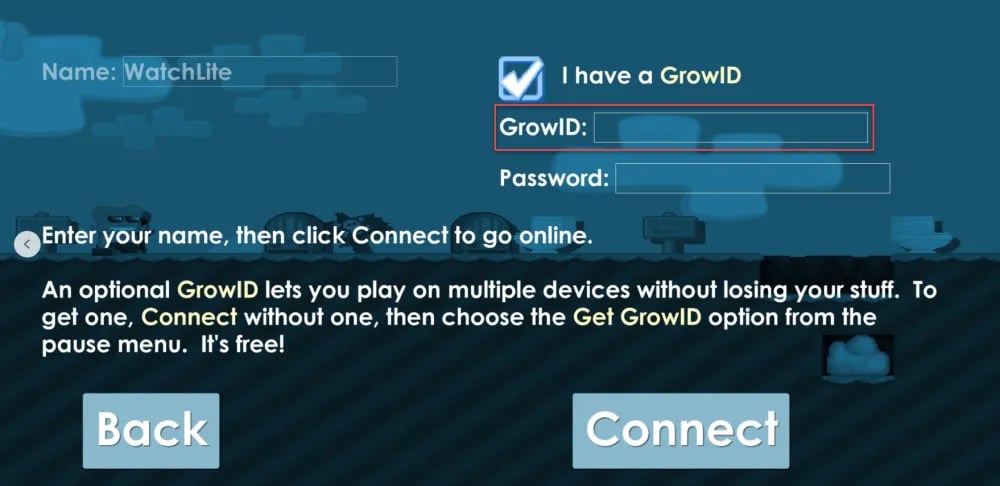
To locate your exact Grow ID:
- Open Growtopia and connect to the game servers.
- Once in-game, tap your character sprite or tap the Options / Menu icon at the top of your screen.
- Look at your player profile card. Your Grow ID appears prominently at the top of the menu profile.
- If your account says "Get a Grow ID", you are currently playing on a guest account. Tap that button, register your account with a valid email address and password, and set your permanent Grow ID before completing any top-up.
Important Tip: Grow IDs are case-insensitive, but spelling must be exact. Avoid typing accidental spaces or confusing similar characters (such as the letter "O" and the number "0") to ensure your top-up is processed without delivery delays.
Growtopia Gems Packages and In-Game Value
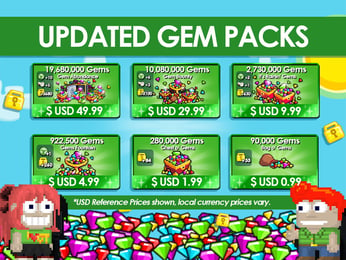
Growtopia offers multiple Gem pack sizes to match your building, trading, and event needs. Whether you are funding farm worlds, preparing for monthly seasonal events, or purchasing store passes, choosing the right package maximizes your efficiency.
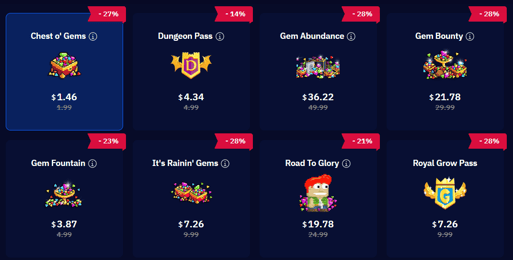
| Gem Package Tier | Typical In-Game Utility | Recommended Player Goal |
|---|---|---|
| Starter Tiers (Small) | Basic locks, clothing items, starter tools | New accounts establishing first farm worlds |
| Mid Tiers (Medium) | World Locks, Megaphones, Geiger Counters, Small Packs | Active traders expanding inventory and tools |
| High Tiers (Large) | Royal Grow Pass progression, Weather Machines, Event Booster Packs | Mass farmers, world builders, and seasonal event competitors |
| Bulk Tiers (Mega) | Diamond Lock conversions, rare store item sets, major event investments | Advanced guild leaders, economy investors, and bulk project crafters |
Note: Exact live rates, bundle sizes, and promotional package prices are displayed dynamically in the ArcTopup store selection panel above.
What You Can Buy with Growtopia Gems in 2026
Growtopia’s player-driven economy revolves around items purchased directly from the in-game Store using Gems. Having a steady Gem supply gives you access to crucial resources:
- World Locks (WLs) & Economy Locks: Convert Gems directly into World Locks from the official store (2,000 Gems per World Lock). World Locks form the base trading currency used by players across the entire game.
- Royal Grow Pass & Subscriptions: Unlock premium reward tracks during active seasons, granting exclusive cosmetics, extra inventory slots, and unique consumable items.
- Essential Tools & Utility Items: Purchase Geiger Counters, Surg Tools, Megaphones, Pickaxes, and Weather Machines necessary for specialized roles like surgery, geiger hunting, and world design.
- Event Packs: Gain immediate access to limited-edition items during events such as Carnival, Clash, and seasonal festivals throughout 2026.
- Farm Packs & Splicing Materials: Purchase basic seed packs and building packs to accelerate block production and mass tree farms.
Direct ID Delivery vs Account Sharing: Keeping Your Account Safe
Many player account compromises in Growtopia stem from unsafe trading methods, including password sharing, account boosting services, or trusting third-party P2P drop worlds. Using ArcTopup removes these vulnerabilities entirely.
- Zero Password Requirements: ArcTopup only requires your public Grow ID. We will never ask for your account password, email access, or two-factor authentication (GrowID Shield) codes.
- No Risky In-Game Trades: You do not need to enter private worlds, trust drop games, or risk getting scammed by trade-box glitches. The Gems transfer straight to your account through the official top-up routing system.
- Account Integrity Protection: Because no third party logs into your device profile, your account remains protected from unauthorized IP flags, rollback penalties, or account bans associated with illicit credential sharing.
Supported Payment Options and Global Currency Checkout
ArcTopup supports a comprehensive range of localized and international payment methods, ensuring you can top up your Growtopia account regardless of your region.
- Cards: Major credit and debit cards processed via secure encryption protocols.
- E-Wallets & Local Banking: Regional payment gateways, digital wallets, and bank transfers configured to support your local currency without unexpected exchange fees.
- Instant Processing: All transactions are verified through automated payment channels to trigger immediate fulfillment to your Grow ID.
To view the specific payment methods available in your country, select your desired Gem package and proceed to the checkout screen.
Troubleshooting Delayed Growtopia Gems Deliveries
While top-ups on ArcTopup process automatically, server fluctuations can occasionally cause minor delays. If your Gems do not show up immediately, use the following checklist:
- Restart the Game Client: Completely close Growtopia and relaunch the app. This forces the client to reconnect and synchronize your updated balance from the Ubisoft database.
- Check Server Status: If Growtopia is experiencing server maintenance, scheduled updates, or lag spikes, deliveries may queue temporarily until servers return to normal operations.
- Verify Your Grow ID: Review your ArcTopup receipt to confirm the Grow ID entered matched your active in-game username without spelling errors.
- Contact ArcTopup Support: If your order status shows completed but your balance has not updated after 15 minutes, reach out to the ArcTopup customer support team with your Order ID and Grow ID for prompt investigation.
Frequently Asked Questions About Growtopia Gems
How do I find my Grow ID to top up Growtopia Gems?
Log into Growtopia and open your player menu by clicking on your character or accessing the main menu. Your Grow ID is displayed at the top of your profile card. If you are using a guest account, make sure to register a Grow ID first before placing a top-up order.
Do I need to give my Growtopia password to buy Gems?
No. ArcTopup only requires your Grow ID. Never share your Growtopia password, account email, or GrowID Shield verification codes with anyone.
How long does it take for Growtopia Gems to reflect in my game?
Under normal operating conditions, Gems are credited to your account within moments of payment confirmation. In rare instances of high server traffic, delivery may take up to a few minutes. Relaunching the game helps refresh your in-game balance.
What should I do if my Growtopia Gems top-up has not arrived?
First, force-restart your Growtopia app to trigger a server synchronization. Check that your payment went through successfully and that the Grow ID on your order receipt was spelled correctly. If your balance does not update, contact ArcTopup customer service with your Order ID.
Can I buy the Royal Grow Pass and Subscription Tokens through top-up?
Yes. Once your top-up arrives in your account balance as Gems, you can open the in-game Growtopia Store and purchase the Royal Grow Pass, monthly subscriptions, or event-specific passes directly.
How to get more gems in Growtopia safely in 2026?
The safest ways to gain Gems include harvesting high-tier farmables (such as Chandelier or Laser Grid blocks), completing daily quests, participating in seasonal events, and purchasing direct top-ups through ArcTopup. Always avoid third-party Gem generator websites or unverified trade worlds, as these are common scams designed to steal accounts.
Current packages and prices
Current base prices exclude Tax. Tax, payment fees and coupon adjustments are shown at checkout.
| Package | Price |
|---|---|
| Chest O' Gems | USD 1.28 |
| Gem Fountain | USD 3.37 |
| It's Rainin' Gems | USD 6.74 |
| Royal Grow Pass | USD 6.74 |
| Gem Bounty | USD 20.22 |
| 1 Year Subscription Token | USD 33.71 |
| Gem Abundance | USD 33.71 |