
Wasla Chat Top Up: Instant UID Recharge Overview
Wasla Chat brings people together through real-time audio rooms, community gatherings, interactive group discussions, and social activities. To participate fully in voice rooms, support room owners, send gifts, and stand out on leaderboards, you need Wasla Chat coins. Recharging your balance directly through your user ID (UID) ensures your account receives coins promptly without compromising personal security.
ArcTopup provides a direct top-up channel for Wasla Chat users. By submitting your numeric UID and picking your desired coin pack from the live catalog, you credit your account directly. You do not need to share your account password or provide third-party social login details.
What Are Wasla Chat Coins and Their In-App Uses
Wasla Chat coins serve as the central currency across the entire voice chat ecosystem. When you top up your coin balance, you gain access to various in-app interactive features:
- Sending Animated Gifts: Tip hosts, room speakers, and friends in group chat rooms with animated virtual gifts ranging from roses and coffee to luxury cars and animated castles.
- Room Entry Effects: Display custom entry banners, arrival animations, and vehicles when entering popular voice rooms to announce your presence.
- Microphone Frames and Bubbles: Customize your avatar's audio microphone frame and text chat speech bubbles with distinct visual styles.
- Unlocking VIP Badges: Upgrade your profile ranking, earn exclusive badge icons, and display distinguished member status next to your username.
- Supporting Room Rank Competitions: Boost your favorite room hosts during audio battles and ranking events to help them reach regional top charts.
Wasla Chat Room Badges, Virtual Gifts, and Rewards
Active room participants use coins to build reputation and gain prestige in the community. Here is a summary of how coins apply across primary app features:
| Feature | Coin Application | Account & Social Benefit |
|---|---|---|
| Virtual Gifting | Micro to luxury gifts in rooms | Increases host popularity and boosts sender leaderboard position |
| Avatar Frames | Themed microphone rings | Highlights your avatar while speaking on active room mics |
| Entry Animations | Custom arrival vehicles | Displays a room-wide visual alert whenever you enter a room |
| VIP Tiers | Monthly or level-based privileges | Grants exclusive profile badges, special fonts, and entry perks |
| Room PK Support | Timed gift bursts during battles | Helps your chosen room win competitive interactive face-offs |
Every gift sent contributes to your account's nobility rank and wealth level, which unlocks additional badge frames and cosmetic rewards directly inside the app.
How to Find Your Wasla Chat UID
Your Wasla Chat UID is a unique numeric identifier tied to your account. ArcTopup uses this UID to route your coin top-up directly to your profile. Follow these steps to find your UID:
- Launch the Wasla Chat app on your Android or iOS mobile device.
- Tap the Profile (or Me) icon located at the bottom right corner of the home navigation bar.
- Look beneath your profile picture and display name at the top of the screen.
- Locate the numeric string labeled UID or ID.
- Tap the copy icon next to the number, or write it down carefully to avoid typing mistakes.
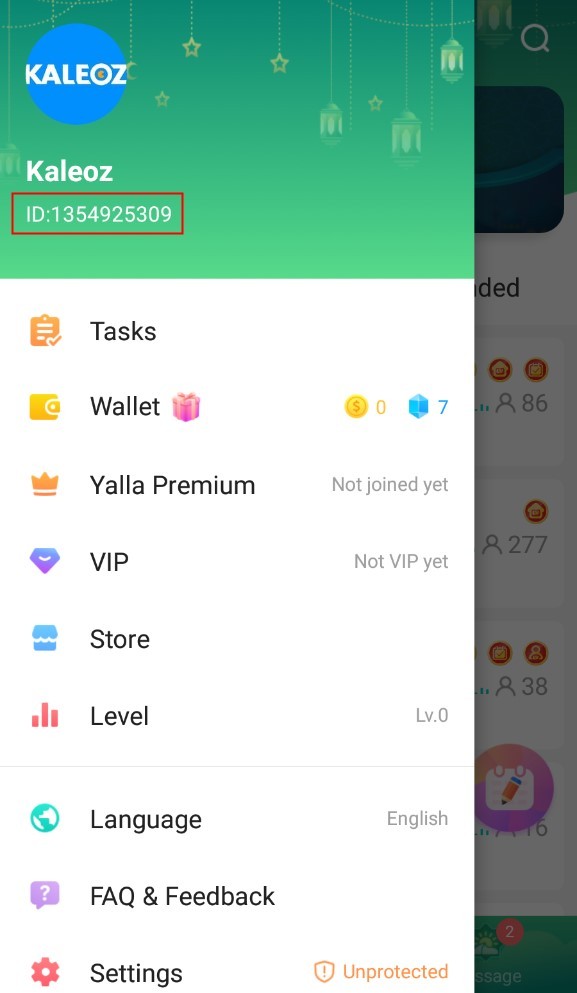
Always double-check the copied digits before submitting your order to guarantee the coins arrive in the correct account.
Step-by-Step Guide to Top Up Wasla Chat on ArcTopup
Recharging your coin balance on ArcTopup takes only a few moments:
- Select Coin Denomination: Browse the available coin amounts on the live ArcTopup catalog and choose the package that matches your requirements.
- Enter Your UID: Paste your numeric Wasla Chat UID into the designated player ID field on the checkout screen.
- Review Your Order: Check the coin amount and verify that your entered UID is exact.
- Pick a Payment Method: Choose from the available local and international payment options displayed on the checkout page.
- Complete Checkout: Finalize your payment. Once the transaction processes successfully, the coins reflect in your Wasla Chat balance automatically.
Advantages of Account-Safe Wasla Chat Recharges
Protecting your personal data is essential when purchasing digital currency. ArcTopup uses a direct-to-account top-up system built around player safety:
- Zero Password Requirements: You never share your Wasla Chat password, email login, or social authentication keys. All orders process strictly via your public numeric UID.
- No Account Sharing: Your account remains active on your phone while the recharge takes place, eliminating the risk of session logouts or unauthorized access.
- Live Catalog Pricing: Available coin packs, promotional rates, and regional prices are shown clearly on the live checkout interface before you pay.
- Broad Payment Coverage: ArcTopup supports regional and global payment methods tailored to voice chat communities around the world.
- Dedicated Support: Customer assistance is available to verify order progress, resolve UID inquiries, and confirm transaction statuses.
What to Do If Wasla Chat Coins Do Not Appear After Top-Up
Top-up transactions usually reflect in your balance shortly after payment confirmation. If your coins do not appear right away, follow these troubleshooting steps:
- Restart the Wasla App: Completely close the Wasla Chat app from your phone's recent apps switcher and reopen it. Check your profile balance.
- Re-enter a Voice Room: Sometimes the balance updates on the server side once your client triggers a new room session.
- Check Order Confirmation: Verify in your ArcTopup account history or email receipt that your payment was successfully processed.
- Verify the Submitted UID: Check your receipt to ensure the UID you entered matches your in-app profile ID.
- Contact ArcTopup Support: If the balance has not updated after a few minutes, reach out to customer support with your ArcTopup Order ID and a screenshot of your Wasla Chat profile screen for swift resolution.
Frequently Asked Questions About Wasla Chat Top Up
Where can I find my Wasla Chat UID?
Open Wasla Chat, tap the Profile or Me tab at the bottom right of the screen, and locate the numeric UID displayed right below your avatar and display name. Tap the copy icon next to the number to copy it to your clipboard.
Do I need to share my Wasla Chat password to top up coins?
No. ArcTopup only requires your numeric Wasla Chat UID. You should never share your account password, SMS verification codes, or social media login credentials with anyone.
How long does it take for Wasla Chat coins to arrive after purchase?
Recharges process automatically once payment confirmation is received. In most cases, coins are credited to your in-app balance within minutes.
What can I use Wasla Chat coins for in the app?
You can spend coins to send virtual gifts to room hosts, activate animated entrance vehicles, equip avatar microphone frames, join room ranking contests, and unlock VIP privileges.
What should I do if I entered the wrong UID during checkout?
Because UID top-ups are dispatched automatically to the game servers upon payment completion, transactions sent to a valid third-party UID cannot be reversed. If you notice a typo before the transaction completes, contact ArcTopup customer support immediately with your order details.
Can I top up Wasla Chat coins for a friend using their UID?
Yes. You can recharge coins for friends or room hosts by entering their numeric UID into the player ID field during checkout on ArcTopup. The coins will be delivered directly to their Wasla Chat account.
Current packages and prices
Current base prices exclude Tax. Tax, payment fees and coupon adjustments are shown at checkout.
| Package | Price |
|---|---|
| Wasla Chat - Wasla Chat*10000 | USD 2.77 |
| Wasla Chat - Wasla Chat*15000 | USD 4.15 |
| Wasla Chat - Wasla Chat*20000 | USD 5.53 |
| Wasla Chat - Wasla Chat*25000 | USD 6.91 |
| Wasla Chat - Wasla Chat*50000 | USD 13.83 |
| Wasla Chat - Wasla Chat*100000 | USD 27.65 |
| Wasla Chat - Wasla Chat*500000 | USD 138.26 |
| Wasla Chat - Wasla Chat*1000000 | USD 276.53 |
| Wasla Chat - Wasla Chat*5000 | USD 1.38 |






























































