
Yoso Farm Top Up: Quick & Secure Account Credits
Maintaining a thriving homestead in Yoso Farm requires steady access to in-game resources, upgrades, and essential items. A Yoso Farm top up gives you immediate access to in-game currencies and premium bundles, allowing you to expand your property, unlock rare decorations, accelerate construction times, and acquire specialized tools without unnecessary delays.
ArcTopup provides a direct recharge system built specifically for Yoso Farm players. By utilizing direct UID crediting, you receive your purchases directly inside your game profile without sharing private login credentials. Review the live catalog options above to select the package that fits your current gameplay goals.
How to Top Up Yoso Farm on ArcTopup
Completing your recharge on ArcTopup takes only a few simple steps. Follow this process to credit your account immediately:
- Select Your Package: Browse the product listing above and choose the currency bundle or item pack you wish to purchase.
- Enter Your Account UID: Type your numeric Yoso Farm UID into the designated player ID field. Double-check the digits to ensure accuracy.
- Proceed to Checkout: Click the purchase button to view your order summary.
- Select a Payment Method: Choose your preferred regional or international payment option from the live checkout interface.
- Complete the Transaction: Finalize payment. Once confirmed, the system processes your order and sends the items directly to your in-game profile.
Step-by-Step Guide to Locate Your Yoso Farm UID
To ensure your package reaches the right profile, you must provide your exact in-game User ID (UID). Finding your UID inside Yoso Farm is straightforward:
- Launch the Yoso Farm application on your mobile device or emulator.
- Wait for the main farm screen to load completely.
- Tap your Avatar / Profile Icon located in the top-left corner of the main display.
- Open the User Info / Account Settings tab.
- Locate the field labeled UID (a sequence of numbers).
- Tap the Copy icon next to your UID, or write it down carefully for entry on ArcTopup.
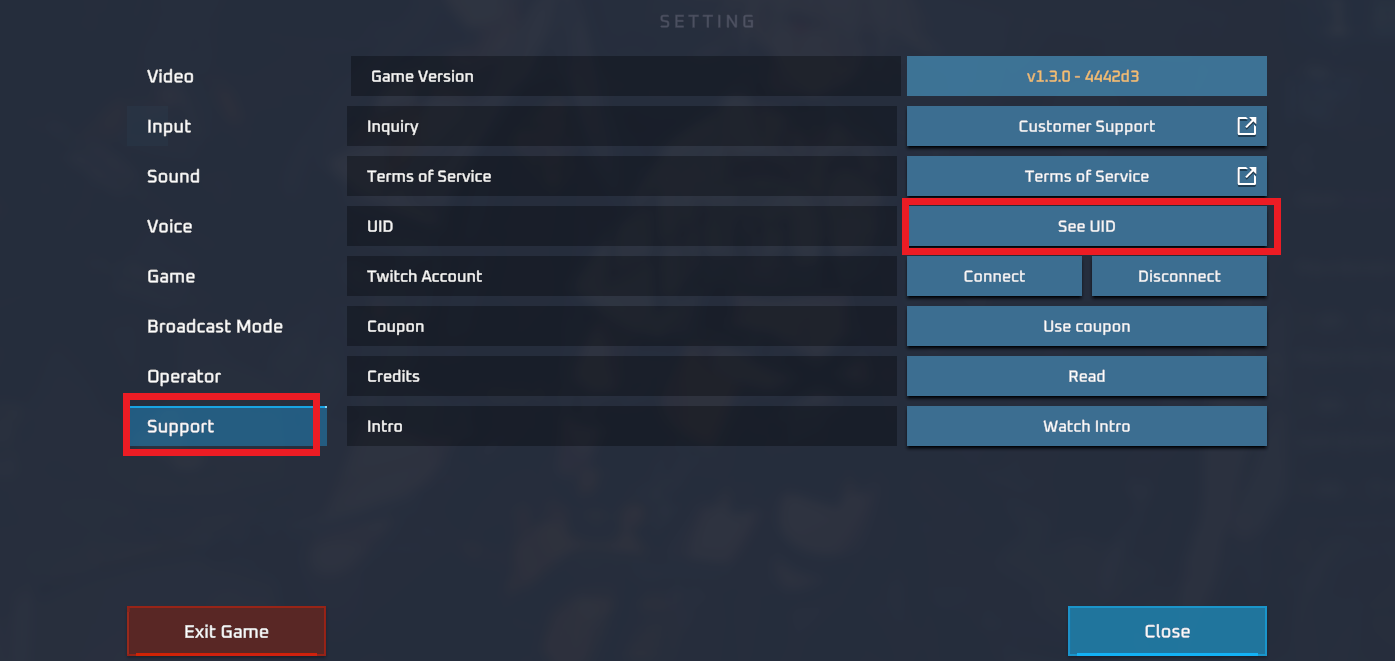
| Data Field | In-Game Location | Purpose on ArcTopup |
|---|---|---|
| User ID (UID) | Avatar / Profile Menu | Direct server destination for purchased credits |
| Character Name | Profile Header Display | Visual verification of your account profile |
Available Yoso Farm Packages and Pricing
ArcTopup offers multiple package tiers to support various playstyles and farm expansion requirements. All active prices, bundle contents, and current product options are displayed in real time on the live selection grid above.
- Starter Bundles: Compact resource packs designed for immediate building materials, early crop boosts, and daily maintenance.
- Growth & Expansion Packs: Mid-tier currency packs suited for upgrading farm structures, acquiring specialized equipment, and unlocking new land plots.
- Premium Value Packages: Large-denomination bundles intended for major progression leaps, special limited-time events, and rare decorative items.
Prices are updated dynamically on the live ArcTopup catalog to reflect current regional pricing and active promotional rates. Check the package selector above before completing your order.
Account Safety: Secure UID-Only Processing
Keeping your gaming account safe is the top priority at ArcTopup. The platform uses a non-invasive direct top-up architecture:
- No Password Required: You never need to provide your account password, email credentials, or linked social media logins.
- No Account Sharing: Your account stays completely in your control on your own device. No third party ever accesses your profile directly.
- Direct Server Crediting: Purchases are routed directly to your account using only the public UID you provide.
- Encrypted Checkout: All personal billing information processed through ArcTopup is protected with standard SSL encryption protocols.
Order Fulfillment and Checking In-Game Balance
After your payment is confirmed on ArcTopup, order fulfillment begins automatically. Follow these steps to verify your updated balance:
- Keep the Yoso Farm app closed or restart it if it was open during the transaction.
- Re-open Yoso Farm and log in to your profile.
- Check your primary currency totals at the top of the main screen.
- If the item was an event package or bundled crate, open your in-game Mailbox or Inventory tab to claim the delivered goods.
- Check your ArcTopup transaction history to confirm that the order status shows as completed.
Troubleshooting Common Top Up Issues
If your credits do not appear immediately or you run into checkout problems, use the following troubleshooting guide:
- Order Processing Delays: Network latency can occasionally cause a brief verification delay. Wait 5 to 10 minutes and perform a full restart of the Yoso Farm game application.
- Verifying Account Login: Ensure you are logged into the exact game account and server region associated with the UID entered during checkout.
- Mistyped UID Entry: If you entered an incorrect UID, check your ArcTopup order status. If the order has already been processed by the automated system to an existing account, completed transactions cannot be reversed. If the order is still pending, contact ArcTopup customer support immediately with your order number.
- Payment Confirmation: Verify that your chosen payment method completed the transaction and that funds were deducted. Check your email for the ArcTopup order receipt.
- Contacting Customer Support: If your balance has not updated after following these steps, open a ticket with ArcTopup customer support. Provide your ArcTopup Order ID, the Yoso Farm UID used, and your payment confirmation receipt for prompt investigation.
Frequently Asked Questions
How do I top up Yoso Farm using ArcTopup?
Select your desired Yoso Farm package from the catalog list above, type your in-game UID into the player ID field, proceed to checkout, choose your preferred payment option, and complete the purchase. The items will be credited directly to your in-game profile.
Where can I find my Yoso Farm UID?
Open Yoso Farm on your device, tap your player profile icon in the top-left corner of the screen, and locate the numeric UID displayed in your profile summary. Use the copy button to capture the exact numbers.
Do I need to provide my Yoso Farm account password to top up?
No. ArcTopup only requires your public Yoso Farm UID. You should never share your account password, security questions, or linked social media login details with anyone.
How long does it take for the Yoso Farm top up to be credited?
Deliveries are processed automatically upon successful payment confirmation. In most cases, items reflect in your in-game account shortly after payment. Restarting the game app helps refresh your balance display.
What should I do if I entered the wrong UID during checkout?
If you realize you submitted an incorrect UID, contact ArcTopup customer support immediately with your order ID. If the delivery process has not yet executed, support may assist in updating the target ID. Completed automated deliveries to valid alternate accounts cannot be recalled.
What payment methods are supported for Yoso Farm top ups?
ArcTopup supports a wide variety of domestic and international payment options, including regional e-wallets, credit and debit cards, and online banking methods. Available payment gateways are displayed on the live checkout screen.
Current packages and prices
Current base prices exclude Tax. Tax, payment fees and coupon adjustments are shown at checkout.
| Package | Price |
|---|---|
| Yoso Farm - Yoso Farm*15000 | USD 1.50 |
| Yoso Farm - Yoso Farm*20000 | USD 2.00 |
| Yoso Farm - Yoso Farm*25000 | USD 2.50 |
| Yoso Farm - Yoso Farm*50000 | USD 5.00 |
| Yoso Farm - Yoso Farm*100000 | USD 10.00 |
| Yoso Farm - Yoso Farm*500000 | USD 50.00 |
| Yoso Farm - Yoso Farm*1000000 | USD 100.01 |
| Yoso Farm - Yoso Farm*10000 | USD 1.00 |






























































