Sent your UltraCubes to the wrong Chief UID or server? Here is how digital delivery rules work, what support can recover, and how to verify your account.
Watching a payment clear, opening your DisCity mailbox, and finding nothing is stomach-dropping. You check the receipt and spot the mistake: one mistyped digit in your Chief UID or the wrong regional server selected at checkout.
In Path to Nowhere, missing out on UltraCubes during an active S-rank banner can wreck your summon plans across Fury, Reticle, Umbra, or Arcane squads. Panicking and filing an instant payment dispute usually makes things worse by triggering account flags. What happens to your missing funds depends on where the delivery landed, storefront consumable policies, and the exact records you bring to support.
The Brutal Reality of Misdirected Top-Ups in Path to Nowhere
Digital game economies rely on automated distribution pipelines. The moment a transaction clears, the server queries the database, matches the destination identifier, and drops items directly into that profile's mailbox.
Standard consumer protections for physical goods do not apply here. When you submit a Path to Nowhere top up, execution is immediate.
Once digital consumables hit an active game profile, statutory withdrawal rights expire. If your typo matches another registered Chief, that account receives the currency. Neither AISNO Games nor third-party aggregators will pull items out of a stranger's inventory to redistribute them to you.
If that player spends even one UltraCube or converts them into Hypercubes for summons, the transaction is functionally irreversible.

Chief Inauguration Special I
 Chief Inauguration Special IUSD 0.62Buy Now
Weekly Arrest Pack
Weekly Arrest PackUSD 0.62Buy Now60 Ultracubes
60 UltracubesUSD 0.62Buy Now330 Ultracubes
330 UltracubesUSD 3.02Buy NowBlack Key VIP (30 Days)
Black Key VIP (30 Days)USD 3.02Buy NowChief Inauguration Special II
Chief Inauguration Special IIUSD 3.02Buy NowChief Inauguration Special III
Chief Inauguration Special IIIUSD 6.25Buy Now980 Ultracubes
980 UltracubesUSD 9.38Buy NowMonthly Arrest Pack I
Monthly Arrest Pack IUSD 9.38Buy NowWeekly Training Pack II
Weekly Training Pack IIUSD 9.38Buy NowRookie Arrest Pack
Rookie Arrest PackUSD 12.41Buy NowMonthly Arrest Pack II
Monthly Arrest Pack IIUSD 16.61Buy NowChief Inauguration Special IV
Chief Inauguration Special IVUSD 18.77Buy Now3280 Ultracubes
3280 UltracubesUSD 31.20Buy NowChief Inauguration Special V
Chief Inauguration Special VUSD 31.20Buy Now6480 Ultracubes
6480 UltracubesUSD 56.34Buy NowChief Inauguration Special VI
Chief Inauguration Special VIUSD 56.34Buy Now
Why Digital Currencies Resist Account Transfers
Customer support cannot simply move currency between two player profiles on request. Under standard digital distribution frameworks, virtual currencies, stamina packs, and consumable resources are strictly classified as non-transferable digital assets.
The table below outlines how major digital distribution models handle in-game consumables and virtual currencies.
| Platform Category | Policy Classification | Operational Rule |
|---|---|---|
| Major PC Digital Storefronts | Non-refundable | Consumables and virtual currencies are excluded from standard 14-day or 2-hour refund windows. |
| Mobile Game Publishers | Non-refundable & Non-transferable | Virtual purchases are final; statutory withdrawal rights waive upon immediate delivery. |
| Console Digital Networks | Non-refundable once delivered | Consumables delivered immediately and wallet top-ups cannot be refunded or canceled within standard 30 to 60 day review windows. |
| Dedicated Game Launchers | Non-refundable standalone items | In-game currencies and downloadable content are excluded from 24, 14, 72, or 30-day refund guarantees. |
Takeaway: Once digital currency arrives in an authenticated game profile, statutory withdrawal rights end immediately across all major digital distribution models.
These restrictions exist to block fraud, black-market currency trading, and chargeback exploitation. Permitting arbitrary manual currency shifts between accounts would destroy audit trails and expose systems to account takeover abuse.
What Happens When You Input a Wrong UID or Server
The fate of your missing UltraCubes depends entirely on the specific error made during checkout.
Scenario 1: The Mistyped UID Does Not Exist
This is the cleanest mistake to fix. If you entered an unregistered UID, the delivery gateway finds no destination mailbox and the delivery fails.
The merchant system or payment gateway retains the funds in a pending or unallocated state. Support can verify the failed delivery against system logs, then either redirect the order to your verified Chief UID or release the uncollected charge.
Scenario 2: The Mistyped UID Belongs to Another Player
This is the worst outcome. If your typo matches a live account, the server processes the order as a direct credit, delivering items within seconds.
Under standard non-transfer rules, support will not deduct assets from a third-party account to resolve user input error. Unless you can prove ownership of both accounts under the same verified identity, those funds are permanently lost.
Scenario 3: You Selected the Wrong Regional Server
Path to Nowhere separates player profiles across dedicated regional partitions (America, Europe, and Asia-Pacific). Account progression, Sinner rosters, and purchase history stay locked to the region where you created your Chief.
Cross-region database transfers do not exist. If you play on America but bought a pack routed to Europe, those UltraCubes sit in the European database partition. They will never transfer to your American roster.
Gathering Payment Records to File a Support Claim
Do not file an immediate bank dispute upon discovering a mistake. Financial chargebacks frequently trigger automated security freezes or permanent bans on linked game accounts. Instead, trace the transaction through merchant support.
The table below summarizes how different payment error scenarios are evaluated during support investigations.
| Error Scenario | Resolution Feasibility | Required Evidence | Typical Investigation Window |
|---|---|---|---|
| Non-Existent UID | High | Bank receipt, exact timestamp, correct UID | 2 to 4-5 business days |
| Active Wrong UID | Extremely Low | Proof of account ownership, transaction ID | 14 to 30 days (rarely granted) |
| Wrong Regional Server | Moderate to Low | Server details, login credentials, order ID | 3 to 10 business days |
| Bounced Gateway Top-Up | High | Payment provider reference, order slip | 24 to 72 hours |
Takeaway: Non-existent IDs and unallocated payments offer a clear path to resolution, while completed deliveries to active accounts are almost never reversed.
To give support the exact data needed to trace your transaction, prepare these records before opening a ticket:
- Official Proof of Payment: Download the bank or payment provider statement showing the charge amount, currency, and authorization code.
- Merchant Order Identifier: Locate the exact invoice or transaction reference string generated at checkout.
- Exact Timestamp: Note the minute the transaction completed.
- Both Chief Identifiers: Provide your actual Chief UID alongside the mistyped UID entered at checkout.
- Server Specification: State your primary Chief profile server region versus what was selected on the order form.
When using a platform to recharge your UltraCubes safely, having this documentation ready allows support agents to locate payment logs without delay.
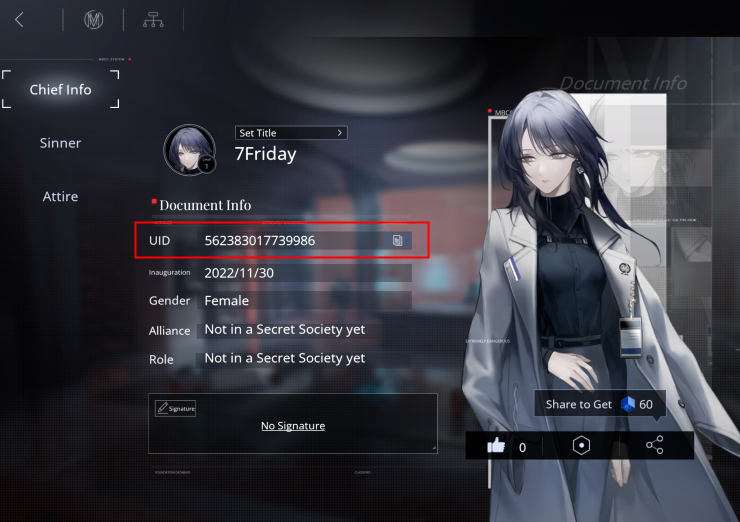
Locating Your Chief UID to Prevent Delivery Failures
Typing errors cause most misdirected top-up issues. Never enter your Chief UID from memory.
Path to Nowhere binds accounts to authenticated logins rather than temporary guest profiles. Your Chief UID serves as your permanent database key.
To retrieve and verify your UID:
- Launch Path to Nowhere and log into your primary profile.
- From the main Bureau dashboard, tap your Chief Profile Icon in the top-left corner.
- Locate your UID directly beneath your Chief name.
- Tap the Copy Icon next to the numeric string.
- Confirm your active Server Region on the title screen before launching.
Paste the copied string directly into the checkout field. A three-second copy-paste prevents funding an unintended account.
Spending Tiers and Essential Purchase Precautions
Match your purchase habits to your risk tolerance:
- Free-to-Play & Low Spenders: If you buy the occasional monthly pass, an entry mistake hurts, but submitting a bank chargeback risks your entire account. Use the in-game copy tool on every order.
- Mid-Tier Spenders: If you regularly purchase battle passes and resource packs, store your verified Chief UID and server region in a secure note on your device, and paste directly during checkout.
- Heavy Spenders: When funding high-volume summons across S-rank banners, avoid large single transactions on unfamiliar devices. Run a minimum-tier test order first. Once the UltraCubes appear in your DisCity mailbox, proceed with the main purchase.
Top-Up Safety: What Legitimate Services Require
Differentiate legitimate payment flows from credential harvesting:
- What a legitimate top-up platform asks for: Your Chief UID and your designated Regional Server. That is all. Legitimate aggregators route currency through official server APIs using only public identifiers.
- What a scam asks for: Account passwords, Apple ID logins, two-factor authentication codes, or security questions. Never disclose login credentials to any external service.
For upcoming banner summons, rely on verified Path to Nowhere recharges that require only your public Chief UID and server selection.
Frequently Asked Questions
Can I get a refund if I sent my top-up to the wrong Path to Nowhere account?
Virtual currency deliveries are final and non-refundable once credited to an active account. If the mistyped UID does not exist in the database, customer support can trace the unallocated funds using your receipt and redirect or cancel the order.
Can in-game currency or items be transferred between different regional servers?
No. Account progress, Sinners, and currency balances are locked to the regional server partition where the account was created. Cross-region transfers are unsupported.
Why was my top-up delivered immediately without a cancellation window?
Digital goods agreements specify that statutory withdrawal rights expire upon immediate electronic delivery. Because the server credits the account instantly upon payment confirmation, no cancellation delay exists.
What documentation should I gather if my top-up went missing or was misdirected?
Collect your merchant order ID, payment receipt, exact transaction timestamp, and both intended and mistyped Chief UIDs. These records allow support agents to locate the transaction in gateway logs.
How long does a payment trace take when investigating a wrong-account recharge?
Resolving an unallocated transaction takes 2 to 4-5 business days depending on payment provider processing times. If inter-bank tracing is required, the process can take up to 14 business days.
Final Action Plan for Affected Chiefs
If you entered the wrong Chief UID, act quickly. Check your transaction receipt, copy your verified UID from the Bureau profile dashboard, and submit a support ticket before order settlement completes.
An invalid destination UID can be recovered. A delivery to an active third-party account cannot. Avoid account-threatening bank chargebacks, and always copy-paste your UID directly from the game client.






Comments