
Direct Baloot Top Up for Gold and Competitive Matches
Baloot stands as the premier trick-taking card game across the Arabian Gulf, combining strategic bidding, suit management, and cooperative team play. In digital Baloot titles—including standard formats and Tarbi3ah Baloot—Gold coins serve as the central utility currency. Players use Gold to pay table buy-ins, access competitive ranking leagues, challenge opponents in custom private sessions, and enter official bracket tournaments.
Running low on Gold limits your matchmaking options and restricts you from accessing high-stakes VIP rooms. A direct Baloot top up on ArcTopup sends Gold straight to your player account using only your numeric User ID (UID). This eliminates account-sharing risks, digital code redemption failures, and regional store checkout friction.
How to Top Up Baloot Gold on ArcTopup Using UID
Recharging your Baloot balance takes less than a minute through our automated UID delivery system. Follow these straightforward steps:
- Select Package: Choose the amount of Baloot Gold you want to purchase from the available product denominations listed above.
- Enter Your UID: Type or paste your numeric Baloot User ID into the designated player input field. Double-check the numbers to avoid crediting the wrong profile.
- Review Order: Confirm your item selection and verify your player identifier.
- Proceed to Checkout: Select your preferred payment option from the live checkout interface and complete the secure transaction.
- Receive Your Gold: The system processes the order automatically and credits the Gold directly into your active Baloot game account.
Step-by-Step Guide: How to Find Your Baloot Numeric UID
To ensure your Gold reaches your account without interruption, you must provide your exact numeric UID from within the game client.
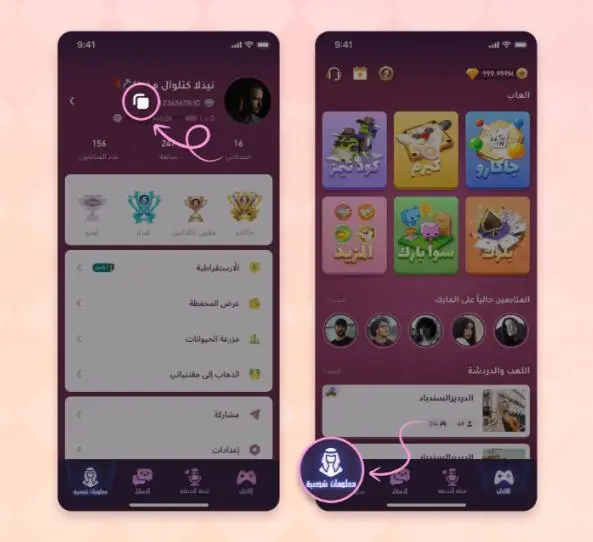
- Launch the Baloot application on your mobile device.
- Tap your Avatar / Profile Icon located in the top corner of the main lobby screen.
- In the profile overview window, locate your User ID (UID) printed below your display name and rank level.
- Tap the small Copy button next to your UID string, or carefully write down the digits.
- Paste the copied number directly into the UID input field on ArcTopup before placing your order.
Why Choose UID Direct Recharge Over Voucher Codes
Traditional digital gift cards and prepaid voucher codes often introduce unnecessary friction: manual 16-digit PIN entry, regional activation locks, and expired batch codes. ArcTopup uses a direct-to-account crediting model tied to your numeric UID.
| Feature | ArcTopup UID Direct Recharge | Digital Voucher / Gift Cards |
|---|---|---|
| Account Password Required | Never (100% Safe) | Never |
| Manual PIN Redemption | Not required | Required (Prone to typos) |
| Crediting Method | Direct to in-game balance | Manual web portal entry |
| Regional Mismatch Risk | None (Credits by UID) | High (Region-locked pins) |
| Order Status Tracking | Live on ArcTopup dashboard | Manual retailer check |
| Device Compatibility | Mobile & Desktop browser | Store-specific redemption |
By routing the transaction straight to your player ID, your Gold appears in your balance ready for immediate use at the tables.
Using Baloot Gold for VIP Tables, Ranked Matches, and 2026 Tournaments
Gold is the primary driver of competitive progression in Baloot. Having an adequate balance lets you participate in higher tiers of play:
- VIP & High-Roller Tables: Access exclusive rooms with larger pot multipliers and skilled competition without running out of buy-in capital.
- 2026 Tournament Entries: Compete in scheduled championship events, ladder tournaments, and daily knockout series where entry fees require dedicated Gold deposits.
- Team and Guild Matches: Back your team during competitive clan wars and seasonal rank grinds where table stakes are higher.
- Customization and Table Personalization: Unlock custom felt themes, card deck backs, interactive table gifts, and chat effects to personalize your gameplay experience.
Secure Checkout and Regional Payment Handling
ArcTopup prioritizes player safety. We never request your account password, email credentials, social login tokens, or two-factor authentication codes. All transactions are completed strictly using your public numeric UID.
Our checkout platform is built with encrypted payment processing supporting standard regional and international payment channels. All pricing, localized currency options, and payment processing details are displayed transparently on the live checkout screen before you finalize your order. You can top up from any device with complete peace of mind.
Troubleshooting Baloot Top-Up Delays and Order Verification
If your Gold balance does not update immediately after your payment is confirmed, follow these diagnostic steps:
- Restart the Game App: Close the Baloot application completely from your device app switcher and relaunch it. This forces the client to pull the latest balance update from the game servers.
- Check ArcTopup Order Status: Visit your ArcTopup transaction history to confirm that your payment has successfully settled and marked as completed.
- Verify Your Submitted UID: Compare the UID on your ArcTopup order receipt against the profile ID in your Baloot game settings. If you discover a typo in the submitted UID, contact ArcTopup customer support immediately with your transaction ID for assistance before server processing completes.
Frequently Asked Questions
What is Baloot and what are Gold coins used for?
Baloot is a popular traditional trick-taking card game played widely across the Middle East. Gold coins are the core in-game currency used to pay table stakes, enter competitive ranked games, register for scheduled tournaments, and unlock custom table cosmetics.
Where can I find my numeric Baloot UID to complete a top up?
Open the Baloot app, tap your player avatar in the main lobby, and locate the numeric UID shown under your profile name. Use the copy icon next to the number to copy your exact ID.
Do I need to provide my Baloot login password to recharge?
No. ArcTopup only requires your numeric Baloot UID. We will never ask for your account password, SMS verification codes, or social login credentials.
How quickly will the Gold be credited to my Baloot game balance?
Once your payment is verified through the live checkout, the Gold is automatically pushed to your Baloot game account via direct UID crediting. Simply refresh or restart your game client to see the updated balance.
What should I do if I entered the wrong Baloot UID during purchase?
Double-check your UID carefully before confirming payment. If you realize an error occurred, immediately contact ArcTopup customer support with your order number. If the order has not yet been processed by the automated system, support will assist in updating the player ID.
Can I use recharged Baloot Gold to participate in high-stakes tables and tournaments?
Yes. The Gold credited to your account functions identically to regular game balance, allowing you to join VIP tables, play high-stake sessions, and register for 2026 tournament brackets.
Current packages and prices
Current base prices exclude Tax. Tax, payment fees and coupon adjustments are shown at checkout.
| Package | Price |
|---|---|
| Baloot - 94300 Gold | USD 3.38 |
| Baloot - 215800 Gold | USD 6.79 |
| Baloot - 406800 Gold | USD 11.38 |
| Baloot - 1080000 Gold | USD 27.17 |
| Baloot - 2376000 Gold | USD 54.35 |
| Baloot - 5427000 Gold | USD 113.80 |
| Baloot - 11113600 Gold | USD 226.76 |
| Baloot - 19980000 Gold | USD 407.68 |
| Baloot - 32800 Gold | USD 1.18 |






























































