Dunk City Dynasty Top Up: Direct In-Game Token Delivery
Dunk City Dynasty brings 3v3 streetball action straight to your screen with licensed superstar players, competitive ranked ladders, and deep player customization. Advancing your lineup, unlocking elite athletes, and customizing your squad with signature court drip requires in-game currency. Purchasing Tokens allows you to acquire exclusive recruitment tickets, upgrade materials, and seasonal passes without waiting.
ArcTopup provides a direct Dunk City Dynasty top up service built specifically for streetball players. You only need your in-game User ID and Server region to complete an order. Your account credentials stay completely private, and Tokens are sent straight to your in-game mailbox or wallet upon payment confirmation.
Dunk City Dynasty Tokens & In-Game Items Explained
Tokens serve as the primary premium currency in Dunk City Dynasty. Managing your balance effectively lets you build a competitive roster and stay ahead during 2026 ranked seasons. Here is what you can acquire with your Tokens:
- Player Recruitment: Use Tokens to purchase player draw vouchers or pull directly on superstar banners to sign top-tier point guards, sharpshooters, and dominant centers.
- Talent & Skill Upgrades: Accelerate player progression by acquiring training manuals, skill enhancement cards, and potential materials necessary to max out your core stats.
- Court Kicks & Streetwear Outfits: Customize your characters with signature shoes, streetwear hoodies, jerseys, and animations that make your squad stand out on the blacktop.
- Season Passes & Growth Funds: Activate premium battle pass tiers to earn tiered milestone rewards, exclusive cosmetics, and extra token rebates as you complete daily matches.
Token Utility Breakdown
| Item / Feature | Primary Currency Used | Core Player Benefit |
|---|---|---|
| Superstar Recruitment | Tokens / Recruitment Tickets | Unlocks top-tier pro basketball athletes for your roster |
| Skill & Potential Cards | Tokens / Training Cards | Boosts specific attributes like 3-point shooting, dunking, and perimeter defense |
| Exclusive Street Cosmetics | Tokens / Fashion Coins | Customizes apparel, signature kicks, accessories, and entrance effects |
| Battle Pass Activation | Direct Tokens | Provides high-yield return on materials, cosmetics, and extra resources |
How to Locate Your Dunk City Dynasty User ID and Server
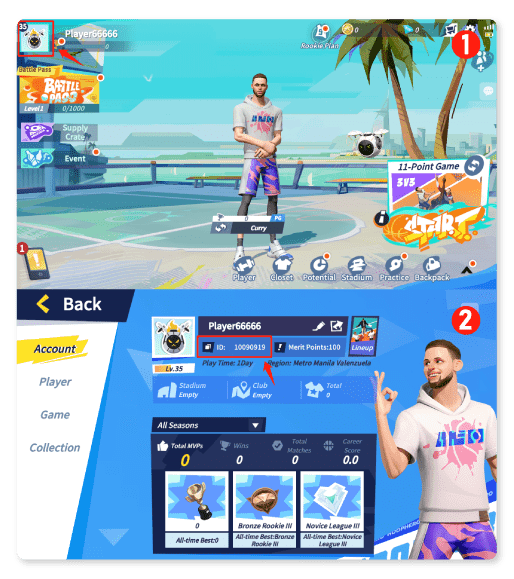
To ensure your token package is credited to the correct account, you must enter your exact User ID (UID) and Server during checkout. Finding this information takes only a few seconds inside the game client.
- Open Dunk City Dynasty on your mobile device or emulator.
- Tap your Avatar / Profile Icon located in the top-left corner of the main lobby screen.
- Your User ID (UID) is displayed below your character name on the profile summary tab.
- Tap the small Copy icon next to your UID to copy the exact string of numbers.
- Note your current Server name shown on the login screen or settings tab before entering it at checkout.
How to Top Up Dunk City Dynasty Tokens on ArcTopup
Recharging your balance on ArcTopup is straightforward and requires zero login credentials. Follow these simple steps:
- Select Your Denomination: Choose the Token package or bundle you wish to purchase from the product catalog.
- Enter Player Information: Paste your copied Dunk City Dynasty User ID and select your active Server.
- Confirm Selection: Check that your UID numbers and selected region match your in-game profile.
- Proceed to Payment: Pick your preferred payment method on the live checkout screen.
- Receive Your Tokens: Once payment completes, launch Dunk City Dynasty to see your updated Token balance or claim items directly from your in-game mailbox.
Safe & Secure UID Top-Up: Protecting Your Game Account
Account safety is a top priority for competitive mobile gamers. ArcTopup uses a direct ID-based fulfillment process designed to keep your private data safe:
- No Passwords Required: You never need to hand over your game login, email password, social login, or verification codes. All transactions process solely through your public User ID.
- Protection Against Phishing: Keeping your login details to yourself eliminates account takeover risks and unauthorized password resets.
- Direct System Crediting: Tokens are sent directly through standard game server endpoints, preserving your account standing and ranked ladder progress.
- Encrypted Checkout: Payment data is processed using modern encryption protocols, keeping personal billing details protected at every stage.
Supported Payment Options and Live Checkout Flow
ArcTopup supports a wide variety of localized and international payment solutions to make purchasing Dunk City Dynasty tokens simple wherever you play. Available channels include major debit and credit cards, popular digital wallets, and region-specific payment rails.
Exact pricing, available bundle bonuses, and current exchange rates appear directly on the live checkout screen. You will always see the exact total before confirming your payment, with no hidden checkout fees added at the end.
Troubleshooting Delivery Issues and Common Player Mistakes
If your Tokens do not appear immediately after placing an order, review these standard troubleshooting steps:
- Restart the Game Client: In-game wallets often update only after a fresh connection. Completely close the Dunk City Dynasty app and reopen it to sync your balance.
- Check the In-Game Mailbox: Certain promotional packages, bonus tickets, and event items are sent directly to your in-game mail tab rather than adding straight to your wallet counter.
- Verify UID Accuracy: Double-check your order receipt against your profile screen. A mistyped number can route a delivery to an inactive or alternate account.
- Confirm Server Selection: If you play on multiple regional servers, ensure you selected the specific server where your primary character lives.
- Contact ArcTopup Support: If your order status shows completed but your balance remains unchanged after 15 minutes, reach out to customer support with your Order ID and UID for rapid verification.
Dunk City Dynasty Top Up Frequently Asked Questions
How do I find my Dunk City Dynasty User ID and Server?
Open Dunk City Dynasty and tap your avatar icon in the top-left corner of the lobby screen. Your User ID is listed on the profile page alongside a copy icon. Your server name is displayed on the main login screen when launching the game.
Do I need to share my game account password to top up Dunk City Dynasty?
No. ArcTopup only requires your User ID and Server name to deliver Tokens. Never share your password, Google, Facebook, or Apple login credentials with anyone.
How long does it take for Tokens to be credited after purchase?
Most token orders are processed and credited to your game account shortly after payment confirmation. During server maintenance periods or major update drops, delivery may take a few extra minutes.
What in-game items can I buy with Dunk City Dynasty Tokens?
Tokens can be used to purchase superstar recruit vouchers, skill training manuals, talent cards, exclusive streetwear cosmetics, signature sneakers, and seasonal battle passes.
What should I do if I entered the wrong User ID or Server at checkout?
Contact ArcTopup customer support immediately with your order confirmation number and the correct User ID. If the order has not yet been processed by the automated fulfillment system, our support team can adjust your details.
Is top-up via User ID safe for my Dunk City Dynasty account?
Yes. Direct top-up via User ID is safe because it interacts only with standard crediting endpoints without requiring sensitive account access or third-party logins.
Current packages and prices
Current base prices exclude Tax. Tax, payment fees and coupon adjustments are shown at checkout.
| Package | Price |
|---|---|
| Dunk City Dynasty - Dunk City Dynasty - Rookie Gift Pack(限购一次) | USD 2.54 |
| Dunk City Dynasty - Dunk City Dynasty - Party Membership | USD 3.91 |
| Dunk City Dynasty - Dunk City Dynasty - Superstar Warmup Pack | USD 3.91 |
| Dunk City Dynasty - Dunk City Dynasty - Star Player Selected Pack | USD 4.05 |
| Dunk City Dynasty - Dunk City Dynasty - 300+30 Tokens | USD 4.24 |
| Dunk City Dynasty - Dunk City Dynasty - Premium Pass(限购一次) | USD 4.59 |
| Dunk City Dynasty - Dunk City Dynasty - Fashion Pack | USD 6.95 |
| Dunk City Dynasty - Dunk City Dynasty - Star Player Treasure | USD 7.02 |
| Dunk City Dynasty - Dunk City Dynasty - Extra Premium Pass(限购一次) | USD 7.65 |
| Dunk City Dynasty - Dunk City Dynasty - 980+130 Tokens | USD 12.33 |
| Dunk City Dynasty - Dunk City Dynasty - Party Permanent Vip(限购一次) | USD 12.33 |
| Dunk City Dynasty - Dunk City Dynasty - Star Player Sparkle Pack | USD 13.09 |
| Dunk City Dynasty - Dunk City Dynasty - 1980+300 Tokens | USD 25.50 |
| Dunk City Dynasty - Dunk City Dynasty - 3280+600 Tokens | USD 42.51 |
| Dunk City Dynasty - Dunk City Dynasty - 6480+1630 Tokens | USD 76.61 |
| Dunk City Dynasty - Dunk City Dynasty - Party Jessy 28 Days Access | USD 2.43 |






























































