
Gimme Top Up: In-App Coins and Live Stream Credits
Gimme is an interactive live streaming application where viewers interact directly with creators, hosts, and broadcasters. To participate fully in live streaming sessions, users purchase in-app credits commonly known as Gimme coins. Unlike fashion items, clothing, or physical merchandise that occasionally share the same name in search results, this service is dedicated exclusively to digital coins for the Gimme live broadcast app.
When you complete a Gimme top up on ArcTopup, your coins are credited directly to your registered user profile. In-app credits allow you to unlock several key platform features:
- Send Virtual Gifts: Show appreciation to your favorite broadcasters by sending animated gifts ranging from standard icons to full-screen dynamic animations.
- Gain VIP Status and Special Badges: Many streamers offer exclusive badges, private chat privileges, or entry into VIP-only broadcast rooms for active supporters.
- Increase Chat Visibility: Post highlighted comments, custom stickers, and pinned messages that stand out in crowded live stream chats.
- Support Creators in Contests: Help your favorite hosts climb the leaderboards during live PK battles and seasonal creator competitions.
To ensure an uninterrupted viewing experience, purchasing your coin packages online provides direct access to every interactive feature across the platform.
How to Find Your Gimme UID in the Live Streaming App
Before placing an order, you need your unique Gimme User Identification number (UID). The UID is a numeric account number assigned to your profile upon registration. You do not need to provide usernames, email addresses, or phone numbers; the numeric UID is the only information required to route credits directly to your balance.
Follow these steps on your mobile device to locate your UID:
- Open the Gimme app on your smartphone or tablet.
- Tap the Profile or Me icon located in the bottom-right corner of the screen.
- Look at the top section of your profile screen, directly beneath your display name and profile picture.
- Locate the line marked UID followed by a series of numbers.
- Tap the copy icon next to the number, or write the digits down carefully.
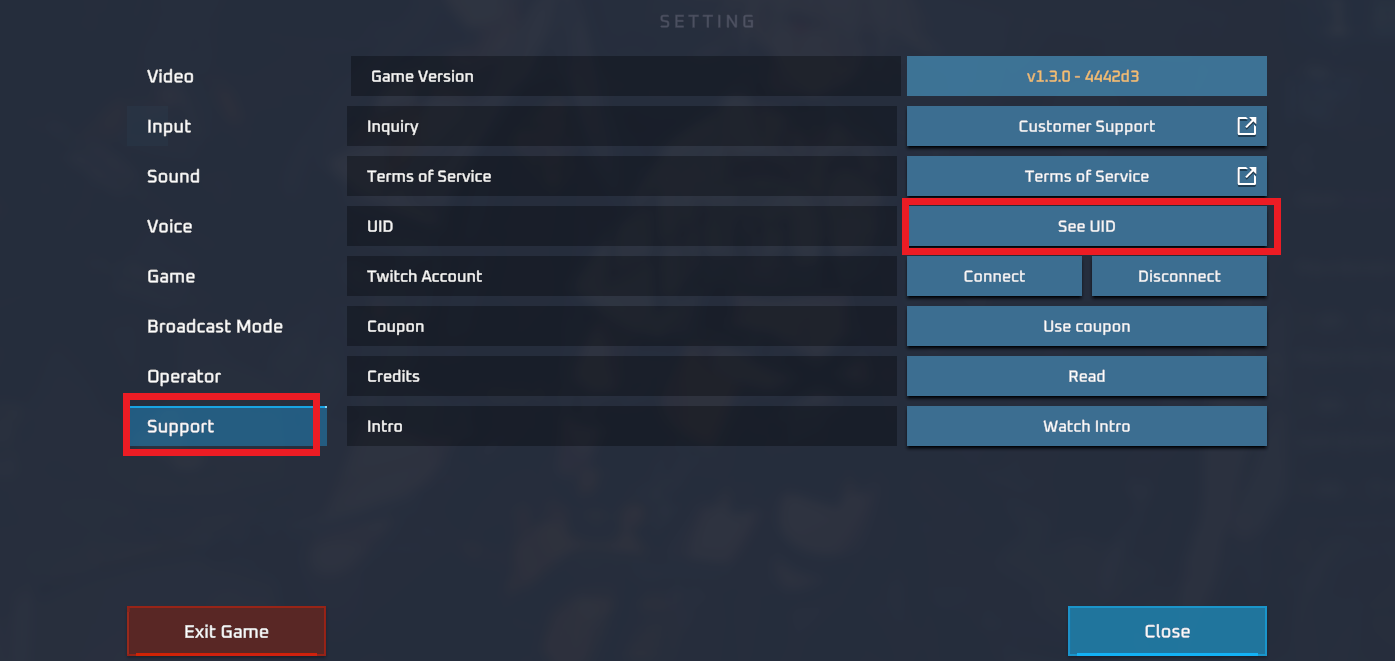
Always double-check your UID before confirming your order. Because account recharges are processed automatically based on this identifier, entering an accurate UID ensures your coins reach your profile without delay.
How to Top Up Gimme on ArcTopup Step-by-Step
Recharging your Gimme balance on ArcTopup is simple and takes only moments. Follow this guide to complete your transaction:
- Select Your Coin Package: Browse the available coin bundles listed on the live product interface. Choose the denomination that best fits your streaming needs.
- Enter Your Gimme UID: Type or paste your numeric Gimme UID into the designated input field. Check every digit carefully to prevent misrouted credits.
- Proceed to Checkout: Select your preferred payment method on the checkout page.
- Authorize the Payment: Follow the on-screen instructions to complete your payment securely.
- Check Your In-App Balance: Once payment confirmation is received, open your Gimme app to view your updated coin total.
Account Security: Why You Only Need Your Gimme UID Without Password
Account safety is essential when purchasing digital credits online. ArcTopup processes every Gimme recharge using only your public User ID (UID).
Here is why direct UID top-up is the safest method for your account:
- No Password Sharing: You never need to supply your password, email login credentials, or SMS verification codes.
- Zero Risk of Account Takeover: Because your login credentials stay in your hands, third parties cannot modify your account settings, transfer your assets, or lock you out of your profile.
- Protection Against Phishing: Phishing sites often ask for personal passwords under the guise of cheap recharge deals. Legitimate UID recharges only need public account numbers.
- Safe for Gifting: Because only a UID is needed, you can purchase coin packages for friends, family members, or your favorite streamers without asking for their private login details.
ArcTopup relies on direct identifier matching to ensure transactions remain fully secure, private, and fast.
Supported Payment Methods and Real-Time Checkout in 2026
ArcTopup provides access to a comprehensive range of global and regional payment options. In 2026, buyers can choose from multiple payment channels tailored to their location and preferences.
Available payment categories include:
- Major Credit and Debit Cards: International card networks for quick, card-based transactions.
- Digital Wallets: Leading digital wallet systems that allow one-tap verification from your phone or browser.
- Local Banking and Instant Transfers: Region-specific online banking channels that enable direct payments in local currencies.
All active package prices, exchange rates, and payment methods are displayed in real time on the live checkout interface. Select your country and preferred method during checkout to view the exact final total with complete price transparency.
Summary of the Gimme Top-Up Process
Here is a quick overview of how the recharge process operates from start to finish:
| Step | Required Action | Verification Method |
|---|---|---|
| 1. Profile Setup | Open Gimme app & copy UID | Profile page beneath avatar |
| 2. Bundle Selection | Pick desired coin pack | Live checkout menu on ArcTopup |
| 3. ID Input | Paste UID into order form | Check numeric sequence twice |
| 4. Payment | Authorize selected payment method | Secure transaction gateway |
| 5. Fulfillment | Open Gimme and verify coin balance | In-app wallet / profile screen |
Troubleshooting Gimme Recharge Delays and Common Errors
Most coin orders arrive in your account shortly after payment confirmation. However, if your coins do not appear immediately, use the following troubleshooting checklist to resolve the issue:
- Restart the Gimme App: Close the Gimme application completely on your mobile device, remove it from background processes, and relaunch it. This forces the app to sync with the central server and refresh your wallet balance.
- Verify Payment Completion: Check your email receipt or banking app to confirm that the transaction was successfully processed and not placed on hold by your payment provider.
- Double-Check the Submitted UID: Review your ArcTopup order summary to confirm that the UID submitted matches your current Gimme account number. If you entered an incorrect UID, contact customer support immediately with your order ID.
- Check for Server Maintenance: During major app updates or high-traffic live events, platform servers may experience brief processing queues. Allow a few moments for the queue to clear.
- Contact ArcTopup Customer Support: If your balance does not update and your payment is confirmed, submit a support ticket including your order number, payment confirmation, and Gimme UID for fast investigation.
Frequently Asked Questions About Gimme Top Up
How do I top up my Gimme account using my UID?
Select your desired coin package on ArcTopup, enter your numeric Gimme UID in the provided field, choose your payment method, and complete the payment. Your coins will be credited directly to your Gimme account balance upon payment confirmation.
Where can I find my Gimme UID in the app?
Open the Gimme app and tap the Profile or Me icon in the bottom-right corner. Your UID is the series of numbers displayed at the top of the profile screen, right under your display name and profile image.
Do I need to share my Gimme login password to recharge?
No. ArcTopup only requires your public numeric UID to process your coin order. Never share your password, login verification codes, or personal account credentials with anyone.
How long does it take for Gimme credits to arrive after purchase?
Orders are processed through an automated system as soon as payment is confirmed. In standard conditions, credits appear in your account balance shortly after the checkout process is completed.
What should I do if my Gimme top up does not appear in my balance?
First, force-close and restart your Gimme app to refresh the wallet balance. If the coins are still missing, verify that your payment went through and that your UID was entered correctly. If everything is correct, contact ArcTopup customer support with your order ID for assistance.
Can I recharge Gimme coins for a friend using their UID?
Yes. Because the recharge system only requires a valid UID without any login credentials, you can enter your friend's Gimme UID into the order field to send coin bundles directly to their account as a gift.
Current packages and prices
Current base prices exclude Tax. Tax, payment fees and coupon adjustments are shown at checkout.
| Package | Price |
|---|---|
| Gimme - Gimme*15000 | USD 1.63 |
| Gimme - Gimme*20000 | USD 2.17 |
| Gimme - Gimme*25000 | USD 2.71 |
| Gimme - Gimme*50000 | USD 5.43 |
| Gimme - Gimme*100000 | USD 10.86 |
| Gimme - Gimme*500000 | USD 54.29 |
| Gimme - Gimme*1000000 | USD 108.59 |
| Gimme - Gimme*10000 | USD 1.09 |






























































