
TAKA Live Coins Top Up: Premium In-App Currency for Livestreams
TAKA Live is a popular global interactive live streaming and voice party platform where users connect, share talents, participate in multi-guest audio rooms, and play social mini-games. TAKA Live Coins serve as the primary currency within the app ecosystem. With coins in your account balance, you can send animated gifts to your favorite broadcasters, unlock VIP and Noble badges, customize your room entry effects, and join interactive games.
ArcTopup provides a direct, secure method for your TAKA Live Coins top up. By entering only your unique Player ID, you can reload your coin balance quickly without sharing private account credentials or passwords.
TAKA Live Coins vs Beans: Key Differences and Conversion Rules
Understanding the distinction between TAKA Live Coins and TAKA Live Beans helps you manage your in-app wallet and spending efficiently.
| Feature | TAKA Live Coins | TAKA Live Beans |
|---|---|---|
| Primary Purpose | Spending on gifts, games, VIP tiers, and room effects | Host earnings received from fan gifts |
| How to Obtain | Purchased via direct top up on ArcTopup or in-app | Earned by streamers during live broadcasts |
| Withdrawal / Payout | Non-withdrawable; in-app utility only | Eligible for cash withdrawal by verified hosts |
| Conversion Ability | Cannot be converted directly into Beans | Can be converted into Coins inside the app |
| Best For | Viewers, party participants, and game players | Content creators and live broadcasters |
While hosts can convert their earned Beans into Coins inside the app settings, active viewers and community supporters rely on direct coin recharges on ArcTopup to get immediate access to top-tier gifts and party interactions without needing to host streams.
Benefits of TAKA Live Coins: VIP Noble Status, Animated Gifts, and In-App Mini-Games
Recharging TAKA Live Coins unlocks full access to the interactive features of the platform:
- Support Broadcasters with Dynamic Gifts: Send a wide variety of virtual items ranging from simple flowers and applause to full-screen 3D animated supercars, castles, and rockets. Sending gifts boosts streamer rankings and displays your name on the room leaderboard.
- VIP and Noble Status Levels: Upgrade your profile to Noble ranks such as Baron, Viscount, Earl, Duke, and King. Noble status grants exclusive profile badges, unique avatar frames, dedicated customer assistance, anti-kick privileges in public rooms, and standout chat bubble colors.
- Voice Party Effects & Entry Banners: Make a grand entrance into audio chat rooms with custom vehicle animations, arrival notifications, and priority microphone reservation options.
- Social Mini-Games: Use coins to participate in popular in-app casual games such as Ludo, Domino, and Lucky Wheel within voice rooms while chatting with friends.
How to Top Up TAKA Live Coins on ArcTopup Using Player ID
Recharging your account on ArcTopup is straightforward and requires no login passwords. Follow these steps to complete your purchase:
- Select Coin Bundle: Choose the TAKA Live Coins denomination you want from the available catalog on ArcTopup.
- Enter Player ID: Type your numerical TAKA Live Player ID into the designated input field.
- Select Payment Option: Pick your preferred payment method on the live checkout screen.
- Review and Pay: Verify that your Player ID is entered correctly, then confirm the transaction.
- Receive Coins: Once payment processing finishes, open the TAKA Live app to see your updated balance in your profile wallet.
Step-by-Step Guide: How to Find Your TAKA Live Player ID
Your Player ID (UID) is a permanent numerical identifier tied to your TAKA Live account. Follow these steps to find it:
- Open the TAKA Live app on your phone or tablet.
- Tap the Profile / Me icon located in the bottom right corner of the navigation bar.
- View your profile screen. Your ID is displayed clearly directly beneath your profile picture and nickname.
- Tap the copy icon next to the number to copy your ID to your clipboard, or write it down carefully.
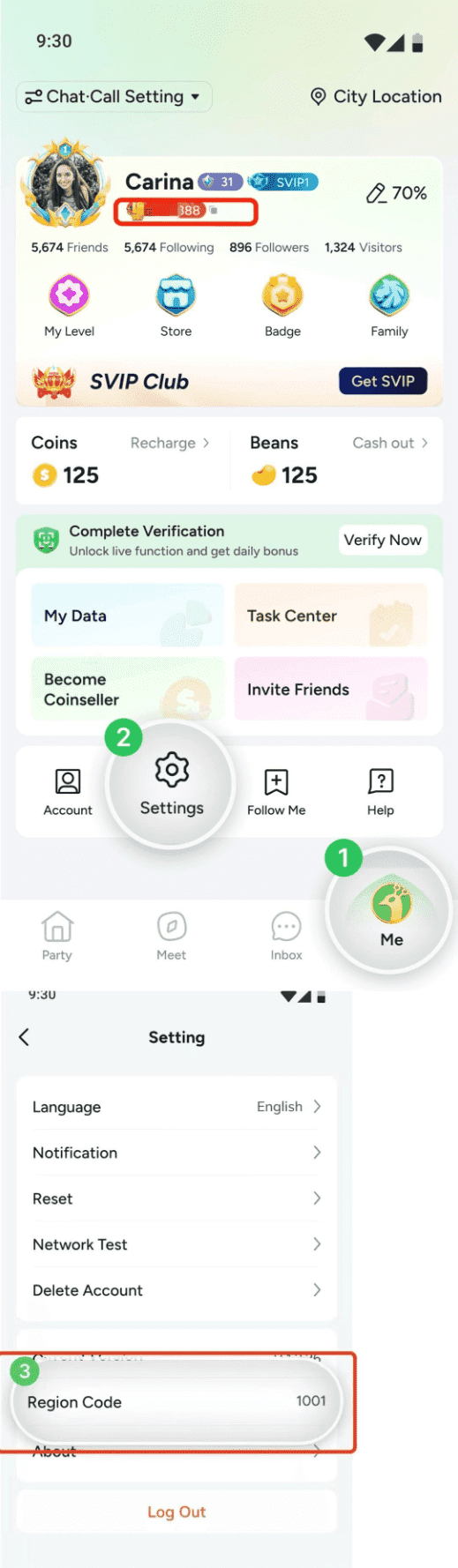
Ensure you enter this exact numerical ID during checkout on ArcTopup to guarantee that your coins reach the correct account.
Troubleshooting Delivery and Common Top-Up Mistakes
If you experience any delay or issue with your coin recharge, refer to these common troubleshooting checks:
- Refresh the TAKA Live Wallet: If coins do not appear immediately after payment, pull down on your profile screen to refresh the app, or fully close and reopen TAKA Live.
- Verify Network Connection: Ensure your mobile data or Wi-Fi connection is stable so the app can sync with the live server.
- Double-Check Player ID Inputs: The most frequent reason for missing coins is entering an incorrect digit during checkout. Because top-ups are processed automatically to the submitted ID, always copy and paste your ID directly from the app profile.
- Order Receipt Support: If your balance does not update within a few minutes after a completed payment, reach out to ArcTopup customer support with your transaction order ID and your TAKA Live Player ID for prompt verification.
Why Choose ArcTopup for Safe, Password-Free TAKA Live Recharge
ArcTopup is designed to provide streaming enthusiasts with a smooth, reliable purchasing experience:
- 100% Password-Free Security: ArcTopup only requires your public Player ID to credit your account. You never have to share your account password, email credentials, or phone verification codes.
- Transparent Live Checkout: Check live coin packages and current pricing directly on the store page without hidden processing fees.
- Dedicated Customer Support: Our support team is ready to assist you with order status inquiries and ensure a smooth top-up experience.
- Optimized Global Experience: Built to accommodate social streaming fans around the world with responsive navigation and simple checkout steps.
Frequently Asked Questions
How to buy TAKA Live coins online?
Select your desired coin package on ArcTopup, input your numerical TAKA Live Player ID, choose your payment method, and complete the checkout. Your coins will be credited directly to your in-app account.
How do I find my TAKA Live Player ID for a top up?
Open the TAKA Live app, tap the Profile (Me) tab in the bottom right corner, and locate the numerical ID shown under your nickname and profile avatar.
Do I need to share my TAKA Live password to recharge coins?
No. ArcTopup never asks for your password, social login details, or verification codes. All coin deliveries are processed safely using only your public Player ID.
What can I use TAKA Live Coins for inside the app?
TAKA Live Coins are used to purchase and send animated virtual gifts to streamers, unlock Noble and VIP membership tiers, buy voice party entrance animations, and participate in mini-games like Ludo and Domino.
Can I convert my TAKA Live Beans into Coins?
Yes. If you are a host or receive gifts, you can convert your earned Beans into Coins directly within the TAKA Live app wallet settings. Viewers who do not broadcast can top up coins directly via ArcTopup.
How long does it take to receive my TAKA Live Coins after payment?
Coins are credited to your account promptly once the payment transaction is confirmed. You can verify your new balance by checking the wallet section in your TAKA Live profile.
What should I do if I entered the wrong Player ID during checkout?
If you realize you entered an incorrect Player ID, contact ArcTopup customer support immediately with your order confirmation details. If the order has already been processed by the automated system to the submitted ID, transactions cannot be reversed, so always double-check your UID before finalizing payment.
Current packages and prices
Current base prices exclude Tax. Tax, payment fees and coupon adjustments are shown at checkout.
| Package | Price |
|---|---|
| Taka Coins*10000 | USD 0.92 |
| Taka Coins*20000 | USD 1.83 |
| Taka Coins*50000 | USD 4.58 |
| Taka Coins*100000 | USD 9.16 |
| Taka Coins*150000 | USD 13.74 |
| Taka Coins*200000 | USD 18.32 |
| Taka Coins*500000 | USD 45.81 |
| Taka Coins*1000000 | USD 91.62 |
| Taka Coins*1500000 | USD 137.43 |
| Taka Coins*2000000 | USD 183.24 |































































