Hago Top Up: Fast Diamond Recharge for Voice Rooms and Games
Hago brings together casual mobile gaming, interactive 3D spaces, and live voice party rooms into a single social app. Whether you are climbing the leaderboards in competitive 1v1 mini-games, hosting a karaoke party, or hanging out in community channels, Diamonds are the core premium currency that powers your social interactions. A quick Hago top up ensures you always have the balance needed to send animated gifts, stand out in chat rooms, and unlock exclusive customization items.
ArcTopup provides a direct recharge system designed specifically for Hago players worldwide. You only need your numerical Player ID to place an order. There is no account linking, no social login requirement, and no password sharing. Your Diamonds credit directly to your in-app account balance as soon as payment is confirmed.
What Are Hago Diamonds and What Can You Buy With Them?
Diamonds are the primary paid currency inside Hago. Unlike standard coins earned through mini-game victories, Diamonds grant access to premium social features, creator gifting, and personalized profile upgrades across the platform.
In-Game Items and Social Utilities for Diamonds
- Virtual Animated Gifts: Send rocket launches, luxury cars, flowers, and custom effects to broadcasters and room hosts during live voice chats.
- Entrance Effects: Display custom animated arrival banners whenever you join popular voice party channels.
- Avatar and Profile Customization: Purchase rare profile frames, dynamic chat bubbles, and 3D space avatar outfits.
- Mini-Game Boosters and Passes: Access premium game modes, buy extra tries, and unlock exclusive cosmetics in competitive mini-games.
- Room Hosting Tools: Activate spotlight boosts for your voice rooms to attract more listeners and community members.
Hago Currency Comparison
| Currency | How to Obtain | Primary Use Cases |
|---|---|---|
| Diamonds | Direct top up on ArcTopup | Sending virtual gifts, purchasing room entrance effects, unlocking premium avatar cosmetics |
| Coins | Playing mini-games, daily tasks | Entry fees for casual mini-games, standard in-game matchmaking |
| Beans / Crystals | Received from gifts as a host | Creator revenue, converting to platform rewards |
Step-by-Step Guide: How to Top Up Hago Diamonds on ArcTopup
Recharging your Hago account takes less than a minute. Follow these simple steps to complete your transaction:
- Select Your Diamond Package: Choose the Diamond denomination that matches your current budget and gifting needs. Real-time pricing for each pack is displayed directly in the product selector above.
- Enter Your Hago Player ID: Type or paste your numerical Player ID into the designated input field. Double-check the digits to ensure accurate account matching.
- Select Your Preferred Payment Method: Pick from the available secure local payment options listed during checkout.
- Complete the Checkout: Finalize your payment through our encrypted gateway.
- Check Your Hago Balance: Open the Hago app on your phone, go to your wallet section, and verify your updated Diamond balance.
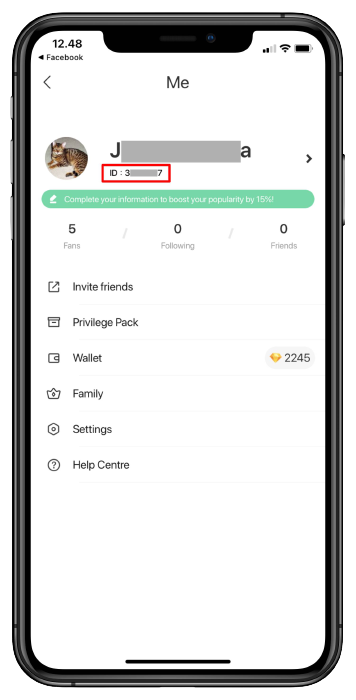
How to Find Your Hago Player ID (UID)
To ensure your Diamonds arrive without delay, you must enter your correct numerical Player ID. You do not need to provide your username or phone number.
- Open the Hago application on your mobile phone.
- Tap the Me (Profile) icon located in the bottom-right corner of the home screen.
- Locate your numerical Player ID displayed directly underneath your profile picture and nickname.
- Tap the small Copy icon next to the number to copy it directly to your clipboard.
- Paste the ID into the input field on ArcTopup before proceeding to checkout.
How to Recharge Hago Diamonds for Friends Using Player ID
Because ArcTopup uses a direct ID-based delivery system, sending Diamonds as a gift to friends, family, or your favorite channel hosts is straightforward:
- Ask the recipient for their numerical Hago Player ID.
- Select the Diamond bundle you wish to gift them on ArcTopup.
- Paste their Player ID into the order form instead of your own.
- Complete the checkout process.
Once the payment clears, the Diamonds are credited directly to their in-app wallet. They do not need to accept an invitation or verify an email code to receive their gift.
Secure Hago Recharge: Why You Never Need to Share Account Passwords
Account safety is a top priority when purchasing digital currencies online. Third-party top-up methods that require your Facebook, Google, Apple ID, or phone login credentials put your personal information and account ownership at serious risk.
ArcTopup operates strictly through direct numerical Player ID delivery:
- Zero Password Requests: We never ask for your account password, security questions, or two-factor authentication codes.
- No Third-Party Logins: Your social media accounts linked to Hago remain completely private on your own device.
- Encrypted Transactions: Every checkout is processed through bank-grade encryption to protect your financial details.
- Direct Server Delivery: Diamond balances are credited directly to the game server matching your unique ID.
Troubleshooting Hago Top-Up Delays and Common Errors
If your Diamonds do not reflect immediately in your account balance after purchasing, follow this troubleshooting checklist:
- Restart the Hago App: In-game wallet caches sometimes fail to update while the app runs in the background. Force close the Hago application completely, wait 10 seconds, and reopen it.
- Verify the Player ID Entered: Check your order confirmation receipt to confirm that the Player ID you typed matches your in-game profile ID. Entering an incorrect digit will deliver the currency to another account.
- Check Payment Status: Make sure your payment provider successfully processed the transaction and did not leave it in a pending authorization state.
- Check Server Maintenance: During major Hago platform updates, in-game wallet synchronization can occasionally experience short processing queues.
- Contact Customer Support: If your payment completed successfully but your balance does not update within a few minutes, reach out to ArcTopup support with your order number and transaction receipt for prompt assistance.
Popular Mini-Games and Voice Party Features in Hago 2026
Hago continues to expand its library of casual multiplayer games and voice chat features. Having a steady supply of Diamonds lets you make the most of every social space:
- Competitive 1v1 Mini-Games: Challenge friends and global players in fast matches like Sheep Fight, Knife Hit, Ludo, Hexagon Fight, and Fruit Master.
- Interactive 3D Party Rooms: Create your personal 3D avatar, furnish virtual rooms, and interact with other community members in real-time virtual spaces.
- Live Karaoke and Talent Channels: Join 8-seat audio stages, showcase your singing or hosting talents, and receive animated gifts from active listeners.
- Community Werewolf & Board Games: Team up with friends in voice-enabled deduction games and strategic party titles that require live voice communication.
Frequently Asked Questions
How do I find my Hago Player ID?
Open the Hago app, tap the Me icon in the bottom right corner, and look right below your avatar and display name. You will see your numerical Player ID with a copy button next to it.
What are Hago Diamonds used for?
Hago Diamonds are used to buy virtual animated gifts for live room hosts, unlock custom chat room entrance effects, purchase 3D avatar clothes, acquire rare profile frames, and access special mini-game items.
Can I recharge Hago Diamonds for a friend's account?
Yes. You only need your friend's numerical Hago Player ID. Enter their ID in the top-up field on ArcTopup, choose the Diamond package, and complete payment. The Diamonds will arrive directly in their wallet.
Do I need to share my Hago password or login credentials to top up?
No. ArcTopup only requires your numerical Player ID. You should never share your account passwords, verification codes, or linked social media logins with anyone.
How long does it take for Hago Diamonds to be credited?
Orders on ArcTopup are processed automatically. Once your payment clears through our secure checkout, Diamonds are sent straight to your Hago account balance within moments.
What should I do if my Hago Diamonds do not show up after payment?
First, force close and restart the Hago app to refresh your wallet cache. If the balance remains unchanged, check your receipt to confirm the Player ID was accurate, then reach out to ArcTopup customer support with your order details.
Can I play Hago games online with friends across different regions?
Yes. Hago connects players across different regions for multiplayer mini-games and voice party channels. Top-ups processed with your numerical Player ID will credit your account regardless of where you are currently playing.
Current packages and prices
Current base prices exclude Tax. Tax, payment fees and coupon adjustments are shown at checkout.
| Package | Price |
|---|---|
| Hago - Hago*30000 | USD 2.23 |
| Hago - Hago*50000 | USD 3.72 |
| Hago - Hago*70000 | USD 5.21 |
| Hago - Hago*100000 | USD 7.45 |
| Hago - Hago*200000 | USD 14.89 |
| Hago - Hago*500000 | USD 37.23 |
| Hago - Hago*700000 | USD 52.12 |
| Hago - Hago*1000000 | USD 74.46 |
| Hago - Hago*2000000 | USD 148.91 |
| Hago - Hago*5000000 | USD 372.29 |