
Ifun Top Up: Direct UID Refill on ArcTopup
Recharging your Ifun coin balance is the most direct way to participate in live streaming broadcasts, send interactive gifts, and connect with your favorite creators. ArcTopup provides a straightforward, direct top-up system that credits coins straight to your account using only your unique User ID (UID). You do not need to share passwords, link social media accounts, or go through complicated verification steps.
Selecting the right coin package gives you the currency needed to unlock exclusive visual effects, enter VIP broadcasts, and support hosts during real-time PK battles. ArcTopup updates all product options and rates directly on the live checkout interface, allowing you to choose the exact package that fits your entertainment goals.
How to Top Up Ifun Coins Using UID on ArcTopup
Completing an Ifun coin top up takes only a few moments. Follow these steps to complete your purchase:
- Select your desired Ifun coin package from the denomination list on ArcTopup.
- Enter your numeric Ifun User ID (UID) into the designated account field.
- Verify that the entered numbers match your in-app profile ID exactly.
- Proceed to checkout and select your preferred payment option.
- Complete the payment process. Your coins will be credited directly to your Ifun balance.
| Order Step | User Action | Verification Point |
|---|---|---|
| 1. Bundle Selection | Choose coin quantity | Match with live stream gifting needs |
| 2. ID Entry | Input your numeric UID | Confirm against your Ifun profile page |
| 3. Payment | Pick local or global method | Verify final checkout summary |
| 4. Delivery | Open Ifun app | Check updated coin wallet balance |
How to Locate Your Ifun User ID (UID)
To ensure your coins arrive at the correct account, you must provide your exact numeric UID. You can find this number directly inside the Ifun application on Android or iOS:
- Launch the Ifun application on your smartphone or tablet.
- Tap the Profile (or "Me") icon located in the bottom-right corner of the main navigation bar.
- Look beneath your profile picture and display nickname at the top of the screen.
- Find the numeric string labeled "UID" or "ID".
- Tap the small copy icon next to the digits, or write down the exact sequence of numbers.
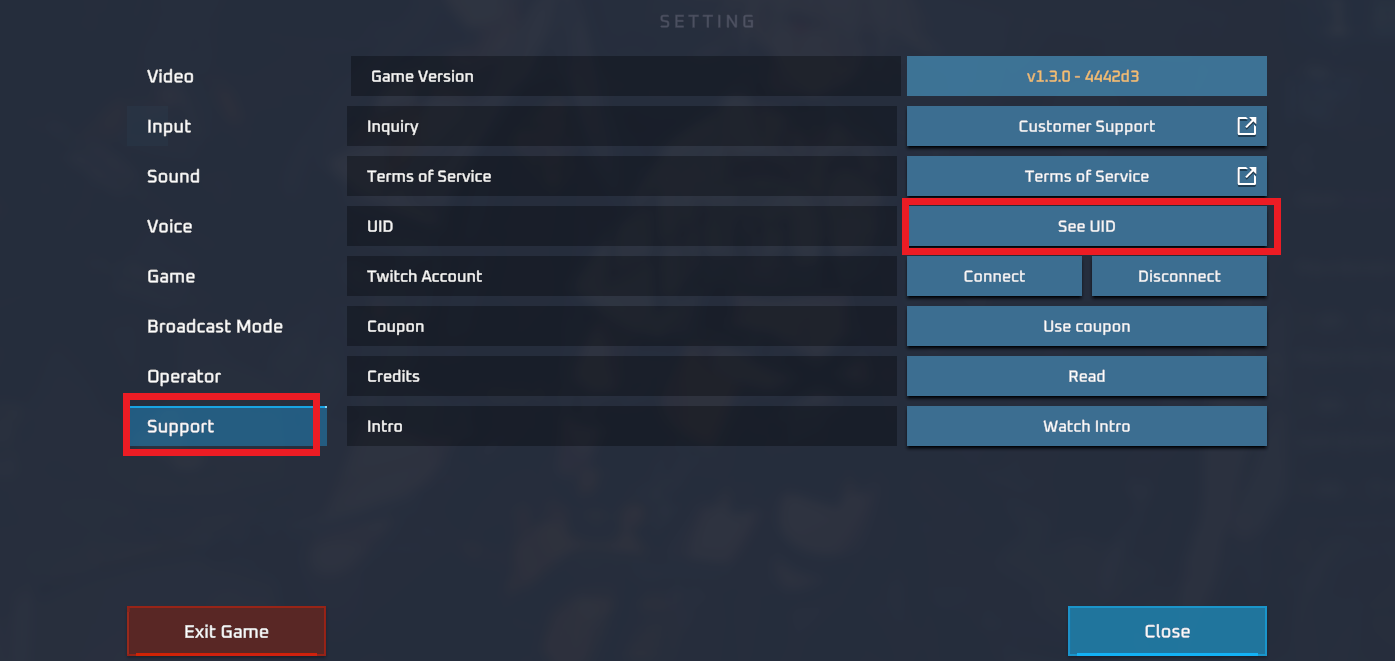
Make sure to copy the numeric UID rather than your display username. Display names can be changed at any time and may contain special symbols, whereas your numeric UID is unique, permanent, and directly connected to your wallet ledger.
Uses of Ifun Coins: Premium Gifts and Creator Support
Ifun coins serve as the primary currency within the live entertainment ecosystem. Maintaining a ready coin balance enables several interactive features across the app:
- Virtual Gifting: Send a wide variety of animated gifts to live hosts during their streams. Gifts range from simple tokens like flowers and stars to high-tier animations such as supercars, yachts, and rocket launches that fill the entire screen.
- PK Battle Support: Help your favorite streamers win competitive live PK challenges against other hosts. Dropping high-value gifts during bonus rounds directly boosts their battle score and leaderboard rank.
- Chat Visibility and Entrance Effects: Users who send premium gifts or hold higher supporter levels receive custom badge icons, highlighted chat text, and animated entrance effects when stepping into any live room.
- Private Club and VIP Access: Certain creators set up exclusive fan clubs or special live rooms that require coin contributions or gift thresholds to join.
Available Secure Payment Options for Ifun Recharge
ArcTopup supports an extensive array of secure payment channels to ensure smooth transactions regardless of your location. Available checkout options include:
- Credit and Debit Cards: Major bank cards with standard encryption protocols.
- Digital Wallets: Popular regional and international mobile wallets for fast checkout.
- Online Banking & Instant Transfers: Direct bank settlement systems tailored to your local market.
- Local Payment Channels: Region-specific retail or virtual payment options where credit cards are not preferred.
All applicable fees, regional exchange rates, and final checkout totals are displayed transparently before you confirm payment. You will never encounter hidden surcharges after completing your purchase.
Account Safety: Why Direct UID Top-Up Protects Your Account
Direct UID recharging is the safest method for topping up virtual live-streaming currencies. When you buy Ifun coins on ArcTopup, your account security remains completely in your hands:
- No Password Requirements: You never have to share your Ifun account password, phone verification codes, or social media login details.
- Zero Risk of Account Takeover: Because our recharge system communicates strictly with the public player identifier, third parties have zero access to your private profile settings or chat history.
- Safe for Third-Party Gifting: You can use this service to recharge coins for friends, family members, or favorite creators directly. All you need is their public UID.
- Direct System Crediting: Coins are sent straight to the host server balance, ensuring your transaction remains clean and compliant with platform terms.
Troubleshooting Ifun Delivery Delays and Payment Issues
If your coins do not appear in your in-app wallet immediately after completing checkout, follow these diagnostic steps:
- Refresh the App: Completely close the Ifun application from your device's recent apps switcher and reopen it. This forces the app to request an updated balance from the central server.
- Check Your Network Connection: Ensure your mobile data or Wi-Fi connection is active and stable. A weak connection can delay wallet synchronization.
- Review Your Order Details: Look at your ArcTopup order confirmation email or order history to verify that the UID you entered matches your account ID without any missing digits.
- Verify Payment Status: Check with your payment provider or bank app to ensure the transaction was fully authorized and not placed on hold.
- Contact Customer Support: If the transaction shows as successful on your statement but your coins have not arrived after a short wait, reach out to the ArcTopup support team. Provide your ArcTopup Order ID, transaction receipt, and Ifun UID so the team can review your order status promptly.
Frequently Asked Questions
What information is required to top up Ifun coins?
You only need to provide your numeric Ifun User ID (UID) and select the coin bundle you wish to purchase. No passwords, security questions, or linked account logins are required.
Where can I find my Ifun UID?
Open the Ifun app, tap on the Profile tab in the bottom-right corner, and locate the numeric ID displayed beneath your avatar and nickname. Tap the copy icon to copy the exact number.
Do I need to share my Ifun password to recharge?
No. ArcTopup processes recharges using direct UID delivery. We will never ask for your account password, email login, or one-time verification codes.
Can I recharge Ifun coins for a friend using their UID?
Yes. You can top up an account for a friend, family member, or live host simply by entering their numeric Ifun UID into the account field during checkout.
What should I do if my Ifun coin top-up is delayed?
First, restart your Ifun app to force a balance refresh. If the coins do not display within a few minutes, check your ArcTopup order history to confirm the UID submitted was accurate, then reach out to customer support with your Order ID.
Which payment options are available for buying Ifun coins on ArcTopup?
ArcTopup supports credit cards, debit cards, popular digital e-wallets, and regional direct banking channels. You can view the full selection of active payment methods and final prices directly on the live checkout screen.
Current packages and prices
Current base prices exclude Tax. Tax, payment fees and coupon adjustments are shown at checkout.
| Package | Price |
|---|---|
| Ifun - Ifun*20000 | USD 1.54 |
| Ifun - Ifun*25000 | USD 1.92 |
| Ifun - Ifun*50000 | USD 3.84 |
| Ifun - Ifun*100000 | USD 7.69 |
| Ifun - Ifun*500000 | USD 38.43 |
| Ifun - Ifun*1000000 | USD 76.85 |
| Ifun - Ifun*5000000 | USD 384.26 |
| Ifun - Ifun*15000 | USD 1.15 |






























































