
LitChat Top Up: Get Diamonds and Coins Quickly on ArcTopup
LitChat connects users across the globe through dynamic audio chat rooms, live voice interactions, and interactive social spaces. To participate actively in group rooms, reward talented broadcasters, and customize your profile presence, having an adequate balance of in-app currency is essential. A direct LitChat top up on ArcTopup allows you to reload your account instantly using only your account UID.
ArcTopup provides a straightforward platform where you select your desired diamond bundle, input your player ID, and complete payment directly. Your items are credited straight to your account without requiring login credentials or private information.
What Is LitChat and How Do In-App Currencies (Diamonds and Coins) Work?
LitChat is a voice-centric social networking app where communities gather to talk, play mini-games, sing, and host themed audio parties. The app utilizes a dual-currency ecosystem consisting of Diamonds and Coins, each serving distinct roles within the platform.
Diamonds vs. Coins Breakdown
Understanding how each currency functions helps you manage your purchases effectively:
| Currency | Primary Acquisition Method | Main Uses & Functions | Transferable to Others? |
|---|---|---|---|
| Diamonds | Direct recharge / top-up | Purchasing premium virtual gifts, unlocking exclusive room effects, activating entrance banners, and purchasing VIP status perks | Yes (sent via live gifts to room hosts and friends) |
| Coins / Points | In-app tasks, daily check-ins, or host earnings | Minor app interactions, mini-game participation, and internal feature unlocks | Limited to specific internal conversion rules |
When you recharge through ArcTopup, your account receives LitChat Diamonds directly. These diamonds give you full access to the gift store, enabling you to support content creators, boost your personal ranking on room leaderboards, and stand out in high-traffic chat channels.
How to Find Your LitChat UID in the App
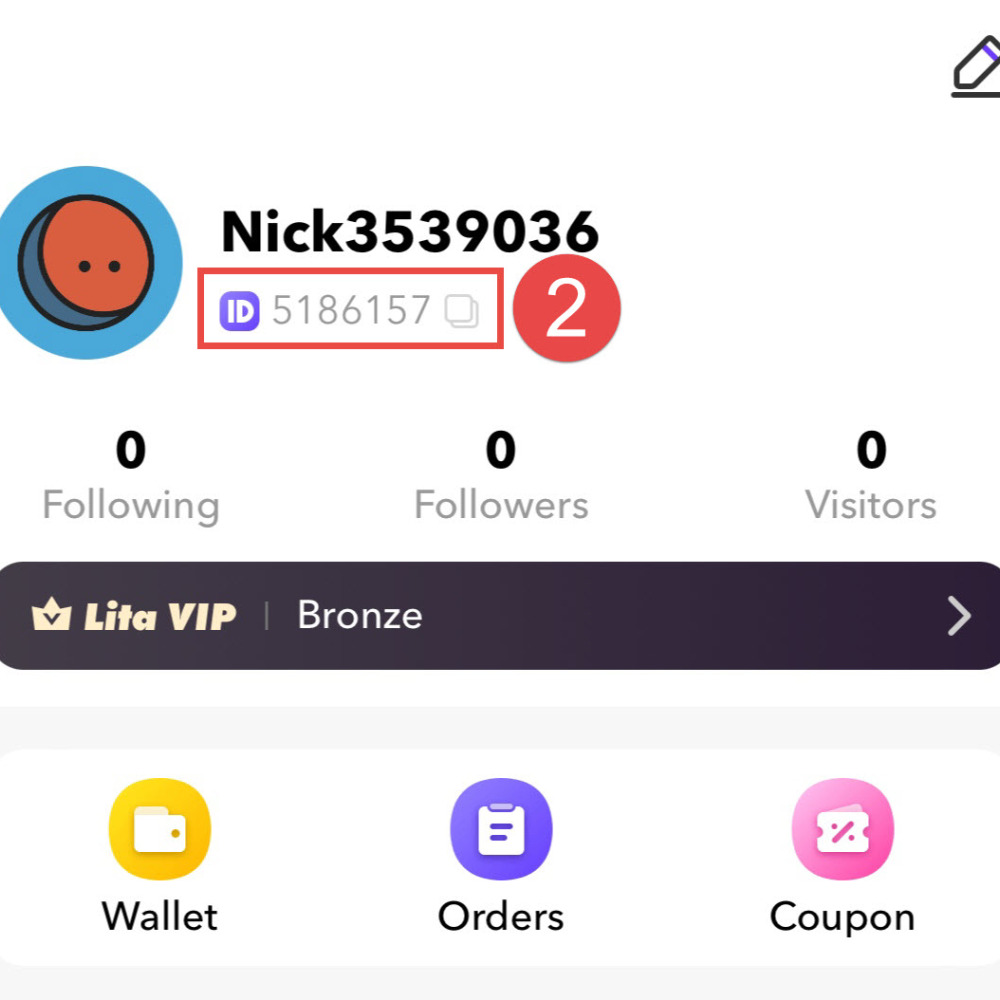
To ensure your recharge reaches the correct profile, you must provide your exact numeric LitChat UID. Finding this identifier takes only a few seconds.
- Open the LitChat application on your mobile device.
- Tap the Profile or Me icon located in the bottom navigation bar.
- Look directly beneath your avatar and display nickname.
- You will see a line labeled ID or UID followed by a unique series of numbers.
- Tap the copy icon next to the number, or write it down carefully.
Common Mistakes to Avoid When Locating Your UID
- Do not enter your Room ID: When hosting or visiting a voice room, the room displays a specific Room Number. This is not your account UID. Diamonds sent to a Room ID will fail to credit properly.
- Do not enter your Display Nickname: LitChat usernames can contain special characters, emojis, or spaces, and they can be changed at any time. ArcTopup processes recharges exclusively via the fixed numeric UID.
- Check for leading or trailing spaces: If copying your ID manually, ensure no accidental blank spaces are inserted into the checkout field.
Step-by-Step Guide to Top Up LitChat on ArcTopup
Recharging your LitChat balance on ArcTopup is designed for speed and convenience. Follow these simple steps:
- Select Your LitChat Product: Choose the diamond package that matches your social needs. Current live prices are displayed clearly alongside each package denomination on the checkout interface.
- Enter Your LitChat UID: Paste or type your numeric player ID into the specified UID field.
- Select Your Payment Channel: Pick your preferred payment method from the available local and global options shown on the checkout screen.
- Confirm and Pay: Review your order details to make sure your UID is entered accurately, then click to finalize the transaction.
- Check Your In-App Balance: Once payment confirmation is received, open LitChat and refresh your wallet screen to see your updated diamond total.
Using LitChat Diamonds: Virtual Gifting, Room Effects, and Social Perks
LitChat diamonds unlock the complete social experience inside the app. Here is how you can use them after completing your top-up:
1. Animated Virtual Gifts
Sending virtual gifts is the primary way to interact with room hosts and participants. Gifts range from simple tokens of appreciation to full-screen 3D animations, custom sound effects, and luxury vehicle entrance alerts. Sending higher-tier gifts displays your profile across the room screen and raises your contributor level.
2. Entrance Effects and Profile Frames
Make a lasting impression whenever you enter a popular audio room. Diamonds allow you to equip premium entrance animations, glowing avatar frames, and custom chat bubbles that distinguish your messages from standard text.
3. Room Ranking and Community Visibility
Voice rooms feature daily, weekly, and monthly contributor leaderboards. Active gifters earn top ranking spots, granting special badges and spotlight visibility across the app's discovery pages.
Account Safety: Why ArcTopup Only Requires Your UID (No Passwords)
Account security is critical when purchasing virtual goods online. ArcTopup operates on a direct UID-credit system, providing maximum safety for your LitChat profile.
- No Passwords Requested: You will never be asked for your LitChat account password, verification SMS codes, or linked social media credentials.
- No Account Sharing: Your profile remains entirely in your control. The recharge is pushed externally straight to your numeric ID through direct network protocols.
- Safe for Friends and Family: Because only the numeric UID is needed, you can easily top up diamonds for friends, community moderators, or favorite broadcasters as a gift without needing access to their personal devices.
Troubleshooting LitChat Top-Up Delivery and Balance Refreshing
Transactions on ArcTopup are processed automatically. If you complete an order and do not immediately see the diamonds in your app, use the following troubleshooting checklist:
- Restart the LitChat App: Fully close the LitChat app from your background application switcher, wait five seconds, and reopen it. This forces the app to sync with the server database.
- Check the Wallet / Diamond Tab: Navigate to your profile, tap Wallet or My Diamonds, and check the internal balance log. In some instances, the balance updates in the wallet before reflecting on live room gift panels.
- Verify Your UID on the Order Receipt: Check your ArcTopup transaction confirmation to confirm that the numeric UID submitted matches your current LitChat profile ID exactly.
- Check Network Connectivity: A weak Wi-Fi or mobile data connection can delay client-side UI updates. Switch connection modes and reload the profile page.
- Contact ArcTopup Support: If your balance does not update after following these steps, reach out to the ArcTopup customer service team with your Order ID and LitChat UID. The support team will verify delivery status with the processing network promptly.
Frequently Asked Questions About LitChat Top Up
How do I find my LitChat UID for recharge?
Open LitChat, tap the Profile or Me icon at the bottom right of the screen, and locate the numeric ID displayed underneath your avatar and display name. Tap the copy icon next to the number to use it during checkout.
Do I need to share my LitChat account password to top up?
No. ArcTopup only requires your numeric LitChat UID to deliver your diamonds. You should never share your account password, email login, or verification codes with anyone.
What is the difference between LitChat diamonds and coins?
Diamonds are the premium currency purchased through direct recharge and are primarily used to send virtual gifts, unlock visual effects, and support room creators. Coins are generally earned or collected through in-app events, tasks, or broadcaster reward systems.
Can I top up LitChat diamonds for a friend using their UID?
Yes. Because ArcTopup only requires a numeric UID, you can input your friend's player ID into the UID field at checkout to deliver diamonds directly to their account.
How long does it take for LitChat diamonds to reflect in my balance?
Recharges are processed automatically upon successful payment. In most cases, diamonds appear in your LitChat wallet immediately. Restarting the app helps refresh the balance display.
What should I do if my LitChat top-up does not show up immediately?
First, force-close and restart your LitChat app to refresh the wallet data. If the diamonds still do not show, check your order confirmation to verify that the entered UID was correct, then contact ArcTopup customer support with your order number for quick assistance.
Current packages and prices
Current base prices exclude Tax. Tax, payment fees and coupon adjustments are shown at checkout.
| Package | Price |
|---|---|
| LitChat - LitChat*15000 | USD 2.42 |
| LitChat - LitChat*20000 | USD 3.23 |
| LitChat - LitChat*25000 | USD 4.04 |
| LitChat - LitChat*50000 | USD 8.07 |
| LitChat - LitChat*100000 | USD 16.14 |
| LitChat - LitChat*500000 | USD 80.71 |
| LitChat - LitChat*1000000 | USD 161.42 |
| LitChat - LitChat*10000 | USD 1.61 |































































