
Marvel Rivals Top Up: How to Buy Lattices Using Your User ID
Getting premium currency in Marvel Rivals is straightforward and requires only your in-game User ID. You do not need to share account passwords or log in through third-party platforms to complete your order.
Follow these steps to complete your Marvel Rivals recharge on ArcTopup:
- Select Your Package: Choose the amount of Marvel Rivals Lattices you wish to purchase from the product denomination list.
- Enter Your User ID: Input your exact Marvel Rivals User ID into the designated player field. Double-check your numbers to ensure smooth delivery.
- Proceed to Checkout: Select your preferred payment method on the live checkout screen and confirm the order details.
- Receive Your Lattices: Once your payment is confirmed, the Lattices are sent directly to your Marvel Rivals account.
Prices and available packages are displayed live during checkout. Always verify your User ID before confirming your payment to avoid delivery errors.
Where to Find Your Marvel Rivals User ID in the Game Client
Your Marvel Rivals User ID (UID) is a unique numerical identifier tied directly to your game account. You can locate it inside the game client across all supported platforms.
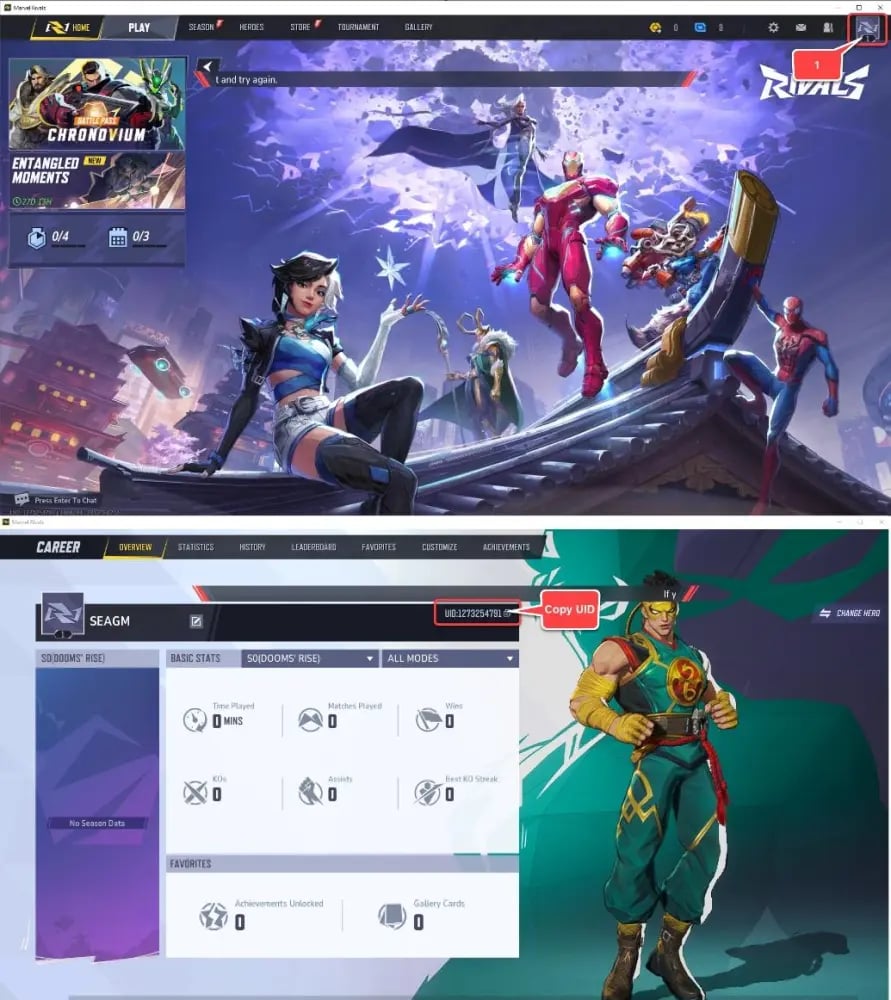
To find your User ID:
- Launch Marvel Rivals on your PC, PlayStation 5, or Xbox Series X/S.
- In the main menu, click on your Player Avatar / Profile Icon located in the top-left or top-right corner of the home screen.
- Open the Profile / Overview tab.
- Look directly below your display name or near your player level badge to find your numerical User ID.
- Click the copy icon next to your ID (or write down the exact sequence of numbers) and paste it into the player field on ArcTopup.
What Are Marvel Rivals Lattices and How to Convert Them to Units
Marvel Rivals features two primary currencies that govern cosmetics, passes, and customization items: Lattices and Units.
- Lattices: The premium paid currency obtained through direct top-ups. Lattices are used to buy exclusive bundles, premium seasonal battle passes, and high-tier cosmetic collections directly from the store.
- Units: The standard in-game transactional currency. You can convert your purchased Lattices into Units at a 1:1 ratio inside the in-game store to unlock individual character costumes, sprays, emotes, and nameplates.
| Currency | Type | Acquisition Method | Primary In-Game Use |
|---|---|---|---|
| Lattices | Premium Currency | Direct Top-Up on ArcTopup | Battle Passes, Premium Bundles, Unit Conversion |
| Units | In-Game Store Currency | 1:1 Conversion from Lattices, Events | Individual Hero Skins, Emotes, MVP Animations, Sprays |
| Battle Pass EXP | Progression Points | Daily/Weekly Missions, Match Play | Unlocking Season Pass Tiers and Rewards |
Converting Lattices into Units gives you full flexibility to purchase specific hero cosmetics for characters like Iron Man, Spider-Man, Scarlet Witch, Venom, and Doctor Strange without buying full bundles.
Unlocking the Marvel Rivals Battle Pass and Premium Hero Skins in 2026
In 2026, Marvel Rivals seasons feature content-rich Battle Passes packed with exclusive character variants, themed weapon models, animated nameplates, and Team-Up victory poses. Purchasing Lattices allows you to unlock the Luxury / Premium Battle Pass track instantly on day one.
Key cosmetic categories you can acquire using your Lattices and converted Units include:
- Legendary & Epic Hero Skins: Distinct visual overhauls for your favorite Duelists, Vanguards, and Strategists.
- Custom MVP Animations: Highlight intro animations displayed at the end of matches when you secure match MVP.
- Emotes and In-Match Sprays: Tactical and expressive communication items usable during live combat.
- Battle Pass Tier Skips: Direct progression boosters to complete tracks quickly before the season ends.
Recharging your Lattices before a new 2026 season launch ensures you immediately claim seasonal rewards as you level up your profile.
Cross-Platform Top-Up Compatibility for PC, PlayStation 5, and Xbox
Marvel Rivals supports cross-progression across PC (Steam / Epic Games Store), PlayStation 5, and Xbox Series X/S when your accounts are linked to your central game account.
When you top up using your User ID on ArcTopup:
- Lattices are delivered directly to your central Marvel Rivals account.
- Unlocked cosmetics, Battle Pass progress, and converted Units sync across all linked platforms.
- You can purchase Lattices through our web store on any device (mobile browser, tablet, or desktop) and access your balance immediately on your console or gaming rig.
Make sure your console accounts are linked to your main profile inside the game settings to maintain unified progression across all your systems.
Safe & Password-Free Marvel Rivals Top-Up on ArcTopup
Account safety is essential when purchasing digital game currencies. Many risky services request full account logins, Steam credentials, or console passwords, exposing your personal information to theft and terms-of-service violations.
ArcTopup operates on a strict User ID-only delivery model:
- Zero Password Requirements: We never ask for your account password, email access, or two-factor authentication codes.
- Direct Balance Crediting: Lattices are sent directly via your numerical ID, keeping your login credentials secure.
- Full Account Protection: User ID delivery eliminates the risk of unauthorized account modifications or credential leaks.
- Clear Checkout: Review your details and order total in real time on the live checkout interface before confirming.
Order Processing and What to Do If Your Lattices Are Delayed
Most Marvel Rivals top-ups are credited directly to your account immediately after payment verification. If you experience a slight delay in your in-game balance update, follow these standard troubleshooting steps:
- Restart Your Game Client: Completely close Marvel Rivals and relaunch the game on your PC or console. This forces the client to fetch fresh balance data from the game servers.
- Verify Your User ID: Check your order confirmation email to ensure the User ID submitted during checkout matches your in-game profile ID.
- Check ArcTopup Order Status: Visit your account dashboard on ArcTopup to confirm that your transaction status shows as completed.
- Contact Customer Support: If your Lattices have not arrived after restarting and confirming your order status, reach out to the ArcTopup 24/7 support team with your order number for fast resolution.
Frequently Asked Questions About Marvel Rivals Top Up
How do I top up Lattices in Marvel Rivals?
To top up, select your desired Lattice pack on ArcTopup, input your in-game User ID, choose your payment method, and complete the checkout. Your Lattices will be credited directly to your Marvel Rivals account.
Where can I find my Marvel Rivals User ID?
Open Marvel Rivals, click your profile avatar in the main menu, and navigate to your Profile Overview. Your numerical User ID is displayed under your player name.
What is the difference between Lattices and Units in Marvel Rivals?
Lattices are the premium currency purchased through top-ups, used for seasonal Battle Passes and premium bundles. Units are the standard in-game store currency, which can be acquired by converting Lattices at a 1:1 ratio to buy individual hero skins, emotes, and cosmetics.
Do I need to provide my Marvel Rivals account password to top up?
No. ArcTopup only requires your in-game User ID. You never need to share your password, email credentials, or console logins.
Can I use ArcTopup to buy Marvel Rivals Lattices for PC, PS5, and Xbox?
Yes. ArcTopup supports Marvel Rivals players across PC, PlayStation 5, and Xbox Series X/S. As long as you provide your correct in-game User ID, the Lattices will credit to your account across linked cross-progression platforms.
How long does it take for Marvel Rivals Lattices to arrive in my account?
Orders are processed immediately once payment is confirmed. In rare cases of server congestion, a quick restart of your game client will update your in-game balance.
Current packages and prices
Current base prices exclude Tax. Tax, payment fees and coupon adjustments are shown at checkout.
| Package | Price |
|---|---|
| 100 Lattice | USD 0.83 |
| 500 Lattice | USD 4.12 |
| 1,000 Lattice | USD 8.16 |
| 2,180 Lattice | USD 16.25 |
| 5,680 Lattice | USD 40.55 |
| 11,680 Lattice | USD 81.09 |






























































