
MateMet Top Up: Fast, Direct UID Credit Recharge
MateMet connects users worldwide through high-quality 1-on-1 video calls, interactive live broadcasts, dynamic virtual gifting, and real-time messaging. To start private calls, send interactive animated gifts to your favorite creators, and unlock premium profile badges, you need MateMet credits in your app balance.
ArcTopup provides a direct, secure MateMet top up service designed for global accounts. By recharging through ArcTopup, you top up your balance directly using your unique numeric User ID (UID). There is no need to share your private account passwords, log in through social media accounts, or manage complicated redemption codes. Select your credit package, enter your UID, complete your payment, and your MateMet credits reflect directly in your account.
How to Top Up MateMet Using Your UID
Completing a MateMet recharge on ArcTopup takes only a few simple steps. Follow this guide to add credits to your account immediately:
- Select Your Credit Amount: Review the available credit denominations displayed in the live checkout catalog on ArcTopup and select the package that suits your needs.
- Enter Your MateMet UID: Type your numeric MateMet User ID into the dedicated UID input field. Double-check the digits to ensure accurate delivery to your profile.
- Select Your Payment Method: Choose your preferred payment gateway from the available options shown at checkout, including international credit cards, debit cards, and localized digital payment options.
- Confirm and Pay: Complete the secure transaction. Once the payment clears, the system routes your credits directly to your MateMet profile.
- Check Your In-App Balance: Open or restart your MateMet app, go to your profile wallet, and confirm that your new credit balance is ready to use.
How to Find Your MateMet UID
Your MateMet UID is a unique numeric identifier assigned to your profile upon registration. Because ArcTopup uses direct UID delivery, finding your exact UID ensures your purchase arrives without delay.
Follow these steps inside the app to locate your ID:
- Launch the MateMet app on your Android or iOS device.
- Tap the Profile (or Me) icon located in the bottom navigation bar on the right.
- Look directly beneath your profile picture and nickname at the top of the screen.
- Locate the line labeled ID: followed by a sequence of numbers.
- Tap the copy icon next to the number or carefully write down the full numeric code.
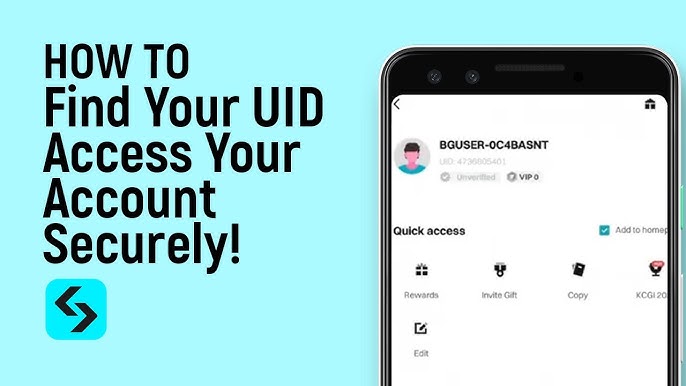
Always paste your copied UID directly into the ArcTopup order form to prevent typing mistakes.
MateMet Credits, Features, and In-App Utility
MateMet credits serve as the core digital currency powering every paid interaction across the platform. While downloading the app and browsing profiles is free, specific interactive features require an active credit balance.
| Feature / Action | Currency Utility | Primary Advantage |
|---|---|---|
| 1-on-1 Video Calls | Per-minute credit deduction | Start private high-definition live video conversations with creators worldwide. |
| Virtual Gifting | Fixed credit cost per gift | Send animated gifts during live streams or private chats to support broadcasters and increase profile visibility. |
| Real-Time Translation | Low credit cost per message | Translate instant text messages automatically to communicate across language barriers. |
| VIP Badges & Entrance Effects | Unlocked via balance milestones | Stand out in public broadcast rooms with custom entrance animations and profile decorations. |
| Direct Match Requests | Credit-based connection | Connect directly with popular broadcasters without waiting in standard public matching queues. |
All real-time prices, bonus amounts, and package tiers are listed on the live checkout menu above. Checking the live catalog ensures you receive up-to-date pricing in your local currency.
Safe Account Recharge: Zero Password Sharing on ArcTopup
Account safety is essential when purchasing in-app currencies online. ArcTopup uses a direct UID-only recharge protocol, which offers distinct security advantages:
- No Passwords Required: You never need to provide your MateMet account password, email login, phone verification codes, or social media credentials.
- Zero Account Takeover Risk: Because your login credentials remain strictly in your control, third parties cannot access your personal chat logs, friend lists, or sensitive account settings.
- Protected Transactions: ArcTopup processes every transaction through encrypted payment gateways, keeping your financial details secure at all times.
- Global Account Support: Direct UID top-up works across all registered MateMet regions, ensuring your account receives credits regardless of your physical location.
Supported Payment Gateways and Global Delivery
ArcTopup supports a wide range of international and localized payment methods to make buying MateMet credits straightforward. Depending on your country and region, available payment channels include:
- International and local credit/debit cards (Visa, Mastercard, and regional card schemes)
- Regional e-wallets and instant mobile payment apps
- Online banking transfers and local direct pay systems
Available payment options, regional currency conversions, and order summaries are updated live at checkout. Select the method that best matches your local convenience to complete your transaction.
Troubleshooting MateMet Recharge Issues
If you experience any delay or issue during your top-up, follow these troubleshooting steps:
- Verify Your UID: Check your purchase receipt to ensure the UID entered matches your in-app profile ID exactly. A single mistyped number can send credits to another account or delay processing.
- Restart the MateMet App: If your credits do not appear immediately, close the MateMet app completely, clear it from your active background applications, and reopen it. This forces the app to sync its wallet balance with the central server.
- Check Payment Status: Confirm that your bank or payment provider marked the transaction as successful and completed, rather than pending or held for verification.
- Contact Customer Support: If your payment was completed but your balance has not updated after a few minutes, copy your ArcTopup Order ID and contact ArcTopup customer support. The support team will verify the transaction status and ensure your credits reach your profile.
Frequently Asked Questions About MateMet Top Up
How do I top up my MateMet account?
To top up your MateMet account, select your preferred credit package on ArcTopup, type your MateMet numeric UID into the player field, choose your payment method, and complete the checkout. Your credits will be delivered directly to your in-app wallet balance.
Where can I find my MateMet UID?
Open the MateMet app on your device, tap the Profile tab in the bottom right corner, and look below your profile photo. Your numeric UID is listed next to the ID: label. You can tap the copy icon next to the number to copy it to your clipboard.
Do I need to share my password to recharge MateMet?
No. ArcTopup requires only your public MateMet UID to deliver your credits. You never need to share your account password, SMS verification codes, or login details.
Is MateMet free or paid to use?
Downloading the MateMet application, creating an account, and viewing general community content is free. However, premium features such as 1-on-1 private video calls, sending interactive virtual gifts, and using advanced live matching require MateMet credits.
What can I purchase with MateMet credits?
With MateMet credits, you can initiate private 1-on-1 video chats, send interactive virtual gifts to broadcasters, unlock premium profile effects and entrance animations, and use real-time multi-language text translation during chats.
What should I do if my MateMet top-up has not arrived?
First, verify that your payment was deducted and marked as completed. Next, fully close and restart the MateMet app to refresh your profile balance. If the credits still do not appear, contact ArcTopup customer support with your Order ID and UID for direct assistance.
Current packages and prices
Current base prices exclude Tax. Tax, payment fees and coupon adjustments are shown at checkout.
| Package | Price |
|---|---|
| MateMet - MateMet*15000 | USD 2.35 |
| MateMet - MateMet*20000 | USD 3.13 |
| MateMet - MateMet*25000 | USD 3.92 |
| MateMet - MateMet*50000 | USD 7.83 |
| MateMet - MateMet*100000 | USD 15.66 |
| MateMet - MateMet*500000 | USD 78.31 |
| MateMet - MateMet*1000000 | USD 156.62 |
| MateMet - MateMet*10000 | USD 1.57 |






























































