
MEYO Live Top Up: In-App Currency and Direct Account Recharge
MEYO Live is a popular interactive social and voice streaming platform where users connect through real-time voice party rooms, private messaging, and interactive digital activities. In-app currencies power your social presence across the community. With a direct MEYO Live top up, you can acquire virtual coins and currency packs to support broadcasters, trigger animated gifts, and participate in community events.
ArcTopup provides a direct-to-account top up system designed for speed and account safety. Because orders process directly through your unique Player ID, your balance updates without requiring account passwords or third-party login access. Select your preferred currency denomination, confirm your ID, and send virtual gifts across your favorite voice rooms right away.
Step-by-Step Guide: How to Top Up Meyo Live on ArcTopup
Recharging your MEYO Live account takes only a few moments. Follow these straightforward steps to complete your transaction:
- Select Your Currency Denomination: Review the available MEYO Live coin packages on this page and choose the amount that fits your current in-app needs.
- Enter Your MEYO Live Player ID: Input your numerical Player ID accurately into the required field. Use the in-app copy function to avoid manual typos.
- Proceed to Checkout: Review your order details. The live checkout screen calculates the exact final total based on your selected regional currency and payment method.
- Complete Payment: Finalize the transaction through the secure payment channel of your choice.
- Check Your In-App Balance: Once payment confirmation is complete, open MEYO Live to verify your updated coin balance in your profile wallet.
How to Find Your Meyo Live Player ID
Your MEYO Live Player ID is the unique numerical identifier linked to your profile. You must provide this exact number so that ArcTopup can credit the purchased coins directly to your account.
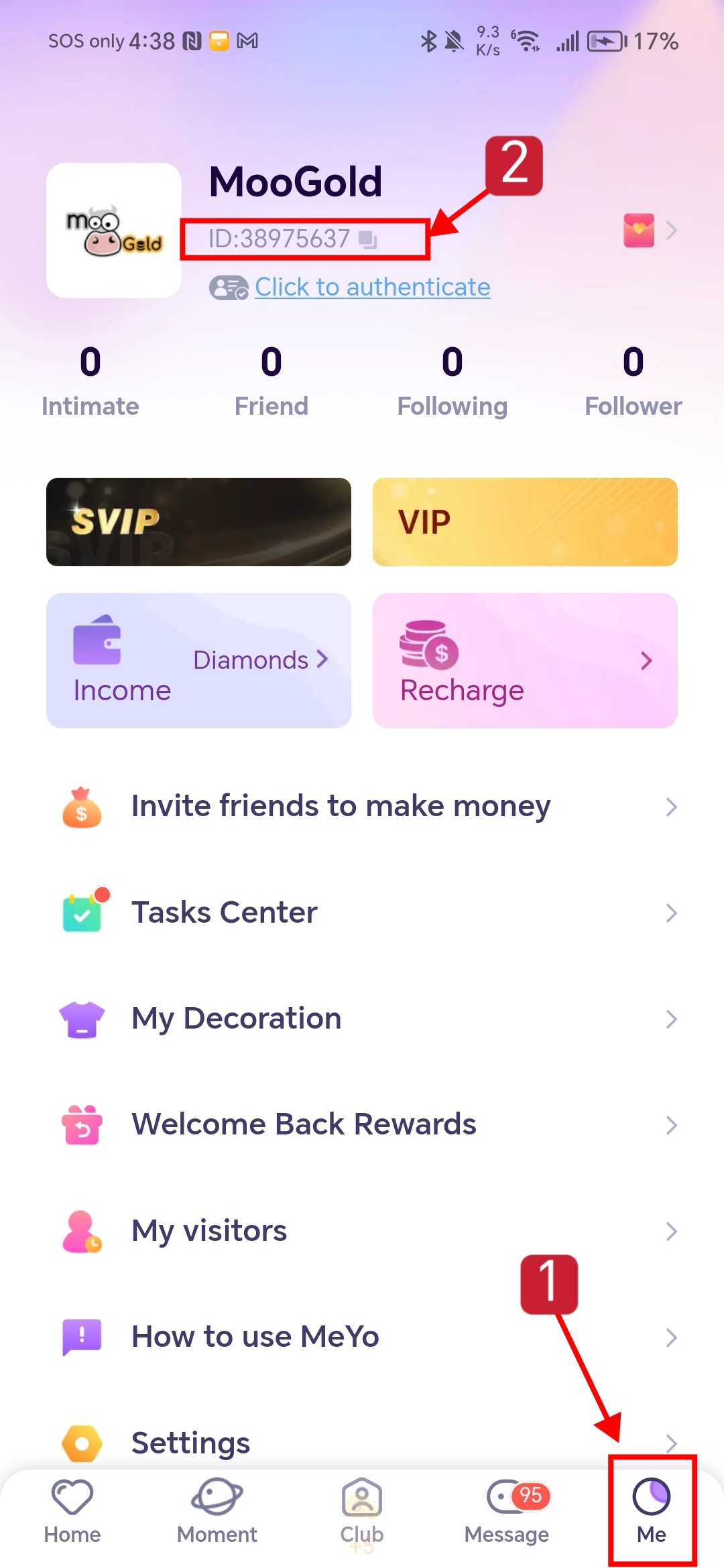
Follow these quick steps inside the app to copy your ID:
- Launch the MEYO Live application on your mobile device.
- Tap the Me (Profile) tab located in the lower-right corner of the main screen.
- Your Player ID is displayed directly beneath your display name and profile picture.
- Tap the small Copy icon next to your Player ID number to save it to your device clipboard. Paste this directly into the ArcTopup order form.
Meyo Live Currency Benefits: Coins, Diamonds, and VIP Membership
Acquiring currency on MEYO Live grants access to various interactive features across voice rooms and live events. The table below outlines how each item works inside the platform:
| Item / Currency | Primary In-App Purpose | Key Benefits |
|---|---|---|
| MEYO Coins | Interactive gifting, party room events, chat games | Triggers on-screen animations, increases broadcaster popularity ranking |
| MEYO Diamonds | Host balance and reward tracking | Generated through received gifts, convertible into host incentives |
| VIP Membership | Profile prestige and exclusive visual perks | Unique entrance banners, special chat bubbles, custom badge flair |
Interactive Virtual Gifts
Sending virtual gifts is the core method of interacting with room hosts and active community members. Gifts range from simple tokens of appreciation to fullscreen animated celebrations that spotlight your profile across the entire room.
Exclusive Room Privileges and Badges
Active currency holders can access premium voice seats, display dynamic room entrance effects, and unlock exclusive decorative frames for their profile avatars. These visual perks signal your active status during high-traffic community events.
Regional Compatibility and Server Information for Meyo Recharge
MEYO Live hosts a global community spanning the Middle East, Southeast Asia, and international servers. ArcTopup uses a direct ID routing protocol that sends credits to your specific account regardless of the physical region where your account was registered.
Before ordering, make sure your account is active and not temporarily restricted. Regional pricing variations and payment method options reflect automatically during checkout based on your selected location.
Safe Top-Up Best Practices: Avoiding ID Errors and Protecting Your Account
Maintaining account security is essential when purchasing digital goods online. Keep the following safety practices in mind:
- Never Share Your Password: ArcTopup only needs your public Player ID to process a top up. We will never ask for your account password, SMS verification codes, or private login credentials.
- Verify the Numerical ID: Always copy and paste your Player ID directly from the MEYO Live app. Mistyping a single digit could result in coins being credited to an unintended user.
- Keep Receipts for Reference: Save your ArcTopup transaction confirmation number until you confirm that your in-app wallet balance has updated.
Why Choose ArcTopup for Meyo Live Recharge
ArcTopup focuses on reliable digital fulfillment and player convenience. When you order through ArcTopup, you benefit from:
- Direct ID Processing: No account linking or sensitive login sharing required.
- Live Checkout Transparency: Clear price calculations across multiple local and international payment methods without hidden checkout fees.
- 24/7 Dedicated Support: Customer assistance is available around the clock to help verify order statuses and resolve transaction queries.
Frequently Asked Questions
How do I find my Meyo Live Player ID for a top up?
Open the MEYO Live app and tap the Me icon in the bottom right corner. Your Player ID is printed directly under your profile avatar. Tap the copy icon next to the number to copy it to your clipboard.
Do I need to provide my Meyo account password to recharge on ArcTopup?
No. ArcTopup processes recharges exclusively using your public Player ID. You should never disclose your password, SMS login codes, or email credentials to anyone.
How long does it take for Meyo Live coins or diamonds to arrive?
Under normal operating conditions, top-ups are processed automatically and credited to your MEYO Live account shortly after payment confirmation. In rare instances of server maintenance, delivery may take a few extra minutes.
Can I top up Meyo Live for a friend using their Player ID?
Yes. You can purchase coins for friends or content creators. Simply enter their numerical Player ID into the Player ID field on ArcTopup instead of your own. Confirm with them that the ID number is exact before checking out.
What should I do if I entered the wrong Meyo Player ID during checkout?
Because digital orders process automatically upon payment, items sent to a valid, mistyped Player ID cannot be retrieved or reassigned. If your payment was completed but the ID does not exist, contact ArcTopup customer support immediately with your order number for assistance.
What payment options are available for Meyo Live recharge?
ArcTopup supports a comprehensive range of global and regional payment options. Available methods, including cards, e-wallets, and regional payment gateways, display dynamically on the live checkout page based on your location.
Current packages and prices
Current base prices exclude Tax. Tax, payment fees and coupon adjustments are shown at checkout.
| Package | Price |
|---|---|
| VIP7 DAYS MEYO LIVE | USD 2.86 |
| 490 MEYO LIVE | USD 4.36 |
| 980 MEYO LIVE | USD 8.80 |
| VIP30 DAYS MEYO LIVE | USD 8.82 |
| 1960 MEYO LIVE | USD 17.52 |
| VIP90 DAYS MEYO LIVE | USD 25.14 |
| 4900 MEYO LIVE | USD 43.80 |
| 9800 MEYO LIVE | USD 87.16 |






























































