
Ayome Top Up: Instant Coin Delivery with Player ID
Ayome connects millions of users worldwide through live voice chat rooms, interactive streaming, group audio parties, and real-time social gaming. Ayome coins serve as the primary currency within the app, allowing you to send animated virtual gifts, unlock room privileges, join competitive PK battles, and support your favorite hosts.
ArcTopup provides a direct, secure Ayome top up service that credits coins straight to your account balance using only your public Ayome Player ID. You never have to share login passwords, private phone credentials, or third-party social authenticators. Choose your coin package, enter your numeric ID, and complete your purchase to enjoy uninterrupted audio chat and live streaming.
What is Ayome and How Are Ayome Coins Used?
Ayome is a global social voice and entertainment platform designed for community interaction. Users can create personalized audio rooms, host talent showcases, participate in multiplayer mini-games, and build fan clubs around popular broadcasters.
Ayome coins power all premium social interactions inside the app. Here is what you can do once you buy Ayome coins:
- Send Virtual Gifts: Show appreciation to live broadcasters and chat room hosts with dynamic 2D and 3D animated gifts.
- Support PK Battles: Boost your favorite streamer during head-to-head PK challenges against rival broadcasters.
- Access VIP Seats & Badges: Secure front-row audio seats in popular group chat rooms and display exclusive profile badges.
- Unlock Special Entrance Effects: Announce your presence in voice rooms with custom vehicle animations, banner text, and avatar frames.
- Play In-App Mini Games: Use coins to enter community games and interactive room events hosted across the platform.
How to Find Your Ayome Player ID
To ensure your Ayome recharge reaches the correct account, you only need to provide your numeric Player ID (also referred to as your Ayome UID). Do not submit a temporary Voice Room ID, as room numbers do not receive coin deposits.
Follow these steps to find your unique Player ID inside the mobile app:
- Open the Ayome app on your iOS or Android device.
- Tap the Profile (or Me) icon located in the bottom-right corner of the main screen.
- Look directly beneath your profile picture and nickname at the top of the screen.
- Locate the numeric string labeled ID or UID.
- Tap the copy icon next to the number to copy your Player ID to your clipboard.
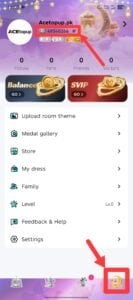
Note: Always double-check that you are copying your permanent Profile ID and not a 6-digit audio room number.
Step-by-Step Guide: How to Top Up Ayome Coins on ArcTopup
Recharging your Ayome account on ArcTopup takes less than two minutes. The process is fully automated and functions across mobile and desktop browsers.
- Select Your Coin Package: Browse the available Ayome coin denominations on this page and choose the amount that fits your needs.
- Enter Your Ayome Player ID: Paste your numeric Player ID into the required input field. Confirm that the digits match the ID shown on your Ayome profile.
- Review Order Details: Check the final coin count and total order price displayed clearly in the live checkout section before proceeding.
- Complete Payment: Choose your preferred payment option from the supported international and local checkout methods.
- Receive Your Coins: Once your payment completes, the coins are sent directly to your Ayome profile balance. Open the app to view your updated coin total.
Direct Player ID Top Up: Why No Password Is Ever Required
Account safety is a core priority when purchasing digital currencies online. ArcTopup uses direct player identification routing, meaning coin orders are fulfilled through public account identifiers alone.
- Zero Password Requests: You will never be asked for your Ayome account password, SMS one-time passcode (OTP), Google login, or Facebook credentials.
- No Account Sharing: Your account remains fully in your control at all times, eliminating the risks associated with third-party account access.
- Direct Balance Updates: Coins credit automatically to the server side of your account, so you do not need to redeem vouchers or gift card codes manually.
- Gift Coins to Friends: Because only a public Player ID is required, you can easily top up Ayome coins for friends, family members, or your favorite streamers by simply entering their numeric UID at checkout.
Ayome In-App Coin Utilization Overview
| Feature | Primary Coin Use | In-App Benefit |
|---|---|---|
| Live Gifting | Sending animated gifts to streamers | Increases host ranking and sender wealth level |
| Audio PK Battles | Dropping gift points during match rounds | Helps your chosen broadcaster win the PK contest |
| Voice Room Seats | Unlocking reserved speaker positions | Allows priority participation in busy chat rooms |
| Avatar & Entrance Items | Purchasing profile frames and arrival cars | Displays custom visual flair when joining rooms |
| Broadcaster Privileges | Creating official agency rooms and events | Expands reach and audience interaction tools |
Troubleshooting Delivery Issues and Incorrect Player ID Submission
Ayome coin delivery is automated, but occasional user input mistakes can cause delays. Review these troubleshooting points to resolve common checkout issues quickly:
Submitting a Room ID Instead of a Player ID
Voice room numbers are temporary session identifiers. If you accidentally entered a Room ID instead of your personal User ID, the system may flag an invalid account error. Always verify that your submission matches the number on your personal profile page.
Typographical Errors in the Numeric ID
If you entered an incorrect digit and the ID belongs to another active Ayome user, the coins will deliver to that profile. Because digital currency transfers are irreversible once finalized on the server, always use the in-app copy button rather than typing numbers manually.
Refreshing the Ayome App Balance
If your order status on ArcTopup displays as successful but your in-app coin balance has not updated, close the Ayome app completely and restart it. You can also visit your profile wallet tab to trigger a server balance refresh.
Order Inquiries and Support
If your transaction has completed but your coins have not appeared after several minutes, locate your ArcTopup Order Number from your confirmation screen and submit an inquiry through ArcTopup customer support for rapid balance verification.
Frequently Asked Questions About Ayome Top Up
What is the Ayome app and what features does it offer?
Ayome is an interactive social entertainment app featuring live voice chat rooms, group audio discussions, live streaming, real-time PK challenges, and in-room mini games. Users can create private or public voice parties, meet new people globally, and support creators using in-app coins.
How do I find my Ayome Player ID for top up?
Open the Ayome app and tap the Profile icon in the bottom right corner. Your numeric Player ID is displayed directly below your profile photo and username at the top of the screen. Tap the copy icon next to the number to copy your exact ID.
Do I need to share my Ayome account password to receive coins?
No. ArcTopup only requires your numeric Ayome Player ID to process your coin recharge. You should never share your account password, email login, or SMS verification codes with anyone.
How long does an Ayome top up take to arrive?
Coin delivery begins immediately after your payment is confirmed. In most cases, coins appear in your Ayome account balance within moments of transaction completion.
What should I do if I entered the wrong Ayome Player ID?
Contact ArcTopup customer support immediately with your Order ID and correct Player ID. If the order has not yet been processed by the automated dispatch system, our team will update your account details. However, if the order has already delivered to the submitted ID, completed digital transfers cannot be reversed.
Can I recharge Ayome coins for a friend's account?
Yes. Because the top up process only requires a Player ID, you can buy Ayome coins for any user by entering their specific numeric ID at checkout.
Current packages and prices
Current base prices exclude Tax. Tax, payment fees and coupon adjustments are shown at checkout.
| Package | Price |
|---|---|
| Ayome - Ayome*10000 | USD 8.70 |
| Ayome - Ayome*30000 | USD 26.11 |
| Ayome - Ayome*50000 | USD 43.52 |
| Ayome - Ayome*70000 | USD 60.93 |
| Ayome - Ayome*100000 | USD 87.05 |
| Ayome - Ayome*200000 | USD 174.10 |
| Ayome - Ayome*500000 | USD 435.24 |






























































