YAYYA Chat Top Up: Direct Credits via Player ID
YAYYA Chat connects users around the world through group voice chat rooms, live audio parties, interactive games, and social networking. To participate fully in the community, send premium gifts, customize your profile, and stand out in voice channels, you need in-app credits.
Recharging credits allows you to support favorite broadcasters, activate special entrance animations, and acquire noble memberships. On ArcTopup, you can complete a YAYYA Chat top up directly to your account using only your numerical Player ID. There is no need to link third-party social logins or hand over private passwords. Simply select your package, complete your payment, and your credits will credit directly to your YAYYA Chat balance.
How to Top Up YAYYA Chat on ArcTopup
To buy YAYYA Chat credits on ArcTopup, follow this simple step-by-step process:
- Enter Your Player ID: Input your exact YAYYA Chat Player ID into the field at the top of this page. Double-check your numbers to ensure correct delivery.
- Select Your Credit Amount: Choose the top-up package that fits your needs. Live prices and denomination options are displayed directly on the product list.
- Choose Your Payment Method: Select your preferred payment option from the available regional and international checkout channels.
- Complete Checkout: Review your order summary and finalize the payment.
- Check Your In-App Balance: Open YAYYA Chat and check your profile wallet. Your credits will appear automatically without needing manual redemption codes.
How to Find Your YAYYA Chat Player ID
Your Player ID is the unique numerical identifier tied to your YAYYA Chat profile. Because ArcTopup uses a direct UID recharge system, you only need this ID to receive your credits.
Follow these steps inside the app to locate your ID:
- Open the YAYYA Chat app on your mobile device.
- Tap the Profile or Me tab located in the bottom-right corner of the main screen.
- Look directly beneath your profile picture and nickname at the top of the screen.
- Locate the line labeled ID followed by a series of numbers.
- Tap the copy icon next to the number or write it down carefully to paste into the ArcTopup order form.
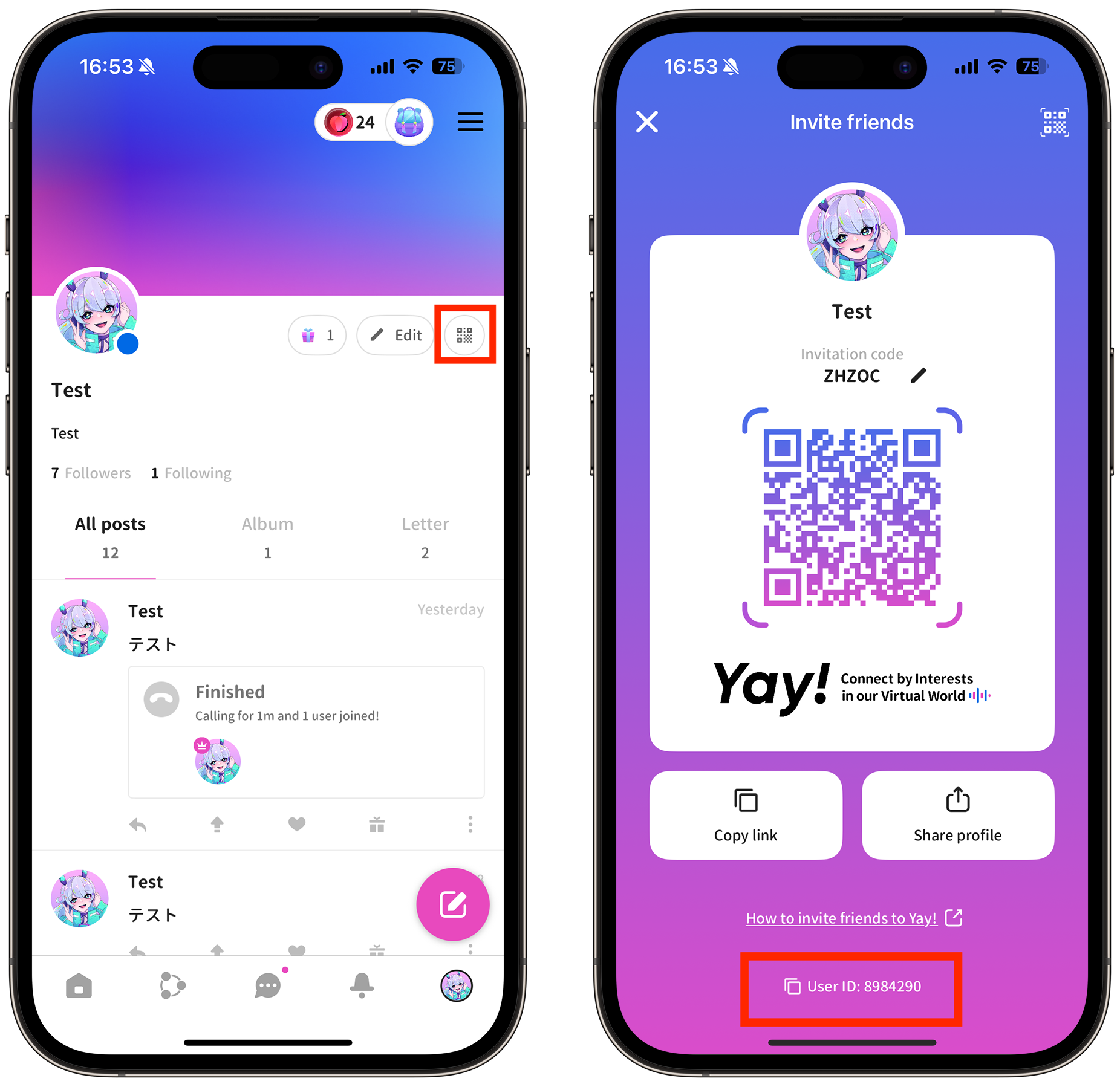
Always verify your ID before proceeding to payment. If you enter someone else's ID by mistake, the credits will be delivered to that user's account.
What You Can Unlock with YAYYA Chat Credits
Credits are the core currency inside YAYYA Chat. Recharging your balance opens up multiple interactive features across public and private audio rooms:
| Feature / Perk | What It Does | In-App Purpose |
|---|---|---|
| Animated Virtual Gifts | Send 2D and 3D visual effects across chat rooms | Support room hosts, celebrate moments, and climb gifting leaderboards |
| Noble Privileges & Badges | Display exclusive noble status tags next to your name | Stand out in room user lists and show VIP standing |
| Custom Entry Vehicles | Show dynamic entrance banners when joining rooms | Announce your arrival with visual animations and sound effects |
| Avatar Frames & Chat Bubbles | Decorate your personal avatar and text messages | Customize your look across chat channels and profile visits |
| Room Interaction Tools | Access premium mini-games and room party tools | Increase engagement and host events in your own voice room |
Safe ID-Only Recharge: No Passwords Needed
Account safety is essential when purchasing digital goods. ArcTopup uses a direct API-based delivery system that requires only your public Player ID.
- Zero Password Sharing: You never need to provide your account password, email login, or verification codes to top up.
- No Account Handover: Your profile stays completely in your control throughout the entire order process.
- Secure Payment Processing: Every transaction is protected with encrypted payment gateways to safeguard your financial details.
- Gifting Capabilities: Because only an ID is needed, you can easily top up credits for friends, family members, or room hosts by entering their Player ID at checkout.
Troubleshooting and Order Verification
Most YAYYA Chat top-up orders process immediately after payment confirmation. If your balance does not update right away, follow these troubleshooting steps:
- Restart the YAYYA Chat App: Close the application completely from your background apps and reopen it. Check your in-app wallet under the Profile tab.
- Confirm Payment Status: Check your payment provider receipt or bank statement to verify that the transaction completed successfully.
- Verify Your Player ID: Review your ArcTopup order confirmation email to ensure the Player ID submitted matches your in-app profile.
- Contact Customer Support: If your credits have not arrived after a short period, reach out to ArcTopup customer support with your Order ID, payment proof, and Player ID for prompt verification.
Frequently Asked Questions
What is YAYYA Chat and what are in-app credits used for?
YAYYA Chat is a group voice social platform where users join audio rooms, chat, play mini-games, and build communities. In-app credits are used to purchase virtual gifts for broadcasters, unlock noble privileges, acquire avatar frames, and activate entrance effects.
How do I find my YAYYA Chat Player ID?
Open the YAYYA Chat app, tap the Profile or Me tab in the bottom-right corner, and look below your profile avatar. Your Player ID is the number listed next to the ID label.
Do I need to share my YAYYA Chat password to top up on ArcTopup?
No. ArcTopup only requires your numerical Player ID. You should never share your password, login credentials, or verification codes with anyone.
Can I top up YAYYA Chat for a friend using their Player ID?
Yes. Simply enter your friend's YAYYA Chat Player ID into the order box instead of your own. Once payment is confirmed, the credits will be added directly to their account balance.
How fast will my YAYYA Chat credits be delivered after payment?
Credits are processed directly after your payment transaction is cleared. Once confirmed, the balance updates automatically inside the YAYYA Chat application.
What payment methods can I use to recharge YAYYA Chat?
ArcTopup supports a wide selection of international and localized payment options, including major credit/debit cards, e-wallets, and regional payment methods. The full list of available options is shown during checkout.
What should I do if my YAYYA Chat top-up is delayed?
First, force-close and restart your YAYYA Chat app to refresh your wallet balance. If the credits still do not show, check your order confirmation email to verify that your Player ID was entered correctly, then contact ArcTopup customer support with your order details.
Current packages and prices
Current base prices exclude Tax. Tax, payment fees and coupon adjustments are shown at checkout.
| Package | Price |
|---|---|
| YAYYA CHAT - YAYYA CHAT*30000 | USD 2.36 |
| YAYYA CHAT - YAYYA CHAT*50000 | USD 3.94 |
| YAYYA CHAT - YAYYA CHAT*70000 | USD 5.52 |
| YAYYA CHAT - YAYYA CHAT*100000 | USD 7.88 |
| YAYYA CHAT - YAYYA CHAT*200000 | USD 15.76 |
| YAYYA CHAT - YAYYA CHAT*500000 | USD 39.41 |
| YAYYA CHAT - YAYYA CHAT*700000 | USD 55.17 |
| YAYYA CHAT - YAYYA CHAT*1000000 | USD 78.81 |
| YAYYA CHAT - YAYYA CHAT*2000000 | USD 157.63 |
| YAYYA CHAT - YAYYA CHAT*5000000 | USD 394.07 |






























































