
Yula Top Up: What Are Credits and How Are They Used?
Yula credits serve as the primary digital currency within the Yula live streaming and interactive social platform. By maintaining an active credit balance, you can participate fully in live stream broadcasts, support your favorite content creators, and unlock premium interactive features across the app.
When you purchase Yula credits, you can use them directly to:
- Send Virtual Gifts: Reward broadcasters and streamers during live sessions with customized animated gifts, special effects, and priority reaction stickers.
- Access Premium Rooms: Enter VIP chat lounges and exclusive creator events that require entry tokens or minimum engagement ranks.
- Boost Profile Visibility: Stand out in community chats, fan leaderboards, and interactive viewer lists during high-traffic streaming broadcasts.
- Unlock Custom Badges and Frames: Personalize your profile avatar with exclusive visual cosmetics and supporter status badges.
Using an online top-up service like ArcTopup allows you to reload your account balance directly by entering your Player ID, bypassing complex in-app billing setups while giving you flexible payment options.
How to Locate Your Yula Player ID
To complete an order on ArcTopup, you only need to provide your unique Yula Player ID. Your Player ID is a permanent public identifier assigned to your profile. You do not need to share your password, linked email, or phone number.
Follow these steps to find your Player ID inside the Yula application:
- Launch the Yula app on your mobile device.
- Log in to your personal account.
- Tap the Profile or My Account icon located at the bottom right corner of the main screen.
- Look directly below your profile avatar and display name to find your numeric or alphanumeric Player ID.
- Tap the copy icon next to your ID to copy it directly to your clipboard.
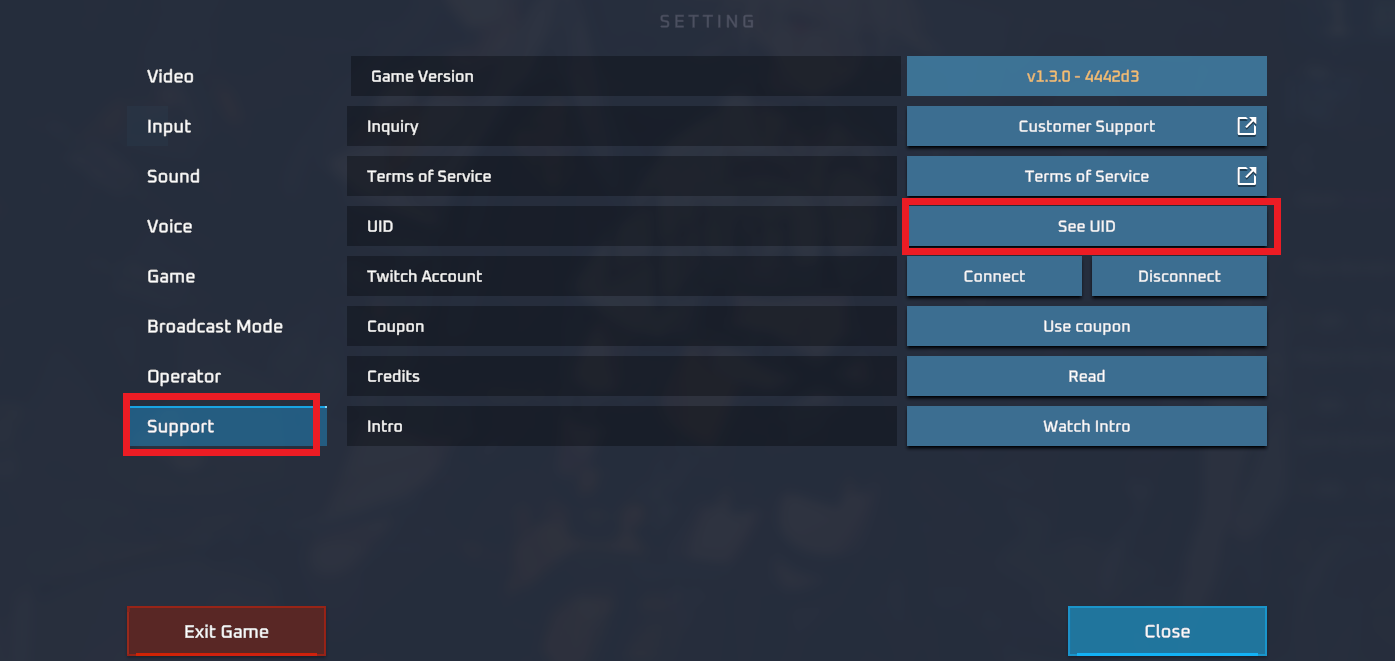
Always double-check the copied ID before submitting your order to ensure that your credits are credited to the correct account.
Step-by-Step Guide to Top Up Yula on ArcTopup
ArcTopup makes purchasing credits simple and direct. Follow these steps to complete your transaction:
- Enter Your Player ID: Paste your Yula Player ID into the top-up input field on this page.
- Select Your Credit Denomination: Choose the credit package that suits your budget and streaming needs.
- Review Order Details: Confirm your Player ID and selected package amount.
- Proceed to Checkout: Choose your preferred payment option on the live checkout screen.
- Complete the Payment: Follow the on-screen prompts to finalize your transaction.
- Receive Your Credits: Once payment is processed, open your Yula app and verify that your credit balance has been updated.
Yula Top-Up Overview
| Order Component | Requirement | Purpose |
|---|---|---|
| Player ID | Numeric / Alphanumeric ID | Direct account routing without login access |
| Password | Never Required | Keeps your account safe from unauthorized access |
| Credit Packages | Selectable on page | Choose exact balance needed for gifting and perks |
| Delivery Method | Direct digital crediting | Funds appear automatically in your Yula app |
| Live Pricing | Displayed at checkout | Real-time currency conversion with no hidden charges |
Safe and Secure Recharge: Why Passwords Are Never Needed
Account safety is essential when purchasing digital credits online. ArcTopup operates on a direct-to-ID delivery system, which means your account credentials remain completely private.
- Zero Password Sharing: You will never be asked for your login password, security questions, or SMS one-time verification codes (OTP).
- Protection Against Account Takeovers: Because login access is never requested, your private chats, follower connections, and account settings remain secure.
- Encrypted Checkout: Every transaction on ArcTopup is protected by modern SSL encryption standards to safeguard your billing data.
If any third party or website asks for your Yula login password in exchange for credits, do not share your credentials. Official top-up transactions only require your public Player ID.
Supported Payment Methods and Regional Availability in 2026
ArcTopup supports a broad selection of local and international payment methods in 2026, allowing users around the globe to recharge their accounts without payment barriers.
Depending on your location, available payment options at checkout include:
- Major international debit and credit cards.
- Regional e-wallets and localized digital payment systems.
- Direct online banking and instant transfer systems.
All exchange rates and processing totals are displayed dynamically on the ArcTopup live checkout screen before you confirm payment. This guarantees that you see the exact price you pay without unexpected foreign transaction fees.
Troubleshooting Common Top-Up Errors and Delivery Delays
While most transactions process immediately, occasional network congestion or data entry errors can cause questions. Use this checklist if you encounter any issue:
- Credits Have Not Appeared Yet: Close the Yula app completely from your device's background tasks and restart it. Refresh your profile balance to pull the latest data from the server.
- Mistyped Player ID: If you enter an incorrect Player ID that belongs to another active user, the delivery cannot be reversed once processed. Always verify the ID string before completing checkout.
- Payment Completed but Status Pending: Bank processing times can vary depending on your payment provider. Keep your transaction reference number and order confirmation receipt.
- Contacting Support: If your balance does not update after confirming your payment, contact ArcTopup customer support with your order number and Player ID for direct assistance.
Frequently Asked Questions About Yula Top Up
What information is required to top up Yula on ArcTopup?
You only need to provide your Yula Player ID and select the credit package you want. ArcTopup never asks for your password, email login, or phone number.
Where do I find my Yula Player ID?
Open the Yula app, tap the Profile tab in the bottom right corner, and find the numeric or alphanumeric ID displayed directly underneath your username. Tap the copy icon to copy it to your clipboard.
Do I need to share my Yula account password for recharge?
No. ArcTopup uses a direct ID-based recharge system that requires no passwords, login credentials, or verification codes.
How quickly will the credits arrive in my Yula account?
Credits are delivered directly to your Yula account as soon as your payment is confirmed by your payment provider. In most cases, the balance updates immediately after restarting your app.
What should I do if I enter the wrong Player ID during checkout?
Because top-up deliveries are processed automatically based on the ID provided, credits sent to an existing account cannot be recalled. If the transaction fails due to an invalid ID, contact ArcTopup customer support immediately with your order details.
Which payment methods are supported for Yula top-ups?
ArcTopup provides access to international credit and debit cards, localized e-wallets, and regional banking options. The full list of available payment channels and local currency options is shown during live checkout.
Current packages and prices
Current base prices exclude Tax. Tax, payment fees and coupon adjustments are shown at checkout.
| Package | Price |
|---|---|
| Yula - Yula*50000 | USD 0.94 |
| Yula - Yula*70000 | USD 1.32 |
| Yula - Yula*100000 | USD 1.88 |
| Yula - Yula*200000 | USD 3.76 |
| Yula - Yula*500000 | USD 9.40 |
| Yula - Yula*700000 | USD 13.17 |
| Yula - Yula*1000000 | USD 18.81 |
| Yula - Yula*2000000 | USD 37.62 |
| Yula - Yula*5000000 | USD 94.05 |
| Yula - Yula*10000000 | USD 188.10 |































































